


Updated on
Swashbuckle and NSwag both describe an ASP.NET Core API as an OpenAPI document and both serve that document through a browsable UI. NSwag adds one thing Swashbuckle does not have: it generates client code from the document, in C# and in TypeScript.
Since .NET 9 the choice starts one step earlier. The Web API template already generates the document through Microsoft.AspNetCore.OpenApi, so neither library is needed for that part any more. What it does not give us is a user interface, and that is where both libraries still earn their place. If all we need is Swagger UI on top of the built-in document, Swashbuckle is the better choice, because it is the smaller step. If we want generated clients, or we still run on .NET Framework, we reach for NSwag.
We compare the two on document generation, UI, client generation, security, performance, setup, framework support and community, and we start from what the built-in generator already gives a new project. The sample repository has one project for each of the three setups, plus the benchmark.
What Are Swashbuckle and NSwag Used For?
Swashbuckle and NSwag are third-party libraries that turn an ASP.NET Core API into an OpenAPI document and then into something a person or a program can use: a browsable page, or generated client code.
Since .NET 9 the framework does the first half on its own. The Web API template registers AddOpenApi() and MapOpenApi() from the Microsoft.AspNetCore.OpenApi package, and a new project serves /openapi/v1.json with neither library installed.
What the template does not give us is a user interface. Microsoft is explicit about it: the package “doesn’t ship with built-in support for visualizing or interacting with the OpenAPI document.”
So the two libraries answer two different questions today. Swashbuckle brings Swagger UI and ReDoc, plus its own document generator for projects that predate the built-in one. NSwag brings a UI as well, and the one thing neither the framework nor Swashbuckle offers: generating C# and TypeScript client code from the document.
OpenAPI, formerly known as Swagger, is a widely adopted standard for RESTful API documentation. Today “Swagger” names a set of tools for working with OpenAPI documents, Swagger UI among them, and Swashbuckle is one .NET library that produces those documents. The quote above is from Microsoft’s guide to using OpenAPI documents in ASP.NET Core.
What Is Swashbuckle?
We will start with Swashbuckle, which is a popular open-source library for generating API documentation for ASP.NET Core applications.
We can use it to automatically generate an OpenAPI specification based on our controllers, routes, and models, allowing us to serve up interactive, browser-based documentation with minimal effort.
On top of that, it offers various customization options, such as adding XML comments to generated documentation, modifying operation tags and descriptions, and customizing UI appearance.
Example Usage of Swashbuckle
First, we need to install Swashbuckle with the .NET CLI command:
dotnet add package Swashbuckle.AspNetCore
Then we have to register the Swagger generator in our Program.cs file:
using Microsoft.OpenApi;

var builder = WebApplication.CreateBuilder(args);

builder.Services.AddControllers();

// Add Swashbuckle to our services
builder.Services.AddEndpointsApiExplorer();
builder.Services.AddSwaggerGen(c =>
{
    c.SwaggerDoc("v1", new OpenApiInfo { Title = "My API", Version = "v1" });
});
This will add the Swagger generator to our collection of services. In Swashbuckle 10, OpenApiInfo lives in the Microsoft.OpenApi namespace, so code that still imports Microsoft.OpenApi.Models stops compiling after an upgrade.
After that, we need to enable middleware to serve generated Swagger as a JSON endpoint and Swagger UI. We do this in the request pipeline, once the app is built:
var app = builder.Build();

if (app.Environment.IsDevelopment())
{
    // Enable middleware to serve generated Swagger as a JSON endpoint and Swagger UI
    app.UseSwagger();
    app.UseSwaggerUI(c =>
    {
        c.SwaggerEndpoint("/swagger/v1/swagger.json", "My API V1");
    });
}

app.MapControllers();

app.Run();
At this point, we are ready to start utilizing Swagger in our project. Here is an example of generated documentation:
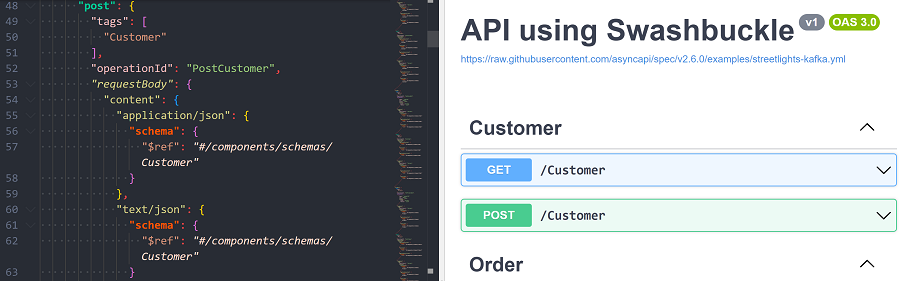
Our guide to configuring Swagger UI in ASP.NET Core goes through the customization options from here.
What Is NSwag?
NSwag is another powerful library for generating OpenAPI Specification documents and client code from .NET applications.
It supports both .NET Framework and .NET Core and offers additional features like code generation.
As we can read on the GitHub page of the project, NSwag is intended to combine functionalities of two other libraries: Swashbuckle for OpenAPI generation and AutoRest for client generation.
Example Usage of NSwag
To install it we simply need to run this command:
dotnet add package NSwag.AspNetCore
Once we have NSwag installed we have to add it to our services collection in our Program.cs file:
var builder = WebApplication.CreateBuilder(args);

builder.Services.AddControllers();

// Register the NSwag services
builder.Services.AddOpenApiDocument(config =>
{
    config.DocumentName = "v1";
    config.Title = "My API";
    config.Version = "v1";
});
After that, we enable the NSwag middleware in the request pipeline:
var app = builder.Build();

if (app.Environment.IsDevelopment())
{
    app.UseOpenApi();
    app.UseSwaggerUi();
}

app.MapControllers();

app.Run();
UseOpenApi() serves the document and UseSwaggerUi() serves Swagger UI. NSwag 14 renamed that method from UseSwaggerUi3(), as the NSwag v14.0.0 release notes on GitHub record, so the older name no longer compiles.
Once we complete these steps we are ready to use NSwag.
Do We Still Need Swashbuckle or NSwag in .NET 10?
Yes, but for less than we used to.
Document generation is no longer a reason to install either one. AddOpenApi() covers controller-based and Minimal API projects, and the Web API template already registers it.
A user interface is a reason. For Swagger UI, the smallest step is the Swashbuckle.AspNetCore.SwaggerUi package pointed at the built-in endpoint, which is the arrangement Microsoft documents in its guide to OpenAPI documents. For ReDoc, Swashbuckle.AspNetCore.ReDoc and NSwag’s UseReDoc() both serve it.
Client generation is the strongest reason of the three, and only NSwag does it. NSwagStudio, the NSwag command-line tool and the NSwag.MSBuild package all turn the document into C# or TypeScript clients.
Older projects are the last reason. NSwag 14 still targets .NET Standard 2.0 and .NET Framework 4.6.2, so a classic ASP.NET Web API application still has a supported option. Swashbuckle.AspNetCore dropped .NET Framework at version 9.
Three jobs, and the framework now does one of them for us:
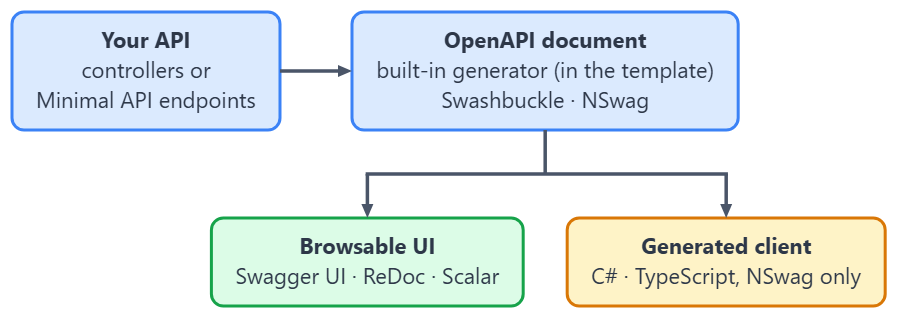
The SwashbuckleVsNSwag.BuiltIn project in the sample is the first arrangement in practice: the built-in generator plus Swagger UI from Swashbuckle.AspNetCore.SwaggerUi, and nothing else.
How Does Each Library Generate the OpenAPI Document?
We will start with the primary feature, which is API documentation generation.
It’s no surprise that both Swashbuckle and NSwag excel at generating API documentation based on our controllers and actions. They inspect our code to create an OpenAPI specification document, which we can serve as interactive documentation through the Swagger UI or ReDoc UI.
The built-in generator does the same for controllers and Minimal API endpoints.

Additionally, all three can provide documentation in either JSON or YAML format.
In Swashbuckle we can achieve that by changing the endpoint in our development block:
if (app.Environment.IsDevelopment())
{
    app.UseSwagger();
    app.UseSwaggerUI(c =>
    {
        c.SwaggerEndpoint("/swagger/v1/swagger.yaml", "My API V1");
    });
}
As we can see, we just need to specify the .yaml extension in our SwaggerEndpoint configuration.
And respectively for NSwag:
if (app.Environment.IsDevelopment())
{
    app.UseOpenApi(p => p.Path = "/swagger/v1/swagger.yaml");
    app.UseSwaggerUi(p => p.DocumentPath = "/swagger/v1/swagger.yaml");
}
Here, we need to do a bit more work.
Firstly, we modify the Path property specifying the .yaml format when calling UseOpenApi method. Then in the same way we need to modify our DocumentPath property when we call the UseSwaggerUi method.
The built-in generator needs one extra line in a project created from the Web API template. A second MapOpenApi() call with a .yaml route serves the same document as YAML:
if (app.Environment.IsDevelopment())
{
    app.MapOpenApi();
    app.MapOpenApi("/openapi/{documentName}.yaml");
}
The first call keeps /openapi/v1.json, and the second adds /openapi/v1.yaml.
Whichever of the three produces the document, we can also control what goes into it. We cover keeping an endpoint out of the generated document and keeping a model property out of the schema in separate articles.
All in all, the three produce the same kind of document, and both libraries allow API consumers to explore and test our API endpoints in a user-friendly manner. And if the only feature we need is generating documentation for our APIs, then the built-in generator already does it, and either library is still a solid choice.
Which UI Options Does Each Library Give Us?
Swagger UI is a popular interactive documentation tool we can customize to match our API’s branding or style requirements. Both Swashbuckle and NSwag support Swagger UI customization. The built-in generator serves no UI at all, so with it we customize whichever UI package we add.
If we would like to modify it we have a few options to choose from.
We can simply inject the style sheet directly into Swagger UI, like so:
app.UseSwaggerUI(c =>
{
    c.SwaggerEndpoint("/swagger/v1/swagger.json", "My API V1");
    c.InjectStylesheet("/custom.css");
});
NSwag has the same option under another name, the CustomStylesheetPath setting:
app.UseSwaggerUi(p => p.CustomStylesheetPath = "/custom.css");
In both cases, /custom.css is a file in our wwwroot folder, so we also add app.UseStaticFiles() to the request pipeline to serve it.
Or we can copy the content of the Swagger UI repository to the wwwroot/swagger/ui folder in our project and modify the required files.
With the built-in generator, the Swashbuckle.AspNetCore.SwaggerUi package gives us the same UseSwaggerUI() call and the same InjectStylesheet() option as Swashbuckle. Our Swagger UI guide covers the rest of the Swagger UI customization options.

Or if we prefer, we can also use ReDoc UI.
First, we need to add a dependency to the Swashbuckle.AspNetCore.ReDoc package. Then we need to call app.UseReDoc() instead of app.UseSwaggerUI().
Lastly, because ReDoc is exposed via /api-docs we can change this when enabling middleware by setting RoutePrefix:
app.UseReDoc(c =>
    c.RoutePrefix = "swagger"
);
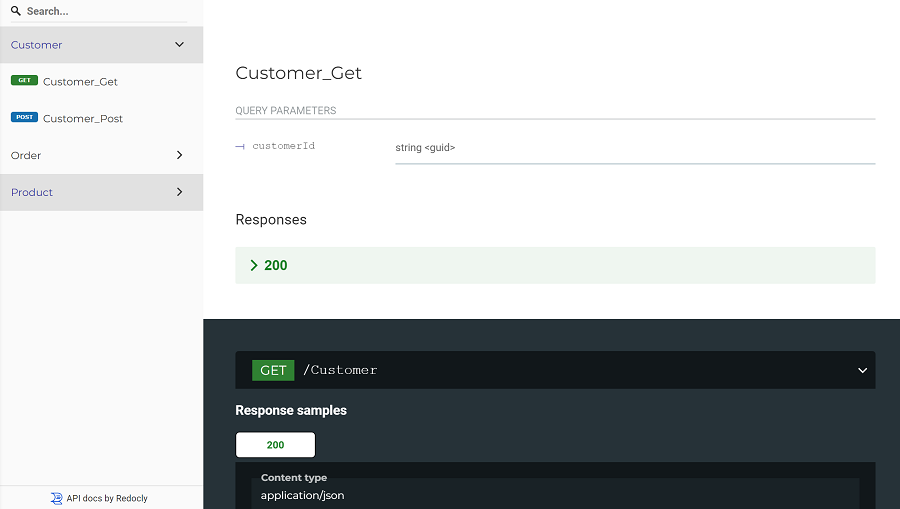
In contrast, this transition is much easier with NSwag. We simply need to call app.UseReDoc() instead of app.UseSwaggerUi() and we are done.
As a result, we can see ReDoc UI:
Which Library Generates Client Code?
NSwag does, Swashbuckle does not.
Swashbuckle stops at the document. To get a client out of it we run a separate tool over the generated JSON, which is a second step and a second dependency to keep current.
NSwag treats the document and the client as one product. The same toolchain that describes our API also writes the code that calls it, in C# or TypeScript, and it gives us several ways to run that.
NSwagStudio is a desktop application: we give it the URL of our swagger.json, pick an output template and click Generate Outputs. The NSwag command-line tool does the same from a build script. The NSwag.MSBuild package wires generation into the build itself, so the step lives in the project file.
The generated C# client is an ordinary class that takes an HttpClient, so it registers like any other typed client when the document carries a server URL, as NSwag’s does.
The built-in generator stops at the document too, so a project that relies on it needs NSwag or another generator for clients.
Here is how we generate a TypeScript client with NSwagStudio. We launch it and provide it with the URL to our Swagger documentation swagger.json file:
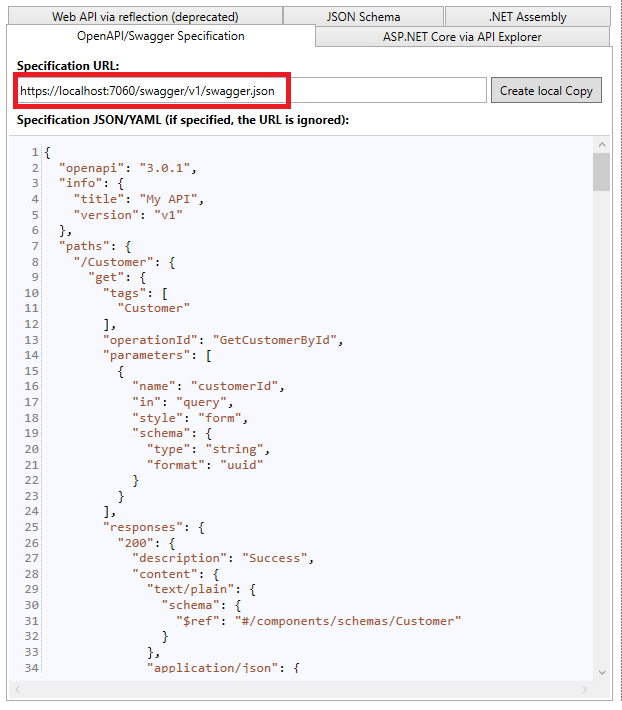
Then select the output format and click Generate Outputs:
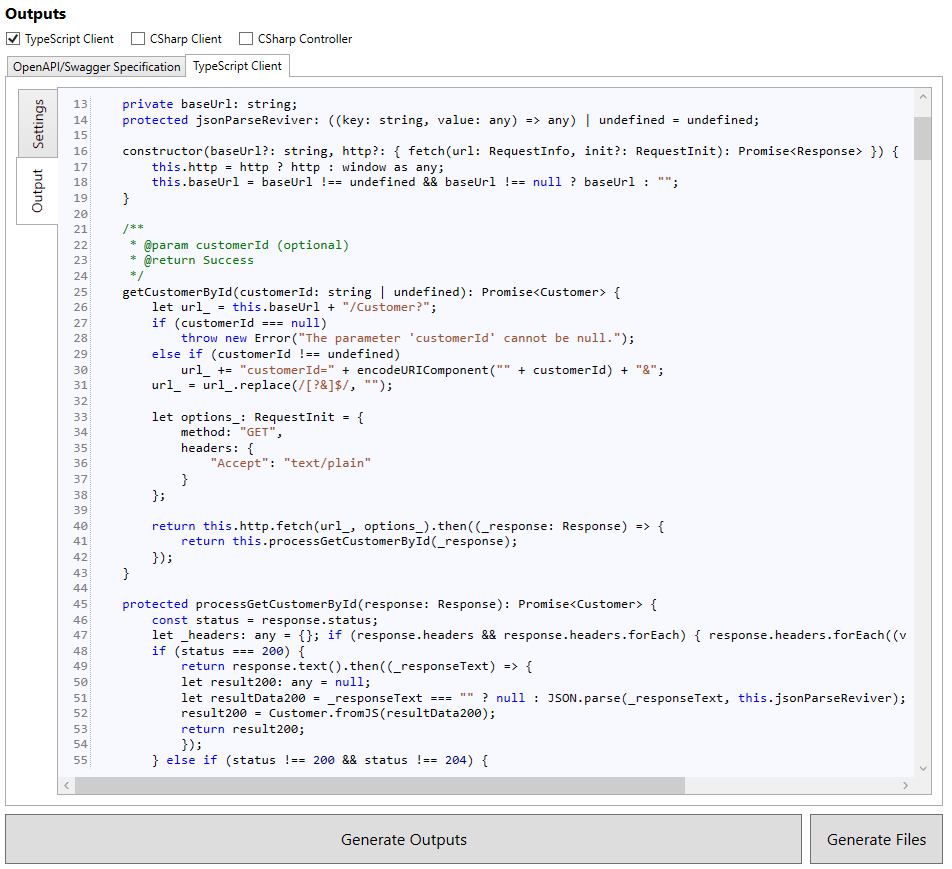
And with those simple steps, we have our client ready to be used in consumer applications.
If we would rather write the client interface by hand, Refit is the other common route, and we cover consuming REST APIs with Refit separately.
How Do We Describe Authentication in the Generated Documentation?
Both Swashbuckle and NSwag support various authentication configurations, allowing us to secure our API and describe that security in its documentation.
Swashbuckle provides support for several authentication methods, including OAuth2, API keys, and JWT (JSON Web Tokens).
We will modify our Program.cs file and set up authentication for our API documentation in Swashbuckle using JWT. The JWT handler comes from the Microsoft.AspNetCore.Authentication.JwtBearer package:
using System.Text;
using Microsoft.AspNetCore.Authentication.JwtBearer;
using Microsoft.IdentityModel.Tokens;
using Microsoft.OpenApi;

var builder = WebApplication.CreateBuilder(args);

//Setup JWT Authentication
builder.Services.AddAuthentication(options =>
{
    options.DefaultAuthenticateScheme = JwtBearerDefaults.AuthenticationScheme;
    options.DefaultChallengeScheme = JwtBearerDefaults.AuthenticationScheme;
})
.AddJwtBearer(options =>
{
    var key = Encoding.UTF8.GetBytes(builder.Configuration["Jwt:Key"]!);

    options.TokenValidationParameters = new TokenValidationParameters
    {
        ValidIssuer = builder.Configuration["Jwt:Issuer"],
        ValidAudience = builder.Configuration["Jwt:Audience"],
        IssuerSigningKey = new SymmetricSecurityKey(key),
        ValidateIssuer = false,
        ValidateAudience = false,
        ValidateLifetime = true,
        ValidateIssuerSigningKey = true
    };
});

// Add Swashbuckle to our services
builder.Services.AddSwaggerGen(c =>
{
    c.SwaggerDoc("v1", new OpenApiInfo { Title = "My API", Version = "v1" });

    // Configure authentication for Swagger
    c.AddSecurityDefinition("Bearer", new OpenApiSecurityScheme
    {
        Description = "JWT Authorization header using the Bearer scheme.",
        Type = SecuritySchemeType.Http,
        Scheme = "bearer"
    });

    c.AddSecurityRequirement(document => new OpenApiSecurityRequirement
    {
        [new OpenApiSecuritySchemeReference("Bearer", document)] = []
    });
});

builder.Services.AddControllers();
The first thing we do is configure JWT authentication. We do this by registering the authentication services with the AddAuthentication method. Next, we use the AddJwtBearer method to enable JWT authentication and configure bearer options. The key, issuer and audience come from the Jwt section of our configuration, for example appsettings.json, and if the key is missing, requests fail with an ArgumentNullException.
Then, we modify the Swashbuckle configuration to enable authentication using the bearer scheme by calling AddSecurityDefinition and AddSecurityRequirement methods. In Swashbuckle 10, AddSecurityRequirement takes a function that receives the document, because the OpenApiSecuritySchemeReference inside the requirement points at a scheme in that document.
NSwag supports a similar range of authentication methods as Swashbuckle, including OAuth2, API keys, and JWT.
We can set up authentication for our API documentation in NSwag by modifying our Program.cs file and adding OAuth2 authentication. The token validation again uses the Microsoft.AspNetCore.Authentication.JwtBearer package:
using Microsoft.AspNetCore.Authentication.JwtBearer;
using NSwag;
using NSwag.Generation.Processors.Security;

var builder = WebApplication.CreateBuilder(args);

//Validate the access tokens our OAuth2 provider issues
builder.Services.AddAuthentication(JwtBearerDefaults.AuthenticationScheme)
    .AddJwtBearer(options =>
    {
        options.Authority = builder.Configuration["OAuth2:Authority"];
        options.Audience = builder.Configuration["OAuth2:Audience"];
    });

// Add NSwag to our services
builder.Services.AddOpenApiDocument(config =>
{
    config.DocumentName = "v1";
    config.Title = "My API";
    config.Version = "v1";

    // Configure OAuth2 authentication for NSwag
    config.AddSecurity("OAuth2", Enumerable.Empty<string>(), new OpenApiSecurityScheme
    {
        Type = OpenApiSecuritySchemeType.OAuth2,
        Flows = new OpenApiOAuthFlows
        {
            AuthorizationCode = new OpenApiOAuthFlow
            {
                AuthorizationUrl = builder.Configuration["OAuth2:AuthorizationUrl"],
                TokenUrl = builder.Configuration["OAuth2:TokenUrl"],
                Scopes = new Dictionary<string, string>
                {
                    { "openid", "OpenID Connect" },
                    { "profile", "User profile" },
                    { "email", "User email" },
                    { "api", "Access to API" }
                }
            }
        }
    });

    config.OperationProcessors.Add(new OperationSecurityScopeProcessor("OAuth2"));
});

builder.Services.AddControllers();
Firstly, we make the API validate the access tokens our OAuth2 provider issues, by pointing the JWT bearer handler at the provider’s authority. The authority, audience and endpoint URLs come from the OAuth2 section of our configuration.
Then, we modify the NSwag configuration to enable OAuth2 authentication with our AddSecurity method, and add an OperationSecurityScopeProcessor for the OAuth2 scheme through OperationProcessors.
Now, when we access the UI generated by NSwag, we will see an Authorize button that allows users to authenticate using our OAuth2 provider. Once authenticated, users can automatically (and securely!) make API calls with the appropriate access token.
So the two libraries describe the same OpenAPI security scheme with different types: Swashbuckle uses the Microsoft.OpenApi object model, and NSwag uses its own OpenApiSecurityScheme from the NSwag namespace. Protecting the Swagger UI page itself is a separate job, which we cover in using authorization with Swagger.
Is There a Performance Difference?
Both Swashbuckle and NSwag have similar performance profiles, meaning that both libraries are suitable for small to large projects.
We have to remember that both libraries focus on generating API documentation and, in NSwag’s case, client code, which are typically one-time or infrequent operations during the development process.
Thus, the performance overhead introduced by these libraries is minimal. Their middleware answers the documentation routes and passes every other request on, so an ordinary API call only pays for that route check.
And indeed, we use the BenchmarkDotNet package to investigate those differences. The benchmark sends 100 POST requests and 100 GET requests to each of the two sample APIs, both running locally over HTTPS:
BenchmarkDotNet v0.15.8, Windows 10 (10.0.19045.6466/22H2/2022Update)
AMD Ryzen 5 3600 3.60GHz, 1 CPU, 12 logical and 6 physical cores
.NET SDK 10.0.302
  [Host]     : .NET 10.0.10 (10.0.10, 10.0.1026.32716), X64 RyuJIT x86-64-v3
  DefaultJob : .NET 10.0.10 (10.0.10, 10.0.1026.32716), X64 RyuJIT x86-64-v3

| Method                   | Mean     | Error    | StdDev   | Allocated |
|------------------------- |---------:|---------:|---------:|----------:|
| Swashbuckle_PostResponse | 13.91 ms | 0.155 ms | 0.137 ms | 391.87 KB |
| NSwag_PostResponse       | 13.29 ms | 0.249 ms | 0.208 ms | 391.84 KB |
| Swashbuckle_GetResponse  | 11.49 ms | 0.198 ms | 0.185 ms | 328.57 KB |
| NSwag_GetResponse        | 11.39 ms | 0.228 ms | 0.460 ms | 328.58 KB |
The two finish within about a millisecond of each other for 100 requests, which is roughly ten microseconds per request. We ran the benchmark three times: NSwag was ahead on GET in all three runs, by 0.10 to 1.38 ms, and on POST the faster library changed from run to run. That is a tie for any real application. The Allocated column counts the benchmark client’s own allocations, which is why it is almost the same for both. Our introduction to BenchmarkDotNet explains how such a benchmark is set up.
NSwag’s code generation feature might add additional overhead, especially when generating code for multiple languages or large APIs. However, due to its infrequent usage, it is normally not a consideration for application runtime performance.
Which Is Easier to Set Up Today?
Both Swashbuckle and NSwag provide us with a straightforward setup process, and our earlier setup examples demonstrate how quickly they allow us to get started.
What changed is the starting point. A project created with dotnet new webapi on the .NET 10 SDK references Microsoft.AspNetCore.OpenApi and no Swashbuckle package, and its Program.cs opens with the built-in generator:
var builder = WebApplication.CreateBuilder(args);

// Add services to the container.
// Learn more about configuring OpenAPI at https://aka.ms/aspnet/openapi
builder.Services.AddOpenApi();

var app = builder.Build();

// Configure the HTTP request pipeline.
if (app.Environment.IsDevelopment())
{
    app.MapOpenApi();
}

app.UseHttpsRedirection();
The template in the 10.0.302 SDK pins Microsoft.AspNetCore.OpenApi 10.0.10, which brings in Microsoft.OpenApi 2.0.0, and the build warns about that version with a high-severity advisory (GHSA-v5pm-xwqc-g5wc). Version 10.0.12 brings in Microsoft.OpenApi 2.12.0, outside the affected range, so it is worth updating the package right after creating the project.
So the template gives us a document at /openapi/v1.json and nothing to look at it with. Adding Swagger UI on top takes the Swashbuckle.AspNetCore.SwaggerUi package and one UseSwaggerUI() call, which is what the SwashbuckleVsNSwag.BuiltIn sample project does:
if (app.Environment.IsDevelopment())
{
    app.MapOpenApi();
    app.UseSwaggerUI(options =>
    {
        options.SwaggerEndpoint("/openapi/v1.json", "v1");
    });
}
That is where Swashbuckle keeps a setup advantage: its UI package adds to the template’s generator. NSwag brings its own generator, and switching to that generator means replacing AddOpenApi() and MapOpenApi() with AddOpenApiDocument() and UseOpenApi(). The configuration process is a manual one in both cases (albeit not too tedious).
Which .NET Versions Does Each Library Support?
This is where the two libraries have moved furthest apart.
Swashbuckle.AspNetCore version 9 dropped the netstandard2.0 target and with it .NET Framework. Version 10 supports ASP.NET Core on .NET 8 and later only. The separate Swashbuckle package for classic ASP.NET Web API is still on NuGet at 5.6.0, published in 2017, and nothing has shipped since.
NSwag 14 kept the wider reach. It targets .NET Standard 2.0 and .NET Framework 4.6.2 as well as every current .NET version, and NSwag.AspNet.WebApi ships on the same version number as the ASP.NET Core package.
So for a new .NET 10 API, both libraries are current and the choice comes down to UI and client generation. For a legacy ASP.NET Web API application that still needs OpenAPI documentation, NSwag is the only one of the two with a release from this decade.
The built-in Microsoft.AspNetCore.OpenApi package ships with each ASP.NET Core release, version 10 for .NET 10, and has no .NET Framework version.
Which Library Has Stronger Community Support?
Finally, and very importantly, we come to community support. Even the greatest library will have limited usefulness without the support of the community and their ongoing development, enhancement, troubleshooting, and bug-fixing efforts. These are indispensable, especially when we are talking about open-source projects.
Swashbuckle is by far the more widely installed of the two. Swashbuckle.AspNetCore has been downloaded more than 1.2 billion times on NuGet, almost nine times as often as NSwag.AspNetCore.
It has a large and active community that contributes to the project, provides support, and shares knowledge. The main GitHub repository for Swashbuckle.AspNetCore has over 5,400 stars and over 1,300 forks.
There are numerous blog posts, tutorials, and Stack Overflow answers available that cover various aspects of Swashbuckle usage and configuration. If we encounter issues or need help, we can often find answers on Stack Overflow, GitHub issues, or other community forums.
NSwag has an active community too, and on GitHub it is ahead: its repository has over 7,300 stars and over 1,300 forks. It also carries far more open issues and pull requests, over 2,000 against fewer than 200 for Swashbuckle.
Similarly to Swashbuckle, there are numerous blog posts, tutorials, and Stack Overflow answers available that cover various aspects of NSwag usage and configuration.
All in all, both libraries have a good number of contributors and resources available for learning and troubleshooting. Both are MIT-licensed and both are maintained: Swashbuckle.AspNetCore 10.3.0 shipped on October 7, 2026, and NSwag.AspNetCore 14.7.1 on April 20, 2026. Swashbuckle has far more installs, and NSwag has more stars.
Swashbuckle vs. NSwag vs. Built-in OpenAPI
Here are the main comparisons above in one place, with the built-in generator as the first option, so the comparison starts where a new project actually starts.
| Capability | Built-in (Microsoft.AspNetCore.OpenApi) | Swashbuckle | NSwag |
|---|---|---|---|
| In the Web API template | Yes, since .NET 9 | No | No |
| Generates the OpenAPI document | Yes, AddOpenApi() and MapOpenApi() | Yes, AddSwaggerGen() and UseSwagger() | Yes, AddOpenApiDocument() and UseOpenApi() |
| Serves Swagger UI | No, add Swashbuckle's SwaggerUi package | Yes, UseSwaggerUI() | Yes, UseSwaggerUi() |
| Serves ReDoc | No | Yes, with its ReDoc package | Yes, UseReDoc() |
| Generates C# client code | No | No | Yes |
| Generates TypeScript client code | No | No | Yes |
| Document in YAML as well as JSON | Yes, a second MapOpenApi() with a .yaml route | Yes | Yes |
| Runs on .NET Framework | No | No, dropped at version 9 | Yes, NSwag.AspNet.WebApi |
| Current version (2026-10-10) | 10.0.12 | 10.3.0 | 14.7.1 |
| Licence | MIT (part of ASP.NET Core) | MIT | MIT |
Whichever we pick, the OpenAPI user interface belongs in Development only, which is how the sample projects gate it.
Conclusion
All in all, both Swashbuckle and NSwag excel in generating API documentation, and since .NET 9 the framework generates the document on its own. Both libraries are great options, with similar capabilities and, in our benchmark, performance within about a millisecond per 100 requests. If all we need is a UI on top of the built-in document, Swashbuckle’s Swagger UI package is the smallest step. On the other hand, if requirements include client code generation, then NSwag may be the tool to use. Or maybe mix it up with documentation from the built-in generator or Swashbuckle and code generated by NSwagStudio. Fortunately, with these options, there is no wrong choice.
Tested with .NET 10.0.10, Microsoft.AspNetCore.OpenApi 10.0.12, Swashbuckle.AspNetCore 10.3.0 and NSwag.AspNetCore 14.7.1.

Whilst NSwag may look great, in practice we have found a number of issues with the code generation. A bigger problem, however, is that it doesn’t seem to be open for maintainance.
There are thousands of bug reports and questions, and pull requests outstanding for over a year.
It looks like only the author is able to do any work on it, and that is very limited.
Of course, you can fork it to fix any bugs which are relevant to you, which we have done.