


Updated on
ConcurrentBag<T> is a thread-safe, unordered collection in the System.Collections.Concurrent namespace. Any number of threads can add to it and take from it at the same time without a lock statement.
The price of that is order. A bag keeps one queue per thread rather than one shared list, so the sequence we put items in is not the sequence we get them back. There is no indexer and no way to remove one specific item.
That trade is worth taking when we have work to hand out and do not care who does which piece. It is the wrong trade when order matters.
What Is a ConcurrentBag in C#?
ConcurrentBag<T> is a thread-safe, unordered collection of objects, and it lives in the System.Collections.Concurrent namespace.
It is a bag rather than a set, so duplicates are allowed. It is unordered, so nothing about the sequence we add items in survives the trip back out.
Three consequences follow from that design, and they are the three things that surprise people. There is no indexer, so we cannot ask for item five. There is no Remove() that takes a value, so we cannot pull one particular item out. And there is no Count we can read for free, because counting an unordered per-thread structure means looking at every part of it.
What we get instead is a small surface: Add() puts an item in, TryTake() removes and returns one, and TryPeek() returns one without removing it. Both Try methods return false when the bag has nothing to give, rather than throwing.
The type implements IProducerConsumerCollection<T>, which is the interface BlockingCollection<T> wraps when it needs a backing store.
How Do We Create a ConcurrentBag in C#?
Now, let’s look at the various ways in which we can create a ConcurrentBag in C#.
Creating an Empty ConcurrentBag in C#
When we create an object of the ConcurrentBag<T> type, we have to state the data type of the items it would store. For example, let’s create a ConcurrentBag that will contain integer items:
ConcurrentBag<int> myNumbers = new();
Here, we declare an empty ConcurrentBag that we can use to store integer values.
Creating a ConcurrentBag With Initial Items
Also, we can create an instance of the ConcurrentBag<T> class by specifying the initial values that it should contain:
var myConcurrentBag = new ConcurrentBag<int>() { 2, 4, 6, 8, 10 };
We initialize a ConcurrentBag that doesn’t have a specified capacity. Its size can increase or decrease dynamically depending on the operations that we perform on it. Also, we can iterate through this collection using a foreach loop.
Creating a ConcurrentBag by Passing Another Collection as an Argument
Another way we can create a ConcurrentBag<T> object is to pass any collection that implements the IEnumerable<T> interface to the constructor:
var myList = new List<int>() { 1, 2, 3, 4, 5, 6, 7 };
var myConcurrentBag = new ConcurrentBag<int>(myList);
The data type of the collection we pass in must be the same as the type of the ConcurrentBag.
How Do We Work With a ConcurrentBag From Multiple Threads?
A ConcurrentBag needs no lock statement around it. Threads can call Add(), TryTake() and TryPeek() at the same time and the bag stays consistent.
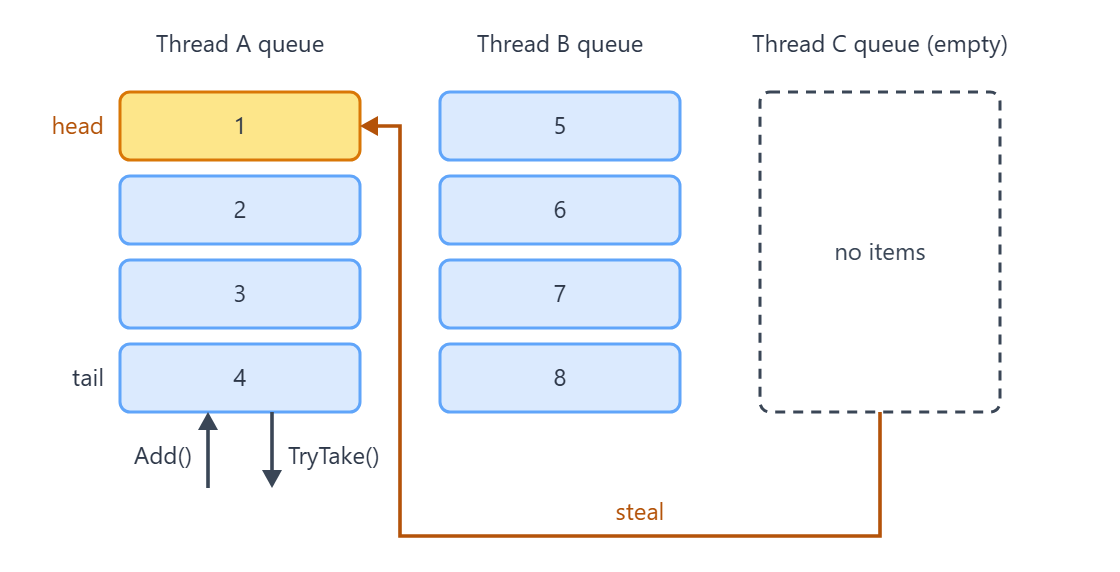
The reason is that the bag is not one list. It keeps a separate queue for every thread that touches it, so a thread adding an item is writing to storage no other thread owns. That is why Microsoft documents the type as optimised for the case where the same thread both produces and consumes the data.
When a thread calls TryTake() and its own queue is empty, the bag does not give up. It steals an item from another thread’s queue instead. Stealing is the slow path, and it takes a lock. The same-thread path usually does not.
So what we are promised is thread safety, not fairness and not order. Two threads draining the same bag will both get items, and neither can predict which ones.
Microsoft’s own remarks on the type state that design goal outright:
ConcurrentBag<T>is a thread-safe bag implementation, optimized for scenarios where the same thread will be both producing and consuming data stored in the bag.
That is from the ConcurrentBag<T> remarks on Microsoft Learn, and it is the same text the runtime source carries above the class declaration.
Adding Elements to a ConcurrentBag Concurrently
First, let’s implement a method that declares a ConcurrentBag, and then concurrently adds elements to it:
public static ConcurrentBag<int> CreateAndAddToConcurrentBagConcurrently()
{
    ConcurrentBag<int> numbersBag = new();

    Parallel.For(0, 1000, i =>
    {
        numbersBag.Add(i);
    });

    return numbersBag;
}
First, we declare a ConcurrentBag<int> object. After that, we invoke the Parallel.For method to add items to our bag. We can use this method to execute a loop in parallel, with each iteration running on a separate thread. When the work inside the loop is asynchronous rather than CPU-bound, Parallel.ForEachAsync() is the method to reach for instead.
The loop iterates from 0 to 1000 and adds each value to our ConcurrentBag. This allows us to add elements concurrently, without explicit synchronization (using the lock statement).
To get the number of elements in the returned collection, we can invoke the built-in Count property:
var myConcurrentBagCount = myConcurrentBag.Count;
Remove Elements From a ConcurrentBag
When we want to remove an item from a ConcurrentBag, we use the TryTake method. The TryTake method removes an item from the bag and returns it to the caller. If the collection is empty, it returns false:
public static List<int> RemoveFromConcurrentBag(ConcurrentBag<int> numbersBag)
{
    var result = new List<int>();
    if (numbersBag.TryTake(out int number))
    {
        result.Add(number);
    }

    return result;
}
In this method, we pass the bag as an argument. Of course, we want to remove an element from that bag. So, in the TryTake method, we pass an out parameter that will reference the returned value. Finally, we remove and return any number found in the collection.
We see that the ConcurrentBag<T> type is non-deterministic. This implies the order of removing items from the collection, may not be the same as the order of adding items.

Now, let’s see what happens when we try to remove items from a ConcurrentBag concurrently:
public static List<int> RemoveFromConcurrentBagConcurrently(ConcurrentBag<int> bag)
{
    var numbersList = new List<int>();
    Parallel.For(0, 20, i =>
    {
        if (bag.TryTake(out int number))
        {
            Console.WriteLine($"Thread {Environment.CurrentManagedThreadId} took item: {number}");
            numbersList.Add(number);
        }
    });

    return numbersList;
}
Again, we use the Parallel.For method to execute a loop concurrently, with each iteration running on a separate thread.
The loop iterates twenty times and tries to remove an item from our collection using the TryTake method. In each iteration, when we remove an item from the ConcurrentBag, we print it to the console along with the Id of the thread that removed it. Then, the item is added to our List<int>.
Finally, we populate the list with the returned values from our ConcurrentBag.
The order in which we remove items from the ConcurrentBag may not be the same as the order in which we print them on the console, because of the concurrent behavior of the operation.
That said if we want to check if a ConcurrentBag object is empty, we can use the IsEmpty property:
var isMyConcurrentBagEmpty = myConcurrentBag.IsEmpty;
Access an Element in a ConcurrentBag
Next up, let’s see how we can access an element in a ConcurrentBag. We can do this using the TryPeek method. When we invoke this method, it returns an item from the collection but does not remove it:
public static List<int> AccessItemFromAConcurrentBag(ConcurrentBag<int> bag)
{
    var result = new List<int>();

    if (bag.TryPeek(out int number))
    {
        result.Add(number);
    }

    return result;
}
The TryPeek method retrieves an object from the bag without modifying the content of the bag and returns it to the caller through the number variable.
Now, if the bag contains an item and the TryPeek method returns true, we add the value of that item (stored in the number variable) to our List<int>. Then, we return the list to the caller.
Finally, let’s see how to concurrently access an item from multiple threads, using the TryPeek method:
public static void AccessItemFromAConcurrentBagConcurrently(ConcurrentBag<int> bag)
{
    Parallel.For(0, 50, i =>
    {
        if (bag.TryPeek(out int number))
        {
            Console.WriteLine("Thread {0} peeked item: {1}", Environment.CurrentManagedThreadId, number);
        }
    });
}
Here, we invoke the Parallel.For method to execute a loop concurrently, with each iteration running on a separate thread.
Finally, the loop iterates fifty times, and each iteration tries to access an object from our collection using the TryPeek method. If the bag has an item, we print it on the console along with the ID of the thread that we use to access it.
In What Order Does a ConcurrentBag Return Items?
There is no ordering guarantee, but the behaviour is not random either, and the pattern explains results that otherwise look like bugs.
A thread taking from its own queue gets items last in, first out. Add 1 to 5 on one thread and TryTake() hands back 5, 4, 3, 2, 1. TryPeek() shows 5 for the same reason, and a foreach walks the bag the same way.
A thread that steals from another thread’s queue takes from the opposite end, oldest first. Produce 0 to 4 on one thread, then drain the bag from a genuinely different thread, and the items come back 0, 1, 2, 3, 4. Two Task.Run calls are not enough to guarantee that, because the pool is free to hand both pieces of work to the same thread.
Mix producers and consumers across several threads and those two ends interleave with no pattern we can rely on. That is the case the documentation calls unordered, and it is the case to code for.
This diagram shows where each thread reads and writes, and where a stealing thread goes instead:
Let’s drain a bag on the same thread that filled it:
public static List<int> DrainOwnQueue()
{
    var bag = new ConcurrentBag<int>();
    for (var i = 1; i <= 5; i++)
    {
        bag.Add(i);
    }

    var taken = new List<int>();
    while (bag.TryTake(out var item))
    {
        taken.Add(item);
    }

    return taken;
}
The items come back 5, 4, 3, 2, 1, because the thread pops its own queue from the tail.
Now let’s fill the bag on one dedicated thread and drain it on another:
public static List<int> DrainStolenQueue()
{
    var bag = new ConcurrentBag<int>();
    var taken = new List<int>();

    // Dedicated threads, never Task.Run: the thread pool is free to hand both pieces of
    // work to the same thread, and a consumer running on the producer's thread pops its
    // own queue last in, first out instead of stealing.
    var producer = new Thread(() =>
    {
        for (var i = 0; i < 5; i++)
        {
            bag.Add(i);
        }
    });
    producer.Start();
    producer.Join();

    var consumer = new Thread(() =>
    {
        while (bag.TryTake(out var item))
        {
            taken.Add(item);
        }
    });
    consumer.Start();
    consumer.Join();

    return taken;
}
This time the items come back 0, 1, 2, 3, 4. The consuming thread has an empty queue of its own, so it steals from the head of the producer’s queue, which is the oldest item.
How Do We Remove a Specific Item From a ConcurrentBag?
We cannot, and that is the whole answer. ConcurrentBag<T> has no Remove() and no RemoveAt(). Its only removal operation is TryTake(), which hands us whichever item the bag chooses.
Two workarounds exist, and both have to be honest about their cost. We can drain the bag in a TryTake() loop, keep the items we want, and add the rest back. That is not atomic: another thread can add or take while we are halfway through.
Or we can build a new bag from a filtered snapshot and swap the reference. Same problem, plus every thread still holding the old reference keeps writing to a bag nobody reads.
If removing one specific item is a requirement rather than an occasional chore, the bag is the wrong collection. ConcurrentDictionary<TKey, TValue> gives us TryRemove(key, out value), which is a single atomic operation and is what this problem actually needs.
Our article on ConcurrentDictionary in C# walks through that type in full.
What Other Methods Does a ConcurrentBag Have?
The public surface is small, and several of the methods people go looking for are not on it.
ToArray() copies the bag into a new array. CopyTo() copies into an array we already have, and throws ArgumentException when that array is too short. Clear() empties the bag, and it arrived with .NET Core 2.0, so it exists on every modern .NET but never shipped on .NET Framework.
Count and IsEmpty report size, and neither is free. Count freezes the whole bag to get an accurate answer, which briefly blocks every other thread. IsEmpty has a fast path that usually avoids the freeze, so it is the cheaper check when all we want to know is whether anything is left.
There is no AddRange(), no Contains(), no Remove() and no indexer. LINQ supplies Contains() and the rest, but it works on a snapshot, not on the live bag.
ToArray
The ToArray method copies all the elements of a ConcurrentBag into a new array:
public static int[] ConcurrentBagToArrayMethod(ConcurrentBag<int> bag)
{
    return bag.ToArray();
}
Here, the ToArray method returns a new array holding the items from our bag, so we never have to size a destination ourselves. We should note that the order of the items in the array, may not be the same as the order in which we added them to the bag.
CopyTo
We use this method to copy the items in a ConcurrentBag to an existing one-dimensional array, starting at a specified index:
public static int[] ConcurrentBagCopyToMethod(ConcurrentBag<int> bag)
{
    var someArray = new int[bag.Count];
    bag.CopyTo(someArray, 0);

    return someArray;
}
Here, we populate the array with elements from the bag, starting at the index, 0. Again, the order of the items in the array, may not be the same as the order of the items when we inserted them into the bag.
Reading Count and then calling CopyTo is two operations, not one. Another thread can add an item between them, and CopyTo then throws ArgumentException because the destination is now too short. Where other threads can still write, we size the destination from a snapshot or size it generously.
Clear
This is a thread-safe method that we can invoke when we want to remove all items from a ConcurrentBag:
public static void ConcurrentBagClearMethod(ConcurrentBag<int> bag)
{
    bag.Clear();

    Console.WriteLine($"My concurrent bag contains {bag.Count} item."); // My concurrent bag contains 0 item.
}
As we can see, the bag is now empty.
Here is the complete public surface of the type, including the members people most often look for and do not find:
| Member | What it does | Notes |
|---|---|---|
Add(T item) | Puts an item into the calling thread's own queue | Takes the lock-free fast path in the common case |
TryTake(out T item) | Removes one item and returns it | false when the bag is empty; which item we get is not ours to choose |
TryPeek(out T item) | Returns one item without removing it | false when the bag is empty |
ToArray() | Copies the bag into a new array | A moment-in-time snapshot; freezes the bag while it copies |
CopyTo(T[] array, int index) | Copies into an array we already have | Throws ArgumentException if that array is too short |
Clear() | Removes every item | .NET Core 2.0 and later, and .NET Standard 2.1. Not on .NET Framework |
Count | How many items the bag holds | Freezes the bag to count; not a free read |
IsEmpty | Whether the bag holds anything | Has a fast path, so it beats Count == 0 |
GetEnumerator() | foreach support | A snapshot, and safe to use while other threads read and write |
Remove(T item) | Does not exist | Use ConcurrentDictionary<TKey, TValue>.TryRemove() when targeted removal is needed |
AddRange(IEnumerable<T>) | Does not exist | Pass the sequence to the constructor, or call Add() in a loop |
Contains(T item) | Does not exist | LINQ's Contains() works, on a snapshot rather than the live bag |
bag[i] (indexer) | Does not exist | The bag is unordered; there is no index to ask for |
The official ConcurrentBag<T> API reference lists every member with its full signature.
When order does matter, a different concurrent collection type is the answer, usually ConcurrentQueue or ConcurrentStack.
When Should We Use a ConcurrentBag in C#?
We should use a ConcurrentBag when we have multiple threads that need to add or remove items from a collection concurrently. This ensures that our collection remains in a consistent state.
Also, we can use this collection type when we want to process grouped objects concurrently and don’t need to preserve the order of the objects.
For example, the ConcurrentBag type is suitable for situations where we want to process a group of objects by a set of worker threads. When we use this collection class, the worker threads can concurrently retrieve items from the collection and process them. Ensuring that we do not worry about synchronization or race conditions.
That said, we must remember that items in a ConcurrentBag are unordered. Therefore, if we need to preserve the order of items, we should consider using a different concurrent collection type, like the ConcurrentQueue or the ConcurrentStack.
What Are the Benefits of a ConcurrentBag in C#?
When we use the ConcurrentBag collection type, we can be sure that our application is thread-safe. This is so because the ConcurrentBag was designed to be used concurrently by multiple threads, and it provides thread safety for adding and removing items.
Adding and taking are fast in the common case because a thread works on its own queue and takes a lock-free path to do it. That path is not the whole story: stealing from another thread’s queue takes a lock, and so do Count, ToArray, CopyTo and Clear, which freeze every queue in the bag while they run.
Finally, because of its unordered nature and ability to increase or decrease its size dynamically, the ConcurrentBag class offers more flexibility. This allows us to store, remove and retrieve items in any order.
What Are the Drawbacks of a ConcurrentBag in C#?
To start with, due to the unordered nature of the ConcurrentBag class, we cannot use it to represent a collection of objects where order is important to us.
Also, if we use a ConcurrentBag to store a sequence of items that need to be processed in a specific order, the unordered nature of the bag can make it difficult to ensure that the items are processed in the correct order.
Finally, when we use a ConcurrentBag, we cannot use indexers, iterators, or other methods to access or modify the items in the bag in a specific order. This is because the ConcurrentBag<T> type does not provide many ways to access or modify the items in the bag.
Conclusion
In this article, we have seen that the ConcurrentBag is an efficient collection type in C# for storing and retrieving items concurrently from multiple threads. However, it does not guarantee the order in which we add and remove items from the collection. Finally, when we are to choose a collection type for concurrent programming in C#, we should consider the specific requirements of our application and select the most suitable collection.
Tested with .NET 10.0.10.
