


Updated on
Counting sort is a sorting algorithm for integers that never compares elements to decide their order. It counts how many times each value appears and writes the values back in order, so its running time depends on the number of elements and on the size of the largest value.
Have you ever needed to sort a list of items but didn’t want to use a built-in sorting algorithm? If so, you may have considered counting sort. We’ll look at how it works, implement it in C#, compare it with other sorting algorithms and analyze its time and space complexity.
Let’s dive in.
What Is Counting Sort?
As its name implies, counting sort works by counting the number of occurrences of each distinct element in the list. An auxiliary array stores these occurrences and maps the values of the distinct elements with the indices of the array. Finally, the algorithm iterates over the auxiliary array while sorting the original array.
Let’s take a deep dive and learn how counting sort works.
How Does Counting Sort Algorithm Work?
Let’s look at an example of how counting sort works. We will use the following set of numbers:
int[] array = {7, 1, 2, 8, 9, 9, 4, 1, 5, 5};
We start by finding the largest element in the array (9).
Next, the counting sort algorithm initializes an array of size [getMax(array[ ])+1] , to store the occurrences of distinct elements.
The algorithm loops through the unsorted array while storing the number of occurrences of every distinct element in the occurrences array, which it achieves by mapping the distinct elements with the index of the occurrences array:
Value: 0, 2, 1, 0, 1, 2, 0, 1, 1, 2
Index: 0, 1, 2, 3, 4, 5, 6, 7, 8, 9
Index 1 holds 2 because the number 1 appears twice in our array, and index 3 holds 0 because there is no 3 at all.
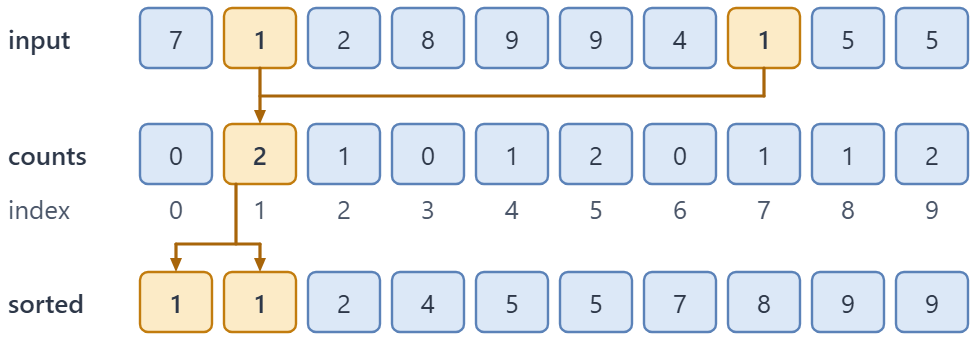
Counting sort on our ten numbers: count each value into its own slot, then write the slots back in order.
Now that we have populated the occurrences array, we are going to iterate through the array as we retrieve the occurrences of each distinct element as we populate the sorted array:
1, 1, 2, 4, 5, 5, 7, 8, 9, 9
Let’s learn how to implement the counting sort algorithm in C#.
How to Implement Counting Sort in C#?
To implement counting sort in C#, we need three passes and one extra array.
First, we find the largest value in the input. It decides the size of the counting array: one slot for every number from 0 up to that maximum.
Next, we walk the input once and increment the slot that matches each value. After this pass, occurrences[5] tells us how many fives the input holds.
Finally, we walk the counting array from the lowest index to the highest and write each index back into the input as many times as its count says.
The method never compares two elements to decide their order. That is why it can beat comparison sorts, and also why it only works with integer keys.
Our first version expects non-negative numbers, because every value becomes an array index. A negative value throws an IndexOutOfRangeException (an OverflowException if every value is below -1), and the stable version further down fixes that with an offset.
Let’s start by writing a GetMaxVal() method in a public CountingSortMethods class of a new console app. It takes an array and its size as inputs and returns the largest integer in that array:
public static int GetMaxVal(int[] array, int size)
{
    var maxVal = array[0];

    for (int i = 1; i < size; i++)
        if (array[i] > maxVal)
            maxVal = array[i];

    return maxVal;
}
The GetMaxVal() method iterates through the array from the first element to the last one while updating the value of maxVal, which we are going to need as we implement the counting sort algorithm.
Next, we are going to write a CountingSort() method in the same class that takes an array as its sole input and returns a sorted array:
public int[] CountingSort(int[] array)
{
    var size = array.Length;
    if (size == 0)
        return array;

    var maxElement = GetMaxVal(array, size);
    var occurrences = new int[maxElement + 1];

    for (int i = 0; i < size; i++)
    {
        occurrences[array[i]]++;
    }

    for (int i = 0, j = 0; i <= maxElement; i++)
    {
        while (occurrences[i] > 0)
        {
            array[j] = i;
            j++;
            occurrences[i]--;
        }
    }

    return array;
}
How the Counting Sort Method Works
We can see that the process starts by getting the largest integer in the array by invoking GetMaxVal(). Once we get the largest integer in the array, we define an array of size maxElement + 1. C# fills a new int array with zeros, so we don’t need to initialize it ourselves. If the array is empty, there is nothing to sort, and we return it straight away.
At this point, we start populating the occurrences array by storing the occurrences of each unique element in the array:
for (int i = 0; i < size; i++)
{
    occurrences[array[i]]++;
}
Next, the algorithm iterates through the occurrences array to sort the array elements by mapping the indexes and their values:
for (int i = 0, j = 0; i <= maxElement; i++)
{
    while (occurrences[i] > 0)
    {
        array[j] = i;
        j++;
        occurrences[i]--;
    }
}

return array;
Finally, in a test method of an MSTest project that references our app, we can verify that the CountingSort() method sorts a given unsorted array accurately:
var array = new int[] { 73, 57, 49, 99, 133, 20, 1 };
var expected = new int[] { 1, 20, 49, 57, 73, 99, 133 };
var sortFunction = new CountingSortMethods();

var sortedArray = sortFunction.CountingSort(array);

Assert.IsNotNull(sortedArray);
CollectionAssert.AreEqual(expected, sortedArray);
Is Counting Sort Stable?
The version we just wrote puts plain integers back into the array. Two fives look the same, so the question of their order never comes up.
It comes up as soon as we sort records by an integer key. Imagine weather readings that we want to order by temperature. Two cities with the same temperature should stay in the order we received them, and temperatures can be negative, which our first method can’t handle.
The classic answer is a stable counting sort that uses running totals, and it goes in the same class:
public static T[] StableCountingSort<T>(T[] items, Func<T, int> getKey)
{
    if (items.Length == 0)
        return [];

    var min = items.Min(getKey);
    var max = items.Max(getKey);
    var range = (long)max - min + 1;
    if (range > Array.MaxLength)
        throw new ArgumentOutOfRangeException(nameof(items), "The key range is too wide for counting sort.");

    var counts = new int[range];

    foreach (var item in items)
        counts[getKey(item) - min]++;

    for (int i = 1; i < counts.Length; i++)
        counts[i] += counts[i - 1];

    var sorted = new T[items.Length];

    for (int i = items.Length - 1; i >= 0; i--)
    {
        var index = getKey(items[i]) - min;
        counts[index]--;
        sorted[counts[index]] = items[i];
    }

    return sorted;
}
First, we find the smallest and the largest key and allocate one slot for every value between them. Subtracting min turns the smallest key into index 0, so negative keys stop being a problem. It also saves memory when the values start high: a range like 10,000 to 30,000 now needs about 20,000 slots instead of 30,000.
We compute the range as a long on purpose. For keys from int.MinValue to int.MaxValue, max - min + 1 doesn’t fit in an int and wraps around to 0, so we check the real size first. Microsoft Learn describes Array.MaxLength as “the maximum number of elements (not bytes) the runtime will allow in an array”, and a key range wider than that can’t get a counting array at all.
Then we count the keys, as before. The second loop turns the counts into running totals, so counts[i] now says how many items have a key of min + i or less. That number is one past the last position this group of items will occupy.
Finally, we walk the input backwards. Each item goes into the slot its running total points to, and the total drops by one. Since we start from the end, the last of two equal keys takes the last free slot of its group, and the earlier one lands in front of it.
Let’s sort some readings in the Program.cs of our console app:
Reading[] readings =
[
    new("Oslo", -3), new("Cairo", 24), new("Lima", 18),
    new("Tromso", -3), new("Accra", 24), new("Quito", 18)
];

var sorted = CountingSortMethods.StableCountingSort(readings, r => r.Temperature);

foreach (var reading in sorted)
    Console.WriteLine(reading);

record Reading(string City, int Temperature);
The result keeps every pair of equal temperatures in input order:
Reading { City = Oslo, Temperature = -3 }
Reading { City = Tromso, Temperature = -3 }
Reading { City = Lima, Temperature = 18 }
Reading { City = Quito, Temperature = 18 }
Reading { City = Cairo, Temperature = 24 }
Reading { City = Accra, Temperature = 24 }
Oslo still comes before Tromso, and Cairo before Accra. The price is memory: besides the counting array, this version allocates a second array of n items for the result.
In everyday code, LINQ gives us the same guarantee for free: OrderBy() is a stable sort, so equal keys keep their order, and our article on sorting with LINQ shows OrderBy() in action. Stability is also what lets radix sort use counting sort one digit at a time: each pass has to keep the order the previous digit produced.
What Is the Time and Space Complexity of Counting Sort?
Counting sort runs in O(n + k) time in the best, average and worst case, and needs O(k) extra space, where n is the number of elements and k is the size of the counting array.
The work doesn’t depend on input order. The method scans the input to find the maximum, scans it again to count, and then walks all k slots while it writes n values back.
The cost depends on k. Our first version makes k the largest value plus one, so 20,000 numbers between 10,000 and 30,000 get a counting array of about 30,000 slots, and more than half of them stay empty.
When k is close to n, the sort runs in linear time. When one value is far larger than the rest, k dominates time and memory.
The stable version needs O(n + k) space for its output array. It keeps equal keys in order, and neither version sorts in place.
Best-Case Time Complexity
The best-case time complexity occurs when every element has the same small value, so the counting array stays tiny. In our benchmark all 20,000 elements are 1, which makes k equal to 2, and the time complexity becomes O(n + 2), or O(n).
Average-Case Time Complexity
Counting sort encounters the average-case time complexity scenario when we select random values from a range that is not much larger than n, for example 20,000 numbers between 10,000 and 30,000. In this case, assuming we have an array of size n and the value of the largest element being k, the algorithm has O(n+k) as its average-case time complexity.
Worst-Case Time Complexity
This time complexity scenario occurs when the elements are skewed with the largest element k, being significantly larger than the rest of the elements in the array. This increases the time it takes for the algorithm to iterate through the occurrences array and worsens the algorithm’s space complexity.
Given the average time complexity of the counting sort algorithm is O(n+k), when the value of k grows for example to n^4, the total time it takes to sort the array is O(n + (n^4)).
Therefore, the time complexity is still O(n + k), but when the maximum element is much larger than the rest, k is the term that decides the runtime, so in practice the cost grows like O(k). Memory grows with it: one value of 2,000,000 means a counting array of 2,000,001 integers, about 8 MB, no matter how short the input is.

Advantages of Counting Sort Algorithm
One advantage of the counting sort algorithm is that it is relatively simple to understand and implement.
Additionally, the algorithm is very efficient for collections with a small range of values. In our benchmark, it sorts 20,000 numbers between 10,000 and 30,000 more than four times faster than Array.Sort(). Finally, counting sort can be made stable, meaning that items with equal keys keep their original order after being sorted, unlike other sorting algorithms such as quicksort.
Disadvantages of Counting Sort Algorithm
First, the algorithm is not well-suited for collections with a large range of values because the algorithm’s efficiency decreases as the range of values increases.
Counting sort is a bit more complex to implement than other sorting algorithms such as selection and bubble sort.
Counting sort is not an in-place sorting algorithm since it requires additional space unlike algorithms such as quicksort, insertion sort, and bubble sort. Our first version needs O(k) extra memory for the counting array, and the stable one O(n + k).
Finally, the algorithm can be slower than algorithms that use divide and conquer approaches such as merge sort and quicksort when the values cover a wide range. In our benchmark, one value of 2,000,000 among 19,999 small numbers makes counting sort more than twice as slow as Array.Sort().
It also needs integer keys, and our first version accepts only non-negative ones.
Performance Tests
Let’s test how long the algorithm takes to sort three arrays that have 20,000 elements each, and compare it with the built-in Array.Sort() using BenchmarkDotNet. To help us complete these tests, we are going to implement two methods.
First, let’s write a method in our CountingSortMethods class to generate a set of random array elements:
public static int[] CreateRandomArray(int size, int lower, int upper)
{
    var array = new int[size];
    var rand = new Random();

    for (int i = 0; i < size; i++)
        array[i] = rand.Next(lower, upper);

    return array;
}
The CreateRandomArray() method takes three integers size, lower and upper. Using the inbuilt Random class, we generate integer values between lower and upper that we’re going to put into the array.
To simulate the worst-case time complexity scenario, we use the CreateRandomArray() we have and add one large element at the end of the array, 2,000,000, which is about 67 times the largest of the other values. This method goes in the same class:
public static int[] CreateImbalancedArray(int[] array) => [.. array, 2_000_000];
An earlier version of this test used Int32.MaxValue / 2 as the large element. That makes the counting array 1,073,741,824 slots long, 4 GB of memory for every single call, so we use a smaller value that shows the same effect.
CountingSort() overwrites the array it receives with the sorted values. The earlier version of this benchmark passed the same array to every call, so after the first call it kept sorting its own output, and every later call received an array that was already sorted.
For counting sort the damage is smaller, because the number of steps doesn’t depend on order. It still isn’t the input we meant to measure, so both methods now copy the generated array into a working array before they sort:
public class CountingSortBenchmarks
{
    private readonly CountingSortMethods _sorter = new();
    private int[] _source = [];
    private int[] _work = [];

    [Params("Best Case", "Average Case", "Worst Case")]
    public string Input { get; set; } = "Average Case";

    [GlobalSetup]
    public void Setup()
    {
        _source = Input switch
        {
            "Best Case" => CountingSortMethods.CreateRandomArray(20_000, 1, 2),
            "Average Case" => CountingSortMethods.CreateRandomArray(20_000, 10_000, 30_000),
            _ => CountingSortMethods.CreateImbalancedArray(
                CountingSortMethods.CreateRandomArray(19_999, 10_000, 30_000))
        };
        _work = new int[_source.Length];
    }

    [Benchmark]
    public int[] CountingSort()
    {
        _source.CopyTo(_work, 0);

        return _sorter.CountingSort(_work);
    }

    [Benchmark(Baseline = true)]
    public int[] ArraySort()
    {
        _source.CopyTo(_work, 0);
        Array.Sort(_work);

        return _work;
    }
}
BenchmarkDotNet calls Setup() once per benchmark method and Input value, before it starts timing. The best case holds 20,000 copies of the number 1, the average case 20,000 random numbers between 10,000 and 30,000, and the worst case the same kind of numbers plus our 2,000,000 at the end. ArraySort() is the baseline, so the Ratio column compares counting sort with the sort we would normally reach for.
Sample Test Results
The benchmark class goes in its own file in our console app. We add the BenchmarkDotNet package to the app, start the class file with using BenchmarkDotNet.Attributes;, and replace the code in Program.cs with using BenchmarkDotNet.Running; and a call to BenchmarkRunner.Run<CountingSortBenchmarks>();. Let’s run it in Release mode and assess the sample best, average, and worst-case complexity performance results of the algorithm against Array.Sort():
| Method       | Input        | Mean        | Error     | StdDev    | Ratio | RatioSD |
|------------- |------------- |------------:|----------:|----------:|------:|--------:|
| CountingSort | Average Case |   180.07 us |  2.720 us |  2.544 us |  0.21 |    0.00 |
| ArraySort    | Average Case |   850.84 us |  3.458 us |  2.888 us |  1.00 |    0.00 |
|              |              |             |           |           |       |         |
| CountingSort | Best Case    |    81.48 us |  0.246 us |  0.230 us |  0.62 |    0.00 |
| ArraySort    | Best Case    |   131.30 us |  0.494 us |  0.386 us |  1.00 |    0.00 |
|              |              |             |           |           |       |         |
| CountingSort | Worst Case   | 2,107.36 us | 39.136 us | 64.301 us |  2.43 |    0.08 |
| ArraySort    | Worst Case   |   868.30 us | 12.476 us | 11.059 us |  1.00 |    0.02 |
As we can see, all three arrays hold 20,000 elements, yet the runtimes differ a lot.
In the average case, counting sort needs about 180 microseconds and Array.Sort() about 851, so counting sort is more than four times faster. With every element equal, both get quicker and the gap narrows, because Array.Sort() speeds up even more, from about 851 to about 131 microseconds.
One large value turns the result around. The 2,000,000 at the end makes the counting array 2,000,001 slots long. Counting sort becomes more than ten times slower than in the average case and more than twice as slow as Array.Sort(), whose cost doesn’t depend on how big the numbers are.
Please note that these runtimes may change depending on the number of elements and the computing resources available.
Conclusion
In this article, we have learned how counting sort in C# works and its time and space complexity.
Counting sort is the right tool when the keys are integers in a small, known range, such as ages or temperatures. When the range is wide but the values are spread evenly, bucket sort spreads them over ranges instead of single slots, and radix sort sorts them one digit at a time. Outside those cases, Array.Sort() is the safer default, and our quicksort article shows how it works inside.
Tested with .NET 10.0.10, BenchmarkDotNet 0.15.8 and MSTest 4.5.2.