


Updated on
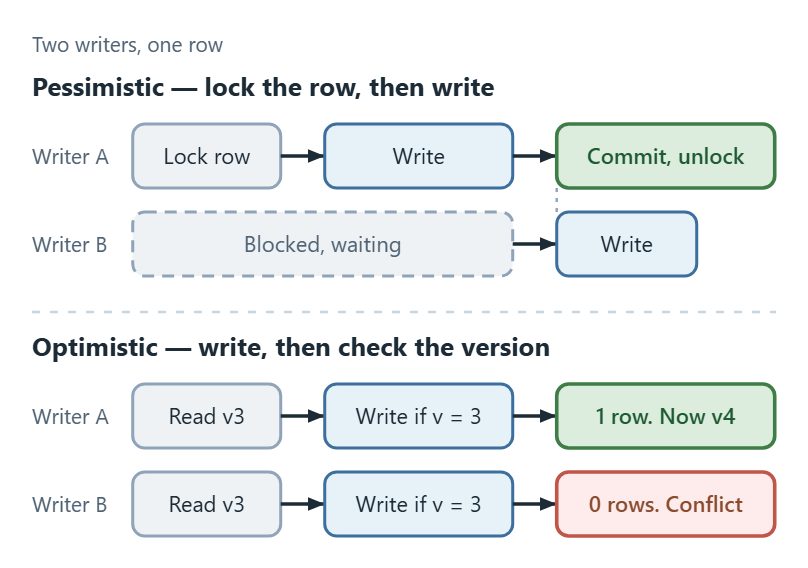
Pessimistic locking prevents a conflict by locking the row so nobody else can touch it. Optimistic locking lets the conflict happen and detects it at save time by checking a version column.
Which one to reach for follows from how often conflicts actually occur. Rare conflicts, the normal case for web applications, favour optimistic locking, because it holds no locks and costs nothing until something goes wrong. Frequent conflicts on a hot row favour pessimistic locking, because retrying a failed save over and over is worse than waiting once.
Prerequisites for Running the Demonstration
In this article, we’ll use Entity Framework Core as an abstraction over our data access and Testcontainers NuGet package to programmatically create an SQL Server database container. This setup allows us to demonstrate pessimistic and optimistic locking strategies in a realistic environment.
After configuring a SQL Server Test Container, we can then configure Entity Framework Core to connect to this SQL Server instance:
builder.Services
    .AddDbContext<ApplicationDbContext>((sp, contextBuilder) =>
    contextBuilder.UseSqlServer(connectionString),
    contextLifetime: ServiceLifetime.Scoped);
With the DbContext configured, we need a simple DTO to handle requests to our API endpoints:
public record AssignWorkItemRequest(long Id, string AssignedTo, bool ForceConflict = false);
Finally, we need a tool such as Swagger, Postman, etc., to send requests to our API.
With our setup ready, we are now ready to demonstrate both pessimistic and optimistic locking.
Let’s begin!
What Is Optimistic Locking?
Optimistic locking takes no lock at all. It assumes conflicts are rare, lets everyone read and edit freely, and checks at save time whether the row changed since it was read.
The check rides on a version column: a rowversion, a counter, a timestamp, a GUID. The update carries the version that was read and asks the database to match on it as well as on the key.
If the row still holds that version, one row updates and the save succeeds. If another writer got there first, the version no longer matches, zero rows update, and the save fails rather than overwriting.
EF Core turns that zero-row result into a DbUpdateConcurrencyException, which is the signal to reload, merge, or ask the user. It is never a signal to retry blindly, because a blind retry is the lost update the version column exists to prevent.
Nothing is held between reading and saving, so the pattern works across requests, across processes, and across disconnected clients.
Optimistic Locking With RowVersion in EF Core
To demonstrate this, let’s define a WorkItemWithRowVersion entity:
public class WorkItemWithRowVersion
{
    public long Id { get; set; }

    public string Title { get; set; }

    public string Description { get; set; }

    public string Status { get; set; }

    public DateTime DueDate { get; set; }

    public string AssignedTo { get; set; }

    [Timestamp]
    public byte[] RowVersion { get; set; }
}
Here, we add a RowVersion property. This property is marked with the [Timestamp] attribute, enabling EF Core to handle concurrency checks automatically.
Alternatively, we can configure the RowVersion with EF Core’s Fluent API:
protected override void OnModelCreating(ModelBuilder modelBuilder)
{
    modelBuilder.Entity<WorkItemWithRowVersion>().Property(p => p.RowVersion).IsRowVersion();
}
We can use either approach depending on our application’s configuration style.
To test our optimistic locking, let’s create a new endpoint that retrieves the WorkItemWithRowVersion entity, updates the AssignedTo field, and saves the changes. If ForceConflict is set to true, a direct SQL update simulates a concurrency conflict by modifying the AssignedTo field in the database:
[HttpPost("/workItem/assign-optimistic-row-version")]
public async Task<IActionResult> AssignWorkItemWithAutomaticOptimisticLockAsync(
    AssignWorkItemRequest assignWorkItemRequest,
    CancellationToken cancellationToken)
{
    var workItem = await DbContext.WorkItemsWithRowVersion
        .FirstOrDefaultAsync(x => x.Id == assignWorkItemRequest.Id, cancellationToken);

    if (workItem is null)
        return NotFound($"Work Item with Id {assignWorkItemRequest.Id} was not found!");

    workItem.AssignedTo = assignWorkItemRequest.AssignedTo;

    if (assignWorkItemRequest.ForceConflict)
    {
        _ = await DbContext.Database.ExecuteSqlInterpolatedAsync(
            $@"UPDATE dbo.WorkItemsWithRowVersion
               SET AssignedTo = 'John Stevens'
               WHERE Id = {assignWorkItemRequest.Id}", cancellationToken);
    }

    try
    {
        await DbContext.SaveChangesAsync(cancellationToken);

        return Ok("Work item updated successfully with optimistic locking.");
    }
    catch (DbUpdateConcurrencyException ex)
    {
        Logger.LogError(ex, "Error while saving changes");

        return Conflict("Resource was already modified. Please retry");
    }
}
Notice that we do not explicitly update the RowVersion property here – EF Core manages this automatically, thanks to the [Timestamp] attribute. This setup allows the database to handle versioning, which is efficient for most use cases. Everything else here is ordinary change tracking, which we cover in full in our guide to modifying data with EF Core.
One thing about the simulation is worth naming. In a real conflict, that competing UPDATE comes from another request on another connection. Here we issue it inline through the same DbContext that is about to save, so the demonstration is deterministic rather than a race we have to win.
Also, notice the DbUpdateConcurrencyException catch block. EF Core raises this exception when it detects a conflict, indicating that another process has modified the data.
To test this, let’s send a request to the /workItem/assign-optimistic-row-version with a valid payload for a successful update:
{
  "id": 2,
  "assignedTo": "John Newman",
  "forceConflict": false
}
As expected, the result shows that we have updated our record:
Work item updated successfully with optimistic locking.

Next, we simulate a concurrency conflict with a new payload:
{
  "id": 2,
  "assignedTo": "John Oldman",
  "forceConflict": true
}
Here we modify the assignedTo value and set forceConflict to true. This time, the response indicates a conflict:
Resource was already modified. Please retry
Additionally, we can also see a message logged in the console:
{"The database operation was expected to affect 1 row(s), but actually affected 0 row(s); data may have been modified or deleted since entities were loaded. See https://go.microsoft.com/fwlink/?LinkId=527962 for information on understanding and handling optimistic concurrency exceptions."}
This message confirms that our optimistic locking is working as intended.
Optimistic Locking With ConcurrencyToken in EF Core
In some scenarios, we might want more control over the version control and manage it manually within our application. The ConcurrencyToken approach allows for this flexibility.
If-Match headers doing the version check between the client and the API. For that side of it, check out our Optimistic Concurrency in ASP.NET Core Web API article.To demonstrate this, we can define a WorkItemWithConcurrencyToken entity:
public class WorkItemWithConcurrencyToken
{
    public long Id { get; set; }

    public string Title { get; set; }

    public string Description { get; set; }

    public string Status { get; set; }

    public DateTime DueDate { get; set; }

    public string AssignedTo { get; set; }

    [ConcurrencyCheck]
    public long Version { get; set; }
}
Here, we add a Version property marked with [ConcurrencyCheck], which could also be an integer, GUID, or other unique value.
Alternatively, we can configure Version as a concurrency token using EF Core’s Fluent API:
protected override void OnModelCreating(ModelBuilder modelBuilder)
{
    modelBuilder.Entity<WorkItemWithConcurrencyToken>()
        .Property(p => p.Version)
        .IsConcurrencyToken();
}
Now, let’s create a new endpoint that retrieves the WorkItemWithConcurrencyToken entity, updates the AssignedTo field, and manually increments the Version property. If ForceConflict is set to true, a direct SQL update simulates a concurrency conflict:
[HttpPost("/workItem/assign-manual-optimistic-concurrency-token")]
public async Task<IActionResult> AssignWorkItemWithManualOptimisticLockAsync(
    AssignWorkItemRequest assignWorkItemRequest,
    CancellationToken cancellationToken)
{
    var workItem = await DbContext.WorkItemsWithConcurrencyToken
        .FirstOrDefaultAsync(x => x.Id == assignWorkItemRequest.Id, cancellationToken);

    if (workItem is null)
        return NotFound($"Work Item with Id {assignWorkItemRequest.Id} was not found!");

    workItem.AssignedTo = assignWorkItemRequest.AssignedTo;
    workItem.Version++;

    if (assignWorkItemRequest.ForceConflict)
    {
        _ = await DbContext.Database.ExecuteSqlInterpolatedAsync(
            $@"UPDATE dbo.WorkItemsWithConcurrencyToken
               SET AssignedTo = 'John Stevens', Version = Version + 1
               WHERE Id = {assignWorkItemRequest.Id}", cancellationToken);
    }

    try
    {
        await DbContext.SaveChangesAsync(cancellationToken);

        return Ok("Work item updated successfully with optimistic locking.");
    }
    catch (DbUpdateConcurrencyException ex)
    {
        Logger.LogError(ex, "Error while saving changes");

        return Conflict("Resource was already modified. Please retry");
    }
}
This endpoint is similar to the previous one, with one key difference – we manually update the property here.
Similar to before, let’s first send a request to /workItem/assign-manual-optimistic-concurrency-token with a valid payload:
{
  "id": 3,
  "assignedTo": "John Doe",
  "forceConflict": false
}
As expected, the result shows our request modifies the resource:
Work item updated successfully with optimistic locking.
To simulate concurrency conflict, let’s change the payload’s assignedTo and forceConflict to true and send a new request:
Resource was already modified. Please retry
As before, EF Core detects the conflict and throws a DbUpdateConcurrencyException, which we handle in the catch block and the result confirms that our concurrency token works.
Additionally, with EF Core logging enabled, we’ll see details of the conflict in the logs, indicating that the Version column is checked for concurrency:
info: Microsoft.EntityFrameworkCore.Database.Command[20101]
      Executed DbCommand (3ms) [Parameters=[@__assignWorkItemRequest_Id_0='?' (DbType = Int64)], CommandType='Text', Com
      SELECT TOP(1) [w].[Id], [w].[AssignedTo], [w].[Description], [w].[DueDate], [w].[Status], [w].[Title], [w].[Versio
      FROM [WorkItemsWithConcurrencyToken] AS [w]
      WHERE [w].[Id] = @__assignWorkItemRequest_Id_0
info: Microsoft.EntityFrameworkCore.Database.Command[20101]
      Executed DbCommand (10ms) [Parameters=[@p0='?' (DbType = Int64)], CommandType='Text', CommandTimeout='30']
      UPDATE dbo.WorkItemsWithConcurrencyToken
                         SET AssignedTo = 'John Stevens', Version = Version + 1
                         WHERE Id = @p0
info: Microsoft.EntityFrameworkCore.Database.Command[20101]
      Executed DbCommand (2ms) [Parameters=[@p2='?' (DbType = Int64), @p0='?' (Size = 4000), @p1='?' (DbType = Int64), @
      SET IMPLICIT_TRANSACTIONS OFF;
      SET NOCOUNT ON;
      UPDATE [WorkItemsWithConcurrencyToken] SET [AssignedTo] = @p0, [Version] = @p1
      OUTPUT 1
      WHERE [Id] = @p2 AND [Version] = @p3;
The last log message indicates that both Id and Version are checked during the update, validating that our manual concurrency token is functioning correctly.
If we need a durable record of which write won and which one lost, that belongs one level lower than the controller. EF Core interceptors see every save attempt, including the one that fails the version check.
What Is Pessimistic Locking?
Pessimistic locking takes a lock on a row before reading it, so that no other transaction can modify it until the first one finishes. It assumes a conflict is coming and prevents it.
The lock lives in the database, not in our application. Every other writer that reaches the same row waits, and how long it waits is not something our code controls.
That waiting is the whole trade. Nothing is ever lost and nothing has to be retried, but throughput on a contended row becomes serial, and a transaction held open too long turns into a timeout or a deadlock.
It suits work where conflicts are frequent and the operation is short: a counter, a stock level, a seat reservation processed in one round trip.
It suits interactive editing badly. Holding a database lock for as long as a user has a form open is not a pattern any database is built for.
Microsoft’s own EF Core concurrency guidance reaches the same conclusion about a transaction that waits on a person: “the transaction must stay alive for a potentially long time, which should be avoided in most cases”.
Worth separating from all of this: the lock we are talking about is a database lock, held by the database and visible to every process that connects to it. The lock statement and friends guard a data structure inside one process instead, and they are a different tool for a different problem. We cover those in C#’s own locking mechanisms, for in-process contention, along with ReaderWriterLockSlim and when it beats lock.
Pessimistic Locking With a Serializable Transaction
To demonstrate pessimistic locking in EF Core, we’ll use a simple WorkItem entity:
public class WorkItem
{
    public long Id { get; set; }

    public string Title { get; set; }

    public string Description { get; set; }

    public string Status { get; set; }

    public DateTime DueDate { get; set; }

    public string AssignedTo { get; set; }
}
The WorkItem class contains properties to represent a task, including an Id, a Title and Description for summarizing and detailing the task, a Status to indicate its current state, a DueDate for deadline tracking, and an AssignedTo field to identify the responsible person for it.
We can achieve pessimistic locking in EF Core by using an explicit transaction:
[HttpPost("/workItem/assign-pessimistic")]
public async Task<IActionResult> AssignWorkItemWithPessimisticLockAsync(
    AssignWorkItemRequest assignWorkItemRequest,
    CancellationToken cancellationToken)
{
    using var transaction = await DbContext.Database
        .BeginTransactionAsync(System.Data.IsolationLevel.Serializable, cancellationToken);

    var workItem = await DbContext.WorkItems.
        FirstOrDefaultAsync(x => x.Id == assignWorkItemRequest.Id, cancellationToken);

    if (workItem is null)
        return NotFound($"Work Item with Id {assignWorkItemRequest.Id} was not found!");

    workItem.AssignedTo = assignWorkItemRequest.AssignedTo;

    try
    {
        await DbContext.SaveChangesAsync(cancellationToken);
        await transaction.CommitAsync(cancellationToken);

        return Ok("Work item updated successfully with pessimistic locking.");
    }
    catch (Exception ex)
    {
        await transaction.RollbackAsync(cancellationToken);

        Logger.LogError(ex, "Error while saving changes");

        return Problem("An error occurred while updating the resource.");
    }
}
We use a serializable transaction isolation level to ensure that no other processes can modify our entity while the current process accesses it. However, we should keep in mind that serializable transaction level can lock more rows than necessary, potentially impairing performance and increasing the risk of deadlocks.
To test this endpoint, let’s send a request to /workItem/assign-pessimistic with a valid payload:
{
  "id": 1,
  "assignedTo": "John Doe"
}
As expected we received a result to show pessimistic locking has been used:
Work item updated successfully with pessimistic locking.
These results indicate that the transaction updated our entity, ensuring no concurrent modifications occurred.
Why a Serializable Transaction Is Not Always Enough
A plain SELECT inside a serializable transaction takes a shared lock, not an exclusive one. Two transactions can therefore both read the same row successfully, and both then attempt to upgrade to a write lock at SaveChangesAsync(). At that point neither can proceed until the other releases, and the database resolves it by killing one of them as a deadlock victim. The read succeeded for both. The write is what collides.
This is not an edge case anyone has to infer. Microsoft’s Transaction Locking and Row Versioning Guide names the pattern outright: with REPEATABLE READ or SERIALIZABLE, “concurrent updates might cause a deadlock”.
The usual remedy is to take the stronger lock at read time rather than at write time. In SQL Server that means an update-lock hint on the query, which is not compatible with a second update lock, so the second transaction waits instead of deadlocking. EF Core has no first-class API for table hints, so this one goes through raw SQL with FromSql rather than through the fluent model.
Optimistic vs Pessimistic Locking: Which One to Use?
Choosing the right locking mechanism depends on different factors – the specific needs of our application, how often conflicts occur, the level of concurrency, and the application’s performance. Let’s take a look at a comparison that helps us make an informed decision for the right locking strategy for our application:
Optimistic locking is the default for almost every web application, and pessimistic locking is the exception we reach for deliberately.
The deciding question is not which is safer. Both are correct. It is how often two writers actually collide on the same row. If that is rare, optimistic locking costs nothing at all until it happens.
If collisions are common on a specific row, optimistic locking degrades badly: every writer does its work, fails, and does it again, and throughput collapses under retries rather than under waiting.
Duration matters as much as frequency. A pessimistic lock is only viable when the transaction is short and machine-driven. Anything spanning a user’s attention has to be optimistic, because the alternative is a database lock held for as long as someone leaves a browser tab open.
They also combine. Optimistic everywhere, pessimistic on the two or three rows that genuinely contend, is a common and sensible answer.
| Criterion | Pessimistic locking | Optimistic locking |
|---|---|---|
| Mechanism | Locks the row for the duration of the transaction | Compares a version value at save time |
| Conflict is | Prevented | Detected |
| Cost when nothing conflicts | Lock held, other writers wait | None |
| Cost when something conflicts | None extra; the second writer waited | The save fails and must be retried |
| Failure mode | Blocking, timeouts, deadlocks | DbUpdateConcurrencyException |
| Scales to | A single database, one transaction | Anything, including disconnected clients |
| Survives a long user think-time | No, the lock would be held that whole time | Yes |
| EF Core support | Explicit transaction plus isolation level or hints | [Timestamp] / IsRowVersion(), [ConcurrencyCheck] / IsConcurrencyToken() |
| Version column managed by | Not applicable, there is no version column | The database, with a RowVersion column, or our own code, with a manually incremented concurrency token |
| Typical systems | Financial ledgers, inventory, seat and slot booking | CMS and social platforms, profile edits, collaborative editing |
| Reach for it when | Conflicts are frequent and retrying is expensive | Conflicts are rare, which is most of the time |
The two orderings behind that table are easier to see side by side:
Conclusion
In this article, we explored pessimistic and optimistic locking mechanisms in EF Core, showing practical examples and scenarios where each is most suitable. Implementing these strategies helps maintain data consistency and prevents concurrency issues, allowing applications to handle multiple users and high data traffic without compromising data integrity. Choosing the appropriate locking mechanism ensures that, even under heavy load, our systems remain reliable, responsive, and resilient to conflicts.
So, is your application facing data conflicts, consistency issues, or performance bottlenecks? Are you using the correct locking strategies? Let’s take a fresh glimpse at our applications with what we’ve learned today to see if there’s something to improve. And don’t forget to come back for our next article!
Tested with .NET 10.0.10, Testcontainers 3.10.0, and SQL Server 2022.
