


Updated on
RandomNumberGenerator is the class in System.Security.Cryptography that produces random values an attacker cannot predict. We use it for keys, tokens, salts and initialisation vectors, and we never use System.Random for any of them.
The members we reach for first are static. RandomNumberGenerator.GetBytes(32) hands back thirty-two random bytes, GetInt32(1, 100) hands back one random integer, and there is no object to construct and nothing to dispose.
Let’s begin!
What Is RandomNumberGenerator in C#?
RandomNumberGenerator is the class in the System.Security.Cryptography namespace that produces random values suitable for keys, tokens, salts and initialisation vectors, which is to say values an attacker must not be able to guess.
The members we reach for first are static. RandomNumberGenerator.GetBytes(32) returns thirty-two random bytes and RandomNumberGenerator.GetInt32(1, 100) returns one random integer, with nothing to construct and nothing to dispose.
The class does not produce the randomness itself. It asks the platform for it, and the platform decides how: BCryptGenRandom on Windows, OpenSSL on Linux, the system generator on macOS, the browser’s cryptographic source under WebAssembly.
The security rests on that delegation. The bytes come from a source our code does not seed, does not control and cannot reproduce, so knowing everything about our program tells an attacker nothing about the next value it will draw.
System.Random is the opposite in every one of those respects, which is why the two classes are never interchangeable.
Random number generation is one of several algorithm families in the System.Security.Cryptography namespace, alongside hashing, symmetric encryption and digital signatures.
Two common jobs for RandomNumberGenerator are generating a salt before hashing a password and generating the key and initialisation vector for symmetric encryption.
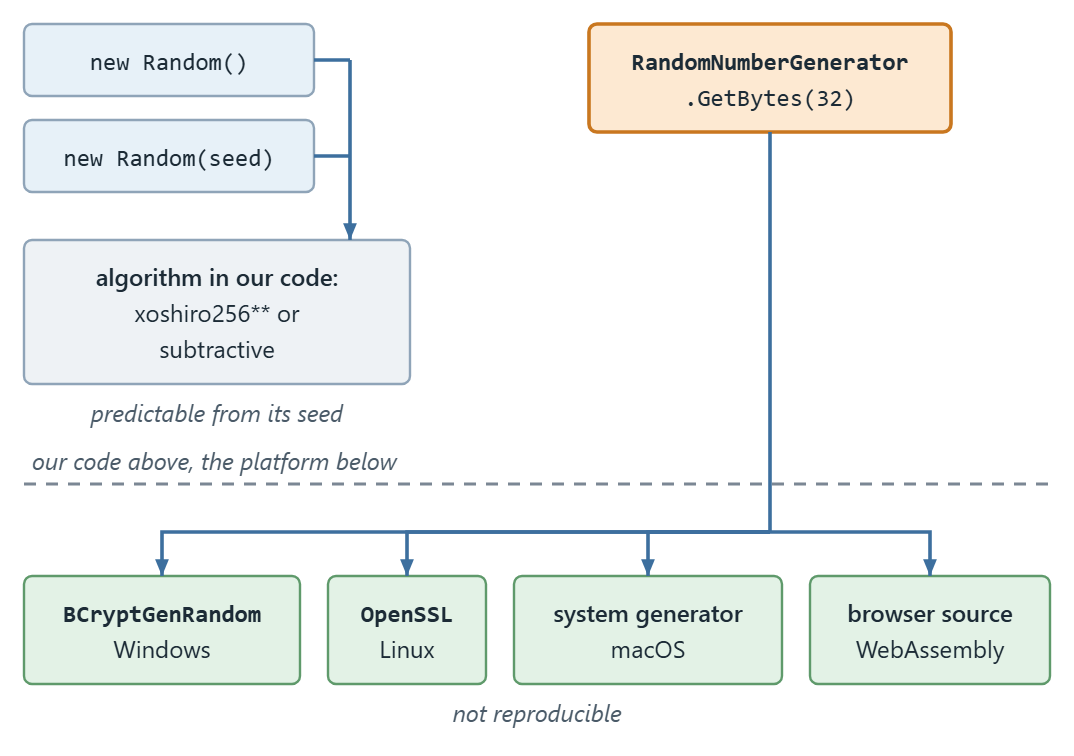
The figure shows the two paths side by side: System.Random runs its algorithm in our own code, while RandomNumberGenerator hands the job to the platform’s generator, which the operating system seeds.
Why Is System.Random Not Safe for Cryptographic Use?
Cryptographic algorithms need random data to produce a key, a salt or an initialisation vector, and the security of the result depends on the unpredictability of that data.
System.Random is a pseudorandom generator. It starts from a seed and derives every later value from it by a fixed calculation, so the whole sequence is a function of the seed. Anyone who learns or guesses the seed learns every number the generator will ever produce.
Which algorithm runs depends on how we construct it. Since .NET 6 the parameterless new Random() uses xoshiro256** (xoshiro128** in a 32-bit process), while new Random(seed) keeps the older subtractive generator so seeded sequences stay reproducible.

Neither algorithm is designed to resist an attacker, and neither claims to be. Both are built for speed and statistical spread.
The Random documentation says so directly: when we need “a cryptographically secure random number, such as one that’s suitable for creating a random password”, we should use “one of the static methods in the RandomNumberGenerator class”.
Programs often use software-based techniques to generate random numbers, and numbers that software generates are pseudorandom: they appear random but are not. The System.Random class works this way.
The seeded constructor uses a subtractive random number generator algorithm, which calculates each number in the sequence from two earlier ones, so the sequence is deterministic and predictable.
That is fine for most application scenarios, like games, where the numbers only have to appear random. For that case, see generating ordinary random numbers in a range.
How Do We Generate Secure Random Numbers With RandomNumberGenerator?
Let’s take a look at how we can use the RandomNumberGenerator class. Our helper methods go in a static CryptographicHelpers class, in a file that starts with using System.Security.Cryptography;, and here is the first one:
public static byte[] GenerateSecureRandomKey(int bytesCount) => RandomNumberGenerator.GetBytes(bytesCount);
Here, we create a GenerateSecureRandomKey() method that calls the RandomNumberGenerator.GetBytes() method. This method generates a random byte array of the specified length. Then, in Program.cs, we can convert this byte array into a Base64 string:
Console.WriteLine(Convert.ToBase64String(CryptographicHelpers.GenerateSecureRandomKey(32)));
When the value goes into a URL or a cookie, System.Buffers.Text.Base64Url, added in .NET 9, is the encoder to use: its EncodeToString() method returns the URL-safe form without padding.
Let’s see another example of generating a random integer value based on the range provided:
public static int GenerateSecureRandomInteger(int minValue, int maxValue) => RandomNumberGenerator.GetInt32(minValue, maxValue);
By using the GetInt32() method, we generate a random integer value that falls in the predefined range. The upper bound is exclusive, so GenerateSecureRandomInteger(1, 100) returns a value from 1 to 99 and never 100.
For the comparison later on, the same helper class also wraps System.Random:
public static int GenerateGeneralRandomInteger(int minValue, int maxValue) => Random.Shared.Next(minValue, maxValue);
Since .NET 8, the class can also build strings directly. Let’s add two helpers for API keys and tokens:
public static string GenerateHexKey(int length) =>
    RandomNumberGenerator.GetHexString(length, lowercase: true);

public static string GenerateToken(int length) =>
    RandomNumberGenerator.GetString("ABCDEFGHJKLMNPQRSTUVWXYZ23456789", length);
The alphabet in GenerateToken() leaves out I, O, 0 and 1, so a token read aloud or typed from a screen is less ambiguous.
Which RandomNumberGenerator Method Should We Call?
The right method depends on what we want back: bytes, a number, text or a collection.
For raw key material, GetBytes(int count) returns a new array and the static Fill(Span<byte> data) fills a buffer we already own. The GetBytes() overloads that take a buffer do the same job, but only on an instance from Create().
For a number in a range, GetInt32() is the only integer method, and its upper bound is exclusive, so GetInt32(1, 100) never returns 100.
For text, .NET 8 added GetString(choices, length), which draws characters from an alphabet we supply, and GetHexString(length, lowercase), which is the same idea optimised for hexadecimal. Both save us generating bytes and encoding them ourselves.
For collections, GetItems<T>() draws elements at random from a set of choices, and Shuffle<T>() reorders a span in place.
There is no GetUInt64() on this class. Eight bytes from GetBytes(8) read through BinaryPrimitives cover that case.
The table lists the members we are likely to call and the first .NET version that has each one. The RandomNumberGenerator reference page carries the full overload list:
| Method | What it gives us | Available since |
|---|---|---|
GetBytes(int count) | A new byte[] of that length, filled with random bytes | .NET 6 |
GetBytes(Span<byte> data) | Fills a buffer we already own; instance method, called on Create() | .NET Core 2.1 |
GetBytes(byte[] data) | Fills an existing array; instance method, called on Create() | .NET Framework 1.0 |
GetBytes(byte[] data, int offset, int count) | Fills part of an existing array; instance method, called on Create() | .NET Framework 4.6 |
Fill(Span<byte> data) | Fills a buffer; the static equivalent of GetBytes(Span<byte>) | .NET Core 2.1 |
GetInt32(int toExclusive) | An integer from 0 up to, but not including, toExclusive | .NET Core 3.0 |
GetInt32(int fromInclusive, int toExclusive) | An integer in a range, upper bound exclusive | .NET Core 3.0 |
GetString(ReadOnlySpan<char> choices, int length) | A string of that length built from an alphabet we supply | .NET 8 |
GetHexString(int stringLength, bool lowercase) | A hexadecimal string, no byte array and no encoding step | .NET 8 |
GetHexString(Span<char> destination, bool lowercase) | Fills a char buffer with hexadecimal characters | .NET 8 |
GetItems<T>(ReadOnlySpan<T> choices, int length) | An array of elements drawn at random from choices | .NET 8 |
GetNonZeroBytes(Span<byte> data) | Random bytes with no zero byte among them; instance method, called on Create() | .NET Core 2.1 |
Shuffle<T>(Span<T> values) | Reorders a span in place | .NET 8 |
Create() | An instance, for the rare case an API demands one | .NET Framework 1.0 |
The row that catches people out is GetBytes(int count): it arrived in .NET 6 and does not exist on .NET Framework, where GetBytes(byte[] data) on an existing array is the way to fill a buffer.
How Much Slower Is RandomNumberGenerator Than System.Random?
To verify that RandomNumberGenerator is slower than System.Random, let’s set up benchmark tests to measure the speed of generating random integers. We add the BenchmarkDotNet package, and the benchmark class goes in a file that starts with using BenchmarkDotNet.Attributes; and using BenchmarkDotNet.Order;:
[Orderer(SummaryOrderPolicy.FastestToSlowest)]
public class RandomNumberBenchmarks
{
    [Benchmark]
    public int UsingCryptoSecureRandomNumberGenerator() =>
        CryptographicHelpers.GenerateSecureRandomInteger(1, 100);

    [Benchmark]
    public int UsingGeneralRandomNumberGenerator() =>
        CryptographicHelpers.GenerateGeneralRandomInteger(1, 100);
}
We are testing the GetInt32() method in the RandomNumberGenerator class and the Next() method in System.Random class. The benchmark calls Next() on the Random.Shared instance, which Microsoft documents as a thread-safe Random instance that may be used concurrently from any thread, so a comparison against a fresh new Random() in a loop measures something else.
To run it, Program.cs calls BenchmarkRunner.Run<RandomNumberBenchmarks>() after using BenchmarkDotNet.Running;, and we start the app in a Release build. Now, let’s compare the speed performance of the crypto-secure random number generator (RandomNumberGenerator) with the general-purpose random number generator (System.Random):
BenchmarkDotNet v0.15.8, Windows 10 (10.0.19045.6466/22H2/2022Update)
AMD Ryzen 5 3600 3.60GHz, 1 CPU, 12 logical and 6 physical cores
.NET SDK 10.0.302
  [Host]     : .NET 10.0.10 (10.0.10, 10.0.1026.32716), X64 RyuJIT x86-64-v3
  DefaultJob : .NET 10.0.10 (10.0.10, 10.0.1026.32716), X64 RyuJIT x86-64-v3

| Method                                 | Mean      | Error     | StdDev    |
|--------------------------------------- |----------:|----------:|----------:|
| UsingGeneralRandomNumberGenerator      |  3.167 ns | 0.0975 ns | 0.2569 ns |
| UsingCryptoSecureRandomNumberGenerator | 81.703 ns | 2.9121 ns | 8.5864 ns |
The tradeoff in this approach is that RandomNumberGenerator is much slower to execute than System.Random: on this run, about 26 times slower, roughly 82 ns per call against 3 ns. The crypto row also moves around from run to run. However, we make a minimal tradeoff when we generate numbers to use as encryption keys: a key is generated once per session or per record, so a difference measured in nanoseconds is invisible. A simulation drawing millions of values per second is where it is not.
Conclusion
RandomNumberGenerator is the class for anything a system’s security depends on, and System.Random is the class for everything else. The cost of getting it the wrong way round is not symmetric: the secure class costs about 80 nanoseconds per call where it was not needed, while System.Random used for a key or token gives an attacker a sequence that follows from a seed.
Tested with .NET 10.0.10 and BenchmarkDotNet 0.15.8.
