


Updated on
To capitalize the first letter of a string in C#, upper case the first character and copy the rest unchanged. string.Create() does it in a single allocation: string.Create(input.Length, input, static (chars, str) => { chars[0] = char.ToUpperInvariant(str[0]); str.AsSpan(1).CopyTo(chars[1..]); }).
Everything else on this page is a variation on that idea with a different cost. Substrings, character arrays, LINQ and a regular expression all work, and all of them allocate more than they need to.
One approach does not belong in production code at all. Pinning the string and overwriting its first character through a pointer is the fastest line in the benchmark and it corrupts every other reference to the same string. We keep it here, labelled, because it circulates widely.
Substring Technique
To successfully convert the first letter of a string to upper case, we have to extract the first letter of the string and use the inbuilt ToUpper() method to convert the first character to upper case.
Let’s implement a method to illustrate this concept:
public string FirstCharSubstring(string input)
{
    if (string.IsNullOrEmpty(input))
    {
        return string.Empty;
    }

    return $"{input[0].ToString().ToUpper()}{input.Substring(1)}";
}
First, we check whether the string is null or empty before extracting the first character from the string and invoking the ToUpper() method to convert the first letter to upper case. Then, we concatenate the first character with the rest of the substring, which we return back to the user.
For all the unit tests we are going to implement today, we are going to use the same field:
private readonly FirstLetterToUpperMethods _upperCase = new();
Next, we can verify that the method successfully achieves its purpose:
var testString = "this is a test string";
var returnedString = _upperCase.FirstCharSubstring(testString);

Assert.AreEqual("This is a test string", returnedString);
Use the AsSpan() Method
We can use the inbuilt AsSpan() method to convert the first letter of a string to upper case. The AsSpan(1) call creates a new read-only span over a string starting from the second character to the last one, which avoids more memory allocation and improves its performance:
public string FirstCharToUpperAsSpan(string input)
{
    if (string.IsNullOrEmpty(input))
    {
        return string.Empty;
    }

    Span<char> destination = stackalloc char[1];

    input.AsSpan(0, 1).ToUpperInvariant(destination);

    return $"{destination}{input.AsSpan(1)}";
}
The FirstCharToUpperAsSpan() method takes a string and checks whether it is null or empty and returns an empty string if true.
Otherwise, we use stackalloc to create a block of memory on the stack for one character. Next, we make the first letter of the string upper case by invoking the AsSpan() method together with the ToUpperInvariant() method.
Finally, we create a read-only span over the rest of the substring and concatenate it with the first letter of the string by invoking the AsSpan() method and return it back to the user.
Let’s verify that the method achieves its purpose with the test:
var testString = "this is a test string";
var returnedString = _upperCase.FirstCharToUpperAsSpan(testString);

Assert.AreEqual("This is a test string", returnedString);
Using string.Create With AsSpan
If you want to improve the Span implementation and gain even more performance you can use string.Create method:
public string FirstCharToUpperStringCreate(string input)
{
    if (string.IsNullOrEmpty(input))
    {
        return string.Empty;
    }

    return string.Create(input.Length, input, static (Span<char> chars, string str) =>
    {
        chars[0] = char.ToUpperInvariant(str[0]);
        str.AsSpan(1).CopyTo(chars[1..]);
    });
}
This is the fastest safe method on the page, and the benchmark further down measures it against the other seven. We would like to thank our reader Joel for adding this suggestion in the comment section.
Make Use of Char.ToUpper() Method
This technique does the same job as the substring technique, with one difference: it upper cases the first character as a char instead of turning it into a one-character string first:
public string FirstCharToUpper(string input)
{
    if (string.IsNullOrEmpty(input))
    {
        return string.Empty;
    }

    return $"{char.ToUpper(input[0])}{input[1..]}";
}
The FirstCharToUpper() method takes the first character input[0] and invokes the char.ToUpper() method to convert it to upper case. We complete the process by concatenating it with the rest of the string and returning it as a string.
We can proceed to check that our implementation converts the first character to upper case:
var testString = "this is a test string";
var returnedString = _upperCase.FirstCharToUpper(testString);

Assert.AreEqual("This is a test string", returnedString);
Utilize Character Arrays
Since we can view a string as an array of characters, we can convert the string into an array and invoke the char.ToUpper() method to convert the first letter of the array to upper case before returning it as a string:
public string FirstCharToCharArray(string input)
{
    if (string.IsNullOrEmpty(input))
    {
        return string.Empty;
    }

    var stringArray = input.ToCharArray();

    if (char.IsLower(stringArray[0]))
    {
        stringArray[0] = char.ToUpper(stringArray[0]);
    }

    return new string(stringArray);
}
After checking whether input is null or empty, we convert it into an array of characters by invoking the string.ToCharArray() method. Next, we convert the first element in the array to upper case by invoking the char.ToUpper() method, after checking if it is in lower case by invoking the char.IsLower() method. We return a new string object after converting the first letter of the string to upper case.
We can verify that the method converts the first letter of a string to upper case:
var testString = "this is a test string";
var returnedString = _upperCase.FirstCharToCharArray(testString);

Assert.AreEqual("This is a test string", returnedString);
Regular Expressions
C# supports regular expressions, which we can find in the System.Text.RegularExpressions namespace. We can use the Regex.Replace() method to convert the first letter of a string to upper case, and we let the source-generated RegEx feature build the engine at compile time:
[GeneratedRegex("^\\p{Ll}")]
private static partial Regex FirstLowerLetter();

public string FirstCharToUpperRegex(string input)
{
    if (string.IsNullOrEmpty(input))
    {
        return string.Empty;
    }

    return FirstLowerLetter().Replace(input, c => c.Value.ToUpper());
}
Here, input is the string we are checking for lowercase characters. "^\p{Ll}" is the regular expression pattern we are using to match the first character of our input string. When the Replace() method encounters a lowercase character at the start of a string, based on our pattern, it replaces it with its uppercase equivalent by invoking the ToUpper() method in the last section c => c.Value.ToUpper().
The pattern matters more than it looks. The obvious spelling, "^[a-z]", matches only the twenty-six lowercase ASCII letters, so a string starting with é or ñ comes back unchanged while every other technique on this page capitalizes it. The Unicode category \p{Ll} means “any lowercase letter” and closes that gap without adding a culture dependency.

We can verify that our solution converts the first letter of a string to upper case with a test:
var testString = "this is a test string";
var returnedString = _upperCase.FirstCharToUpperRegex(testString);

Assert.AreEqual("This is a test string", returnedString);
Convert the First Letter to Upper Case Through LINQ
Another way we can convert the first letter of a string to uppercase is to use LINQ. To make our example simple, we are going to use the FirstOrDefault() method to extract the first character from the input string and invoke the ToUpper() method to convert it to upper case:
public string FirstCharToUpperLinq(string input)
{
    if (string.IsNullOrEmpty(input))
    {
        return string.Empty;
    }

    return $"{input.FirstOrDefault().ToString().ToUpper()}{input.Substring(1)}";
}
We extract the first letter of the string, convert it to upper case, and concatenate it with the rest of the substring before returning it to the user.
Now let’s test this logic:
var testString = "this is a test string";
var returnedString = _upperCase.FirstCharToUpperLinq(testString);

Assert.AreEqual("This is a test string", returnedString);
Why Should We Not Capitalize a String With Unsafe Code?
The unsafe version never builds a new string. It pins the string it was given, overwrites the first character in place, and hands the same instance back.
Strings in .NET are immutable and the runtime depends on that. Identical literals in an assembly normally share one interned instance, so overwriting the first character of one variable changes every other variable, field and dictionary key pointing at the same literal.
We ran it on .NET 10. Two variables assigned the same literal are the same instance, and after one call through either of them both read This is a test string.
A Dictionary<string, int> built with that string before the call then fails to find an equal key afterwards, because the bucket was chosen from the old contents.
The benchmark flatters this method for the same reason. It allocates nothing and copies nothing, so it is not doing the work the other seven methods do.
The picture is the whole problem: a and b were never separate strings.
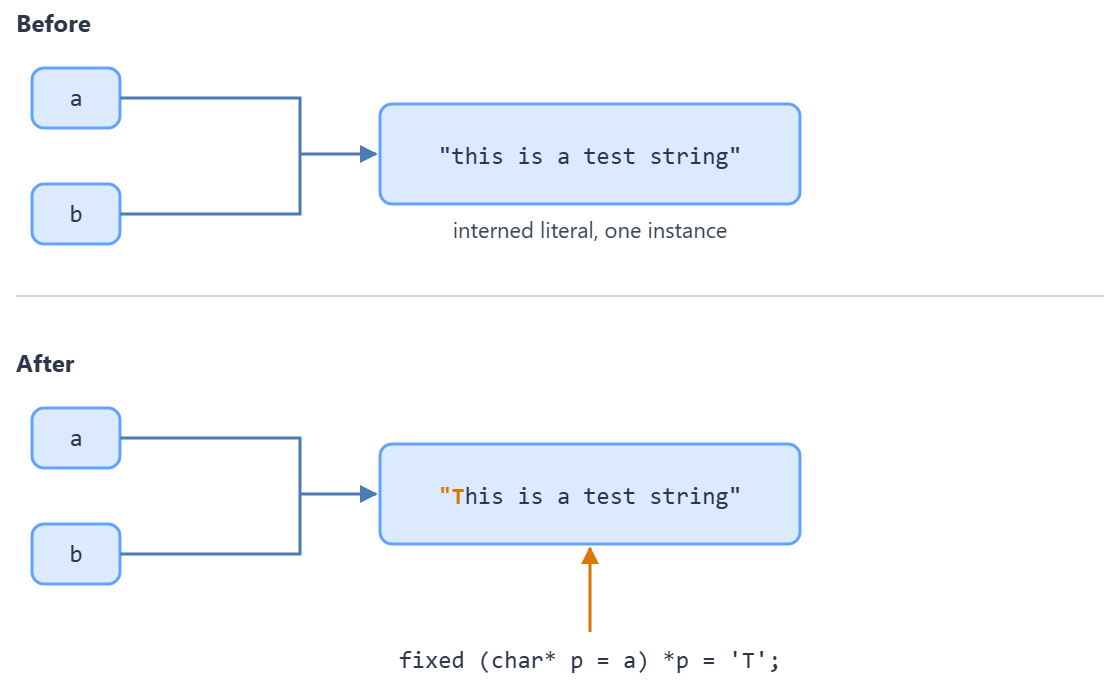
Do not use this in production code. It is here because it circulates as a performance tip, and the paragraphs above explain what it actually does. We can see how it works with unsafe code:
public string FirstCharToUpperUnsafeCode(string input)
{
    if (string.IsNullOrEmpty(input))
    {
        return string.Empty;
    }

    unsafe
    {
        fixed (char* p = input)
        {
            *p = char.ToUpper(*p);
        }
    }

    return input;
}
Does Capitalizing a Letter Depend on the Culture?
Yes, and the two calls that look interchangeable are not.
char.ToUpper(c) applies the casing rules of the current culture. The Microsoft reference for the method puts it in one line: “Casing rules are obtained from the current culture.” char.ToUpperInvariant(c) applies the invariant culture instead, whatever the machine is set to.
For most letters the two agree. Turkish is where they part. The same reference shows the lowercase i (U+0069) becoming I (U+0049) under en-US and the invariant culture, and İ (U+0130) under tr-TR.
We reproduced it. With the current culture set to tr-TR, char.ToUpper('i') returned U+0130 and char.ToUpperInvariant('i') returned U+0049.
So the question is what the string is for. Text a person reads should follow their culture. An identifier, a file name, a protocol token or a database key should use ToUpperInvariant(), because the result must not change when the machine’s locale does.
Both casing rules come from the Char.ToUpper method reference, whose example table gives the en-US, invariant and tr-TR results for i side by side.
How Do We Make a Whole String Upper Case in C#?
ToUpper() on a string converts every character and returns a new string when anything changes, leaving the original untouched. ToUpperInvariant() does the same job under the invariant culture, so the choice between them is exactly the culture choice above.
Neither one capitalizes only the first letter, which is why the rest of this article exists. "code maze".ToUpper() returns CODE MAZE, not Code maze.
Capitalizing the first letter of every word is a third job again, and TextInfo.ToTitleCase() is the method built for that one. It also lower cases the rest of each word, unless the whole word is upper case.
None of these methods mutates anything. A string in .NET is immutable, so whenever a character has to change, each one of them allocates a fresh string the same length as the original. In a loop that runs often, that allocation is the cost worth measuring, and it is the reason the span based approaches further up this page exist at all.
Performance Tests
Let’s assess how these techniques perform by running these benchmarks yourself. First, we are going to implement a method that generates a random string, which we are going to pass to our examples:
private string GenerateRandomString(int size)
{
    var random = new Random();

    var charOptions = "abcdefghijklmnopqrstuvwxyz";

    return new string(Enumerable.Repeat(charOptions, size).Select(s => s[random.Next(s.Length)]).ToArray()).ToLower();
}
First, we define a string charOptions that contains all the alphabet characters, which we will use to generate random strings. Then, we use the inbuilt random class, LINQ, and the Length of the string to return a new random string.
Next, we are going to create a new object that passes random strings each having a length of 2000 to our examples:
public IEnumerable<object[]> SampleStrings()
{
    yield return new object[] { GenerateRandomString(2000)};
}
Let’s assess how the different ways of making the first letter of a string to upper case perform:
BenchmarkDotNet v0.15.8, Windows 10 (10.0.19045.6466/22H2/2022Update)
AMD Ryzen 5 3600 3.60GHz, 1 CPU, 12 logical and 6 physical cores
.NET SDK 10.0.302
  [Host]     : .NET 10.0.10 (10.0.10, 10.0.1026.32716), X64 RyuJIT x86-64-v3
  DefaultJob : .NET 10.0.10 (10.0.10, 10.0.1026.32716), X64 RyuJIT x86-64-v3
| Method                       | input                | Mean       | Error      | StdDev     | Median     | Rank | Gen0   | Gen1   | Allocated |
|----------------------------- |--------------------- |-----------:|-----------:|-----------:|-----------:|-----:|-------:|-------:|----------:|
| FirstCharToUpperUnsafeCode   | fowj(...)jwgs [2000] |   3.912 ns |  0.1390 ns |  0.3277 ns |   3.825 ns |    1 |      - |      - |         - |
| FirstCharToUpperStringCreate | kbbm(...)nhyr [2000] | 181.430 ns |  8.7778 ns | 24.0291 ns | 173.651 ns |    2 | 0.4809 |      - |    4024 B |
| FirstCharToUpperAsSpan       | zhay(...)mbzp [2000] | 344.204 ns | 20.6009 ns | 59.7669 ns | 323.639 ns |    3 | 0.4807 |      - |    4024 B |
| FirstCharToCharArray         | glhj(...)kvvv [2000] | 365.260 ns | 12.7927 ns | 36.0820 ns | 352.843 ns |    3 | 0.9618 | 0.0072 |    8048 B |
| FirstCharToUpperLinq         | gkkq(...)aiqu [2000] | 390.932 ns | 22.4573 ns | 64.0720 ns | 362.186 ns |    3 | 0.9675 | 0.0072 |    8096 B |
| FirstCharSubstring           | vmla(...)mybs [2000] | 407.755 ns | 11.0983 ns | 31.6641 ns | 401.588 ns |    4 | 0.9675 | 0.0072 |    8096 B |
| FirstCharToUpper             | ovap(...)dkyy [2000] | 476.392 ns | 13.8828 ns | 39.3832 ns | 469.819 ns |    5 | 0.9618 |      - |    8048 B |
| FirstCharToUpperRegex        | tpvo(...)tijn [2000] | 561.932 ns | 17.1487 ns | 50.2942 ns | 549.487 ns |    6 | 0.5112 |      - |    4280 B |
The unsafe code technique is the fastest row at 3.912 ns, and it is the row to ignore: it allocates nothing and copies nothing because it does not build a new string at all. Of the seven methods that do the work, string.Create() wins at 181.430 ns and the regular expression is the slowest at 561.932 ns. The “Allocated” column separates them further: string.Create() and AsSpan() allocate one string each, while the substring, LINQ and char.ToUpper() techniques allocate the intermediate strings too, and the character array technique allocates an intermediate array.
| Approach | Call | Allocations per call | Culture | Use it when |
|---|---|---|---|---|
string.Create with a span | string.Create(len, input, …) + char.ToUpperInvariant() | One string | Invariant, explicit | Default choice; hot paths |
AsSpan() with stackalloc | input.AsSpan(0, 1).ToUpperInvariant(dest) | One string, via interpolation | Invariant, explicit | You already hold a span |
| Character array | input.ToCharArray() then char.ToUpper() | Array plus string | Current culture, implicit | The array is needed anyway |
| Substring | input[0].ToString().ToUpper() + input.Substring(1) | Four strings | Current culture, implicit | Readability over cost |
char.ToUpper with a range | char.ToUpper(input[0]) + input[1..] | Two strings | Current culture, implicit | Readability over cost |
| LINQ | FirstOrDefault().ToString() + .ToUpper() | Four strings | Current culture, implicit | Never; it is the substring version wearing a hat |
| Regular expression | [GeneratedRegex("^\\p{Ll}")] then Replace(input, …) | Three strings plus match machinery | Current culture, implicit | A real pattern is involved, not one character |
| Unsafe pointer write | fixed (char* p = input) *p = … | None, because it mutates in place | Current culture, implicit | Never. See the unsafe section |
Conclusion
In this article, we learned the different techniques that we can use to convert the first letter of a string to upper case.
string.Create() is the one to reach for: it produces the result in a single allocation and it is the fastest of the safe techniques at 181.430 ns. The pointer technique is faster still on paper at 3.912 ns, and it is the one to avoid, because it mutates a string that other parts of the program are also holding.
Capitalizing every word rather than the first letter is a different job again, and our article on how to convert a string to title case covers it.
Tested with .NET 10.0.10 and BenchmarkDotNet 0.15.8.

To clarify the “comes with the risk of introducing bugs”: one bug I see is with interned strings. If an interned string get capitalized it will not only capitalize the input, but also other strings which have the same interned string.
This could be alleviated by checking with “string.IsInterned” and if it is an interned string it should fallback to one of the other methods. Though this will probably give a false sense of security as there are other bug sources around the proper usage of FirstCharToUpperUnsafeCode arising from the fact that strings are meant to be immutable and are treated as such by the CLR and probably the JITter.
Thanks a lot, Mike for this explanation. This is great to have here.
I suspect that string.Create() might beat out the other approaches, except for the unsafe version:
return string.Create(input.Length, input, static (Span<char> chars, string str) =>
{
chars[0] = char.ToUpperInvariant(str[0]);
str.AsSpan(1).CopyTo(chars[1..]);
});
Indeed, on my machine the string.Create() approach comes in second at 263.9 ns. Third is FirstCharToUpperAsSpan with 390.8 ns, then FirstCharToCharArray at 522.5 ns.
Thank you for this Joel. Yes, this method comes in second place, and it doesn’t allocate more memory than other ones. That’s a great suggestion and to be honest, it never crossed my mind. Yes, you use span here as well, which we covered but in a different and obviously faster way. Thanks one more time.
I knew the unsafe method would be the fastest, but I wouldn’t have guessed by how much.
But the real surprise was how badly FirstCharToUpper did. (I was sure it would come in second place). I do note that it is the only one in which you used an interpolated string and “{input[1..]}” and I wonder if that’s the problem.
I absolutely refuse to believe that “input.FirstOrDefault().ToString().ToUpper()” in faster that “Char.ToUpper(input[0]))”
Hi James. Well, I just tested that method with Substring(1) instead of the input[1…] and it was still the last. It was quite faster with the Substring than with the [1…] but still it was the last one.