


Updated on
C# gives us three tools for sharing a variable between threads, and each one solves a different problem. volatile controls the order in which reads and writes become visible. Interlocked makes a read-modify-write on one variable atomic. lock makes a whole block of code exclusive to one thread at a time.
It is easy to read them as three strengths of the same tool. They are not ranked: volatile cannot fix _balance -= amount however many fields we mark, Interlocked cannot keep two fields consistent with each other, and lock can, though it is the only one of the three that makes a thread wait.
We run the same 1,000 withdrawals against an unprotected field and against each of the three, check which runs end with the right balance, and close the comparison with the rule we use to choose: volatile for a flag, Interlocked for one variable, and lock for anything that spans more than one step or field.
Multithreading in C#
In programming, multithreading allows us to execute multiple threads concurrently. Each of these threads can perform different tasks at the same time. This parallel execution of threads helps our program run faster and be more responsive.
It introduces concurrency in our applications and we can utilize it to make an application asynchronous. However, multithreading by default doesn’t make a program asynchronous. We need to explicitly use techniques such as async/await to run tasks independently to achieve asynchrony.
For efficient utilization, threads share resources thus reducing the overall consumption. However, this also opens us to a set of challenges:
- Multiple threads access the shared data simultaneously and lead to unpredicted results by interfering with each other in a race condition
- Threads may keep waiting indefinitely for each other to release resources while causing the application to freeze in a deadlock
- When there are multiple threads interacting with resources it leads to complexity in application maintenance and debugging
Need for Synchronization in a Multithreaded Environment
Synchronization is essential in a multithreaded program. If we allow multiple threads to access and make changes in shared resources simultaneously, it’d result in a chaotic mess.
We might end up in a situation where while a thread is making modifications, another thread changes the value before the first thread can commit its change.
Let’s understand this with an Account class:
public class Account
{
    private int _balance;

    public int Balance
    {
        get => _balance;
        set => _balance = value;
    }

    public void Withdraw(int amount)
    {
        _balance -= amount;
    }
}
This class represents a bank account with Balance property and a Withdraw() method to withdraw some amount from the initial balance.
Concurrency and Race Condition
Let’s simulate a scenario where we have multiple tasks trying to withdraw balance, in a static AccountService class:
public static class AccountService
{
    public static void WithdrawBalance(Action<int> withdrawalAction)
    {
        using var synch = new ManualResetEventSlim(false);

        var tasks = new Task[10];

        for (var i = 0; i < tasks.Length; i++)
        {
            tasks[i] = Task.Run(() =>
            {
                synch.Wait();

                for (var j = 0; j < 100; j++)
                    withdrawalAction(100);
            });
        }

        synch.Set();
        Task.WaitAll(tasks);
    }
}
Here, we have a WithdrawBalance() method that takes an Action delegate as a parameter. It starts ten tasks, and each task calls the referenced method 100 times, so every run makes 1,000 withdrawals of 100. Because each task loops, the tasks keep running side by side long enough for two of them to be inside the same update at once.
We are using the ManualResetEventSlim class to hold the tasks at a common starting point until we call synch.Set(). A task that reaches synch.Wait() before that blocks there, and the call releases all of them together.
Let’s use it to call the Withdraw() method of the Account class:
var account = new Account
{
    Balance = 100000
};

Console.WriteLine("Withdrawal without synchronization");
AccountService.WithdrawBalance(account.Withdraw);
Console.WriteLine($"Final balance: {account.Balance}");
We set the initial balance to 100,000 and try to withdraw all of it concurrently, as 1,000 withdrawals of 100 spread over ten tasks, using the Withdraw() method.
This is where we might encounter the race condition. Since multiple tasks are trying to withdraw simultaneously, several of them might see a balance of 100,000 and reduce 100 from it at the same time. The first task reads the balance, subtracts 100 from it, and updates the balance to 99,900. However, before the first task can update the balance, the second task reads it. The balance for the second task is still 100,000 as the first task didn’t update it. Thus, the second task subtracts 100 from 100,000 (instead of 99,900) and updates the balance to 99,900 (instead of 99,800).
The four steps, in the order the threads run them:
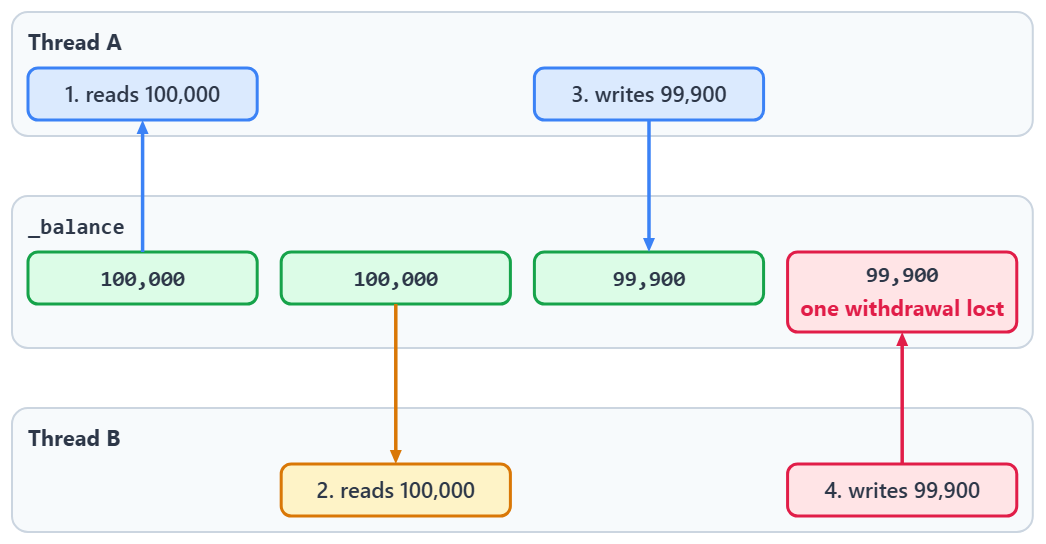
Let’s execute the application and see the race condition in action:
Withdrawal without synchronization
Final balance: 5900
Here, we are left with 5,900 as the final account balance instead of the expected 0, so 59 of the 1,000 withdrawals were lost. However, even this balance keeps changing on each run based on the execution order of the threads: across ten runs on our machine it ranged from 200 to 10,400.
This leads to the final balance being unpredictable. Thus, we need synchronization mechanisms to effectively handle concurrent executions in a multithreaded environment.
What Does the volatile Keyword Guarantee in C#?
volatile is a field modifier. It limits how the compiler, the runtime and the processor may reorder reads and writes around that field, and nothing more.
A volatile read has acquire semantics: no read or write that comes later in program order may move ahead of it. A volatile write has release semantics: every earlier read and write becomes observable before it does. The .NET memory model specification is explicit that this is about order, not timing: volatile semantics “only specifies the order of effects when they eventually become observable”.
So the common belief that a volatile read always returns the newest value written by any thread is wrong. The C# language reference says so directly: on a multiprocessor system a volatile read “doesn’t guarantee to obtain the latest value written to that memory location by any processor”.
volatile also never makes an operation atomic. _balance -= amount is a read, a subtraction and a write, and marking the field leaves all three steps as interruptible as they were.
The first quote is from the .NET memory model specification in the dotnet/runtime repository, and the second from the C# reference page for the volatile keyword.
Let’s see how that can affect our Account class:
public class Account
{
    private volatile int _balanceVolatile;

    public int BalanceVolatile
    {
        get => _balanceVolatile;
        set => _balanceVolatile = value;
    }

    public void WithdrawVolatile(int amount)
    {
        _balanceVolatile -= amount;
    }
}
As evident, the class doesn’t change much apart from marking the field representing the account balance as volatile.
Synchronization With Volatile
We’ll continue to use the WithdrawBalance() method to simulate the withdrawal of balance. Now, we might wonder if the race condition we had previously gets resolved with volatile:
var account = new Account
{
    BalanceVolatile = 100000
};

Console.WriteLine("Withdrawal with the 'volatile' keyword");
AccountService.WithdrawBalance(account.WithdrawVolatile);
Console.WriteLine($"Final balance: {account.BalanceVolatile}");
If volatile meant that every thread always saw the latest value of _balanceVolatile, this might look like enough. However, the answer is no:
Withdrawal with the 'volatile' keyword
Final balance: 8500
Similar to the example without synchronization, the final balance remains unpredictable with the volatile keyword. Across the same ten runs it ranged from 6,600 to 16,300.

The volatile keyword guarantees ordering. However, it doesn’t prevent race conditions, as it doesn’t make the read, the subtraction and the write one uninterrupted operation. Multiple tasks can still modify the balance concurrently and thus we are still left with our problem of the correct balance not getting updated.
Another limitation of volatile is the set of types it accepts. It works for simpler types like int, bool, or char, but marking a long, double, or decimal field volatile is a compile error. A private volatile long _balanceLong; field in our Account class gives error CS0677: 'Account._balanceLong': a volatile field cannot be of the type 'long'. Oddly, float is allowed while double is not, although both are floating-point types. For long and double fields, the C# reference sends us to the Interlocked class or the lock statement instead.
How Does the lock Statement Make Code Thread-Safe?
The lock statement lets one thread at a time hold the lock on an object, so only one thread runs any block guarded by it. The lock is released on the way out, even when an exception is thrown.
What it compiles to depends on the type of the expression. When the compiler knows the expression is a System.Threading.Lock, lock (x) is precisely equivalent to using (x.EnterScope()). For any other reference type it expands to Monitor.Enter() and Monitor.Exit() inside try and finally.
Mutual exclusion is what fixes the withdrawal: the read, the subtraction and the write all happen while one thread holds the lock, so no other thread can read the balance in between.
The lock is reentrant: a thread that already holds it can enter again, and it has to exit as many times as it entered. It belongs to a thread, not to a task, and an await is not allowed inside the block, because the code after an await can resume on a different thread, which does not hold the lock.
The C# reference page for the lock statement prints both expansions. When many threads read a value and only a few write it, a plain lock makes the readers queue too, and our article on choosing ReaderWriterLockSlim over a plain lock covers that case.
Let’s make the Account class thread-safe:
public class Account
{
    private int _balanceLock;
    private object _lock = new object();

    public int BalanceLock
    {
        get
        {
            lock (_lock)
            {
                return _balanceLock;
            }
        }
        set
        {
            lock (_lock)
            {
                _balanceLock = value;
            }
        }
    }

    public void WithdrawLock(int amount)
    {
        lock (_lock)
        {
            _balanceLock -= amount;
        }
    }
}
The _lock object we introduce here acts as the synchronization object. It ensures that all code sections within the lock statement are accessible to only one thread at a time.
Synchronization With Lock
We’ve used the lock statement in the BalanceLock property as well as the WithdrawLock() method. This ensures that all thread executions related to the _balanceLock field are mutually exclusive.
Now, let’s try to perform the withdrawal with multiple threads concurrently:
var account = new Account
{
    BalanceLock = 100000
};

Console.WriteLine("Withdrawal with the 'lock' statement");
AccountService.WithdrawBalance(account.WithdrawLock);
Console.WriteLine($"Final balance: {account.BalanceLock}");
When the first task reaches the _balanceLock field with a value of 100,000, it holds the lock on _lock. Hence, the second task can’t access the field till the first task is done with the modification and releases the lock.
Once the second task gets hold of the field, the balance is already updated to 99,900. Thus, we avoid any race conditions here:
Withdrawal with the 'lock' statement
Final balance: 0
As expected, the final balance is the expected amount of 0. The lock statement guarantees the mutual exclusion of the threads. Hence, the final balance of the Account object remains consistent.
The lock statement is task agnostic, i.e., it doesn’t distinguish between threads originating from multiple tasks or threads created with the Thread class. When a thread enters the code under the lock statement, it gets an exclusive lock meaning no other thread can enter the code till the former exits.
Now, while the lock statement is great for avoiding race conditions, a single-variable update like our withdrawal does not need a whole block to itself. For simple operations on one shared variable, we can use the Interlocked class and skip acquiring and releasing a lock.
What Does the Interlocked Class Do in C#?
Interlocked is a static class of atomic operations on a single variable. Each read-modify-write method reads the variable, computes the new value and stores it as one indivisible step, so no other thread can observe the halfway state.
Increment(), Decrement() and Add() do arithmetic. Exchange() stores a value and returns the one it replaced. CompareExchange() stores a value only if the variable still holds the one we expected. And() and Or() do bitwise updates. Every one of them takes the variable by ref, so it works on the field itself.
Atomic is not the same as exclusive, and this is where the class gets misread. An Interlocked operation cannot be interleaved with another Interlocked operation on the same variable, but it does not stop a plain assignment somewhere else in the program from overwriting the field a microsecond later. Every thread that writes to the variable has to go through Interlocked for the guarantee to mean anything.
These methods are also full fences, so they order the reads and writes around them.
The Interlocked class reference lists every overload, and the full-fence rule is in the memory model specification we quoted above.
Let’s modify the Account class to use Interlocked operations:
public class Account
{
    private int _balanceInterlocked;

    public int BalanceInterlocked
    {
        get => Interlocked.CompareExchange(ref _balanceInterlocked, 0, 0);
        set => Interlocked.Exchange(ref _balanceInterlocked, value);
    }

    public void WithdrawInterlocked(int amount)
    {
        Interlocked.Add(ref _balanceInterlocked, -amount);
    }
}
Here, we no longer need to acquire specific locks, thus making our code more concise. For a single-variable update, Interlocked also avoids the bookkeeping a lock needs and is usually the faster of the two. It is not free: each call is an atomic instruction that the processor has to coordinate across cores, and under heavy contention a compare-and-swap loop can retry many times.
Synchronization With Interlocked
In a multithreaded environment, the Interlocked class provides thread safety by making the operations atomic. Thus, two Interlocked operations on the same variable can never interleave, so no update is lost as long as every thread that writes to the variable goes through Interlocked.
In our example of concurrent withdrawal, this helps prevent race conditions:
var account = new Account
{
    BalanceInterlocked = 100000
};

Console.WriteLine("Withdrawal with the 'Interlocked' class");
AccountService.WithdrawBalance(account.WithdrawInterlocked);
Console.WriteLine($"Final balance: {account.BalanceInterlocked}");
When a task performs an Interlocked.Add() on the balance, the read, the subtraction and the write happen as one step, so no other Interlocked.Add() can land in between.
Hence, we avoid the condition where multiple threads overwrite each other’s changes to the balance:
Withdrawal with the 'Interlocked' class
Final balance: 0
Similar to the lock statement scenario, the final balance is 0. As the Interlocked operations are always atomic, the balance remains consistent in multiple executions.
How Do Interlocked.Exchange and CompareExchange Work?
Interlocked.Exchange(ref target, value) writes value into target and returns whatever was there before, in one indivisible step. The return value is the reason to call it: it tells the calling thread what it replaced, so when many threads write the same value, exactly one of them gets the old value back and knows it was the one that made the change.
Interlocked.CompareExchange(ref target, value, comparand) writes value only if target currently equals comparand, and it returns the value it found either way. Comparing that return value with the comparand tells us whether our write went in or another thread changed the variable first.
That makes CompareExchange() the building block for any update that has to read the old value before it can compute the new one. We read the field, compute the new value and try to swap it in. If another thread got there first, we take the value it left behind and try again. We use this retry loop later in this section for a withdrawal that must not overdraw.
Only one thread should ever run an expensive initialization, and Exchange() picks the winner without a lock:
public sealed class OneShotInitializer
{
    private int _started;

    public bool TryStart() => Interlocked.Exchange(ref _started, 1) == 0;
}
The thread that finds a 0 in the return value is the one that flipped the field from 0 to 1, and every other thread gets back the 1 it has already been set to.
Let’s call TryStart() from 1,000 parallel iterations and count the winners:
var initializer = new OneShotInitializer();
var winners = 0;

Parallel.For(0, 1000, _ =>
{
    if (initializer.TryStart())
        Interlocked.Increment(ref winners);
});

Console.WriteLine($"Calls that won the initialization: {winners}");
Exactly one call wins:
Calls that won the initialization: 1
Interlocked.Add() cannot express a withdrawal that must not overdraw, because the balance has to be checked before the subtraction. A CompareExchange() loop can, so let’s add a WithdrawIfSufficient() method to the Interlocked version of our Account class:
public bool WithdrawIfSufficient(int amount)
{
    var current = Volatile.Read(ref _balanceInterlocked);

    while (current >= amount)
    {
        var actual = Interlocked.CompareExchange(ref _balanceInterlocked, current - amount, current);

        if (actual == current)
            return true;

        current = actual;
    }

    return false;
}
CompareExchange() returns what it found, so a failed swap hands us the fresh value for free and the loop tries again with it.
The same method explains the getter of our BalanceInterlocked property. Interlocked.CompareExchange(ref _balanceInterlocked, 0, 0) is a compare-and-swap used as a fenced read: it writes 0 only when the field already holds 0, which changes nothing, and returns the current value either way. Interlocked.Read() exists only for long and ulong, which is why this trick shows up for an int. Volatile.Read(ref _balanceInterlocked) is the lighter option, because an aligned 32-bit read is already atomic on every platform .NET supports. It is lighter rather than identical, since it is an acquire read and not a full fence.
Now let’s make 1,100 withdrawal attempts of 100 against a balance of 100,000, which is 100 attempts more than the account can cover:
var account = new Account
{
    BalanceInterlocked = 100000
};
var approved = 0;

Parallel.For(0, 1100, _ =>
{
    if (account.WithdrawIfSufficient(100))
        Interlocked.Increment(ref approved);
});

Console.WriteLine($"Approved withdrawals: {approved} of 1100");
Console.WriteLine($"Final balance: {account.BalanceInterlocked}");
Exactly 1,000 withdrawals go through and the balance stops at 0:
Approved withdrawals: 1000 of 1100
Final balance: 0
The other 100 attempts return false instead of taking the balance below zero.
Which Synchronization Mechanism Should We Choose?
The choice follows from what the code does to the shared field, since the three mechanisms are not stronger and weaker versions of each other.
If a thread only reads the field or only writes it, and nothing computes a new value from the old one, volatile is enough. The classic case is a stop flag that a worker loop reads and one other thread sets.
If the update is one arithmetic step, one swap, or one compare-and-swap on a single variable, use Interlocked. It is atomic without making any thread wait, and unlike volatile it accepts a long.
If two or more fields have to change together, or the critical section is more than one operation, use lock. Mutual exclusion is the only one of the three that can make a multi-step change look atomic from the outside, because no other thread that respects the lock can see the fields between the first change and the last.
Here are the three side by side, against the questions that decide between them:
| Question | volatile | Interlocked | lock |
|---|---|---|---|
| What does it guarantee? | The order in which reads and writes around the field become observable | That one read-modify-write on one variable happens as an indivisible step | That one thread at a time runs the guarded block |
Does it make _balance -= 100 safe? | No | Yes, with Interlocked.Add() | Yes |
| Can it keep two fields consistent? | No | No | Yes |
| May a thread have to wait? | No | No, though a compare-and-swap loop can retry | Yes |
Works on long and double? | No, compile error CS0677 | long yes; double only with Exchange() and CompareExchange() | Yes |
Works on decimal? | No, compile error CS0677 | No | Yes |
| Reach for it when | One thread writes a flag and others read it | Counters, one-time initialization, swapping a single value | An update touches more than one field or takes more than one step |
In practice, these techniques are not used in isolation from each other. We might very well use Interlocked for updating a flag and lock for more complex operations in the same application together. Thus, we should make this choice based on multiple factors such as performance considerations and complexity of operations. For shared collections, .NET also ships thread-safe types that handle this for us, such as ConcurrentDictionary and the rest of the concurrent collections.
What Is the System.Threading.Lock Type in C# 13?
System.Threading.Lock is a dedicated lock type added in .NET 9, and C# 13 teaches the lock statement to recognize it. The C# reference is explicit about it: “Starting with .NET 9 and C# 13, lock a dedicated object instance of the System.Threading.Lock type for best performance.”
The compiler treats the type as a special case. When it knows the expression is a Lock, lock (x) compiles to using (x.EnterScope()) instead of a Monitor.Enter() and Monitor.Exit() pair. EnterScope() enters the lock and returns a ref struct whose Dispose() exits it again.
The compiler has to see the Lock type for any of that to happen. If we assign the Lock to an object variable first and lock that variable, the statement falls back to Monitor, and the compiler warns us about it.
Outside the lock statement, the type also gives us Enter(), TryEnter() with an optional timeout, Exit(), EnterScope() and an IsHeldByCurrentThread property, all on the same object.
The Lock class reference documents each of those members. In our Account class, changing the lock object is the whole edit, and it is one line:
public class Account
{
    private int _balanceLock;
    private readonly Lock _lock = new();

    public int BalanceLock
    {
        get
        {
            lock (_lock)
            {
                return _balanceLock;
            }
        }
        set
        {
            lock (_lock)
            {
                _balanceLock = value;
            }
        }
    }

    public void WithdrawLock(int amount)
    {
        lock (_lock)
        {
            _balanceLock -= amount;
        }
    }
}
Every lock (_lock) reads exactly as it did with an object, and the compiler now routes each one through EnterScope() instead of Monitor.
The mistake to avoid is converting the Lock to another type before locking it, because the statement then goes back to Monitor:
Lock balanceLock = new();
object lockObject = balanceLock;

lock (lockObject)
{
    Console.WriteLine("Locked through Monitor");
}
The compiler reports warning CS9216: A value of type 'System.Threading.Lock' converted to a different type will use likely unintended monitor-based locking in 'lock' statement. The code still compiles and runs, but it takes the Monitor path that Lock was added to replace.
For the other locking primitives in C#, such as Monitor, Mutex, SpinLock and Semaphore, see our guide to locking mechanisms in C#.
Conclusion
In this article, we learned about various synchronization mechanisms like volatile, lock, and Interlocked. We looked at their usage and how to make informed decisions on which technique to choose in our applications.
Tested with .NET 10.0.10.
