


Updated on
System.Linq.Dynamic.Core lets us write LINQ queries as strings. Where typed LINQ takes a lambda, Where(e => e.Department == "IT"), the library takes text, Where("Department == @0", "IT"), and parses it into the same expression tree.
We need that when the shape of a query is only known at runtime, for example when the reader picks the sort column of a data grid.
Because the query arrives as text, versions 1.3.0 and 1.6.0 both restricted which types and members that text may reach, and the section before the conclusion covers those restrictions.
What Is System.Linq.Dynamic.Core?
System.Linq.Dynamic.Core is a NuGet package that adds string overloads to the standard LINQ operators. It is not part of .NET and never has been, so we install it ourselves.
Where(), Select(), OrderBy(), GroupBy() and the other operators we already know each gain an overload that accepts a string. The library parses that string into the expression tree the C# compiler would have produced from a lambda.
We reach for it when the query is not known until the program runs. A grid where the reader chooses the sort column, a saved-search feature, or a rules engine loading conditions from a table all describe the shape of the query as data, and a typed lambda cannot express a shape that arrives at runtime.
The package is open source under the Apache-2.0 licence, and the current release is 1.7.4.
If LINQ itself is new ground, our guide to basic LINQ concepts covers the operators this library extends. The library’s own site has a simple query guide that puts the typed and string forms side by side.
How Do We Install Dynamic LINQ in a C# Project?
Using a simple console application, we are going to demonstrate how to use the System.Linq.Dynamic.Core library.
First off, we create a Console application via CLI or Visual Studio.
Right after creating the project, we need to install the library as a dependency. To install the library from the CLI, we run the command:
dotnet add package System.Linq.Dynamic.Core
In Visual Studio, we open up the Package Manager Console window and run:
Install-Package System.Linq.Dynamic.Core
Take the current release. Versions before 1.3.0 and before 1.6.0 each carry a published security advisory, both of them about what a query string is allowed to reach.
How Do We Write Dynamic LINQ Queries?
Every dynamic query is an ordinary LINQ call with a string where the lambda would go. The string overloads hang off IQueryable exactly like their typed counterparts, so the rest of the chain is unchanged.
Values belong in parameters, not in the string. Where("Department == @0", departmentName) binds the first argument to the @0 placeholder, which keeps the value out of the text the parser reads. This is the form to use by default, and the only safe form when the value comes from a user.
Inside a query string, = and == both mean equality. There is no assignment to confuse them with, so "Department = \"IT\"" and "Department == \"IT\"" parse identically.
Projections come back untyped. Select("new {Name, Department}") builds an anonymous type the compiler never saw, so the result arrives through ToDynamicList() as List<dynamic> rather than List<Employee>.
The first class is the Employee class which describes an employee of a company:
public class Employee
{
    public Guid Id { get; set; }
    public string Name { get; set; }
    public string Department { get; set; }
    public int Age { get; set; }
    public string Residence { get; set; }
    public Employer Employer { get; set; }
}
The second class is the Employer class, with two properties of an employer:
public class Employer
{
    public long Id { get; set; }
    public string Name { get; set; }
}
The third class is EmployeeData class that has one public Employees property and a constructor. Also, the class has one method GetEmployees() that returns employee test data:
public class EmployeeData
{
    public IQueryable<Employee> Employees;

    public EmployeeData()
    {
        GetEmployees();
    }

    public IQueryable<Employee> GetEmployees()
    {
        Employees = new[]
        {
            new Employee
            {
                Id = Guid.NewGuid(),
                Name = "John Doe",
                Department = "IT",
                Age = 25,
                Residence = "Malibu"
            },
            ...
            new Employee
            {
                Id = Guid.NewGuid(),
                Name = "Bob Mkenya",
                Department = "Infrastructure",
                Age = 25,
                Residence = "Kenya",
                Employer = new Employer
                {
                    Id = 0,
                    Name = "Test Company"
                }
            }
        }.AsQueryable();

        return Employees;
    }
}
The return type of the GetEmployees() method is IQueryable<Employee> because we want to simulate a data source, like a database, used in most applications. Also, we shortened the snippet here, but if you want to inspect the entire class, you can do that by checking the class in the source code.
Filtering Data Using Dynamic LINQ
Let’s start with a strongly typed LINQ example to see how that’s done the usual way, and then introduce the dynamic LINQ ways:
public List<Employee> FilterEmployeesByDepartmentUsingTypedLinq(string departmentName) =>
    Employees
        .Where(e => e.Department == departmentName)
        .ToList();
Using dynamic LINQ:
public List<Employee> FilterEmployeesByDepartment(string departmentName) =>
    Employees
        .Where("Department == @0", departmentName)
        .ToList();
First, pass departmentName as a parameter to the FilterEmployeesByDepartment() method. After that, we filter the returned list based on whether employees are in the IT department or not. When filtering, the library gives us the flexibility of using strings instead of strongly typed arguments. Then, we chain ToList() which returns the results as a list of Employee type.

For filters that arrive as query-string parameters on an HTTP request, our article on filtering a Web API result set applies each one with typed LINQ.
We can also use the string escape sequence since “IT” is also a string:
public List<Employee> FilterEmployeesUsingEscapeSequence() =>
    Employees
        .Where("Department == \"IT\"")
        .ToList();
And the third way would be to use the lambda => operator to filter our results:
public List<Employee> FilterEmployeesUsingLambdaOperator() =>
    Employees
        .Where("c => c.Department = \"IT\"")
        .ToList();
Selecting Data Using Dynamic LINQ
The data we get after querying a data source may contain additional data which we may not need. In order to ensure we only return the relevant data, we use the Select() method.
Similar to filtering data, we can select data using strongly typed LINQ:
public List<Employee> SelectEmployeesUsingTypedLinq() =>
    Employees
        .Select(e => new Employee
        {
            Name = e.Name,
            Department = e.Department,
        })
        .ToList();
Using dynamic LINQ:
public List<dynamic> SelectEmployees() =>
    Employees
        .Select("new {Name, Department}")
        .ToDynamicList();
Out of all the data, we are only interested in the Name and Department fields. Also, note that the return type for this method is List<dynamic>, not a strongly typed list. When we print the results of this query, we get:
Name                Department
===============================================
John Doe            IT
Jane Doe            Finance
Quincy Nigellus     Finance
Sharron Zachary     IT
Kristia Cletis      Human Resource
Chrissie Elihu      Human Resource
Businge Missy       Hospitality
Bob Mkenya          Infrastructure
The results only have two columns, which we specified in the query. We can apply the same to large data sets where we only want to use a subset of that data.
Sorting Data With Dynamic LINQ
We might want to sort the data based on one or multiple properties.
First, let’s start with a strongly typed LINQ:
public List<Employee> SortEmployeesUsingTypedLinq() =>
    Employees
        .OrderBy(x => x.Name)
        .ToList();
Writing the same query using dynamic LINQ:
public List<Employee> SortEmployees() =>
    Employees
        .OrderBy("Name")
        .ToList();
Here, we are sorting the employees using the Name property. In this case, we sort employees in ascending order, which is the default.
We can also sort the data using more than one property. Using strongly typed LINQ, our query would be:
public List<Employee> SortEmployeesByMultiplePropertiesUsingTypedLinq() =>
    Employees
        .OrderBy(x => x.Department)
        .ThenBy(x => x.Name)
        .ToList();
In dynamic LINQ, we provide a comma-separated list of properties instead:
public List<Employee> SortEmployeesByMultipleProperties() =>
    Employees
        .OrderBy("Department desc, Name")
        .ToList();
We are sorting the employees, first by the Department property in descending manner, then the Name property in ascending order.
When we print out the results and inspect them, we see the sorted data:
Name: John Doe, Dept: IT
Name: Sharron Zachary, Dept: IT
Name: Bob Mkenya, Dept: Infrastructure
Name: Chrissie Elihu, Dept: Human Resource
Name: Kristia Cletis, Dept: Human Resource
Name: Businge Missy, Dept: Hospitality
Name: Jane Doe, Dept: Finance
Name: Quincy Nigellus, Dept: Finance
The departments come back in descending order because of the desc keyword, and inside each department the names are ascending, which is the default when no direction is given.
The same string-based OrderBy() drives sorting an ASP.NET Core Web API by a client-supplied field, where the ordering string comes from the request and is checked against the entity type before it reaches the query.
What Are the Advanced Features of Dynamic LINQ?
Configuration, null propagation and runtime lambda expressions carry most of the library’s advanced use, and the configuration decides how the other two are parsed.
ParsingConfig is the object that tells the parser how to read a string. We pass it as the first argument to any dynamic operator, and it governs date handling, casing, type resolution and the security switches covered in the type-resolution section. Constructed with no arguments, it carries the library defaults.
Null propagation is the np() function. np(Employer.Name) walks the path and yields null instead of throwing when a link in the chain is null, and the two-argument form, np(Employer.Name, "Not Specified"), substitutes a fallback value.
DynamicExpressionParser.ParseLambda() returns an Expression<Func<T, bool>> instead of a result set. We can store that expression, combine it with other expressions, or hand it to Entity Framework Core, which translates it into the SQL WHERE clause, so a filter assembled from reader input runs in the database.
Our guide to queries in Entity Framework Core covers client versus server evaluation, which decides whether a LINQ filter runs in the database or in memory.
Library Configuration
We can pass additional configurations to extend the functionalities of the queries we write. This way, we can dictate the behavior of our applications:
var config = new ParsingConfig()
{
    DateTimeIsParsedAsUTC = true
};

var query = employees
    .Where(config, "Age > 26")
    .ToList();
We first create a configuration by creating a new ParsingConfig object and instantiating the DateTimeIsParsedAsUTC property. In this case, we would like to have the DateTime to be in UTC format. To use this configuration, we pass it as an argument of the dynamic query.
The use case for this would be when retrieving data from the database. We can apply this same approach to all the other types of queries supported by the library.
Null Propagation
There are times when some fields in our data are null. In such cases, the library provides us with two options.
The first option is to return fields that are not null:
public List<Employee> GetEmployeesByEmployer(string employer) =>
    Employees
        .Where("np(Employer.Name) == @0", employer)
        .ToList();
In this example, we use the np() method provided in the library. We fetch all the employees where the employer name is not null and the name is equal to the employer parameter passed in the method signature.
The second option assigns an alternative value to the Employer property where it is null:
public List<dynamic> GetEmployeesWhereEmployerIsNull() =>
    Employees
        .Select("np(Employer.Name, \"Not Specified\")")
        .ToDynamicList();
In this case, all the employees without an employer specified will have the value “Not Specified”.
Dynamically Creating Lambda Expressions
The library also provides a way to create lambda expressions as expression trees:
Expression<Func<Employee, bool>> itExpression = DynamicExpressionParser
    .ParseLambda<Employee, bool>(new ParsingConfig(), true, "Department = @0", department);

Expression<Func<Employee, bool>> ageExpression = DynamicExpressionParser
    .ParseLambda<Employee, bool>(new ParsingConfig(), true, "Age >= @0", age);

return Employees
    .Where("@0(it) and @1(it)", itExpression, ageExpression)
    .ToList();
We create two lambda expressions: itExpression and ageExpression.
The first lambda expression returns true if there are employees where the department is IT. The second expression keeps employees whose Age is greater than or equal to the age argument. Combining the results of the two lambda expressions, we create a query to fetch data and filter it.
Printing the results of the query, we get:
Name: John Doe, Age: 25
Name: Sharron Zachary, Age: 23
The "@0(it) and @1(it)" string applies both conditions at once, where it is the current element.
How Does System.Linq.Dynamic.Core Restrict Type Resolution?
Dynamic LINQ parses a string into an expression tree, so the text of the query decides which types and members it reaches. Two published advisories came out of that, and both were closed by tightening type resolution.
Version 1.3.0 closed the first, CVE-2023-32571 (GHSA-w65q-jcmv-28gj), rated critical at CVSS 9.8 and affecting 1.0.7.10 up to, but not including, 1.3.0. Methods became callable only on the predefined types such as bool, int and string. To call a method on one of our own classes we now annotate it with [DynamicLinqType], supply a custom IDynamicLinqCustomTypeProvider, or pass the type in the additional-types list of DefaultDynamicLinqCustomTypeProvider.
Version 1.6.0 closed the second, CVE-2024-51417 (GHSA-4cv2-4hjh-77rx), rated high and affecting every earlier version. Equals() and ToString() on object stopped being callable, RestrictOrderByToPropertyOrField began defaulting to true, and the default type provider narrowed to types carrying the attribute.
Reader-supplied values still belong in @0 parameters, never concatenated into the query string.
The parser is the only component that reads our query string, so the restrictions in this section all apply to the parser.
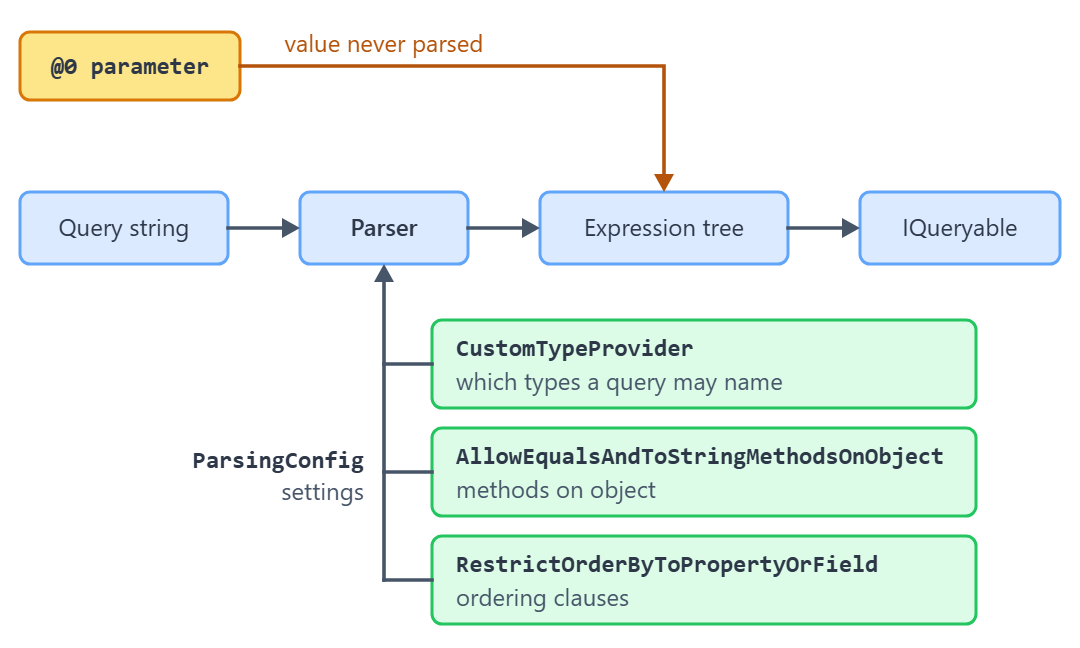
The table lists six ParsingConfig settings, the default each one has in 1.7.4, and when to change it.
| Setting and default | What it does | Change it when |
|---|---|---|
CustomTypeProviderDefault: DefaultDynamicLinqCustomTypeProvider | Decides which types a query string may name. The default one returns only types annotated with [DynamicLinqType]. | Our types cannot carry the attribute, so we supply our own type provider. |
AllowEqualsAndToStringMethodsOnObjectDefault: false | Blocks Equals(), ReferenceEquals() and ToString() on object. Tightened in 1.6.0 for CVE-2024-51417. | A trusted internal query genuinely needs ToString(). Never for reader-supplied strings. |
RestrictOrderByToPropertyOrFieldDefault: true (since 1.6.0) | Requires an ordering clause to start with a property or field rather than an arbitrary expression. | An internal query orders by a computed expression. |
AllowNewToEvaluateAnyTypeDefault: false | Restricts which types the new keyword may construct inside a query string. | Rarely. Leave it off when the string is not ours. |
DisallowNewKeywordDefault: false | Set to true to reject the new keyword outright, which also rejects new {Name, Department} projections. | We accept query strings from readers and want no object construction at all. |
DateTimeIsParsedAsUTCDefault: false | Parses date literals as UTC instead of unspecified. Not a security setting; listed because the article already uses it. | Our store keeps UTC and the query string carries date literals. |
The second advisory concerns reflection. GitHub’s advisory record says versions before 1.6.0 “allow remote access to properties on reflection types and static properties/fields”.
Conclusion
Dynamic LINQ trades compile-time checking for the ability to build a query at runtime, and that trade is worth making when the query arrives as data.
Bind reader-supplied values to @0 parameters, and run 1.6.0 or later so the parser’s own restrictions are in place.
Tested with .NET 10.0.10 and System.Linq.Dynamic.Core 1.7.4.
