


Updated on
A custom attribute in C# is a class that derives from System.Attribute and gets applied in square brackets to a type or a member. The compiler writes it into the assembly’s metadata, where it sits until something reads it back with reflection.
Using one takes three steps: we declare an attribute class, mark code with it, and later ask a Type or a MemberInfo what it was marked with. AttributeUsage controls where the mark is allowed and whether derived code keeps it.
How Do We Declare a Custom Attribute in C#?
A custom attribute is an ordinary class that derives from System.Attribute. The class is the attribute, its constructor parameters become the attribute’s positional parameters, and its public read-write properties and fields become the named ones.
Nothing more is required: a class that derives from Attribute can already be applied to code, and the compiler stores it in the assembly’s metadata.
Microsoft’s guidance describes the naming convention: “By convention, the name of the attribute class ends with the word Attribute.” The compiler lets us drop that suffix where we apply it, so TaskDescriptorAttribute is written as [TaskDescriptor].
The parameter types are restricted, because the runtime has to read the values straight out of metadata. Simple types, string, Type, enum types and single-dimensional arrays of those are allowed. decimal, nint and nuint are not, and the attribute class still compiles: the error appears where we try to apply it.
Here is a small attribute, the first version of our TaskDescriptorAttribute:
namespace CustomAttributes;

public class TaskDescriptorAttribute : Attribute
{
    public string? Name { get; set; }
}
That compiles, and we can already apply it anywhere in the project. The next section narrows that down. For the full rules, see Microsoft’s guide to writing custom attributes and the attribute parameter types section of the C# specification.
Every class in this article lives in a console app called CustomAttributes, and each class file starts with the same namespace CustomAttributes; line, which the snippets below leave out.
What Does the AttributeUsage Attribute Control?
AttributeUsage is the attribute we put on our own attribute class to say where it may be applied and how it behaves. It carries one positional parameter and two named ones.
The positional parameter is AttributeTargets, and it is not optional. AttributeUsageAttribute declares exactly one public constructor, AttributeUsageAttribute(AttributeTargets), so there is no way to write the attribute without naming its targets. Values combine with the bitwise OR operator, so AttributeTargets.Class | AttributeTargets.Struct permits both.
Inherited decides whether a derived class or an overriding member keeps the attribute. It defaults to true.
AllowMultiple decides whether the same attribute may appear twice on one element. It defaults to false, and then a second application fails to compile.
Leaving AttributeUsage off the class entirely is a different thing from leaving its argument out. An unmarked attribute class may be applied anywhere, is inheritable and is single-use, because the effective usage falls back to AttributeTargets.All with Inherited true and AllowMultiple false.
AttributeTargets Enum
The AttributeTargets enum specifies application elements we can apply our custom attribute to.
To see how it works, let’s extend our TaskDescriptorAttribute class:
[AttributeUsage(AttributeTargets.Class | AttributeTargets.Struct)]
public class TaskDescriptorAttribute : Attribute
{
    public string? Name { get; set; }
    public string? Description { get; set; }
    public bool NeedsManager { get; set; }
    public int DeveloperCount { get; set; }
}
We can apply this attribute (TaskDescriptorAttribute) just to the classes and structures because we have set its target to both using a bitwise combination. Of course, other than classes and structs, we can use methods, enums, and other application elements when creating attributes. If we want the attribute to be usable everywhere, AttributeTargets.All says so explicitly, and it is also what we get by leaving AttributeUsage off the class altogether. What we cannot do is leave the argument out: AttributeUsage has a single public constructor and it takes an AttributeTargets value, so [AttributeUsage] on its own does not compile.
Let’s use our attribute with the MyTasks class:
[TaskDescriptor(Name = "The task's name",
    Description = "Some descriptions for the task",
    NeedsManager = true,
    DeveloperCount = 5)]
public class MyTasks
{
}
When we apply our TaskDescriptorAttribute to a class, we just use the TaskDescriptor part because the compiler lets us use it without the ‘Attribute’ suffix.
If the attribute needs to carry a type, generic attributes, added in C# 11, let us declare a TaskDescriptorAttribute<T> and write [TaskDescriptor<Order>] instead of [TaskDescriptor(typeof(Order))].
AllowMultiple Property
The AllowMultiple property permits multiple instances of our attribute. This property can be either false (the default) or true.
Our next attribute takes a priority, so let’s declare a Priorities enum for it first:
public enum Priorities
{
    High,
    Mid,
    Low
}
Priorities is an ordinary enum and holds one value at a time. AttributeTargets is a bit-field enum marked with the [Flags] attribute, so one value can hold several targets, as Class | Struct did earlier.
Let’s create another attribute called DeveloperTaskAttribute:
[AttributeUsage(AttributeTargets.Method, AllowMultiple = true)]
public class DeveloperTaskAttribute : Attribute
{
    public Priorities Priority { get; set; }
    public string? Description { get; set; }
    public DeveloperTaskAttribute(Priorities priority)
    {
        Priority = priority;
    }
}
We can use this attribute only on methods. And we can apply multiple instances of it to them. It has the required Priority and the optional Description parameters.
To apply this attribute, we are going to create a new ScheduleMeeting() method inside the MyTasks class:
public class MyTasks
{
    [DeveloperTask(Priorities.Low)]
    [DeveloperTask(Priorities.High, Description = "High level description")]
    public void ScheduleMeeting()
    {
    }
}
The ScheduleMeeting() method has two DeveloperTask attributes now. We declare the first one with only the required parameter but the second one with both the required and optional parameters. We cannot define a DeveloperTask attribute without a Priorities parameter though, or we’ll get a compiler error.

Inherited Property
The Inherited property is another key feature that we can apply to a custom attribute. It indicates whether that attribute can be inherited. This property has a default value of true.
Framework attributes use the same setting: ApiControllerAttribute is declared with Inherited = true, which is why the [ApiController] attribute on a base controller class also applies to every controller that derives from it.
To see the usage of this property, let’s create the ManagerTaskAttribute attribute:
[AttributeUsage(AttributeTargets.Method, Inherited = false)]
public class ManagerTaskAttribute : Attribute
{
    public Priorities Priority { get; set; }
    public bool NeedsReport { get; set; }
}
This new attribute cannot be inherited, and both of its parameters are optional.
Now, we are going to create the ScheduleInterview method in the MyTasks class to utilize it:
public class MyTasks
{
    [ManagerTask(Priority = Priorities.Mid, NeedsReport = true)]
    [DeveloperTask(Priorities.High, Description = "High level description")]
    public virtual void ScheduleInterview()
    {
    }
}
This method has two attributes, one DeveloperTask and one ManagerTask attribute each. We also add the virtual keyword because we want to override it in another class.
So, let’s create the YourTasks class that inherits from the MyTasks class:
public class YourTasks : MyTasks
{
    [DeveloperTask(Priorities.Mid, Description = "Mid level description")]
    public override void ScheduleInterview()
    {
    }
}
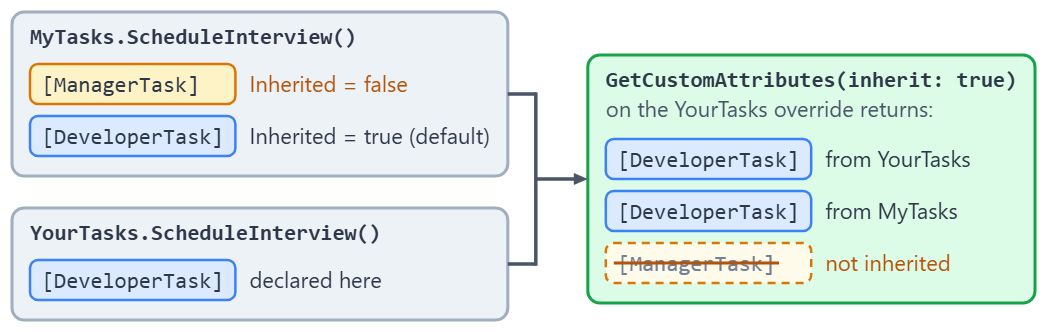
The ScheduleInterview method inside the YourTasks inherited class overrides the previous ScheduleInterview method from the MyTasks base class. This method does not have the ManagerTask attribute because its Inherited property has a value of false.
But, the DeveloperTask attribute has a default Inherited value of true and an AllowMultiple value of true. So, the YourTasks.ScheduleInterview method has two DeveloperTask attributes. We have declared the first one inside the YourTasks class and the second one inside the MyTasks class.
How Do We Read a Custom Attribute With Reflection?
We read attributes with reflection. We get hold of a MemberInfo for the thing we marked, then ask for the attribute the compiler stored beside it.
Attribute.GetCustomAttribute(element, attributeType) returns a single instance, or null when the mark is absent. Type derives from MemberInfo, so typeof(MyTasks) is a legal first argument, and that is how we read an attribute applied to a class.
The generic extension method is shorter and needs no cast. typeof(MyTasks).GetCustomAttribute<TaskDescriptorAttribute>() hands back a TaskDescriptorAttribute? directly. It lives in CustomAttributeExtensions, in the System.Reflection namespace.
What comes back is a real object, constructed from the values written at the usage site. With the generic method, we read its properties like those of any other object. The non-generic one returns a plain Attribute, so reaching our properties takes a cast or another round of reflection.
When we only need to know whether the mark is there rather than what it holds, IsDefined answers that question without constructing the attribute at all.
All of this is a small corner of C# reflection, which uses the same Type and MemberInfo objects to inspect and invoke members at run time.
Let’s create a static CustomAttributeHelper class for acquiring the information stored in the TaskDescriptor instance. It prints that information with a second pass of reflection, over the attribute instance’s own properties, so we start with its WriteOnTheConsole() method:
using System.Reflection;

public static class CustomAttributeHelper
{
    private static void WriteOnTheConsole(Attribute attributeInstance)
    {
        var pInfoList = attributeInstance.GetType().GetProperties(BindingFlags.Public |
                BindingFlags.Instance |
                BindingFlags.DeclaredOnly);

        Console.WriteLine($"\nThe {attributeInstance} attribute:");

        foreach (var pInfo in pInfoList)
            Console.WriteLine($"The {pInfo.Name} property is: {pInfo.GetValue(attributeInstance)}");
    }
}
DeclaredOnly is what keeps TypeId out of the output, since that property comes from the Attribute base class.
Now, let’s add the GetAttribute method to the same class:
public static string? GetAttribute(Type desiredType, Type desiredAttribute)
{
    var attributeInstance = Attribute.GetCustomAttribute(desiredType, desiredAttribute);

    if (attributeInstance == null)
        Console.WriteLine($"The class {desiredType} does not have attributes.");
    else
        WriteOnTheConsole(attributeInstance);

    return attributeInstance?.ToString();
}
Our GetAttribute method expects a (class) type and an attribute type as input parameters and prints the information on the console.
Inside the Attribute base class, we can find different overloads of the GetCustomAttribute method. For our example, we use the GetCustomAttribute(MemberInfo element, Type attributeType) overload to get our desired information.
The Type inherits from the MemberInfo base class so, we can pass it to the method as the first argument. We also send our custom attribute’s type as the second argument. We print all information on the console using a bit of reflection inside the WriteOnTheConsole() method.
What GetCustomAttribute Returns
The GetCustomAttribute method returns either an instance of the attribute or a null value. So, the attributeInstance variable stores an instance of our custom attribute if it does exist. Now, we are going to retrieve the information of that instance.
Retrieving the Information of a Custom Attribute
To retrieve the information of our custom attribute, we are going to call the GetAttribute method in Program.cs and pass typeof(MyTasks) and typeof(TaskDescriptorAttribute) as its arguments:
using CustomAttributes;

CustomAttributeHelper.GetAttribute(typeof(MyTasks), typeof(TaskDescriptorAttribute));
If the GetAttribute method finds an instance of the TaskDescriptorAttribute class, we should get all of its properties as a result:
The CustomAttributes.TaskDescriptorAttribute attribute:
The Name property is: The task's name
The Description property is: Some descriptions for the task
The NeedsManager property is: True
The DeveloperCount property is: 5
We retrieved the information of a custom attribute class successfully.
How Do We Read All Attributes on a Type’s Members?
Sometimes, we need to access all attributes of the class’s members. The Attribute base class has another GetCustomAttributes method to return them as an array.
Let’s create the GetAttributesOfMethods method in the CustomAttributeHelper class to access instances of all attributes and retrieve their information:
public static List<string> GetAttributesOfMethods(Type elementType)
{
    var attributes = new List<string>();

    var methodInfoList = elementType.GetMethods(BindingFlags.Public |
        BindingFlags.Instance |
        BindingFlags.DeclaredOnly);

    if (methodInfoList.Length == 0)
    {
        Console.WriteLine($"The type {elementType} does not have any methods.");
        return attributes;
    }

    foreach (var methodInfo in methodInfoList)
    {
        var attributeList = Attribute.GetCustomAttributes(methodInfo, true);

        if (attributeList.Length == 0)
        {
            Console.WriteLine($"The {elementType.Name}.{methodInfo.Name} method does not have attributes.");
            continue;
        }

        Console.WriteLine($"The {elementType.Name}.{methodInfo.Name} method's attribute:");

        foreach (var att in attributeList)
        {
            WriteOnTheConsole(att);
            attributes.Add(methodInfo.Name + "-" + att.ToString());
        }

        Console.WriteLine();
    }

    return attributes;
}
We want to obtain all of the attributes of every declared method. So, we call the GetMethods method using the appropriate enums.
Inside the first foreach loop, we call Attribute.GetCustomAttributes(MemberInfo element, bool inherit) and send the fetched MethodInfo values, one by one. We also pass true as the second argument because we need the inherited attributes.
That true works here because Attribute.GetCustomAttributes walks the inheritance chain for every kind of member. The instance method, methodInfo.GetCustomAttributes(true), returns the same attributes on a method but ignores inherit on a property or an event. The next section covers that difference.
Inside the inner foreach loop, we sequentially fetch items of the attributeList array and print them on the console using the WriteOnTheConsole method.
Now, let’s call the GetAttributesOfMethods method for the MyTasks class:
CustomAttributeHelper.GetAttributesOfMethods(typeof(MyTasks));
We send the type of the MyTasks class to this method and as a result, we expect to see all the attributes of its methods:
The MyTasks.ScheduleMeeting method's attribute:

The CustomAttributes.DeveloperTaskAttribute attribute:
The Priority property is: Low
The Description property is:

The CustomAttributes.DeveloperTaskAttribute attribute:
The Priority property is: High
The Description property is: High level description

The MyTasks.ScheduleInterview method's attribute:

The CustomAttributes.ManagerTaskAttribute attribute:
The Priority property is: Mid
The NeedsReport property is: True

The CustomAttributes.DeveloperTaskAttribute attribute:
The Priority property is: High
The Description property is: High level description
The GetAttributesOfMethods prints the attributes of ScheduleMeeting and ScheduleInterview methods respectively.
We can do the same for the YourTasks class:
CustomAttributeHelper.GetAttributesOfMethods(typeof(YourTasks));
And find the results very similar:
The YourTasks.ScheduleInterview method's attribute:

The CustomAttributes.DeveloperTaskAttribute attribute:
The Priority property is: Mid
The Description property is: Mid level description

The CustomAttributes.DeveloperTaskAttribute attribute:
The Priority property is: High
The Description property is: High level description
We don’t see the ManagerTask attribute on the console because this attribute has an Inherited value of false. The reason we see two DeveloperTask attributes is because we’ve declared the first one inside the YourTasks class and the second inside the MyTasks class.
Which Method Should We Use to Read Custom Attributes?
Three families of methods read custom attributes, and they differ in what they hand back and in whether they walk the inheritance chain.
The static methods on Attribute, GetCustomAttribute and GetCustomAttributes, take an inherit flag and honour it for every kind of member. Those are the ones this article has used so far.
The CustomAttributeExtensions methods are extension methods on MemberInfo, ParameterInfo, Module and Assembly. They come in generic form, so GetCustomAttribute<T>() gives us a T back with no cast and GetCustomAttributes<T>() gives us a sequence of them. Without an inherit argument, they search the inheritance chain too.
MemberInfo.GetCustomAttributes(inherit) is the instance method, and it carries one trap. The documentation states it plainly: “This method ignores the inherit parameter for properties and events.”
So for a property or an event, inherit: true on the instance method is ignored, while the static Attribute methods and the CustomAttributeExtensions methods still search the chain.
Here are the calls side by side, with what each one returns and whether it honours inherit:
| To do this | Call | Returns | Honours inherit |
|---|---|---|---|
| Read one attribute of a known type | Attribute.GetCustomAttribute(element, attributeType) | Attribute? | Yes, on every member kind |
| Read one attribute, typed, no cast | element.GetCustomAttribute<T>() | T? | Yes, by default |
| Read every attribute of one type | element.GetCustomAttributes<T>() | IEnumerable<T> | Yes, by default |
| Read every attribute on a member | Attribute.GetCustomAttributes(element, inherit) | Attribute[] | Yes |
| Same, as an instance method | element.GetCustomAttributes(inherit) | object[] | No for properties and events |
| Ask only whether an attribute is present | element.IsDefined(typeof(T)) | bool | Yes, by default |
| Inspect an attribute without constructing it | element.GetCustomAttributesData() | IList of CustomAttributeData | No, declared attributes only |
The No in the fifth row comes from the remarks of the MemberInfo.GetCustomAttributes reference, and the sample repository checks it with a TeamTaskBoard class that overrides a property and a method carrying a [Reviewed] attribute in its TaskBoard base class. On the property, Attribute.GetCustomAttributes() finds the attribute and the instance method does not. On the method, both find it.
Conclusion
In this article, we have learned how to declare custom attributes in .NET. We’ve seen that we can utilize them for classes and their members. We also have touched upon the access ways to the single and multiple attribute instances. Finally, we have found out how to retrieve their information.
Tested with .NET 10.0.10 (SDK 10.0.302) and MSTest 4.5.1.

I am trying to perform validation using custom class attributes. I have to keep my model validation rules inside XML files. Custom Class attribute specifies the path to the XML file and custom attributes will contain the logic to read XML files and get the validation rules for that class. When I will call Model.Isvalidate() that time Validation will get executed. I already have this working in .Net 4.5 MVC application. The same thing I am trying in .Net 6 its not working. Your assistance will be highly appreciated.
I didn’t have a situation like that, so I am pretty sure I can’t help you there. But who knows, maybe someone will know the answer, or if nothing StackOverflof is always a place to ask with a source code provided (but I am sure you already know that 🙂 )