


Updated on
Sorting a Web API means turning a query string like ?orderBy=name,dateOfBirth desc into an ORDER BY clause the database runs. The client names the fields at request time, so the ordering cannot be written into the code ahead of it.
That is the whole problem in one sentence: LINQ’s OrderBy() wants a compile-time lambda, and we have a runtime string. Everything in this article is a way of bridging those two, validate the field names against the entity type, then hand the validated string to a query builder that accepts strings.
This is the fourth part of the advanced series and it builds on searching.
NOTE: Some degree of previous knowledge is needed to follow this article. It relies heavily on the ASP.NET Core Web API series on Code Maze, so if you are not sure how to set up the database or how the underlying architecture works, we strongly suggest you go through the series.
VIDEO: Sorting Implementation in ASP.NET Core Web API.
Let’s begin.
What Is Sorting in a Web API?
Sorting a Web API means letting the client choose the order of the results through the query string, and translating that choice into an ORDER BY clause the database executes.
It has nothing to do with sorting algorithms. We never order anything in memory here. The client’s request is turned into part of a SQL statement, and the database does the ordering before a single row reaches our code.
The convention this article follows is a comma-separated list where each entry is a field name optionally followed by desc, so ?orderBy=name,dateOfBirth desc means order by name ascending, then by date of birth descending within each group of equal names.
Two constraints make it harder than it looks. The client picks the fields at request time, so no lambda can be written in advance, and the client’s input reaches a query builder, so every field name has to be checked before it gets there.
If it is the algorithms themselves you are after, we cover those separately in sorting algorithms in C#.
Let’s say we want our API to sort owners by their name in ascending order, and then by their date of birth.
To do that, our API call needs to look something like this:
https://localhost:5001/api/owners?orderBy=name,dateOfBirth desc
Our API needs to take all the parameters into consideration and sort our results accordingly. In our case, this means sorting results by their name, and then, if there are owners with the same name, sorting them by the DateOfBirth property.
Let’s recall how our owner data looks like in the database:

For the sake of demonstrating this example, we are going to add one more Anna Bosh to our database. You can add whatever you want besides that to test the results.
So, let’s add another Anna Bosh:
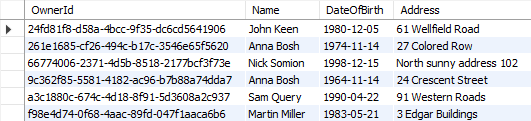
The new Anna is 10 years older and lives on a different address.
Great, now we have the required data to test our functionality properly.
And of course, like with all other functionalities we’ve implemented so far (paging, filtering, and searching), we need to implement this to work well with everything else. We should be able to get the paginated, filtered and sorted data for example.
Let’s see one way to go around implementing this.
How Do We Build an OrderBy Query From a Query String?
The method takes the raw orderBy string and produces a second string that Dynamic LINQ understands, checking every field name against the entity type on the way through.
Four steps do the work. Split the input on commas to get the individual clauses. Read the entity type’s public instance properties through reflection. For each clause, take the text before the space as the field name and look it up among those properties, skipping anything that does not match. Then append the property’s real name and a direction to a StringBuilder.
The direction is the simple part: a clause ending in desc becomes descending, and everything else becomes ascending.
What comes out is a string like Name ascending, DateOfBirth descending, which is exactly what OrderBy(string) from System.Linq.Dynamic.Core expects. The equivalent hand-written LINQ would be OrderBy(x => x.Name).ThenByDescending(x => x.DateOfBirth).
The embedded video follows an earlier version of this code. The approach is unchanged, but the sample below has been updated for current .NET, so a few lines differ from what you will see on screen.
Every entity should be sortable by some criterium, so we add an OrderBy property to our base class QueryStringParameters:
public abstract class QueryStringParameters
{
    const int MaxPageSize = 50;

    private int _pageNumber = 1;
    private int _pageSize = 10;

    public int PageNumber
    {
        get => _pageNumber;
        set => _pageNumber = Math.Max(value, 1);
    }

    public int PageSize
    {
        get => _pageSize;
        set => _pageSize = Math.Clamp(value, 1, MaxPageSize);
    }

    public string? OrderBy { get; set; }
}
We won’t set any default values since different classes can have different default values.
For example, we want OwnerParameters to order our results by the property “name” by default:
public class OwnerParameters : QueryStringParameters
{
    public OwnerParameters()
    {
        OrderBy = "name";
    }

    [Range(1900, 2100)]
    public int? MinYearOfBirth { get; set; }

    [Range(1900, 2100)]
    public int? MaxYearOfBirth { get; set; }

    public bool ValidYearRange =>
        MinYearOfBirth is null || MaxYearOfBirth is null || MaxYearOfBirth >= MinYearOfBirth;

    public string? SearchTerm { get; set; }
}
And we want our Accounts to be ordered by DateCreated:
public class AccountParameters : QueryStringParameters
{
    public AccountParameters()
    {
        OrderBy = "DateCreated";
    }
}
Next, we’re going to dive right into the implementation of our sorting mechanism, or rather, our ordering mechanism.
One thing to note is that we’ll be using System.Linq.Dynamic.Core NuGet package to dynamically create our OrderBy query on the fly. So, feel free to install it in the Entities project and add a using directive where we need it.

Let’s add a new private method ApplySort in our OwnerRepository class:
private static IQueryable<Owner> ApplySort(IQueryable<Owner> owners, string? orderByQueryString)
{
    if (string.IsNullOrWhiteSpace(orderByQueryString))
        return owners.OrderBy(o => o.Name);

    var orderParams = orderByQueryString.Trim().Split(',');
    var propertyInfos = typeof(Owner).GetProperties(BindingFlags.Public | BindingFlags.Instance);
    var orderQueryBuilder = new StringBuilder();

    foreach (var param in orderParams)
    {
        if (string.IsNullOrWhiteSpace(param))
            continue;

        var propertyFromQueryName = param.Split(' ')[0];
        var objectProperty = propertyInfos.FirstOrDefault(pi =>
            pi.Name.Equals(propertyFromQueryName, StringComparison.InvariantCultureIgnoreCase));

        if (objectProperty is null)
            continue;

        var sortingOrder = param.EndsWith(" desc", StringComparison.OrdinalIgnoreCase)
            ? "descending"
            : "ascending";

        orderQueryBuilder.Append($"{objectProperty.Name} {sortingOrder}, ");
    }

    var orderQuery = orderQueryBuilder.ToString().TrimEnd(',', ' ');

    if (string.IsNullOrWhiteSpace(orderQuery))
        return owners.OrderBy(o => o.Name);

    return owners.OrderBy(orderQuery);
}
Okay, that’s a lot of method to take in at once. We’re actually doing multiple different things here to get our results sorted, so let’s take it step-by-step and see what we’ve done exactly.
Let’s dissect our method.
Implementation – Step by Step
First, let start with the method definition. It has two arguments, one for the list of owners as IQueryable<Owner>, and other for the ordering query. If we send a request like this one https://localhost:5001/api/owners?orderBy=name,dateOfBirth desc, our orderByQueryString will be name,dateOfBirth desc.
We begin with a single check. If the query string is empty, there is nothing to build, so we order the owners by name and hand the query straight back:
if (string.IsNullOrWhiteSpace(orderByQueryString))
    return owners.OrderBy(o => o.Name);
Next, we’re splitting our query string to get the individual fields:
var orderParams = orderByQueryString.Trim().Split(',');
We’re also using a bit of reflection to prepare the list of PropertyInfo objects that represent the properties of our Owner class. We need them to be able to check if the field received through the query string really exists in the Owner class:
var propertyInfos = typeof(Owner).GetProperties(BindingFlags.Public | BindingFlags.Instance);
Having that prepared, we can actually run through all the parameters and check for their existence:
if (string.IsNullOrWhiteSpace(param))
    continue;

var propertyFromQueryName = param.Split(' ')[0];
var objectProperty = propertyInfos.FirstOrDefault(pi =>
    pi.Name.Equals(propertyFromQueryName, StringComparison.InvariantCultureIgnoreCase));
If we don’t find such a property we skip the step in the foreach loop and go to the next parameter in the list:
if (objectProperty is null)
    continue;
If we do find the property, we return it and additionally check if our parameter contains “desc” at the end of the string. We use that to decide how we should order our property:
var sortingOrder = param.EndsWith(" desc", StringComparison.OrdinalIgnoreCase)
    ? "descending"
    : "ascending";
The StringComparison.OrdinalIgnoreCase argument is doing quiet work there. Without it, a request for ?orderBy=name DESC would sort ascending, because the comparison would only ever match the exact lower-case token, and the client would get the wrong order with no error to explain it.
We use the StringBuilder to build our query with each loop:
orderQueryBuilder.Append($"{objectProperty.Name} {sortingOrder}, ");
Notice what gets appended: objectProperty.Name, the name reflection just handed us, and never the text the client typed. That detail is the whole of our validation and we come back to it further down.
Now that we’ve looped through all the fields, we are removing excess commas and doing one last check to see if our query indeed has something in it:
var orderQuery = orderQueryBuilder.ToString().TrimEnd(',', ' ');

if (string.IsNullOrWhiteSpace(orderQuery))
    return owners.OrderBy(o => o.Name);
Finally, we can order our query:
return owners.OrderBy(orderQuery);
At this point, our orderQuery variable should contain “Name ascending, DateOfBirth descending” string. That means it will order our results first by Name in ascending order, and then by DateOfBirth in descending order.
The standard LINQ query for this would be:
owners.OrderBy(x => x.Name).ThenByDescending(o => o.DateOfBirth);
A neat little trick to form a query when you don’t know how you should sort in advance.
Calling the Method
Now that we’ve seen how the method works up close, we should just call it in our GetOwners method:
public Task<PagedList<Owner>> GetOwners(OwnerParameters ownerParameters)
{
    var owners = FindAll();

    if (ownerParameters.MinYearOfBirth is { } minYear)
        owners = owners.Where(o => o.DateOfBirth >= new DateTime(minYear, 1, 1));

    if (ownerParameters.MaxYearOfBirth is { } maxYear)
        owners = owners.Where(o => o.DateOfBirth < new DateTime(maxYear + 1, 1, 1));

    owners = owners.Search(ownerParameters.SearchTerm);

    var sortedOwners = ApplySort(owners, ownerParameters.OrderBy);

    return PagedList<Owner>.ToPagedListAsync(sortedOwners,
        ownerParameters.PageNumber,
        ownerParameters.PageSize);
}
We are providing the query we have narrowed so far and the OrderBy query string. Nothing has reached the database yet, because an IQueryable defers execution until something enumerates it, so filtering, searching, sorting and paging all end up in one statement.
That’s it for our implementation. Or maybe not? What if we want to use ApplySort in the AccountRepository? Should we actually keep this logic in our repository class?
The answer to both our questions is of course NO!
Let’s see how to make our method more generic, and implement it in such a way that it can be used by both Account and Owner repositories (or any other repository that comes later).
How Do We Make the Sort Helper Generic?
Move the method out of OwnerRepository into a generic SortHelper<T> behind an ISortHelper<T> interface, then inject it wherever a repository needs to sort.
Nothing about the logic is owner-specific. typeof(T).GetProperties() reads whichever entity is passed, so the same class sorts accounts, owners and anything added later.
The change is mechanical: register both closed generics in the service collection, take the interface in each repository’s constructor, and return the sorted IQueryable instead of mutating a parameter.
One detail must not be lost in the move, and in the original refactor it was. The private version fell back to ordering by name when the query string produced nothing usable, and the first generic version dropped that branch, which leaves paging returning arbitrary rows. The fallback belongs in the generic version too, expressed generically: when there is nothing valid to order by, return the query untouched and let the caller’s default apply.
ISortHelper lives in the Helpers folder of the Entities project and declares one method, ApplySort:
public interface ISortHelper<T>
{
    IQueryable<T> ApplySort(IQueryable<T> entities, string? orderByQueryString);
}
As you can see, ISortHelper is a generic interface and it can be applied to any type we want. We need to provide a collection of entities, and a sorting string.
Now let’s see the actual implementation:
public class SortHelper<T> : ISortHelper<T>
{
    public IQueryable<T> ApplySort(IQueryable<T> entities, string? orderByQueryString)
    {
        if (string.IsNullOrWhiteSpace(orderByQueryString))
            return entities;

        var orderParams = orderByQueryString.Trim().Split(',');
        var propertyInfos = typeof(T).GetProperties(BindingFlags.Public | BindingFlags.Instance);
        var orderQueryBuilder = new StringBuilder();

        foreach (var param in orderParams)
        {
            if (string.IsNullOrWhiteSpace(param))
                continue;

            var propertyFromQueryName = param.Split(' ')[0];
            var objectProperty = propertyInfos.FirstOrDefault(pi =>
                pi.Name.Equals(propertyFromQueryName, StringComparison.InvariantCultureIgnoreCase));

            if (objectProperty is null)
                continue;

            var sortingOrder = param.EndsWith(" desc", StringComparison.OrdinalIgnoreCase)
                ? "descending"
                : "ascending";

            orderQueryBuilder.Append($"{objectProperty.Name} {sortingOrder}, ");
        }

        var orderQuery = orderQueryBuilder.ToString().TrimEnd(',', ' ');

        if (string.IsNullOrWhiteSpace(orderQuery))
            return entities;

        return entities.OrderBy(orderQuery);
    }
}
Two things differ from the private version, and the highlighted lines are both of them. The generic helper cannot fall back to OrderBy(x => x.Name), because T might not have a Name property, so when no clause survives the lookup it returns the query exactly as it received it.
That hands the default ordering to whoever calls it, which is why GetOwners below passes a query that is already ordered by name. Skip that and an explicitly empty ?orderBy= pages an unordered query, which is a bug that only shows up on page two.
The database will not cover for that omission. Microsoft’s EF Core documentation on pagination states it plainly: “Note that relational databases do not apply any ordering by default, even on the primary key.”
This implementation gives us the ability to inject this class to our repositories and call ApplySort wherever we need it:
private readonly ISortHelper<Owner> _sortHelper;

public OwnerRepository(RepositoryContext repositoryContext,
    ISortHelper<Owner> sortHelper)
    : base(repositoryContext)
{
    _sortHelper = sortHelper;
}
We also need to extend our RepositoryWrapper since our repository classes are instantiated there:
public class RepositoryWrapper : IRepositoryWrapper
{
    private readonly RepositoryContext _repoContext;
    private readonly ISortHelper<Owner> _ownerSortHelper;
    private readonly ISortHelper<Account> _accountSortHelper;
    private IOwnerRepository? _owner;
    private IAccountRepository? _account;

    public RepositoryWrapper(RepositoryContext repositoryContext,
        ISortHelper<Owner> ownerSortHelper,
        ISortHelper<Account> accountSortHelper)
    {
        _repoContext = repositoryContext;
        _ownerSortHelper = ownerSortHelper;
        _accountSortHelper = accountSortHelper;
    }

    public IOwnerRepository Owner => _owner ??= new OwnerRepository(_repoContext, _ownerSortHelper);

    public IAccountRepository Account => _account ??= new AccountRepository(_repoContext, _accountSortHelper);

    public void Save() => _repoContext.SaveChanges();
}
And now we can call it in our GetOwners method:
public Task<PagedList<Owner>> GetOwners(OwnerParameters ownerParameters)
{
    var owners = FindAll();

    if (ownerParameters.MinYearOfBirth is { } minYear)
        owners = owners.Where(o => o.DateOfBirth >= new DateTime(minYear, 1, 1));

    if (ownerParameters.MaxYearOfBirth is { } maxYear)
        owners = owners.Where(o => o.DateOfBirth < new DateTime(maxYear + 1, 1, 1));

    owners = owners.Search(ownerParameters.SearchTerm);

    var sortedOwners = _sortHelper.ApplySort(owners.OrderBy(o => o.Name), ownerParameters.OrderBy);

    return PagedList<Owner>.ToPagedListAsync(sortedOwners,
        ownerParameters.PageNumber,
        ownerParameters.PageSize);
}
Same thing with the AccountRepository. If you are having trouble implementing it, refer to the finished project linked at the top of this article.
And since we used dependency injection to inject our SortHelper, we need to not forget to register it in our ServiceExtensions class:
public static void ConfigureRepositoryWrapper(this IServiceCollection services)
{
    services.AddScoped<ISortHelper<Owner>, SortHelper<Owner>>();
    services.AddScoped<ISortHelper<Account>, SortHelper<Account>>();
    services.AddScoped<IRepositoryWrapper, RepositoryWrapper>();
}
A lot of work, but it’s worth it, now we can apply sorting to any entity in our project, even if we add new ones in the future.
Why Do We Check the Sort Fields Against the Type?
Because the string we build is handed to a parser, and everything in it came from the client.
OrderBy(string) parses its argument as an expression, not as a field name. By default it cannot reach arbitrary .NET types, but it can do anything to the entity, call methods on a property, index into it, divide by it, so unchecked input is still client-written code evaluated inside our query.
The reflection lookup is what closes that. A clause survives only if its text matches the name of a public instance property on the entity, and what gets appended to the builder is the property’s real name from reflection, never the client’s text. Anything unmatched is skipped silently.
That is also why the fallback matters. If every clause is skipped, the built string is empty, and the parser rejects an empty string outright. Without a guard the request fails on input the API should simply have ignored.
A reader who reads that loop as typo-checking will delete it the first time it gets in the way, which is why it is worth stating plainly: ?orderBy=Id / 0 is a DivideByZeroException on an unguarded helper, and it arrives from a browser address bar. The rules governing what the parser will and will not resolve are worth knowing in full, and we cover the library itself, its parsing rules and how to restrict what it will resolve in a separate article.
The package documents that scope rather than hiding it. The Dynamic LINQ documentation says: “When querying data using Dynamic LINQ, everything can be expressed using strings.”
Let’s test it out.
Testing Our Implementation
Now the fun part starts, let’s put the result of all our efforts to test.
First, let’s try out the query we’ve been using as an example:
https://localhost:5001/api/owners?orderBy=name,dateOfBirth desc
The response should be:
[
    {
        "id": "261e1685-cf26-494c-b17c-3546e65f5620",
        "name": "Anna Bosh",
        "dateOfBirth": "1974-11-14T00:00:00",
        "address": "27 Colored Row"
    },
    {
        "id": "9c362f85-5581-4182-ac96-b7b88a74dda7",
        "name": "Anna Bosh",
        "dateOfBirth": "1964-11-14T00:00:00",
        "address": "24 Crescent Street"
    },
    {
        "id": "24fd81f8-d58a-4bcc-9f35-dc6cd5641906",
        "name": "John Keen",
        "dateOfBirth": "1980-12-05T00:00:00",
        "address": "61 Wellfield Road"
    },
    {
        "id": "f98e4d74-0f68-4aac-89fd-047f1aaca6b6",
        "name": "Martin Miller",
        "dateOfBirth": "1983-05-21T00:00:00",
        "address": "3 Edgar Buildings"
    },
    {
        "id": "66774006-2371-4d5b-8518-2177bcf3f73e",
        "name": "Nick Somion",
        "dateOfBirth": "1998-12-15T00:00:00",
        "address": "North sunny address 102"
    },
    {
        "id": "a3c1880c-674c-4d18-8f91-5d3608a2c937",
        "name": "Sam Query",
        "dateOfBirth": "1990-04-22T00:00:00",
        "address": "91 Western Roads"
    }
]
As you can see, the list is sorted by Name ascending, and since we have two Anna’s, they were sorted by DateOfBirth, descending.
Now try reversing the ordering in the query:
https://localhost:5001/api/owners?orderBy=name desc,dateOfBirth
Now the result should be:
[
    {
        "id": "a3c1880c-674c-4d18-8f91-5d3608a2c937",
        "name": "Sam Query",
        "dateOfBirth": "1990-04-22T00:00:00",
        "address": "91 Western Roads"
    },
    {
        "id": "66774006-2371-4d5b-8518-2177bcf3f73e",
        "name": "Nick Somion",
        "dateOfBirth": "1998-12-15T00:00:00",
        "address": "North sunny address 102"
    },
    {
        "id": "f98e4d74-0f68-4aac-89fd-047f1aaca6b6",
        "name": "Martin Miller",
        "dateOfBirth": "1983-05-21T00:00:00",
        "address": "3 Edgar Buildings"
    },
    {
        "id": "24fd81f8-d58a-4bcc-9f35-dc6cd5641906",
        "name": "John Keen",
        "dateOfBirth": "1980-12-05T00:00:00",
        "address": "61 Wellfield Road"
    },
    {
        "id": "9c362f85-5581-4182-ac96-b7b88a74dda7",
        "name": "Anna Bosh",
        "dateOfBirth": "1964-11-14T00:00:00",
        "address": "24 Crescent Street"
    },
    {
        "id": "261e1685-cf26-494c-b17c-3546e65f5620",
        "name": "Anna Bosh",
        "dateOfBirth": "1974-11-14T00:00:00",
        "address": "27 Colored Row"
    }
]
Works like a charm!
Now, you can try different invalid queries like:
https://localhost:5001/api/owners?orderBy=age
https://localhost:5001/api/owners?orderBy=
https://localhost:5001/api/owners?orderBy=name desc&dateOfBirth
and see the results for yourself. None of them is an error: age is not a property of Owner, so every clause is skipped and the default ordering by name takes over, which is exactly the branch we restored in the generic helper.
One more thing we should try is whether sorting works when combined with the paging, filtering, and searching we built in the earlier parts.
https://localhost:5001/api/owners?pageNumber=1&pageSize=5&orderBy=dateOfBirth asc&minYearOfBirth=1960&maxYearOfBirth=1980&searchTerm=Anna
Can you guess what’s the result of this query? If you’ve guessed, leave us a comment with what you think the result is.
If you want to see the statement that actually reaches the database rather than guess at it, there is one line that prints it, and we walk through it in seeing the SQL EF Core actually generates.
That’s it, let’s summarize.
Do We Need System.Linq.Dynamic.Core to Sort?
For a client-chosen sort field, yes, or something that does the same job. The package’s purpose is exactly the gap this article opened with: OrderBy() needs a lambda known at compile time, and we have a field name that arrives with the request.
The package is still the pragmatic choice for this problem. It is actively released, widely used, and it replaces a considerable amount of expression-tree code with one method call.
The alternative without a dependency is to build the expression tree ourselves. It is entirely doable and it is more code than the whole rest of this article, which is the trade being made.
The third option only looks like an alternative. A switch over a fixed set of properties is simpler and safer, but it stops accepting arbitrary field names, which was the requirement. It is the right answer when the sortable fields are genuinely few and fixed.
| Approach | Extra dependency | Accepts field names at runtime | The cost |
|---|---|---|---|
System.Linq.Dynamic.Core, OrderBy("Name ascending") | Yes, one package | Yes | A string is parsed at runtime, so a bad field name is a runtime failure, not a compile error |
| Expression trees built by hand | No | Yes | Considerably more code for the same result; the query builder becomes ours to maintain |
A switch expression over known fields | No | Only the fields listed | Every new sortable field is a code change, and the list is duplicated per entity |
| The Sieve package | Yes, one package | Yes | Takes over filtering and paging too, so it replaces the pattern rather than slotting into it |
Two of those rows are written up in full elsewhere: building the same ordering with expression trees by hand, and a package that takes over sorting, filtering and paging together.
The Ultimate ASP.NET Core Web API course builds this same sort helper as an IQueryable extension method behind a service layer, which is the shape the Conclusion below describes and this article deliberately leaves out.
Conclusion
As you have seen, even the trivial sort like this requires a certain amount of business logic, some reflection, validation, and even a bit of dynamic query building. But once you implement it, your API becomes really versatile and flexible.
This implementation is as simple as it gets, but there are certain things we can do to improve it. We can implement a service layer (we don’t have one to keep things simple), we can make our code generic, and not just owner-specific, and we can, of course, create an extension method ApplySort for IQueryable which would make this solution even more flexible.
In this article we’ve covered:
- The definition of sorting and how it works
- How to build an OrderBy query from a query string
- How to make the sort helper generic, and why it needs a fallback
- Why the sort fields are checked against the entity type
- Testing our solution for valid and invalid queries
- Whether we need System.Linq.Dynamic.Core at all
That’s it for sorting. If you have any questions or suggestions, please leave us a comment.
Next up, we’ll cover a very nice topic of data shaping.
Tested with .NET 10.0.10, EF Core 10.0.11, System.Linq.Dynamic.Core 1.7.4, and SQL Server Express LocalDB 13.0.4001.0.

Check this,
if you provide an invalid single column in OrderBy you get an error stating that the entities.OrderBy(orderQuery) does not work with empty value.
(tenantId is not a valid column in owners entity)
Exception: System.ArgumentException
Message: Value cannot be empty. (Parameter ‘ordering’)
Works properly. Thank you Vladimir for this excellent article.
Did everything as instructed. Why is there a validation error before it even gets to the sorting code?
“title”: “One or more validation errors occurred.”,
“status”: 400,
“errors”: {
“Name”: [
“The Name field is required.”
]
Based on the JSON you provided, it seems that the [ApiController] attribute took over the request and validate it. After .NET 6, if you don’t want any property to be required, you can make it nullable:
public string? Name { get; set; }
If you do this, I think you won’t get this error. Of course, I would suggest you to read more about the ApiController attribute here https://code-maze.com/apicontroller-attribute-in-asp-net-core-web-api/ just to be sure what it does (if you are not familiar with it).
Thank you for responding. I had already done that except for OwnerParameters.cs, after making Name nullable there, it started working. I didn’t think it got validation from that class.
Does this way OrderBy work in .net> 5.0?
I have an exception:
you need to install System.Linq.Dynamic.Core from nuget
Hi, first of all thanks for the tutorial.
I had a question, why this line of code:
Isn’t this an unecessary roundtrip to database?
Regards
Hello, how do you get the PropertyInfos[] of the related class(es) of a parent class like in One-To-Many, One-To-One, Many-To-Many scenerio for sorting and apply them to the dynamic linq?
What I miss here is an option to also sort via navigation properties like
name.firstname, name.lastname
( assuming name is navigation property ).
Hi, thank you for your site and every articles, they are really helpful. I was wondering if you had a solution in your book or site page for sorting from Dto to Entity.
Example : My grid receives a Dto from API. The sort and filtering in querystring are from Dto properties. In Api, I need to translate EmployeeDto.CompleteName to Employee.Name for sorting.
Do you have an clean solution or should do I need to translate before applying sort?
Thank you
Hi ,
I just came back to this great article and I started to wonder why you have done it as service and not as extension method on IQueryable ?
Hey Lukasz, there was no particular reason for doing that except for demonstration purposes. Doing it via the extension method is indeed a viable choice for this problem and you should definitely try it out.
We’ve implemented it as an extension method in our book Ultimate ASP.NET Core Web API.
That said, this is not wrong, but many find it more intuitive as an extension method so we’ve covered that approach as well.
This web page shows var orderParams = orderByQueryString.OrderBy.Trim().Split(‘,’); on the implement SortHelper class but it is correct on the GitHub, it should be var orderParams = orderByQueryString.Trim().Split(‘,’);
Thanks for that. It will be fixed in the article.
hi,
this quey is not working give error
entities.OrderBy(orderQuery);
Hi. The error description would be helpful. Secondly, try to download our source code and run it. It should be working – then you can compare your and our solution. Lastly, have you installed the System.Linq.Dynamic.Core library?
You should always include the include statements in you code references.
Hello Bob. Thanks for the suggestion but we are not including the using statements because Visual Studio does that for you. It will give you suggestion what using statement you require for that peace of code. To be honest, many time I just let visual studio offer me the suggestion about the using statement and only then I know what to include. Additionally, we have the source code for every article, so if there is any confusion about the using statements, you can always check the source code. Finally, in some articles we add additional paragraph to state which using statements are required but not in the code samples.
You mentioned that readers can get the source code for every article, but i still can not find it.
Can You, please tell me how to get it or provide a link.
Hi, I’ve a problem when building the generic version of ApplySort.
owners.OrderBy(x => x.Name) does not return ordered rows. No errors are displayed but simply rows come without order.
With ApplySort() locally in the owner repository all works fine.
I’m working with net core 3.1
Any idea?
Regards
Hey Jose,
There has been a mistake in the article and the source code regarding ApplySort method.
Try pulling the latest version of the code and running the examples again.
Sorry to say this, but it was a copy paste mistake on my part. 🙂
And to clarify, this is a dynamic query, so the OrderByin ApplySort works a bit differently than your standard OrderBy. Check out the definition with F12 in VS. It’s very powerful, and let’s you build complex dynamic and custom queries like this one.
Hope this helps.
Hi Vladimir,
Thank you very much for your support.
I’m unable to sort entities. I’m working with the latest github code and all works fine but the code return entities.OrderBy(orderQuery); returns the same entities without order.
I’m watching the orderQuery parameter and it is fine “Name ascending” or “Description ascending” but the records are returned in the same order as they are read.
No errors, no warnings, I’m a little lost.
I’ve even tried to call return entities.OrderBy(“Name”); with the same result.
Locally ApplySort in every repository works fine, but OrderBy in the generic version does not work. It return the same rows in the same order.
Regards
Jose
Hey Jose,
Are you using modified version of our code, or clean solution as we’ve provided it?
The problem with the code before we’ve fixed it was that we haven’t assigned the return value from the ApplySort method. Now it should be working fine, we’ve tested it locally again.
The above code for generic way is still has issue.. Is that the updated one?
Hey Aishwarya,
It has been updated since, it should work now.
I am having the same issue as well. using latest code on github. the list is returned as is without sorted. API goes through with 200 successful. no errors or whatsoever, System.Linq.Dynamic.Core library is installed
I am having the same issue as well. using latest code on github. the list is returned as is without sorted and the API goes through with 200 successful. no errors or whatsoever. The System.Linq.Dynamic.Core library is also installed. On dotnetcore 3.1
EDIT: Managed to get it working as expected. I had the wrong reference. I double checked it was not using System.Linq.Dynamic.Core. I recreated the Isorthelper and sorthelper using the latest github code. it is working!!
Hi Tham. This is really strange. I’ve just tested the code from this branch and it works as expected. As Vlada replied to Jose, the problem was fixed as you can see with this commit: https://uploads.disquscdn.com/images/8a3e8b53f2eec4e87edf9a593a16ecc86713cc0928952c6f9b0007e15801f981.png
Hey #Tham, it’s easy to mix up the default Linq library with the dynamic one. Glad you’ve managed to sort it out *no pun intended* 🙂