


Updated on
ToDictionary() turns any IEnumerable<T> into a Dictionary<TKey, TValue> in a single call. Usually we give it a function that produces the key and, optionally, a second one that produces the value. It runs the query right away and hands back a fully built dictionary.
One rule it enforces is that keys are unique: when two elements produce the same key, the call throws an exception instead of overwriting the first entry. The grouping methods in LINQ work the other way and keep every element that shares a key.
What Does the ToDictionary() Method Do?
ToDictionary() is a LINQ extension method on IEnumerable<T> that builds a Dictionary<TKey, TValue> out of a sequence.
Unless the source already holds key-value pairs or tuples, we hand it a key selector: a function that turns each element into the key it will be stored under. We can also hand it a value selector, so the dictionary holds something narrower than the whole element, and an IEqualityComparer<TKey> that decides when two keys count as equal, in place of the default equality of the key type.
It executes immediately. Select() and Where() build a query and wait for something to enumerate it, while ToDictionary() walks the source the moment we call it. Whatever the source does lazily, a database round trip or a file read, happens right there.
What comes back is an ordinary Dictionary<TKey, TValue>. It is not a query and not a view over the source, so adding elements to the source or removing them afterwards does not change it.
Our article on the LINQ Where() method covers the deferred side of that contrast.
Alright! With these details in mind, let’s now use the ToDictionary() method to convert an enumerable to a dictionary.
Create the Sample Data
Our input enumerable will be a list of countries. Therefore, let’s first define a Country record:
public record Country(string Name, string Capital, string Continent);
Here, we define a record that specifies that all its instances must have a name, a capital, and a continent.
With that, let’s now create a ToDictionaryOperations class, which holds every method in this article, and give it the list of countries:
public class ToDictionaryOperations
{
    private static readonly List<Country> _countries
        = [
            new("Egypt", "Cairo", "Africa"),
            new("India", "New Delhi", "Asia"),
            new("Chile", "Santiago", "South America"),
            new("Australia", "Canberra", "Oceania"),
            new("Kenya", "Nairobi", "Africa")
          ];
}
Here, we create a list of five countries. For each one, we define its name, capital, and continent. Egypt and Kenya share a continent, which matters once we use the continent as a key.
Which ToDictionary() Overload Do We Need?
There are eight overloads, and picking one comes down to three decisions.
The first decision is what the source already gives us. If the source is a sequence of KeyValuePair<TKey, TValue> values or of two-item tuples, we call ToDictionary() with no arguments at all and each element is used as it stands. Those two forms arrived in .NET 8.
The second decision is what each entry should hold. A key selector on its own stores the whole element as the value. A key selector plus a value selector stores whatever the second function returns, which is usually one property.
The third decision is how keys compare. Each of the four shapes, key-value pairs, tuples, a key selector, and a key selector with a value selector, comes with and without an IEqualityComparer<TKey> parameter, which is how four shapes become eight overloads. The usual reason to pass one is StringComparer.OrdinalIgnoreCase, so that a lookup still finds its entry when the casing differs.
Creating a Dictionary by Specifying Keys Only
First, let’s examine an overload of the ToDictionary() method that allows us to create a dictionary by specifying only the keys we want in it:
public static Dictionary<string, Country> CallToDictionaryWithKeysOnly()
    => _countries.ToDictionary(c => c.Name);
Here, we use the ToDictionary<TSource,TKey>(IEnumerable<TSource>, Func<TSource,TKey>) overload to create a dictionary.
This overload allows us to pass in just one Func<TSource, TKey> argument to select the keys we want in our dictionary. This function is called a key selector, and in this case, we use it to specify that the keys in our dictionary should be the names of all the countries in our list.

When we call this method, it returns a dictionary that maps the names of countries in our list to their corresponding Country objects.
This call can also fail, and the section on duplicate keys below shows how.
Creating a Dictionary By Specifying Both Keys and Values
Moving on, let’s explore another overload of the ToDictionary() method that we can use to create a dictionary by specifying both the keys we desire and their associated values:
public static Dictionary<string, string> CallToDictionaryWithKeysAndValues()
    => _countries.ToDictionary(c => c.Name, c => c.Capital);
With the ToDictionary<TSource,TKey,TElement>(IEnumerable<TSource>, Func<TSource,TKey>, Func<TSource,TElement>) overload, we can specify the keys we want in our resulting dictionary, as well as their values.
Here, we specify that we want a Dictionary<string, string> that has our countries’ names as keys and their capitals as values.
Great! With that, we’ve successfully discussed two important overloads of the ToDictionary() method. As we’ve seen, these overloads are pretty useful tools for creating dictionaries from enumerables in our applications.
Creating a Dictionary From Key-Value Pairs or Tuples
Sometimes the sequence is already shaped like a dictionary, and since .NET 8 we can say so without writing selectors at all:
public static Dictionary<string, string> CallToDictionaryOnKeyValuePairs()
    => _countries
        .Select(c => new KeyValuePair<string, string>(c.Name, c.Capital))
        .ToDictionary();

public static Dictionary<string, string> CallToDictionaryOnTuples()
    => _countries
        .Select(c => (c.Name, c.Capital))
        .ToDictionary();
Both calls produce the same Dictionary<string, string>. The KeyValuePair overload takes each pair’s Key and Value. The tuple overload takes the first item as the key and the second as the value, whether or not the tuple elements are named.
Creating a Dictionary With a Custom Key Comparer
By default, the dictionary compares string keys exactly, so "Egypt" and "egypt" are two different keys. An IEqualityComparer<TKey> changes that:
public static Dictionary<string, Country> CallToDictionaryWithComparer()
    => _countries.ToDictionary(c => c.Name, StringComparer.OrdinalIgnoreCase);
The dictionary that comes back keeps the comparer, so it applies to every lookup afterwards as well as to building the dictionary. Asking this dictionary for "egypt" returns Egypt.
Here are all eight overloads side by side:
| Source sequence | Call | What we get back |
|---|---|---|
Any IEnumerable<T> | ToDictionary(c => c.Name) | Key from the selector, the whole element as the value |
Any IEnumerable<T> | ToDictionary(c => c.Name, comparer) | Same, with keys compared by the comparer |
Any IEnumerable<T> | ToDictionary(c => c.Name, c => c.Capital) | Key and value each from their own selector |
Any IEnumerable<T> | ToDictionary(c => c.Name, c => c.Capital, comparer) | Same, with keys compared by the comparer |
IEnumerable<KeyValuePair<TKey, TValue>> | ToDictionary() | Each pair stored as it stands (.NET 8) |
IEnumerable<KeyValuePair<TKey, TValue>> | ToDictionary(comparer) | Same, with keys compared by the comparer (.NET 8) |
IEnumerable<(TKey, TValue)> | ToDictionary() | First tuple item is the key, second is the value (.NET 8) |
IEnumerable<(TKey, TValue)> | ToDictionary(comparer) | Same, with keys compared by the comparer (.NET 8) |
The four calls with selectors work on any sequence, and the four without them need a sequence of key-value pairs or tuples. For the remarks and the exceptions of each overload, see the Enumerable.ToDictionary Method documentation.
What Happens When Two Items Produce the Same Key?
The call throws. ToDictionary() builds a real dictionary, a dictionary cannot hold the same key twice, and the second element to produce a key that is already present ends the call with an ArgumentException naming the key that collided.
Nothing is overwritten or skipped, and no partial dictionary comes back. Readers who expect the last value to win are thinking of the indexer, which does overwrite when we assign into a dictionary ourselves.
That leaves three ways to respond. If duplicate keys mean the data is wrong, we let the exception fire and fix the data. If we want one entry per key and do not care which element wins, DistinctBy() before the call keeps the first. If we want every element that shares a key, we are not building a dictionary at all, and ToLookup() is the method we wanted.
Don’t do this. Our list holds two African countries, so a continent key repeats:
// Throws: two countries share the continent "Africa"
public static Dictionary<string, Country> CallToDictionaryWithDuplicateKeys()
    => _countries.ToDictionary(c => c.Continent);
Calling ToDictionaryOperations.CallToDictionaryWithDuplicateKeys() from Program.cs stops the program, and the first line of the output names the offending key:
Unhandled exception. System.ArgumentException: An item with the same key has already been added. Key: Africa
The message names the key, so we know which value to look for in our data. A dictionary’s own Add() method throws the same exception for a key it already holds, and checking whether a key is already there covers how to avoid it when we add entries one at a time.
The Enumerable.ToDictionary reference on Microsoft Learn lists this case among the exceptions of the key selector overloads: an ArgumentException when “keySelector produces duplicate keys for two elements.”
Duplicate keys are not the only invalid input. If our input enumerable is null, or our key selector generates a null key, this method will raise an ArgumentNullException instead. The parameter names differ: a null source reports Value cannot be null. (Parameter 'source'), and a null key reports Value cannot be null. (Parameter 'key').
Therefore, if there is any chance that our input collection might be null or that our key selector might return a null key or duplicate key, it is advisable to add guard clauses to handle these cases. With these clauses, we ensure that our application does not behave strangely or waste computing resources on unnecessary processes.
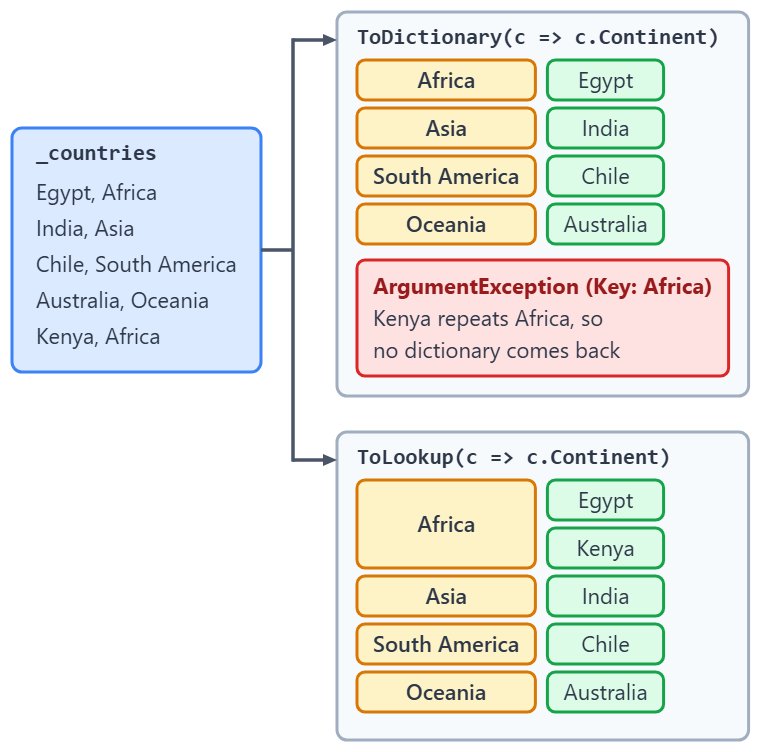
The figure below passes the same continent key selector to ToDictionary() and to ToLookup(). Look at where Africa ends up in each:
Keeping the first element per key needs one method in front of the call:
public static Dictionary<string, Country> CallToDictionaryKeepingFirstPerContinent()
    => _countries
        .DistinctBy(c => c.Continent)
        .ToDictionary(c => c.Continent);
This dictionary has four entries, and its "Africa" entry is Egypt, the first of the two African countries in our list. When the choice of which element survives needs more control than source order, see taking the first record in each group.
When Should We Use ToLookup() or ToFrozenDictionary() Instead?
ToLookup() is the right call when one key maps to several elements. It returns an ILookup<TKey, TElement> in which every key holds a sequence of the elements that produced it, so a repeated key is expected and does not throw. It also answers a key that is not there with an empty sequence instead of throwing, so we can skip the key-existence check before reading it.
ToFrozenDictionary() is the alternative when the dictionary is built once and then only read for the life of the process, such as a lookup table loaded at startup. It lives in the System.Collections.Frozen namespace, and the dictionary it returns is read-only, so nothing can be added to it or removed from it after construction.
ToDictionary() stays the default. It fits whenever every key is unique and we may still want to add entries to the result, or remove them, after we build it.
Here is ToLookup() with the same continent key that made ToDictionary() throw:
public static ILookup<string, Country> CallToLookupOnContinents()
    => _countries.ToLookup(c => c.Continent);
On our list, this lookup has four keys, and "Africa" holds both Egypt and Kenya. Asking it for "Antarctica", a key that was never added, returns an empty sequence. For more on the type that comes back, see our article on the Lookup<TKey, TElement> class.
As a next step, let’s consider different scenarios where the ToDictionary() method will be of great use to us in our applications.
Common Uses of the ToDictionary() Method in C#
Firstly, whenever we have an enumerable such as a list, an array, a stack, or any other collection type that implements the IEnumerable<T> interface and we wish to convert it to a dictionary, we should utilize the ToDictionary() method.
The key selector does not group elements. Each key holds exactly one element, and two elements producing the same key end the call with an exception. When several elements belong under one key, ToLookup() is the method we want.
Finally, this method can come in handy when we aim to create key-value pairs from the results of our LINQ queries.
Conclusion
ToDictionary() turns a sequence into a dictionary in one call, and the overload follows from what the source holds. Plain elements need a key selector and, if the entry should hold less than the whole element, a value selector. Key-value pairs and tuples need no selector at all, and any of the four shapes takes a comparer when keys should not compare exactly.
The other question is whether every key in our data is unique. When it is not, DistinctBy() keeps one element per key, and ToLookup() keeps all of them.
Tested with .NET 10.0.10 (SDK 10.0.302).
