


Updated on
Use await. It suspends the method and returns the thread to the pool while the operation runs, so the application keeps serving other work. When the task fails, the original exception surfaces where we can catch it.
Task.Wait() blocks the calling thread until the task finishes. It wraps any failure in an AggregateException, and in a context with a synchronization context it can deadlock outright. The only place it is defensible is a synchronous entry point that cannot be made async.
await vs Wait: What Is the Difference in C#?
Both wait for a task to finish. The difference is what happens to the thread while they wait.
await suspends our method and returns the thread to the pool. The rest of the method is registered as a continuation and runs when the task completes, possibly on a different thread. Nothing is blocked, so the same small pool of threads keeps serving other requests.
Task.Wait() blocks. The calling thread stops and stays stopped until the task completes, doing no useful work in the meantime. Under load that is how a server ends up with rising latency and idle CPU.
Exceptions differ too. await rethrows the original exception, so an ordinary catch (HttpRequestException) works. Task.Wait() throws AggregateException wrapping it, so the same catch block never fires.
The rule is short: if the method can be async, use await; if it cannot, the fix is usually to make it async, not to block.
Why Blocking Code Is Bad
We write code to build applications, and those applications run as commands inside OS processes. Each process draws on a limited number of threads, managed by a thread pool, to execute them.
Every command in our software executes in a thread:
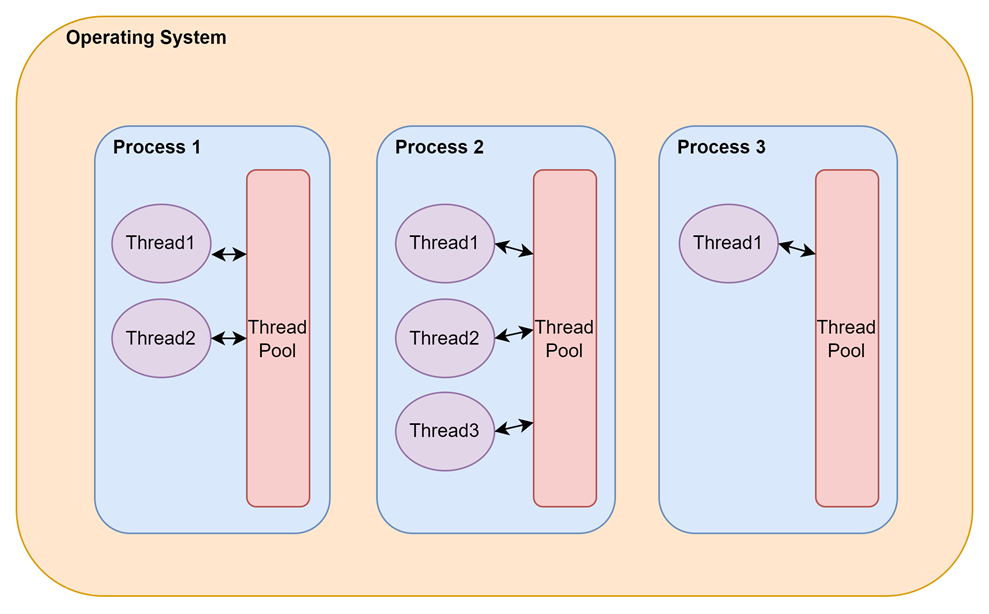
Because that number has a ceiling, our code should hold a thread for as little time as possible and return it to the pool as soon as it is no longer needed.
However, there are commands that by nature will require much time to complete.
There are 2 categories of such long operations:
- CPU-intensive: Heavy operations that stress out the CPU and require significant time to complete. Examples of such operations are complex mathematical calculations and video or image compression.
- I/O-intensive: Operations that heavily rely on external and remote resources and involve significant wait times. Examples include writing to/reading from the database and calling Web APIs.
Blocking code is code that reserves a thread for the whole period until a CPU or I/O intensive operation completes. This is often a long period and such code often leads to inefficiencies, unresponsiveness, and bad user experience.
As developers, we should avoid writing blocking code. And we have the tools to achieve that.
Understanding Asynchronous Programming for await and Task.Wait
Asynchronous Programming is a programming paradigm that we can use to avoid blocking threads in our application. The execution of long-running CPU and I/O intensive operations moves to a separate flow from the main execution flow of our application. The threads waiting for those long-running operations do not block but, they are freed up and used in other tasks until the long-running operation is completed. At that point, code execution resumes with the next operation. This way our system remains responsive and the overall perception is that our application runs faster.
In the latest .NET versions, asynchronous programming is achieved via Task-based Asynchronous Pattern, and the keywords await and async.
Now that we have learned the fundamentals of blocking and asynchronous code, let’s continue by seeing the effects that Task.Wait() and await have in our applications and how these relate to the above concepts.
Asynchronous Programming and Task.Wait
Task is a class in the System.Threading.Tasks namespace that represents an asynchronous operation. When we want to run some operation asynchronously then we can wrap it in a Task object and start it. Task exposes lots of useful functionality through its interface that allows us to interact with it and the running operation. One of the methods that we can use on Task objects is Task.Wait().
When we call Task.Wait() we instruct the runtime to stop and wait for the Task to complete its execution, causing the execution to block. That means on stopping, the running thread is not freed up. Rather it stays occupied, waiting for the operation to complete. This also means that the thread running our code before calling Wait() will also run our code after the call. We understand that calling Task.Wait() has all the negatives that we mentioned earlier in the article about blocking code.
Let’s see how we can call the Task.Wait() method on a running Task:
public static void BlockingCodeExample()
{
    Console.WriteLine("** Blocking code Example **");

    Console.WriteLine($"Current ManagedThreadId: {Environment.CurrentManagedThreadId}");

    Task<string> taskToBlock = Task.Run(() =>
    {
        Thread.Sleep(5000);

        return "Hello, from a blocking task";
    });

    taskToBlock.Wait();

    string blockingResult = taskToBlock.Result;
    Console.WriteLine($"Current ManagedThreadId: {Environment.CurrentManagedThreadId}");
}
Here, we create the BlockingCodeExample() method that initially prints, in the console, the CurrentManagedThreadId of the executing thread. Then, we define an object of type Task, which wraps a Func delegate method. The delegate method calls Thread.Sleep() to mock a long-running operation that takes 5 seconds to complete and returns a string.

Then, we call the Wait() method on the Task that causes the executing thread to block while waiting for the completion of the long-running operation. After that, we call the Result property of taskToBlock to retrieve the result of the task.
Finally, we print again the CurrentManagedThreadId, noticing that the thread is the same.
Let’s check the console output:
** Blocking code Example **
Current ManagedThreadId: 2
Current ManagedThreadId: 2
Let’s continue with the await operator to see how it differs from what we’ve seen so far.
Asynchronous Programming and await
The await operator is used to wait for an operation to complete asynchronously. As soon as the runtime notices that a Task is awaited, execution stops and the running thread is freed up until the asynchronous operation completes. Until that happens, the runtime can use the thread in other operations and the system remains responsive.
Additionally, the await keyword also “unwraps” the returned value of the asynchronous operation upon its completion and lets us assign it to a variable.
The await operator can only be used on asynchronous methods marked with the async modifier. It is also a best practice the method to have a return type of Task or Task<T>. This way the caller of the method can also use await. Event handlers are good to be marked async with a void return type.
Let’s now see how we can use the await keyword in an asynchronous method:
public async static Task AsynchronousCodeExampleAsync()
{
    Console.WriteLine("** Asynchronous code Example **");

    Console.WriteLine($"Current ManagedThreadId: {Environment.CurrentManagedThreadId}");

    Task<string> taskToAwait = Task.Run(() =>
    {
        Thread.Sleep(5000);

        return "Hello, from an asyncrhonous task";
    });

    string awaitResult = await taskToAwait;

    Console.WriteLine($"Current ManagedThreadId: {Environment.CurrentManagedThreadId}");
}
Here, we declare the AsynchronousCodeExampleAsync() method marking it async so that we can use the await operator inside it. We print the CurrentManagedThreadId of the executing thread and we define the Task that we will await, mocking a long-running operation which we do by calling Thread.Sleep().
Then we use the await keyword to asynchronously wait for the completion of the Task and to receive its result. Notice that in this case, we don’t need to use the Result property as we did before. Finally, we print again the CurrentManagedThreadId.
Let’s see the output of our method:
** Asynchronous code Example **
Current ManagedThreadId: 2
Current ManagedThreadId: 10
Notice that in this case, CurrentManagedThreadId has changed value after calling the await keyword. This is because the runtime decides to switch the executing thread. As mentioned earlier, the initial thread is freed up instead of blocking while waiting for completion. Depending on the application type and our code, the runtime might wait for the initial thread to be free again to continue execution after the completion of the long-running operation.
Both examples above use Thread.Sleep() only as a stand-in for real work; see Thread.Sleep vs Task.Delay for why the choice between the two matters once the wait is real. That distinction is also separate from returning vs awaiting a task from inside a method, which is about what the method itself hands back, not what it waits on.
How Do We Wait for a Task in C# Without Blocking?
Waiting without blocking means awaiting, and the shape of the wait depends on what we are waiting for.
For one task, await task. For several that can run at once, await Task.WhenAll(t1, t2) awaits them together and resumes when the last finishes, much faster than running each in turn.
For the first result of several, await Task.WhenAny(tasks) returns the task that completed first, which is how a timeout is expressed without blocking anything.
To wait for a fixed period, await Task.Delay(ms), never Thread.Sleep(ms): the first frees the thread, the second holds it.
Two shapes look like waiting and are not. task.Result and task.GetAwaiter().GetResult() both block, the second differing only in unwrapping the exception; neither is a non-blocking wait.
If the method cannot be marked async because an interface or framework signature forbids it, that signature is the problem worth fixing.
Task.WhenAll and Task.WhenAny are the entry point for executing multiple tasks asynchronously. When there really is no way to make the signature async, running an async method synchronously covers the narrow cases where that is the only option.
Exception Handling With await and Task.Wait
Now that we’ve discussed the differences between await and Task.Wait() in the execution flow, let’s also see how they differ in the way that they handle exceptions.
As we’ve seen the await keyword returns the result of an asynchronous operation on its completion. In addition to that, it also checks if any Exception has been raised within the asynchronous operation and throws the Exception back to the awaiting method. Therefore, the experience that we get is very similar to the one of synchronous execution.
Let’s now see this in action:
public async static Task AsynchronousExceptionHandlingAsync()
{
   Console.WriteLine("** Asynchronous Exception Handling **");

    try
    {
        Task taskToFail = Task.Run(() =>
        {
            throw new ApplicationException("Error in the asynchronous long-running operation");
        });

        await taskToFail;
    }
    catch (ApplicationException ex)
    {
        Console.WriteLine(ex.Message);
    }
}
Here, we define the AsynchronousExceptionHandlingAsync() method which runs a Task that raises an ApplicationException. We use a try-catch block to wrap the code and handle any exceptions.
Now, let’s run this code and we should see that we successfully catch the ApplicationException:
** Asynchronous Exception Handling **
Error in the asynchronous long-running operation
Let’s now see how the same code behaves when we use Task.Wait():
public static void BlockingExceptionHandling()
{
    Console.WriteLine("** Blocking Exception Handling **");

    try
    {
        Task taskToFail = Task.Run(() =>
        {
            throw new ApplicationException("Error in the blocking long-running operation");
        });

        taskToFail.Wait();
    }
    catch (ApplicationException ex)
    {
        Console.WriteLine(ex.Message);
    }
}
Here, we define the BlockingExceptionHandling() method which runs a Task that raises an ApplicationException. The only difference this time is that we don’t await to the result, instead calling the Wait() method.
We run this code but we notice that it crashes!
Let’s see the output:
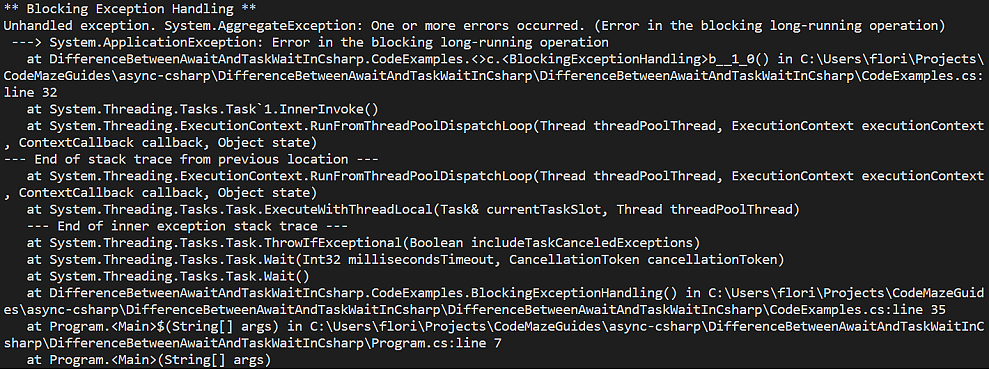
It looks like our code throws a System.AggregateException instead of the ApplicationException that we expected. Task-based programming uses the AggregateException to consolidate multiple exceptions that parallel tasks might throw. It is a powerful concept when we deal with concurrent Tasks and we want to check their status and report their failures. However, when handling errors in a single asynchronous task, AggregateException adds complexity to our code without any benefits.
Why Does Task.Wait() Cause Deadlocks?
The deadlock happens when the blocked thread is the only one allowed to finish the work it waits on.
Some environments install a synchronization context that lets only one thread at a time run continuations: the UI thread in WinForms and WPF, the thread that holds the request context in classic ASP.NET. Calling Task.Wait() there blocks it.
The awaited operation finishes, its continuation is queued to that same context, and the thread cannot run it because it is still blocked waiting. Both sides wait forever.
ASP.NET Core removed the request synchronization context, so the classic hang is rarer than it was. It is not gone: WPF, WinForms, and any custom single-threaded context still reproduce it.
The workaround people reach for is ConfigureAwait(false) on every call in the chain, which works only if nothing forgot.
Stephen Toub of the .NET team puts the distinction plainly in the ConfigureAwait FAQ: “whereas the classic ASP.NET on .NET Framework has its own SynchronizationContext, in contrast ASP.NET Core does not”.
| Criterion | await task | task.Wait() / task.Result |
|---|---|---|
| Holds the calling thread | No: returned to the pool | Yes: blocked until completion |
| Usable in a synchronous method | No: the method must be async | Yes |
| Exception surfaced | The original exception | AggregateException wrapping it |
| try/catch catches the real type | Yes | Only via ex.InnerException |
| Deadlock risk with a synchronization context | None | Real: classic ASP.NET and WinForms/WPF hang |
| Cancellation | CancellationToken on the awaited call | Wait(timeout) returns, work keeps running |
| Thread-pool cost under load | One thread serves many waits | One blocked thread per wait |
| Where it belongs | Everywhere | Main before C# 7.1, and constructors |
The table is Microsoft’s position too: its asynchronous-programming guidance carries a “Current code → Replace with ‘await'” table that maps Task.Wait or Task.Result to await, Task.WaitAny to await Task.WhenAny, Task.WaitAll to await Task.WhenAll, and Thread.Sleep to await Task.Delay (Asynchronous programming scenarios, Microsoft Learn, read 2026-08-09).
Conclusion
In this article, we’ve analyzed the differences between the await operator with the Task.Wait() method. We started by discussing what is blocking code, why is it a bad practice, and how we can use asynchronous code instead. We’ve seen how we can use await and Task.Wait() in our code and how they affect the execution flow of our programs. We’ve seen how await makes our Exception handling easier and why we should use it to build efficient and responsive systems.
Tested with .NET 10.0.10.
