


Updated on
A path in C# is just a string, so nothing about it tells us whether it names a file, a directory, or nothing at all. The file system has to answer that, and .NET gives us three ways to ask: File.Exists() and Directory.Exists(), the Exists property on FileInfo and DirectoryInfo, and the attribute bits behind File.GetAttributes().
Path.Exists() answers the shorter question, “is there anything here at all”, in one call since .NET 7. We look at each of them, what they return when the path is missing, and which one to reach for.
How Do We Check if a File or a Directory Exists in C#?
File.Exists() answers one question: does this path name an existing file? Directory.Exists() answers the mirror question for directories. Both are static methods that take a path string and return a bool.
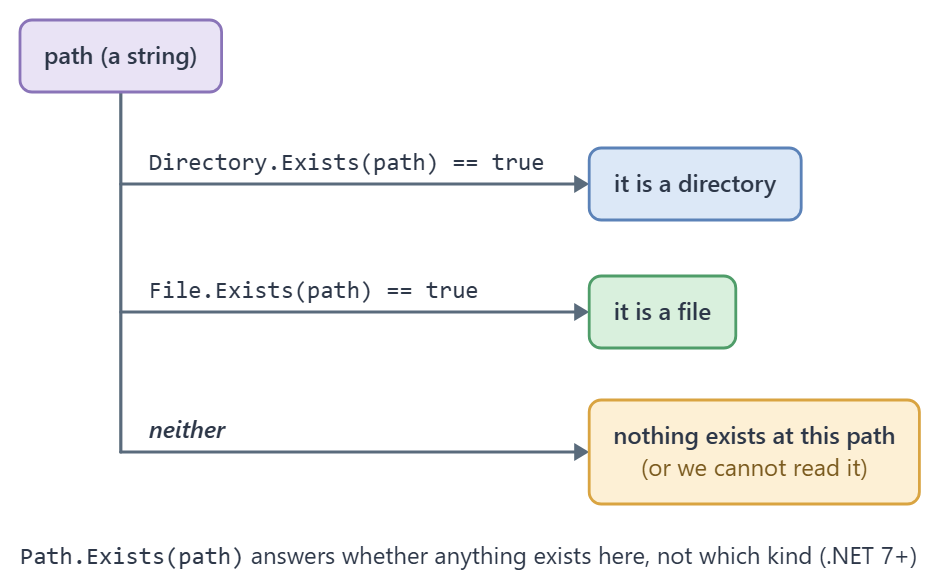
Used together, they settle whether a path is a file or a directory. File.Exists() returns false when the path describes a directory, and Directory.Exists() returns false when it describes a file. So for a path that exists, exactly one of the two is true, unless an error hides it from both.
Neither method throws. According to Microsoft Learn, Exists “returns false if any error occurs while trying to determine if the specified file exists”, which covers a null path, an invalid path, a missing disk, and a path we lack permission to read. A false means “not that, or we could not tell”.
Case sensitivity follows the file system: NTFS ignores it by default, Linux file systems do not.
Both methods take a path, the string that locates a resource in the file system, and .NET has a second pair of classes that answer the same questions from an object: FileInfo and DirectoryInfo. For an in-depth look at how the two pairs differ, see our articles File and FileInfo Class Comparison in C# and Managing Directories With Directory and DirectoryInfo in C#. If these types are new, start with the File and Directory classes from the ground up.
Using Directory and File Classes
File and Directory are static classes, so we don’t need to create instances of them.
Both classes have an Exists() method. Let’s create a file to see how these methods work:
var testFile = Path.Combine(Path.GetTempPath(), "test_file.abc");
File.WriteAllText(testFile, string.Empty);

bool isFile = File.Exists(testFile);
bool isDirectory = Directory.Exists(testFile);
With File.Exists(), we check if the path exists as a file, and it returns true. We also use Directory.Exists() to check if test_file.abc exists as a directory, and the result is false.
Let’s try with a directory:
var testDirectory = Path.Combine(Path.GetTempPath(), "test_directory");
Directory.CreateDirectory(testDirectory);

bool isFile = File.Exists(testDirectory);
bool isDirectory = Directory.Exists(testDirectory);
This time Directory.Exists() returns true, while File.Exists() returns false.
Now we check the same functions when neither a directory nor a file exists:
var notExistingPath = "someNotExistingPath";

bool isFile = File.Exists(notExistingPath);
bool isDirectory = Directory.Exists(notExistingPath);
Both File.Exists() and Directory.Exists() return false.
Using DirectoryInfo and FileInfo Classes
FileInfo and DirectoryInfo work similarly to File and Directory, but they aren’t static. Consequently, we have to create an instance of them, passing the path to the constructor.
When we use FileInfo and DirectoryInfo, file access happens only once, the first time we read a property such as Exists. So, if we need to perform a lot of path operations, it’s more convenient to use FileInfo and DirectoryInfo than File and Directory. The latter performs file access on every method call.
Anyway, we have to be careful when using FileInfo and DirectoryInfo, because they cache information. If we create an instance of the FileInfo object and read Exists before creating the file with a File method, the Exists property returns false even after the file creation. We avoid this by using the Refresh() method.
Let’s reproduce it:
var path = Path.Combine(Path.GetTempPath(), "test_file3.abc");
if (File.Exists(path)) File.Delete(path);

var fileInfo = new FileInfo(path);
bool firstAnswer = fileInfo.Exists;   // false, and now cached

File.WriteAllText(path, string.Empty);

bool staleAnswer = fileInfo.Exists;   // still false
fileInfo.Refresh();
bool freshAnswer = fileInfo.Exists;   // true
The first read fills the cache, so the second read still returns false although the file exists by then. Exists reports true only after Refresh().

FileInfo and DirectoryInfo have an Exists property that answers the same question as the Exists() method of File and Directory.
Let’s use FileInfo and DirectoryInfo to check the existence of a file:
var testFile = Path.Combine(Path.GetTempPath(), "test_file2.abc");
File.WriteAllText(testFile, string.Empty);

var fileInfo = new FileInfo(testFile);
var directoryInfo = new DirectoryInfo(testFile);

bool isFile = fileInfo.Exists;
bool isDirectory = directoryInfo.Exists;
Checking testFile we receive the expected results, fileInfo.Exists returns true, whereas directoryInfo.Exists returns false.
Dealing with directories is quite straightforward:
var testDirectory = Path.Combine(Path.GetTempPath(), "test_directory2");
Directory.CreateDirectory(testDirectory);

var fileInfo = new FileInfo(testDirectory);
var directoryInfo = new DirectoryInfo(testDirectory);

bool isFile = fileInfo.Exists;
bool isDirectory = directoryInfo.Exists;
With testDirectory, fileInfo.Exists returns false, and directoryInfo.Exists returns true.
Let’s have a look at how to manage when neither a directory nor a file exists:
var notExistingPath = "someNotExistingPath2";

var fileInfo = new FileInfo(notExistingPath);
var directoryInfo = new DirectoryInfo(notExistingPath);

bool isFile = fileInfo.Exists;
bool isDirectory = directoryInfo.Exists;
In this case, both fileInfo.Exists and directoryInfo.Exists return false, because notExistingPath doesn’t exist as a file or a directory.
How Do We Check if a Path Exists in C#?
Path.Exists() answers the shorter question: is there anything at this path, file or directory? It takes a nullable path string and returns a bool, and it arrived in .NET 7.
One call replaces the File.Exists(path) || Directory.Exists(path) pair that readers write by hand, and it asks the file system once rather than up to twice.
Microsoft Learn notes Path.Exists() returns true for existing non-regular files such as pipes, and true for a link whose target no longer exists.
Microsoft Learn warns against using File.Exists() for path validation, and the reason applies here too: a malformed path returns false, the same answer a perfectly good path to nothing gives. Checking the string itself is a separate job, and Path.GetInvalidPathChars() is where it starts.
None of these checks is race free: another process can create or delete the path between our check and our next call.
Let’s ask all three questions about the same path:
var path = Path.Combine(Path.GetTempPath(), "test_directory");

bool anythingHere = Path.Exists(path);
bool isDirectory = Directory.Exists(path);
bool isFile = File.Exists(path);
Path.Exists() is true whenever either of the other two is.
Which characters a path may not contain is covered in our article on the Path class and its invalid-character helpers.
How Do We Tell a File From a Directory With FileAttributes?
File.GetAttributes() reads the attribute bits of a path in one call, and FileAttributes.Directory is the bit that settles our question. It is set for a directory and clear for a file, so attributes.HasFlag(FileAttributes.Directory) classifies anything that exists and that we can read.
The catch is what happens when the path does not exist. File.GetAttributes() throws, and which exception we get depends on which part of the path is missing: FileNotFoundException when only the final segment is absent, DirectoryNotFoundException when a directory above it is absent too. Both derive from IOException, so catching the base type covers both, and catching only FileNotFoundException leaves a hole.
The cleaner shape is to stop using exceptions for control flow. Ask Path.Exists() first, and read the attributes only when the answer is true. That turns two exception paths into one branch, and it is the same amount of code.
Let’s see how we can use File.GetAttributes():
var testFile = Path.Combine(Path.GetTempPath(), "test_file4.abc");
File.WriteAllText(testFile, string.Empty);

var attributes = File.GetAttributes(testFile);

bool isDirectory = attributes.HasFlag(FileAttributes.Directory);
bool isFile = !isDirectory;
If the path exists, the FileAttributes.Directory flag tells us that the path is a directory. If this flag is not set, the path is a file for sure.
The FileAttributes enum also tells us if the file is a normal file, if it’s hidden, read-only, compressed, and many other things. We can find all the details by reading FileAttributes Enum on Microsoft Learn.
When the path doesn’t exist, File.GetAttributes() throws, so we ask Path.Exists() first:
var path = Path.Combine(Path.GetTempPath(), "someNotExistingPath");

bool isDirectory = false;
bool isFile = false;

if (Path.Exists(path))
{
    var attributes = File.GetAttributes(path);

    isDirectory = attributes.HasFlag(FileAttributes.Directory);
    isFile = !isDirectory;
}
For a missing path, both flags stay false and File.GetAttributes() never runs, so there is no exception to catch.
Microsoft documents FileAttributes.Directory as supported on Windows, Linux and macOS. Several other flags in the enum, Archive and Compressed among them, are not supported on Linux or macOS at all, so check the enum’s documentation before relying on a flag other than this one.
Which Check Should We Use for a Path in C#?
When the only question is whether something is there, use Path.Exists(). It never throws, and on .NET 7 and later a single call is the shortest correct answer.
To tell a directory from a file, call Directory.Exists() and File.Exists(). Between them they classify any path into directory, file, or neither, and neither call throws.
FileInfo and DirectoryInfo pay off when we are about to do more with the path than ask about it. Both cache their answer the first time we read a property such as Exists, so it can go stale, and Refresh() is what clears it. That caching is a cost when we only want one question answered and a saving when we want ten.
Use File.GetAttributes() when the other attribute bits matter too, hidden and read-only among them, and guard it, because it throws on a missing path.
The table sets the six calls side by side, with what each one returns for a missing path and for a directory:
| Call | Question it answers | Missing path | Directory passed in | Available since |
|---|---|---|---|---|
File.Exists(path) | Is this an existing file? | false | false | .NET Framework 1.0 |
Directory.Exists(path) | Is this an existing directory? | false | true | .NET Framework 1.0 |
Path.Exists(path) | Is anything here, file or directory? | false | true | .NET 7 |
new FileInfo(path).Exists | Is this an existing file? | false | false | .NET Framework 1.0 |
new DirectoryInfo(path).Exists | Is this an existing directory? | false | true | .NET Framework 1.0 |
File.GetAttributes(path) | Which attribute bits are set, including Directory? | throws | returns attributes with Directory set | .NET Framework 1.0 |
Every call in the table asks the real file system, which makes the code around it awkward to unit test. We cover how to test code that touches the file system without touching the disk in a separate article.
The figure puts the two Exists() checks on one spine, and the amber branch at the bottom is the case where both return false:
Conclusion
In summary, we showed three ways to test if a path is a file or a directory in C#. We can check if a path exists as a file or a directory with the File, Directory, FileInfo, and DirectoryInfo classes. We then explored another possibility using the FileAttributes. We can get the FileAttributes from the path and check whether the Directory flag is set.
Once we know what a path is, two questions usually follow: how to count the files inside it when it is a directory, and whether another process has the file open when it is a file.
Tested with .NET 10.0.10.
