


Updated on
A modular monolith is one application, deployed as one unit, whose code we split into loosely coupled modules along business lines.
Let’s see how it compares with traditional monoliths and microservices, and then build one in .NET with two modules. We will also explain the different communication patterns we can implement between our modules.
In the last decade, many enterprise businesses have switched from monolith applications to microservice applications because monolith applications have coupling and scalability issues. However, microservice applications have some downsides such as being expensive to maintain and complex to develop.
What Is a Modular Monolith?
A modular monolith is a monolith application where the different business modules are loosely coupled, and each module packs a different set of functionalities that serve this business module.
We run and deploy it as one application, like any other monolith.
What makes it modular is inside the code. Each module keeps its classes and its data to itself. Other modules see only a small public contract, made of interfaces and records, and the events the module publishes.
Inside that boundary, each module picks the style that fits it. One module can be layered like Clean Architecture, and the next one can be a handful of vertical slices.
Modular monolith applications come as a middle ground between traditional monoliths and microservice applications, providing loosely coupled modules that interact with each other using various communication patterns, without all the expenses and complexity shipped with microservice applications.
Here’s the shop we’re going to build:
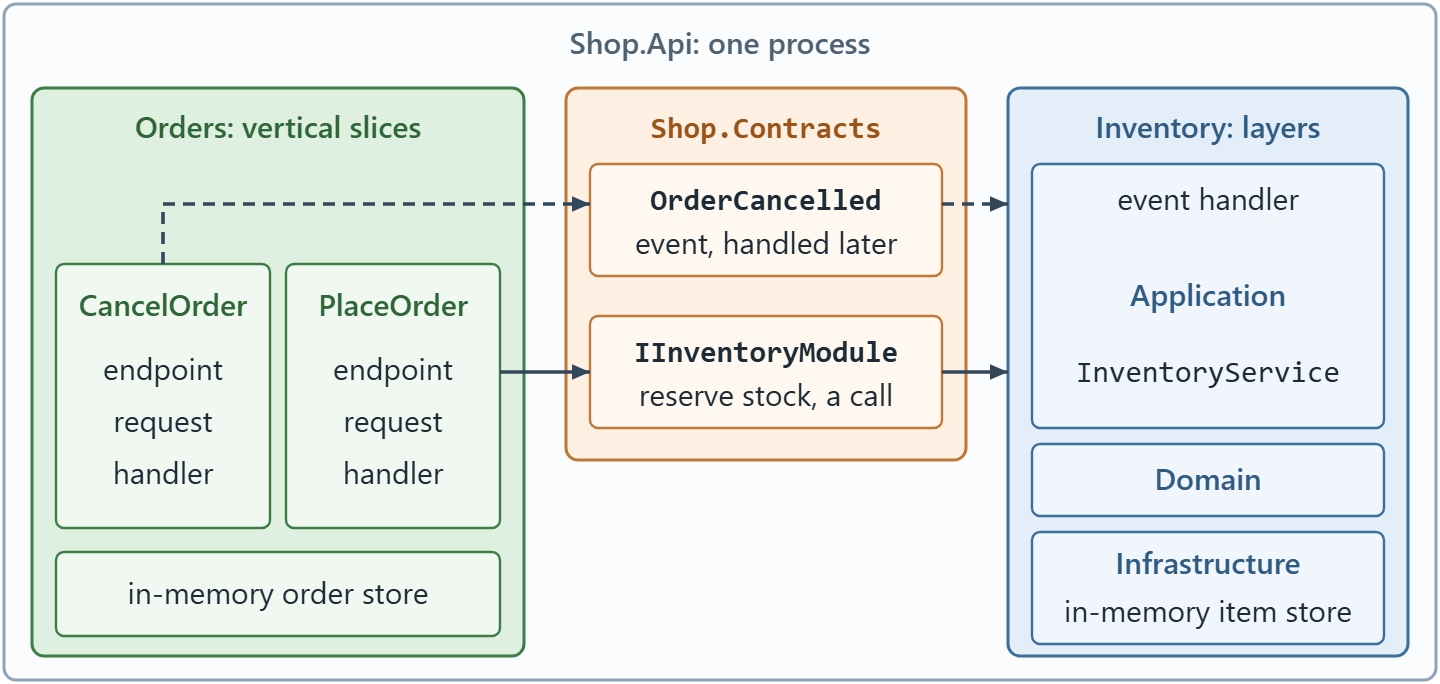
One process, two modules, one way in: every call between the modules goes through a contract or an event.
Start at the outer box: everything inside it runs in one process. Can you find a line that goes from one module straight into the other? There isn’t one.
Traditional Monolith vs Modular Monolith
Traditional and modular monolith applications consist of a single deployment comprising different business modules. The main difference is that, unlike in a traditional monolith application where all the business modules are tightly coupled, in a modular monolith, the code base consists of separate modules that are loosely coupled and independent.
What does tightly coupled look like? Here’s an endpoint that places an order in a traditional monolith, where the features share one DbContext. It runs, but it’s exactly the coupling we want to remove, so don’t copy it:
app.MapPost("/api/orders", async (PlaceOrderRequest request, ShopDbContext db) =>
{
    var item = await db.Items.FindAsync(request.ItemId);
    if (item is null)
        return Results.NotFound();

    if (item.InStock < request.Quantity)
        return Results.Conflict("Out of stock");

    item.InStock -= request.Quantity;
    db.Orders.Add(new Order { ItemId = item.Id, Quantity = request.Quantity });
    await db.SaveChangesAsync();

    return Results.Ok();
});
The order code loads an inventory item, checks the stock and changes it, all by itself. Nobody owns the stock rule, and renaming a column in the inventory table breaks code all over the app.
Martin Fowler’s advice in Monolith First is to design the monolith carefully, with attention to modularity “both at the API boundaries and how the data is stored.”
A modular monolith draws both lines: each module is reachable only through its contract, and each module owns its data (with a real database, usually one schema per module).
Traditional monoliths are effective in small-scale applications that do not contain a lot of modules. On the other hand, modular monoliths better serve mid to enterprise-level applications that contain several modules.
To learn more about monoliths, you can check out our article on the distributed monolith.
Setting Up Our Modular Monolith
Let’s consider an e-commerce application that manages an inventory of items and the orders created. Since we are creating a modular monolith application, we should divide our application into modules. In our case, we have an inventory module and an order module.
The two modules have different problems, so we build them in different styles: layers for Inventory and vertical slices for Orders. Both keep their data in memory, so there’s no database to set up.
We use the .NET 10 SDK (our projects target net10.0, so an older SDK can’t build them). Let’s create the solution, the host and one class library for each part of the app:
dotnet new sln -n Shop
dotnet new web -n Shop.Api
dotnet new classlib -n Shop.Shared
dotnet new classlib -n Shop.Contracts
dotnet new classlib -n Shop.Inventory
dotnet new classlib -n Shop.Orders
dotnet solution add Shop.Api Shop.Shared Shop.Contracts Shop.Inventory Shop.Orders
Shop.Api is the host that wires the modules together. Shop.Contracts holds what one module may use from another, and Shop.Shared holds a few technical types every module needs.
Every classlib project starts with an empty Class1.cs, so let’s delete all four. .NET 10 writes the solution file as Shop.slnx.
Next, we connect the projects:
dotnet reference add Shop.Shared --project Shop.Contracts
dotnet reference add Shop.Shared Shop.Contracts --project Shop.Inventory
dotnet reference add Shop.Shared Shop.Contracts --project Shop.Orders
dotnet reference add Shop.Inventory Shop.Orders --project Shop.Api
Can you see what’s missing? No module references another module. Only the host sees both:
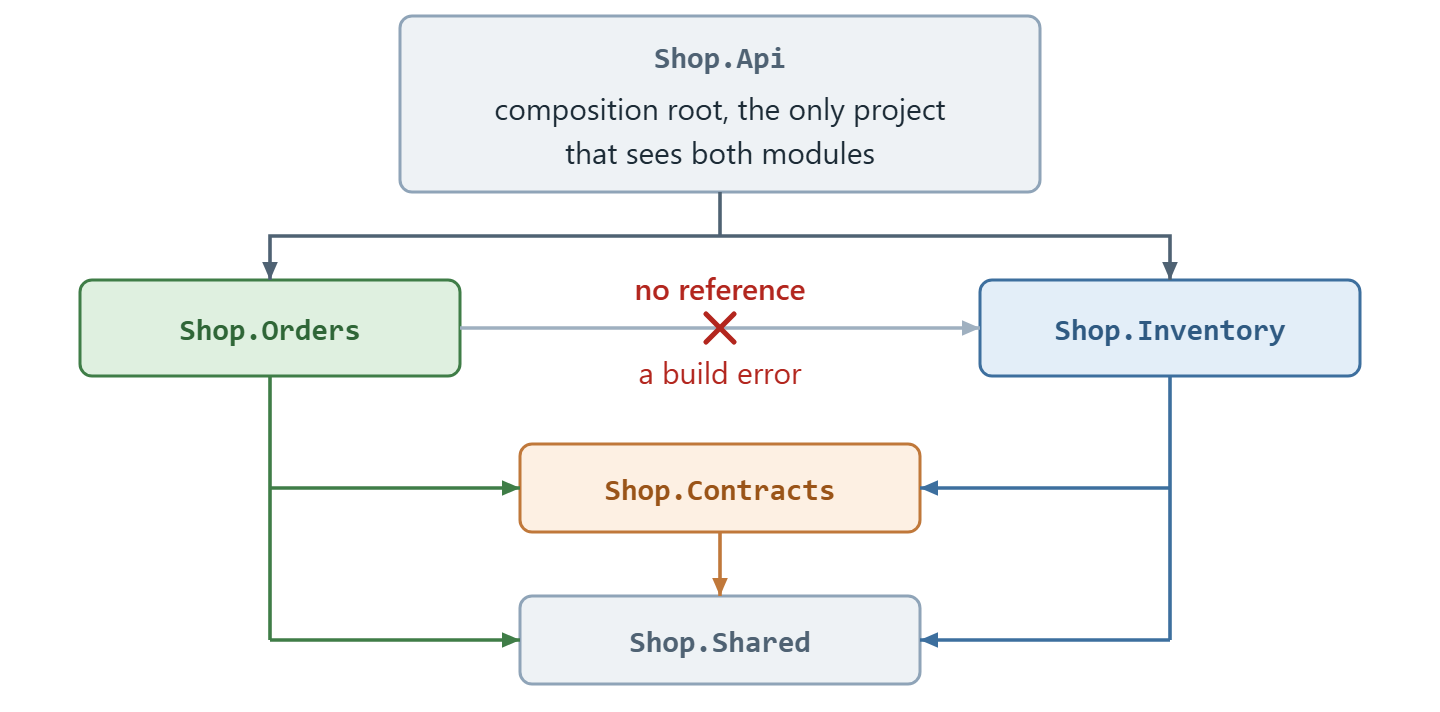
Every arrow is a ProjectReference, and none connects the two modules.
Our modules map their own endpoints, so they need ASP.NET Core types, which a class library doesn’t get by default. Replace Shop.Shared/Shop.Shared.csproj with:
<Project Sdk="Microsoft.NET.Sdk">

  <PropertyGroup>
    <TargetFramework>net10.0</TargetFramework>
    <ImplicitUsings>enable</ImplicitUsings>
    <Nullable>enable</Nullable>
  </PropertyGroup>

  <ItemGroup>
    <FrameworkReference Include="Microsoft.AspNetCore.App" />
  </ItemGroup>

</Project>
Inventory maps its own endpoints too, so we state the same FrameworkReference there, although it would also flow in through Shop.Shared. Replace Shop.Inventory/Shop.Inventory.csproj with:
<Project Sdk="Microsoft.NET.Sdk">

  <PropertyGroup>
    <TargetFramework>net10.0</TargetFramework>
    <ImplicitUsings>enable</ImplicitUsings>
    <Nullable>enable</Nullable>
  </PropertyGroup>

  <ItemGroup>
    <FrameworkReference Include="Microsoft.AspNetCore.App" />
  </ItemGroup>

  <ItemGroup>
    <ProjectReference Include="..\Shop.Shared\Shop.Shared.csproj" />
    <ProjectReference Include="..\Shop.Contracts\Shop.Contracts.csproj" />
  </ItemGroup>

</Project>
Orders gets one more line. Replace Shop.Orders/Shop.Orders.csproj with:
<Project Sdk="Microsoft.NET.Sdk">

  <PropertyGroup>
    <TargetFramework>net10.0</TargetFramework>
    <ImplicitUsings>enable</ImplicitUsings>
    <Nullable>enable</Nullable>
  </PropertyGroup>

  <ItemGroup>
    <FrameworkReference Include="Microsoft.AspNetCore.App" />
    <InternalsVisibleTo Include="Shop.Tests" />
  </ItemGroup>

  <ItemGroup>
    <ProjectReference Include="..\Shop.Shared\Shop.Shared.csproj" />
    <ProjectReference Include="..\Shop.Contracts\Shop.Contracts.csproj" />
  </ItemGroup>

</Project>
We set almost every class inside a module as internal to prevent any coupling with other modules. InternalsVisibleTo makes one exception, for our test project. To learn more about internal, check out our article on C# access modifiers.
Inventory Module in Our Modular Monolith
Let’s start by implementing the inventory module. Inventory has a rule that must never break, so it gets layers, the way Clean Architecture does it.
Domain holds the rule, Application holds the use cases and Infrastructure handles storage. The layers are folders inside one project.
But first, how does Inventory say no? When Orders asks for three rubber ducks and there are only two, that’s normal business for a shop, so Inventory returns a result instead of throwing an exception. Create Shop.Shared/Result.cs:
namespace Shop.Shared;

public enum ErrorType
{
    NotFound,
    Conflict
}

public sealed record Error(string Code, string Description, ErrorType Type);

public class Result
{
    protected Result(Error? error) => Error = error;

    public Error? Error { get; }
    public bool IsSuccess => Error is null;

    public static Result Success() => new(null);

    public static implicit operator Result(Error error) => new(error);
}

public sealed class Result<TValue> : Result
{
    private readonly TValue? _value;

    private Result(TValue? value, Error? error)
        : base(error) => _value = value;

    public TValue Value => IsSuccess
        ? _value!
        : throw new InvalidOperationException("A failed result has no value.");

    public static implicit operator Result<TValue>(TValue value) =>
        new(value, null);

    public static implicit operator Result<TValue>(Error error) =>
        new(default, error);
}
A Result reports success, or failure with an Error, and Result<TValue> also carries a value.
The two implicit operators in Result<TValue> are why a single method in InventoryService can return a StockReservation or an Error, as we’ll see in a moment. Our Result pattern article covers the idea in detail.
Both modules map a failed result to HTTP the same way. Create Shop.Shared/ResultExtensions.cs:
using Microsoft.AspNetCore.Http;

namespace Shop.Shared;

public static class ResultExtensions
{
    public static IResult ToProblem(this Result result)
    {
        var error = result.Error
            ?? throw new InvalidOperationException("A successful result is not a problem.");

        var statusCode = error.Type switch
        {
            ErrorType.NotFound => StatusCodes.Status404NotFound,
            ErrorType.Conflict => StatusCodes.Status409Conflict,
            _ => StatusCodes.Status500InternalServerError
        };

        return TypedResults.Problem(statusCode: statusCode, title: error.Code, detail: error.Description);
    }
}
ToProblem() returns a problem details response, 404 for NotFound and 409 for Conflict, with our error code as its title.
Now, the contract, the only way into Inventory. Create Shop.Contracts/Inventory/IInventoryModule.cs:
using Shop.Shared;

namespace Shop.Contracts.Inventory;

public interface IInventoryModule
{
    Task<Result<StockReservation>> ReserveStockAsync(
        int itemId, int quantity, CancellationToken cancellationToken = default);
}

public sealed record StockReservation(int ItemId, string ItemName, decimal UnitPrice, int Quantity);
Orders can ask Inventory to reserve stock, but it can’t touch the Item entity or set the stock directly. Inventory decides whether it can reserve the stock. As the solution grows, each module often gets its own contracts project.
In the Inventory class library, let’s add our entity. Create Shop.Inventory/Domain/Item.cs:
using Shop.Shared;

namespace Shop.Inventory.Domain;

internal sealed class Item(int id, string name, decimal unitPrice, int inStock)
{
    public int Id { get; } = id;
    public string Name { get; } = name;
    public decimal UnitPrice { get; } = unitPrice;
    public int InStock { get; private set; } = inStock;

    public Result Reserve(int quantity)
    {
        ArgumentOutOfRangeException.ThrowIfNegativeOrZero(quantity);

        if (quantity > InStock)
            return ItemErrors.OutOfStock(Id, InStock, quantity);

        InStock -= quantity;

        return Result.Success();
    }

    public void Release(int quantity)
    {
        ArgumentOutOfRangeException.ThrowIfNegativeOrZero(quantity);

        InStock += quantity;
    }
}

internal static class ItemErrors
{
    public static Error NotFound(int itemId) =>
        new("Item.NotFound", $"Item {itemId} was not found.", ErrorType.NotFound);

    public static Error OutOfStock(int itemId, int inStock, int requested) =>
        new("Item.OutOfStock", $"Only {inStock} of item {itemId} left, {requested} requested.", ErrorType.Conflict);
}
The Item class has four properties: Id, Name, UnitPrice and InStock. InStock has a private setter, so the only way to take stock out is Reserve(), which returns Item.OutOfStock when there isn’t enough.
Nobody orders zero keyboards on purpose, so a zero quantity is a caller’s bug, and Reserve() throws.
The Application layer needs an interface for storage. Create Shop.Inventory/Application/IItemRepository.cs:
using Shop.Inventory.Domain;

namespace Shop.Inventory.Application;

internal interface IItemRepository
{
    Task<Item?> GetByIdAsync(int itemId, CancellationToken cancellationToken = default);

    Task SaveChangesAsync(CancellationToken cancellationToken = default);
}
Now, we create an InventoryService class that will hold the business logic related to the inventory module. Create Shop.Inventory/Application/InventoryService.cs:
using Shop.Contracts.Inventory;
using Shop.Inventory.Domain;
using Shop.Shared;

namespace Shop.Inventory.Application;

internal sealed record ItemResponse(int Id, string Name, decimal UnitPrice, int InStock);

internal sealed class InventoryService(IItemRepository items) : IInventoryModule
{
    public async Task<Result<StockReservation>> ReserveStockAsync(
        int itemId, int quantity, CancellationToken cancellationToken = default)
    {
        var item = await items.GetByIdAsync(itemId, cancellationToken);
        if (item is null)
            return ItemErrors.NotFound(itemId);

        var reservation = item.Reserve(quantity);
        if (!reservation.IsSuccess)
            return reservation.Error!;

        await items.SaveChangesAsync(cancellationToken);

        return new StockReservation(item.Id, item.Name, item.UnitPrice, quantity);
    }

    public async Task<Result<ItemResponse>> GetItemAsync(
        int itemId, CancellationToken cancellationToken = default)
    {
        var item = await items.GetByIdAsync(itemId, cancellationToken);
        if (item is null)
            return ItemErrors.NotFound(itemId);

        return new ItemResponse(item.Id, item.Name, item.UnitPrice, item.InStock);
    }
}
Here, we implement the contract and use the IItemRepository interface to load and save items. There’s no stock check in the service, because Item decides. GetItemAsync() isn’t on the contract, so no other module can call it.
Then the storage. Create Shop.Inventory/Infrastructure/InMemoryItemRepository.cs:
using Shop.Inventory.Application;
using Shop.Inventory.Domain;

namespace Shop.Inventory.Infrastructure;

internal sealed class InMemoryItemRepository : IItemRepository
{
    private readonly Dictionary<int, Item> _items = new()
    {
        [1] = new Item(1, "Mechanical keyboard", 89.99m, inStock: 10),
        [2] = new Item(2, "Rubber duck", 4.99m, inStock: 2)
    };

    public Task<Item?> GetByIdAsync(int itemId, CancellationToken cancellationToken = default) =>
        Task.FromResult(_items.GetValueOrDefault(itemId));

    public Task SaveChangesAsync(CancellationToken cancellationToken = default) =>
        Task.CompletedTask;
}
We seed a mechanical keyboard with ten in stock and a rubber duck with only two, because every developer needs one. With EF Core behind the same interface, SaveChangesAsync() is where the DbContext would save.
Finally, we create the module’s entry point. Create Shop.Inventory/InventoryModule.cs:
using Microsoft.AspNetCore.Builder;
using Microsoft.AspNetCore.Http;
using Microsoft.AspNetCore.Routing;
using Microsoft.Extensions.DependencyInjection;
using Shop.Contracts.Inventory;
using Shop.Inventory.Application;
using Shop.Inventory.Infrastructure;
using Shop.Shared;

namespace Shop.Inventory;

public static class InventoryModule
{
    public static IServiceCollection AddInventoryModule(this IServiceCollection services)
    {
        services.AddSingleton<IItemRepository, InMemoryItemRepository>();
        services.AddScoped<InventoryService>();
        services.AddScoped<IInventoryModule>(sp => sp.GetRequiredService<InventoryService>());

        return services;
    }

    public static void MapInventoryEndpoints(this IEndpointRouteBuilder app)
    {
        var inventory = app.MapGroup("/api/inventory");

        inventory.MapGet("/items/{itemId:int}", async (
            int itemId,
            InventoryService service,
            CancellationToken cancellationToken) =>
        {
            var result = await service.GetItemAsync(itemId, cancellationToken);

            return result.IsSuccess ? Results.Ok(result.Value) : result.ToProblem();
        });
    }
}
This is the only public type in the module. AddInventoryModule() registers the services, and MapInventoryEndpoints() maps one endpoint, which fetches a single item by its id. InventoryService is registered once and handed out as IInventoryModule too.
Our Clean Architecture in .NET course takes this layered style much further: its event ticketing app is built in .NET 10 and comes with four full test suites.
The Orders Module
Now let’s implement the Orders module. Similar to the Inventory module, it’s a class library, but placing an order is one call to Inventory and one save. Three layers for that would be ceremony.
So we write each feature as a vertical slice, one file that carries it from the HTTP endpoint down to the data.
In the Orders class library, let’s create our entity. Create Shop.Orders/Order.cs:
using Shop.Shared;

namespace Shop.Orders;

internal enum OrderStatus
{
    Placed,
    Cancelled
}

internal sealed class Order(int id, int itemId, int quantity, decimal total)
{
    public int Id { get; } = id;
    public int ItemId { get; } = itemId;
    public int Quantity { get; } = quantity;
    public decimal Total { get; } = total;
    public OrderStatus Status { get; private set; } = OrderStatus.Placed;

    public Result Cancel()
    {
        if (Status == OrderStatus.Cancelled)
            return OrderErrors.AlreadyCancelled(Id);

        Status = OrderStatus.Cancelled;

        return Result.Success();
    }
}

internal static class OrderErrors
{
    public static Error NotFound(int orderId) =>
        new("Order.NotFound", $"Order {orderId} was not found.", ErrorType.NotFound);

    public static Error AlreadyCancelled(int orderId) =>
        new("Order.AlreadyCancelled", $"Order {orderId} is already cancelled.", ErrorType.Conflict);
}
Our Order class consists of Id, ItemId, Quantity, Total and Status properties, and Cancel() makes sure we cancel an order only once.

Orders keeps its data in memory too. Create Shop.Orders/OrderStore.cs:
using System.Collections.Concurrent;

namespace Shop.Orders;

internal sealed class OrderStore
{
    private readonly ConcurrentDictionary<int, Order> _orders = new();
    private int _lastId;

    public Order Add(int itemId, int quantity, decimal total)
    {
        var order = new Order(Interlocked.Increment(ref _lastId), itemId, quantity, total);
        _orders[order.Id] = order;

        return order;
    }

    public Order? Find(int orderId) => _orders.GetValueOrDefault(orderId);
}
There’s no repository interface here. A slice talks to its module’s storage directly.
Now the first slice. Create Shop.Orders/Features/PlaceOrder.cs:
using System.ComponentModel.DataAnnotations;
using Microsoft.AspNetCore.Builder;
using Microsoft.AspNetCore.Http;
using Microsoft.AspNetCore.Routing;
using Shop.Contracts.Inventory;
using Shop.Shared;

namespace Shop.Orders.Features;

internal static class PlaceOrder
{
    public sealed record Request(int ItemId, [property: Range(1, 10)] int Quantity);

    public sealed record Response(int OrderId, string ItemName, int Quantity, decimal Total);

    public sealed class Handler(IInventoryModule inventory, OrderStore orders)
    {
        public async Task<Result<Response>> HandleAsync(
            Request request, CancellationToken cancellationToken = default)
        {
            var reservation = await inventory.ReserveStockAsync(
                request.ItemId, request.Quantity, cancellationToken);
            if (!reservation.IsSuccess)
                return reservation.Error!;

            var stock = reservation.Value;
            var order = orders.Add(stock.ItemId, stock.Quantity, stock.UnitPrice * stock.Quantity);

            return new Response(order.Id, stock.ItemName, order.Quantity, order.Total);
        }
    }

    public static void MapPlaceOrder(this IEndpointRouteBuilder app) =>
        app.MapPost("/", async (Request request, Handler handler, CancellationToken cancellationToken) =>
        {
            var result = await handler.HandleAsync(request, cancellationToken);

            return result.IsSuccess ? Results.Ok(result.Value) : result.ToProblem();
        });
}
This one file is the whole feature. The handler asks Inventory to reserve the stock through IInventoryModule. If Inventory says no, we pass the error on. If it says yes, we store the order at the price Inventory returned.
The [Range] attribute rejects a zero quantity before the handler runs. Our Vertical Slice Architecture article builds a whole app this way.
Finally, let’s create the module’s entry point. Create Shop.Orders/OrdersModule.cs:
using Microsoft.AspNetCore.Builder;
using Microsoft.AspNetCore.Routing;
using Microsoft.Extensions.DependencyInjection;
using Shop.Orders.Features;

namespace Shop.Orders;

public static class OrdersModule
{
    public static IServiceCollection AddOrdersModule(this IServiceCollection services)
    {
        services.AddValidation();
        services.AddSingleton<OrderStore>();
        services.AddScoped<PlaceOrder.Handler>();

        return services;
    }

    public static void MapOrdersEndpoints(this IEndpointRouteBuilder app)
    {
        var orders = app.MapGroup("/api/orders");

        orders.MapPlaceOrder();
    }
}
AddOrdersModule() registers the store and the handler, and AddValidation() turns on the request validation that .NET 10 added to minimal APIs.
Why do we call AddValidation() here and not in Program.cs? Its source generator only sees the endpoints mapped in the project that calls it. Microsoft’s validation documentation says: “The source generator creates metadata only for the assembly where AddValidation is called.”
We learned that the hard way. With the call in Program.cs, an order for zero keyboards went straight past [Range] into Item.Reserve():
System.ArgumentOutOfRangeException: quantity ('0') must be a non-negative and non-zero value. (Parameter 'quantity')
The client got a 500 instead of a 400, and nothing in the log said that validation had been skipped. So every module that maps endpoints with validated requests calls AddValidation() itself.
Running Our Modular Monolith
The host is where the modules meet. Replace Shop.Api/Program.cs with:
using Shop.Inventory;
using Shop.Orders;

var builder = WebApplication.CreateBuilder(args);

builder.Services.AddProblemDetails();

builder.Services.AddInventoryModule();
builder.Services.AddOrdersModule();

var app = builder.Build();

app.UseExceptionHandler();

app.MapInventoryEndpoints();
app.MapOrdersEndpoints();

app.Run();
Each module registers its services with one call and maps its endpoints with another. No other file knows about both modules, which makes Program.cs our composition root.
If you’re new to how the container resolves what each module registered, our guide to dependency injection starts from the basics.
Let’s start the app:
dotnet run --project Shop.Api -- --urls http://localhost:5000
Wait for Now listening on: http://localhost:5000 in the console before sending anything.
Our requests live in an .http file. Visual Studio and Rider run it out of the box, and VS Code needs the REST Client extension. Create Shop.Api/Shop.Api.http:
GET http://localhost:5000/api/inventory/items/1

###

POST http://localhost:5000/api/orders
Content-Type: application/json

{ "itemId": 1, "quantity": 2 }

###

GET http://localhost:5000/api/inventory/items/1

###

POST http://localhost:5000/api/orders
Content-Type: application/json

{ "itemId": 2, "quantity": 3 }

###

POST http://localhost:5000/api/orders
Content-Type: application/json

{ "itemId": 1, "quantity": 0 }
The first request shows all ten keyboards in stock:
{"id":1,"name":"Mechanical keyboard","unitPrice":89.99,"inStock":10}
Ordering two keyboards goes through Orders, which calls Inventory:
{"orderId":1,"itemName":"Mechanical keyboard","quantity":2,"total":179.98}
And Inventory now has eight left:
{"id":1,"name":"Mechanical keyboard","unitPrice":89.99,"inStock":8}
What happens when we order three rubber ducks and there are only two? Inventory says no, and the answer travels back through Orders as a 409 Conflict:
{
  "type": "https://tools.ietf.org/html/rfc9110#section-15.5.10",
  "title": "Item.OutOfStock",
  "status": 409,
  "detail": "Only 2 of item 2 left, 3 requested.",
  "traceId": "00-8474ff3ab0595b5df8b2d983d992be06-a9f52f9b4275d414-00"
}
No exception was thrown, Orders kept no order, and the title tells the client which module said no.
An order for zero keyboards never reaches either module:
{
  "type": "https://tools.ietf.org/html/rfc9110#section-15.5.1",
  "title": "One or more validation errors occurred.",
  "status": 400,
  "errors": {
    "Quantity": [
      "The field Quantity must be between 1 and 10."
    ]
  },
  "traceId": "00-8f98ff40a9202a74cd81947cffdf5f46-86b2c57246006ca6-00"
}
Communication Patterns in Modular Monoliths
Since the modules in a modular monolith are loosely coupled, we need different means of communication so that the modules can interact. We can achieve this either by using synchronous communication or asynchronous communication, each with its positives and negatives.
Either way, one module never touches another module’s classes or data.
Synchronous Communication
Synchronous communication is when the caller waits for a response after sending a request. We use synchronous communication when the response impacts our process, like Orders waiting to hear that Inventory reserved the stock.
In our shop, that’s a plain method call through IInventoryModule, and it never leaves the process.
We should note that although we are using the async and await keywords, this is still synchronous communication, because Orders has to wait for Inventory to reply to continue its work.
Between services, examples of synchronous communication include REST APIs, gRPC, and SOAP. You’ll also see modules call each other over REST inside one process, with a client like this one. Don’t copy it:
public sealed class InventoryHttpClient(HttpClient http)
{
    public Task<ItemDto?> GetItemAsync(int itemId, CancellationToken cancellationToken = default) =>
        http.GetFromJsonAsync<ItemDto>($"/api/inventory/items/{itemId}", cancellationToken);
}
Our GetItemAsync() method creates a synchronous call to the Inventory module, retrieves a single item as JSON and then deserializes it into an ItemDto.
It works. But every call now goes through a socket and a JSON serializer, and it can fail in ways a method call can’t, such as a timeout or a refused connection.
How much does that cost us? We measured it with BenchmarkDotNet on .NET 10, reading the same item both ways inside one process.
The direct call took about 50 nanoseconds. The HTTP call over localhost took about 90 microseconds, some 1,700 to 1,900 times as long across our two runs.
A module that moves out to its own service has to pay that price. Inside one process, we’d pay it for nothing.
Asynchronous Communication
Asynchronous communication is when one module sends a message to another and continues executing regardless of whether the other module successfully processed the message. This is helpful when the process does not depend on the success of the request.
Cancelling an order is a good example. The order is cancelled whether or not the stock is back yet, and tomorrow a billing module may want to know about it too.
So Orders publishes an integration event, a message that tells any module that cares what happened.
The plan is to pass a message from the Orders module to the Inventory module asynchronously to put the stock back after an order is cancelled.
Examples of asynchronous communication protocols include AMQP and MQTT. One of the most used tools for asynchronous communication is RabbitMQ, which uses the Advanced Message Queuing Protocol (AMQP). Our modules run in one process, though, so a channel from System.Threading.Channels will do.
The event is part of Orders’ public contract. Create Shop.Contracts/Orders/OrderCancelled.cs:
namespace Shop.Contracts.Orders;

public sealed record OrderCancelled(int OrderId, int ItemId, int Quantity);
Modules need a way to publish events and to handle them. Create Shop.Shared/EventBus.cs:
namespace Shop.Shared;

public interface IEventBus
{
    ValueTask PublishAsync<TEvent>(TEvent integrationEvent, CancellationToken cancellationToken = default)
        where TEvent : notnull;
}

public interface IIntegrationEventHandler<in TEvent>
{
    Task HandleAsync(TEvent integrationEvent, CancellationToken cancellationToken = default);
}
How events travel is the host’s decision, so the implementation lives in the host. Create Shop.Api/InProcessEventBus.cs:
using System.Threading.Channels;
using Shop.Shared;

namespace Shop.Api;

public delegate Task EventDelivery(IServiceProvider services, CancellationToken cancellationToken);

public sealed class InProcessEventBus : IEventBus
{
    private readonly Channel<EventDelivery> _deliveries = Channel.CreateUnbounded<EventDelivery>();

    public ChannelReader<EventDelivery> Deliveries => _deliveries.Reader;

    public ValueTask PublishAsync<TEvent>(TEvent integrationEvent, CancellationToken cancellationToken = default)
        where TEvent : notnull =>
        _deliveries.Writer.WriteAsync(async (services, token) =>
        {
            foreach (var handler in services.GetServices<IIntegrationEventHandler<TEvent>>())
                await handler.HandleAsync(integrationEvent, token);
        }, cancellationToken);
}

public sealed class EventDispatcher(
    InProcessEventBus eventBus,
    IServiceScopeFactory scopeFactory,
    ILogger<EventDispatcher> logger) : BackgroundService
{
    protected override async Task ExecuteAsync(CancellationToken stoppingToken)
    {
        await foreach (var delivery in eventBus.Deliveries.ReadAllAsync(stoppingToken))
        {
            using var scope = scopeFactory.CreateScope();

            try
            {
                await delivery(scope.ServiceProvider, stoppingToken);
            }
            catch (Exception exception)
            {
                logger.LogError(exception, "An integration event handler failed.");
            }
        }
    }
}
PublishAsync() doesn’t call any handler. It writes a small delivery function to the channel and returns right away.
EventDispatcher is a BackgroundService that reads the channel, creates a fresh DI scope for each delivery and calls every handler for that event. Our article on .NET channels explains channels in more detail.
The next step is to produce a message from our Orders module every time an order is cancelled. Create Shop.Orders/Features/CancelOrder.cs:
using Microsoft.AspNetCore.Builder;
using Microsoft.AspNetCore.Http;
using Microsoft.AspNetCore.Routing;
using Shop.Contracts.Orders;
using Shop.Shared;

namespace Shop.Orders.Features;

internal static class CancelOrder
{
    public sealed record Response(int OrderId, string Status);

    public sealed class Handler(OrderStore orders, IEventBus eventBus)
    {
        public async Task<Result<Response>> HandleAsync(
            int orderId, CancellationToken cancellationToken = default)
        {
            var order = orders.Find(orderId);
            if (order is null)
                return OrderErrors.NotFound(orderId);

            var cancellation = order.Cancel();
            if (!cancellation.IsSuccess)
                return cancellation.Error!;

            await eventBus.PublishAsync(
                new OrderCancelled(order.Id, order.ItemId, order.Quantity), cancellationToken);

            return new Response(order.Id, order.Status.ToString());
        }
    }

    public static void MapCancelOrder(this IEndpointRouteBuilder app) =>
        app.MapPost("/{orderId:int}/cancel", async (
            int orderId, Handler handler, CancellationToken cancellationToken) =>
        {
            var result = await handler.HandleAsync(orderId, cancellationToken);

            return result.IsSuccess ? Results.Ok(result.Value) : result.ToProblem();
        });
}
The handler cancels the order, and PublishAsync() puts our message on the channel to be processed by the Inventory module. The cancel slice itself never mentions Inventory.
Next, we define the subscriber in Inventory’s Application layer. Create Shop.Inventory/Application/ReleaseStockWhenOrderCancelled.cs:
using Shop.Contracts.Orders;
using Shop.Shared;

namespace Shop.Inventory.Application;

internal sealed class ReleaseStockWhenOrderCancelled(IItemRepository items)
    : IIntegrationEventHandler<OrderCancelled>
{
    public async Task HandleAsync(
        OrderCancelled integrationEvent, CancellationToken cancellationToken = default)
    {
        var item = await items.GetByIdAsync(integrationEvent.ItemId, cancellationToken)
            ?? throw new InvalidOperationException($"Item {integrationEvent.ItemId} was not found.");

        item.Release(integrationEvent.Quantity);

        await items.SaveChangesAsync(cancellationToken);
    }
}
Our HandleAsync() method is the function the dispatcher will invoke whenever it delivers an OrderCancelled event. It loads the item, releases the stock and saves.
Now, Inventory registers its handler. Replace Shop.Inventory/InventoryModule.cs with:
using Microsoft.AspNetCore.Builder;
using Microsoft.AspNetCore.Http;
using Microsoft.AspNetCore.Routing;
using Microsoft.Extensions.DependencyInjection;
using Shop.Contracts.Inventory;
using Shop.Contracts.Orders;
using Shop.Inventory.Application;
using Shop.Inventory.Infrastructure;
using Shop.Shared;

namespace Shop.Inventory;

public static class InventoryModule
{
    public static IServiceCollection AddInventoryModule(this IServiceCollection services)
    {
        services.AddSingleton<IItemRepository, InMemoryItemRepository>();
        services.AddScoped<InventoryService>();
        services.AddScoped<IInventoryModule>(sp => sp.GetRequiredService<InventoryService>());
        services.AddScoped<IIntegrationEventHandler<OrderCancelled>, ReleaseStockWhenOrderCancelled>();

        return services;
    }

    public static void MapInventoryEndpoints(this IEndpointRouteBuilder app)
    {
        var inventory = app.MapGroup("/api/inventory");

        inventory.MapGet("/items/{itemId:int}", async (
            int itemId,
            InventoryService service,
            CancellationToken cancellationToken) =>
        {
            var result = await service.GetItemAsync(itemId, cancellationToken);

            return result.IsSuccess ? Results.Ok(result.Value) : result.ToProblem();
        });
    }
}
Orders registers the new handler and maps the new slice. Replace Shop.Orders/OrdersModule.cs with:
using Microsoft.AspNetCore.Builder;
using Microsoft.AspNetCore.Routing;
using Microsoft.Extensions.DependencyInjection;
using Shop.Orders.Features;

namespace Shop.Orders;

public static class OrdersModule
{
    public static IServiceCollection AddOrdersModule(this IServiceCollection services)
    {
        services.AddValidation();
        services.AddSingleton<OrderStore>();
        services.AddScoped<PlaceOrder.Handler>();
        services.AddScoped<CancelOrder.Handler>();

        return services;
    }

    public static void MapOrdersEndpoints(this IEndpointRouteBuilder app)
    {
        var orders = app.MapGroup("/api/orders");

        orders.MapPlaceOrder();
        orders.MapCancelOrder();
    }
}
And the host registers the bus and starts the dispatcher. Replace Shop.Api/Program.cs with:
using Shop.Api;
using Shop.Inventory;
using Shop.Orders;
using Shop.Shared;

var builder = WebApplication.CreateBuilder(args);

builder.Services.AddProblemDetails();

builder.Services.AddSingleton<InProcessEventBus>();
builder.Services.AddSingleton<IEventBus>(sp => sp.GetRequiredService<InProcessEventBus>());
builder.Services.AddHostedService<EventDispatcher>();

builder.Services.AddInventoryModule();
builder.Services.AddOrdersModule();

var app = builder.Build();

app.UseExceptionHandler();

app.MapInventoryEndpoints();
app.MapOrdersEndpoints();

app.Run();
Now let’s stop the app with Ctrl+C and run it again:
dotnet run --project Shop.Api -- --urls http://localhost:5000
Then add these requests to the end of Shop.Api/Shop.Api.http:
###

POST http://localhost:5000/api/orders
Content-Type: application/json

{ "itemId": 1, "quantity": 2 }

###

POST http://localhost:5000/api/orders/1/cancel

###

GET http://localhost:5000/api/inventory/items/1

###

POST http://localhost:5000/api/orders/1/cancel
The app started fresh, so the new order is order 1 again. Cancelling it returns right away:
{"orderId":1,"status":"Cancelled"}
A moment later, all ten keyboards are back in stock:
{"id":1,"name":"Mechanical keyboard","unitPrice":89.99,"inStock":10}
A second cancel is refused by the order itself:
{
  "type": "https://tools.ietf.org/html/rfc9110#section-15.5.10",
  "title": "Order.AlreadyCancelled",
  "status": 409,
  "detail": "Order 1 is already cancelled.",
  "traceId": "00-a87dcb7da4c0ea29647b82ed6b12694a-349112acd4f4c442-00"
}
Using our in-process event bus, we pass a message asynchronously from the Orders module to the Inventory module. After passing the message, the Orders module continues executing regardless of whether the Inventory module received it successfully.
The figure puts both flows next to each other:
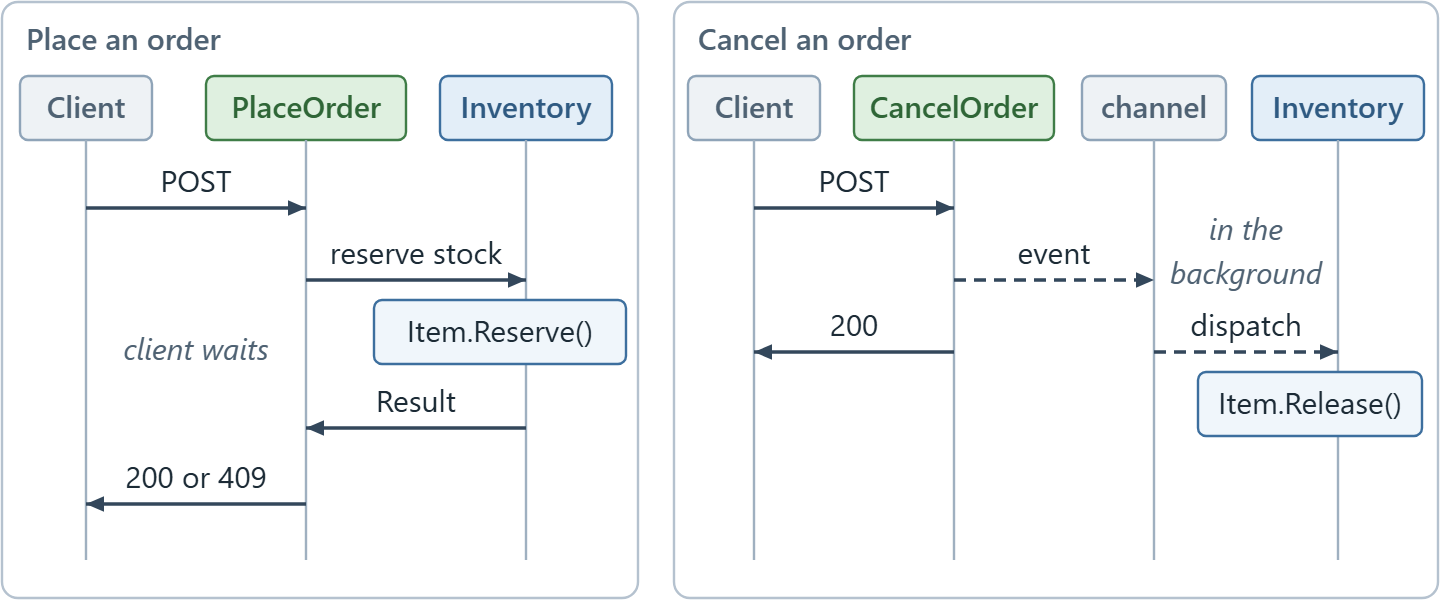
A call makes the caller wait for the answer. An event lets the caller finish first.
Follow the placed order on the left first. The client waits while Orders calls Inventory. On the right, the cancel returns without waiting for Inventory.
What happens to an event if the app crashes? It’s lost, because the channel lives in memory. And if a handler throws, the dispatcher only logs the error.
In production, we’d use the outbox pattern: we save the event in the same transaction as the order, and a background job delivers it and retries until it succeeds. Our article on Wolverine shows a library with an outbox built in.
Testing Our Modular Monolith
A contract between modules is also a seam for tests. We’re done with the running app, so let’s stop it with Ctrl+C. The tests get one more project:
dotnet new classlib -n Shop.Tests
dotnet solution add Shop.Tests
Its Class1.cs can go. Then replace Shop.Tests/Shop.Tests.csproj with:
<Project Sdk="Microsoft.NET.Sdk">

  <PropertyGroup>
    <TargetFramework>net10.0</TargetFramework>
    <ImplicitUsings>enable</ImplicitUsings>
    <Nullable>enable</Nullable>
    <IsPackable>false</IsPackable>
    <IsTestProject>true</IsTestProject>
  </PropertyGroup>

  <ItemGroup>
    <Using Include="Xunit" />
  </ItemGroup>

  <ItemGroup>
    <PackageReference Include="Microsoft.NET.Test.Sdk" Version="18.10.1" />
    <PackageReference Include="NetArchTest.Rules" Version="1.3.2" />
    <PackageReference Include="xunit.v3.mtp-off" Version="4.0.1" />
    <PackageReference Include="xunit.runner.visualstudio" Version="4.0.0" />
  </ItemGroup>

  <ItemGroup>
    <ProjectReference Include="..\Shop.Inventory\Shop.Inventory.csproj" />
    <ProjectReference Include="..\Shop.Orders\Shop.Orders.csproj" />
  </ItemGroup>

</Project>
xunit.v3.mtp-off gives us xUnit v3 without extra test runner settings, and NetArchTest.Rules checks what compiled code depends on.
Testing Each Module on Its Own
How do we test Orders without Inventory? We don’t start Inventory at all. A fake, a few lines that fulfil the contract, stands in for it. Create Shop.Tests/PlaceOrderTests.cs:
using Shop.Contracts.Inventory;
using Shop.Orders;
using Shop.Orders.Features;
using Shop.Shared;

namespace Shop.Tests;

public class PlaceOrderTests
{
    [Fact]
    public async Task HandleAsync_WhenInventoryReservesTheStock_StoresTheOrder()
    {
        var inventory = new FakeInventoryModule(
            new StockReservation(ItemId: 1, ItemName: "Mechanical keyboard", UnitPrice: 89.99m, Quantity: 2));
        var orders = new OrderStore();
        var handler = new PlaceOrder.Handler(inventory, orders);

        var result = await handler.HandleAsync(
            new PlaceOrder.Request(ItemId: 1, Quantity: 2), TestContext.Current.CancellationToken);

        Assert.True(result.IsSuccess);
        Assert.Equal(179.98m, result.Value.Total);
        Assert.NotNull(orders.Find(result.Value.OrderId));
    }

    [Fact]
    public async Task HandleAsync_WhenInventorySaysNo_StoresNothing()
    {
        var inventory = new FakeInventoryModule(
            new Error("Item.OutOfStock", "Only 2 of item 2 left, 3 requested.", ErrorType.Conflict));
        var orders = new OrderStore();
        var handler = new PlaceOrder.Handler(inventory, orders);

        var result = await handler.HandleAsync(
            new PlaceOrder.Request(ItemId: 2, Quantity: 3), TestContext.Current.CancellationToken);

        Assert.False(result.IsSuccess);
        Assert.Equal("Item.OutOfStock", result.Error!.Code);
        Assert.Null(orders.Find(1));
    }
}

internal sealed class FakeInventoryModule(Result<StockReservation> answer) : IInventoryModule
{
    public Task<Result<StockReservation>> ReserveStockAsync(
        int itemId, int quantity, CancellationToken cancellationToken = default) =>
        Task.FromResult(answer);
}
FakeInventoryModule returns whatever answer the test hands it. The first test checks that a reservation becomes an order with the right total, and the second that Orders stores nothing when Inventory says no.
The event side needs one more small fake. Create Shop.Tests/CancelOrderTests.cs:
using Shop.Contracts.Orders;
using Shop.Orders;
using Shop.Orders.Features;
using Shop.Shared;

namespace Shop.Tests;

public class CancelOrderTests
{
    [Fact]
    public async Task HandleAsync_WhenOrderIsPlaced_PublishesOrderCancelled()
    {
        var orders = new OrderStore();
        var order = orders.Add(itemId: 1, quantity: 2, total: 179.98m);
        var eventBus = new FakeEventBus();
        var handler = new CancelOrder.Handler(orders, eventBus);

        var result = await handler.HandleAsync(order.Id, TestContext.Current.CancellationToken);

        Assert.True(result.IsSuccess);
        Assert.Equal(new OrderCancelled(order.Id, ItemId: 1, Quantity: 2), Assert.Single(eventBus.Published));
    }
}

internal sealed class FakeEventBus : IEventBus
{
    public List<object> Published { get; } = [];

    public ValueTask PublishAsync<TEvent>(TEvent integrationEvent, CancellationToken cancellationToken = default)
        where TEvent : notnull
    {
        Published.Add(integrationEvent);

        return ValueTask.CompletedTask;
    }
}
Let’s run them:
dotnet test
All three pass:
Test summary: total: 3, failed: 0, succeeded: 3, skipped: 0, duration: 2.9s
Build succeeded in 4.9s
None of these tests needs the other module or a web server. To prove that the modules fit together in one host, we’d add integration tests with WebApplicationFactory, which we skip here.
Guarding the Boundaries With Architecture Tests
The compiler already guards half of every boundary. Let’s break it on purpose (and undo it afterwards) by putting this line at the top of PlaceOrder.cs:
using Shop.Inventory.Domain;
The build fails:
PlaceOrder.cs(1,12): error CS0234: The type or namespace name 'Inventory' does not exist in the namespace 'Shop' (are you missing an assembly reference?)
Orders has no reference to Shop.Inventory, so for Orders that namespace doesn’t exist.
So what are the tests for? A project reference is one command away, and internal has a back door.
Say someone adds a project reference from Orders to Inventory and puts <InternalsVisibleTo Include="Shop.Orders" /> in Shop.Inventory.csproj. Now Orders can read Inventory’s repository from a new class. This is the shortcut we want to stop, so treat it as a demonstration only:
using Shop.Inventory.Application;

namespace Shop.Orders.Features;

internal sealed class StockLevel(IItemRepository items)
{
    public async Task<int> InStockAsync(int itemId) =>
        (await items.GetByIdAsync(itemId))?.InStock ?? 0;
}
And it compiles. Would a code review catch it? Only if the reviewer knows the rule and reads the project files. An architecture test catches it on every run. Create Shop.Tests/ModuleBoundaryTests.cs:
using NetArchTest.Rules;
using Shop.Inventory;
using Shop.Orders;

namespace Shop.Tests;

public class ModuleBoundaryTests
{
    [Fact]
    public void Orders_DoesNotDependOnInventory()
    {
        var result = Types.InAssembly(typeof(OrdersModule).Assembly)
            .ShouldNot()
            .HaveDependencyOn("Shop.Inventory")
            .GetResult();

        Assert.True(result.IsSuccessful, "Offending types: " + string.Join(", ", result.FailingTypeNames ?? []));
    }

    [Fact]
    public void Inventory_DoesNotDependOnOrders()
    {
        var result = Types.InAssembly(typeof(InventoryModule).Assembly)
            .ShouldNot()
            .HaveDependencyOn("Shop.Orders")
            .GetResult();

        Assert.True(result.IsSuccessful, "Offending types: " + string.Join(", ", result.FailingTypeNames ?? []));
    }

    [Fact]
    public void InventoryDomainAndApplication_DoNotDependOnInfrastructure()
    {
        var result = Types.InAssembly(typeof(InventoryModule).Assembly)
            .That().ResideInNamespace("Shop.Inventory.Domain")
            .Or().ResideInNamespace("Shop.Inventory.Application")
            .ShouldNot()
            .HaveDependencyOn("Shop.Inventory.Infrastructure")
            .GetResult();

        Assert.True(result.IsSuccessful, "Offending types: " + string.Join(", ", result.FailingTypeNames ?? []));
    }
}
Each test loads one module’s assembly and lists what it must not depend on. HaveDependencyOn() matches a namespace and every namespace below it, which is why our contracts live under Shop.Contracts and not under the modules.
The third test checks the layers inside Inventory, which the compiler can’t guard because they’re only folders.
Let’s run the tests while the shortcut is still there:
  Shop.Tests test net10.0 failed with 1 error(s) (1.6s)
    ...\Shop.Tests\ModuleBoundaryTests.cs(17): error TESTERROR:
      Shop.Tests.ModuleBoundaryTests.Orders_DoesNotDependOnInventory (4ms): Error Message: Offending types: Shop.Orders.Features.StockLevel
...

Test summary: total: 6, failed: 1, succeeded: 5, skipped: 0, duration: 1.6s
Build failed with 1 error(s) in 3.2s
The failing test names the offending class. Undo the three changes, and all six tests pass again:
Test summary: total: 6, failed: 0, succeeded: 6, skipped: 0, duration: 1.7s
Build succeeded in 3.9s
Our guide to NetArchTest.Rules covers more of the rules we can write. The library’s last release was 1.3.2, back in May 2021, and our run above shows it working on .NET 10 regardless.
That completes our shop, and here’s how its files are laid out:
Shop.slnx
Shop.Api/
    InProcessEventBus.cs, Program.cs, Shop.Api.http
Shop.Shared/
    EventBus.cs, Result.cs, ResultExtensions.cs
Shop.Contracts/
    Inventory/IInventoryModule.cs
    Orders/OrderCancelled.cs
Shop.Inventory/
    Domain/Item.cs
    Application/IItemRepository.cs, InventoryService.cs, ReleaseStockWhenOrderCancelled.cs
    Infrastructure/InMemoryItemRepository.cs
    InventoryModule.cs
Shop.Orders/
    Features/CancelOrder.cs, PlaceOrder.cs
    Order.cs, OrderStore.cs, OrdersModule.cs
Shop.Tests/
    CancelOrderTests.cs, ModuleBoundaryTests.cs, PlaceOrderTests.cs
As we can see in our solution, the Orders and Inventory modules are completely separated, and neither project references the other. Inside, Inventory is organized by layer and Orders by feature, and neither choice leaks out.
This way, we ensure that we separate the modules in a loosely coupled manner, making it easier to switch to microservices if needed.
Microservices vs Modular Monolith
Although microservice and modular monolith applications may seem similar, the two architectures have their set of differences. While we deploy the different modules in a microservice application separately, the modules in a modular monolith are packed in a single service.
We typically use microservices where we favor scalability and isolation over simplicity and cost-effectiveness. That pays off when one business area has to scale or ship on its own schedule.
If we don’t need that yet, we’d start with a modular monolith, which draws the same boundaries on day one and keeps the option to split later.
Let’s cover the differences between microservices and modular monoliths, with the traditional monolith next to them, across different aspects such as deployment, performance, data, and scaling:
| Traditional monolith | Modular monolith | Microservices | |
|---|---|---|---|
| Deployment | One unit | One unit | One unit per service |
| What keeps business areas apart | Discipline only | Contracts, internal types and architecture tests | The network |
| A call into another area | A method call into any class | A method call through a contract: about 50 ns in our benchmark | A network request: about 90 µs to localhost in our benchmark |
| Data | One schema that every feature shares | One database, one schema per module | One database per service |
| Consistency across areas | One transaction | Transactions inside a module, events between modules | Events between services |
| Scaling | The whole app | The whole app | Each service on its own |
| Moving one area out later | Find every caller of its tables first | Swap the contract implementation and the event transport | Already separate |
| Fits best | Small apps and small teams | Growing apps with several business areas | Areas that must deploy or scale on their own |
The call times in the table are the ones we measured earlier, on one machine.
When a module does need to leave, IInventoryModule gets an implementation that calls the new service over the network, and the host swaps InProcessEventBus for a broker. Orders doesn’t change.
Clients then reach the new service through its own address. If you want to learn more about microservices, check out our article on the API gateway pattern.
Conclusion
Modular monolith applications give us the simplicity of one deployment and clear boundaries between business areas. Although they can’t completely replace traditional monolith or microservice applications, they have a clear use case that can be useful for different businesses.
We’ve built a shop with a layered Inventory module and an Orders module made of vertical slices.
Orders calls Inventory through a contract when it needs an answer and publishes an event when it doesn’t. And if one module ever reaches into the other, the architecture tests fail.
Got an existing monolith to split? Write the architecture tests first. They list every type with a dependency that already crosses a future module line.
Tested with .NET 10.0.10, xUnit v3 4.0.1 and NetArchTest.Rules 1.3.2.
