


Updated on
InvalidOperationException: Unable to resolve service for type 'X' while attempting to activate 'Y' means the dependency injection container was asked to build Y, found a constructor parameter of type X, and had no registration for X.
The full message looks like this, with the two type names filled in:
System.InvalidOperationException: Unable to resolve service for type 'MyApp.Interfaces.IUserService' while attempting to activate 'MyApp.Controllers.UserController'.
There are only two mistakes behind it. Either X was never registered, or something was registered under a different type than the one the constructor asks for. Everything below is a variation on those two.
Let’s get started.
What Does “Unable to Resolve Service for Type” Mean?
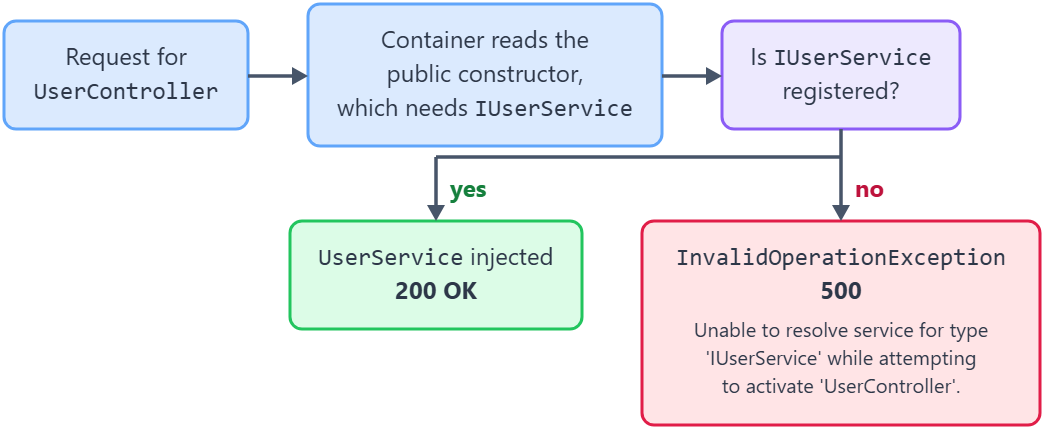
The message comes from Microsoft.Extensions.DependencyInjection, and the container throws it while it is building an object, before any code in that object runs. When ASP.NET Core needs a controller, it reads that controller’s public constructor and tries to supply every parameter from the service collection.
If one parameter’s type has no registration, activation stops there and the container reports which type it could not supply and which type it was building at the time.
The two names in the message are those two types: the first is the missing dependency, and the second is the class that asked for it. Reading them in that order tells us where to look: the second name is the file with the constructor, the first name is what belongs in Program.cs.
Only two things produce it. The dependency was never registered, or it was registered under a type that is not the one the constructor asks for.
Microsoft Learn’s .NET dependency injection guide states the rule behind that lookup: “When IServiceProvider or ActivatorUtilities resolve services, constructor injection requires a public constructor.”
The diagram below follows a request for UserController through the container, and the error comes from the branch where IUserService has no registration.
Why Is the Service Not Registered in the DI Container?
This is the common case, and the cause is one missing line. We write the interface, write its implementation and inject the interface into a controller, but we never tell the container which implementation it should hand over.
Nothing warns us while we type. The code compiles, because the compiler only checks that IUserService is a type the constructor can accept. The container is the part that has to find an actual object to pass in, and it only tries when the first request for that controller arrives.
So the failure shows up at runtime as a 500 Internal Server Error on a route that looks correct, and the real reason is written to the response body or the console.
The fix is one registration line in Program.cs, and the only decision it carries is the lifetime: AddSingleton, AddScoped or AddTransient.
In our ASP.NET Web API project, let’s consider that we have a User entity:
public class User
{
    public int Id { get; set; }
    public required string FirstName { get; set; }
    public required string LastName { get; set; }
}
In order to manipulate the User entity we create a IUserService interface with a GetUser() method:
public interface IUserService
{
    User? GetUser();
}
Then, we implement the interface and for simplicity, we just return a hardcoded User:
public class UserService : IUserService
{
    public User GetUser()
    {
        return new User
        {
            Id = 1,
            FirstName = "Code",
            LastName = "Maze"
        };
    }
}
Finally, to be able to request a user from our server, we create a UserController class that depends on IUserService and contains a GetUser() HTTP GET endpoint:
[Route("api/[controller]")]
[ApiController]
public class UserController : ControllerBase
{
    private readonly IUserService _userService;

    public UserController(IUserService userService)
    {
        _userService = userService;
    }

    [HttpGet]
    public IActionResult GetUser()
    {
        var user = _userService.GetUser();
        return Ok(user);
    }
}
Once we try to run the code and call the GET endpoint, what we would expect from it is to return a 200 OK response with the user details in the body. However, we get a 500 Internal Server Error with an error message:
System.InvalidOperationException: Unable to resolve service for type 'FixUnableToResolveServiceIssue.Interfaces.IUserService' while attempting to activate 'FixUnableToResolveServiceIssue.Controllers.UserController'.
The reason behind this error is that the UserController is requesting an implementation for the IUserService interface from the dependency injection container but we did not register the UserService nor any other implementation. Hence, the resolution of IUserService has failed and we aren’t able to create or activate the UserController.

Solution
To solve this issue we have to register the UserService implementation of the IUserService interface in the dependency injection container with the right lifetime, singleton, scoped, or transient. To do that, we need to add a single line of code in the Program.cs file:
builder.Services.AddScoped<IUserService, UserService>();
Now, if we try to call the endpoint again we will get the expected response.
Why Does Injecting the Concrete Type Cause the Error?
The second mistake is subtler, because the registration is there and the error is identical. builder.Services.AddScoped<IUserService, UserService>() registers exactly one service type: IUserService. UserService is the implementation it returns, not a second entry in the container.
So a constructor that asks for UserService asks for something that was never registered, and the message names the concrete class instead of the interface. Reading the first type name in the message is what separates the two cases: an interface name means a missing registration, a concrete class name usually means this.
The fix is to ask for the registered type. Change the parameter to IUserService and the existing registration satisfies it.
Registering the concrete type as well, with AddScoped<UserService>(), also makes the error go away, and it is the wrong fix: it creates a second, separate instance and defeats the point of coding against the interface.
Let’s update the UserController‘s constructor and change IUserService to UserService:
[Route("api/[controller]")]
[ApiController]
public class UserController: ControllerBase
{
    private readonly IUserService _userService;

    public UserController(UserService userService)
    {
        _userService = userService;
    }
}
When we call the GetUser() endpoint, we get:
System.InvalidOperationException: Unable to resolve service for type 'FixUnableToResolveServiceIssue.Services.UserService' while attempting to activate 'FixUnableToResolveServiceIssue.Controllers.UserController'.
If we look closely, we can see that we have requested the implementation UserService instead of the IUserService interface. And in our dependency injection container, we have only registered IUserService.
Solution
To solve this issue, we should replace the constructor parameter type to be of the same type as the service registered in the dependency injection container.
In our case, we replace UserService in the constructor of the UserController with the interface IUserService:
private readonly IUserService _userService;

public UserController(IUserService userService)
{
    _userService = userService;
}
Why Can the Container Not Resolve a String or an Int?
unable to resolve service for type 'system.string' while attempting to activate is the same failure with a primitive as the missing type. A constructor takes a connection string or a timeout as a plain string or int, and the container has no idea which string we meant.
The container matches on type alone. There is exactly one string type, so a registration for it would answer every string parameter in the application, which is why nobody registers one and why the message names System.String.
Configuration values belong in a typed options class instead. We bind a section of appsettings.json to a small class, register it, and inject IOptions<T>, which is a type the container can resolve unambiguously.
Keyed services are the other route when the value really is a primitive and several are in play: register each under a key and ask for it by that key.
Let’s say we have an EmailService, registered with AddScoped<EmailService>(), that takes the SMTP host as a plain string:
public class EmailService
{
    private readonly string _host;

    public EmailService(string host)
    {
        _host = host;
    }
}
When the container tries to build EmailService, it throws:
System.InvalidOperationException: Unable to resolve service for type 'System.String' while attempting to activate 'FixUnableToResolveServiceIssue.Services.EmailService'.
The container has no registration for string, so it cannot supply the host parameter and cannot build EmailService.
Solution
To solve this issue, we move the values into configuration and read them through the options pattern. First, we add an Smtp section to appsettings.json:
{
  "Smtp": {
    "Host": "smtp.example.com",
    "Port": 587
  }
}
Then, we create a class with a property for each value in the section:
public class SmtpSettings
{
    public string Host { get; set; } = string.Empty;
    public int Port { get; set; }
}
In the Program.cs file, we bind the section to that class and keep the existing EmailService registration:
builder.Services.Configure<SmtpSettings>(builder.Configuration.GetSection("Smtp"));
builder.Services.AddScoped<EmailService>();
Finally, EmailService asks for IOptions<SmtpSettings> instead of a string:
public class EmailService
{
    private readonly SmtpSettings _settings;

    public EmailService(IOptions<SmtpSettings> options)
    {
        _settings = options.Value;
    }

    public string GetServerAddress() => $"{_settings.Host}:{_settings.Port}";
}
The Configure<SmtpSettings>() call is what makes IOptions<SmtpSettings> resolvable, and options.Value holds the values bound from appsettings.json.
When a value has to stay a primitive, our article on keyed services shows how to register each one under its own key and request it with [FromKeyedServices].
Why Does the Error Name HttpClient or IHttpClientFactory?
HttpClient and IHttpClientFactory are not registered by default. A fresh ASP.NET Core Web API project does not include them, so the first constructor that asks for either one throws. The message then names a .NET framework type as the missing dependency, which makes it look like a platform bug.
The cause is an ordinary missing registration: neither type is part of the default service collection. The registration that adds both lives in a separate package that the shared framework already ships.
One call fixes both: builder.Services.AddHttpClient() registers IHttpClientFactory and makes a plain HttpClient injectable, each one created through the factory.
A typed client is the better shape when a service talks to one API. builder.Services.AddHttpClient<WeatherClient>() registers the class and hands it its own configured HttpClient, which also gives us one place to set the base address and the default headers.
Solution
For the plain case, we add one line to the Program.cs file:
builder.Services.AddHttpClient();
With that line in place, any constructor can take an IHttpClientFactory or an HttpClient.
For a typed client, we create a class that takes an HttpClient in its constructor:
public class WeatherClient(HttpClient httpClient)
{
    public Task<string> GetForecastAsync() => httpClient.GetStringAsync("forecast");
}
Then, we register it with AddHttpClient<WeatherClient>() and set its base address in the same call:
builder.Services.AddHttpClient<WeatherClient>(client =>
{
    client.BaseAddress = new Uri("https://api.example.com/");
});
Now any constructor can take a WeatherClient, and the HttpClient inside it already points at the API. Our article on IHttpClientFactory covers named clients as well as typed ones.
Which Other DI Errors Mean the Same Mistake?
The container has several messages for what is usually one mistake, and which one we see depends on when the failure happens and who asked.
In the Development environment the host validates every registration while the application starts, so a broken registration fails at startup with Some services are not able to be constructed and the real errors underneath it. Outside Development that validation is off, and the same mistake waits until a request arrives.
No service for type 'X' has been registered. is the same gap reported by GetRequiredService<X>(), which throws rather than returning null.
The lifetime messages are a different fault with a similar shape. Cannot consume scoped service 'X' from singleton 'Y'. means the registration exists but the lifetimes do not fit, and a singleton would keep a scoped object alive past its scope.
The table below maps each message to the mistake behind it.
| Message | What the container is telling us | Fix |
|---|---|---|
Unable to resolve service for type 'X' while attempting to activate 'Y'. | Y has a constructor parameter of type X, and X has no registration | Register X, or change the parameter to a type that is registered |
No service for type 'X' has been registered. | Something called GetRequiredService<X>() and no registration exists | Register X, or use GetService<X>() and handle null |
Some services are not able to be constructed | The container validated every registration at startup and at least one could not be built; the real errors are the inner exceptions | Read the inner exceptions, then fix each one as its own resolution failure |
Cannot consume scoped service 'X' from singleton 'Y'. | A singleton asked for a scoped dependency, which would outlive its scope | Make Y scoped, or resolve X from a scope created inside Y |
Cannot resolve scoped service 'X' from root provider. | A scoped service was requested from the root provider instead of a scope | Create a scope with IServiceScopeFactory and resolve inside it |
A suitable constructor for type 'X' could not be located. Ensure the type is concrete and services are registered for all parameters of a public constructor. | X is a concrete class with no public constructor, so the container has nothing to call | Make the constructor public |
Cannot instantiate implementation type 'X' for service type 'Y'. | The implementation type in the registration is itself an interface or an abstract class | Register a concrete class as the implementation of Y |
Both scope rows come down to creating a scope and resolving inside it, and our article on how to resolve a service from a scope yourself shows the CreateScope() call that does it.
Conclusion
The message names two types, and reading them in order tells us where to look: the first is the dependency the container could not supply, and the second is the class whose constructor asked for it. Either that first type was never registered, or the constructor asks for a type other than the one we registered, such as the concrete class in place of its interface. The string and HttpClient variants are the first mistake as well: a configuration value belongs in an options class, and AddHttpClient() registers the client.
Tested with .NET 10.0.10 and NUnit 4.6.1.
