


Updated on
A custom JsonConverter is a class we hand to Json.NET (Newtonsoft.Json) to take over reading or writing one type. We override WriteJson() to control the JSON that comes out, ReadJson() to control the object that goes in, and the serializer calls our code instead of its own contract for that type.
Json.NET handles most serialization and deserialization customization through attributes: ignoring a property, handling nulls, formatting data. A converter covers what attributes cannot reach, such as conditional output, a JSON shape that does not match the class, polymorphic deserialization, or a domain model we refuse to decorate with serialization attributes.
System.Text.Json has the same concept under the same name, System.Text.Json.Serialization.JsonConverter<T>, with Read() and Write() in place of ReadJson() and WriteJson(). This article is about the Newtonsoft one. For the System.Text.Json version, see polymorphic serialization with System.Text.Json.
Preparation of Data Models
To begin, let’s add some data models.
The Department enum:
public enum Department
{
    Operations, Admin, CustomerCare
}
The Address record:
public record class Address(string Street, string City);
And finally our primary object model, the Contact record:
public record class Contact(string Name, Department Department, string Phone, Address Address);
We aim to implement a custom converter for the serialization/deserialization of Contact.
The converter base classes come from the Newtonsoft.Json NuGet package, so let’s add it to our project:
dotnet add package Newtonsoft.Json
Every file that holds a converter or a JsonConvert call below also needs using Newtonsoft.Json;, and the files that use JObject need using Newtonsoft.Json.Linq; too.
What Must a Custom JsonConverter Implement?
The simplest way of creating a custom converter is to extend the inbuilt JsonConverter:
public class ContactConverter : JsonConverter
{
    public override bool CanConvert(Type objectType)
    {
        return objectType == typeof(Contact);
    }

    public override void WriteJson(JsonWriter writer, object? value, JsonSerializer serializer)
    {
        // omitted for brevity
    }

    public override object? ReadJson(JsonReader reader, Type objectType, object? existingValue,
        JsonSerializer serializer)
    {
        throw new NotImplementedException();
    }
}
A custom converter is a class deriving from Newtonsoft.Json.JsonConverter, and the serializer reaches it through five members.
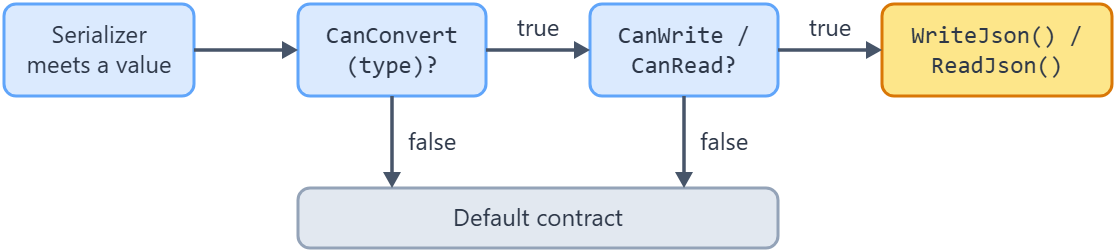
CanConvert(Type objectType) answers whether this converter handles that type. The serializer asks before it handles each value, and a false leaves that value to the default contract. A converter attached with an attribute skips this check.
WriteJson(JsonWriter writer, object? value, JsonSerializer serializer) holds the serialization logic. It writes tokens straight to the writer: WriteStartObject(), then a WritePropertyName() and WriteValue() pair for each property, then WriteEndObject().
ReadJson() holds the deserialization logic and returns the object it built from the reader.
CanRead and CanWrite decide which of those two the serializer is allowed to call. Both are true on the base class, so a new converter reads and writes until we say otherwise.
Setting CanRead to false makes the converter serialize-only. ReadJson() is then never called, even though it is abstract and still has to be declared.
For every value it meets, the serializer runs the same two checks before it calls our code:
Make a Converter Write-Only or Read-Only
Additionally, we can configure the converter for only serialization or only deserialization roles:
public class ContactConverter : JsonConverter
{
    // omitted for brevity

    public override object? ReadJson(JsonReader reader, Type objectType, object? existingValue,
        JsonSerializer serializer)
    {
        throw new NotImplementedException();
    }

    public override bool CanWrite => true;

    public override bool CanRead => false;
}
CanWrite and CanRead are both true on the base class, so the override that does the work here is CanRead => false. It tells the serializer to ignore this converter during deserialization, which is why ReadJson() never runs even though it is abstract and has to be declared. The CanWrite => true override changes nothing and is there to make the pair readable.
Custom Serialization by Overriding WriteJson
Now, let’s consider we have a list of contacts:
public class DataSource
{
    public static List<Contact> GetContacts()
    {
        return new List<Contact>()
        {
            new ("John", Department.Admin, "+1234", new("Street 1","City 1")),
            new ("Jane", Department.CustomerCare, "+2341", new("Street 2", "City 2")),
            new ("Mike", Department.Operations, "+3421", new("Street 3", "City 3"))
        };
    }
}
And we only want Name and Department of contacts in the serialized output. We can define this logic inside WriteJson method:
public override void WriteJson(JsonWriter writer, object? value, JsonSerializer serializer)
{
    if (value is not Contact contact)
        return;

    writer.WriteStartObject();

    writer.WritePropertyName(nameof(contact.Name));
    writer.WriteValue(contact.Name);

    writer.WritePropertyName(nameof(contact.Department));
    writer.WriteValue(contact.Department);

    writer.WriteEndObject();
}
Since our converter only recognizes Contact object, we cast the value to a Contact instance first.

Talking about serialization, we first write the starting node of JSON object ( “{“). Then we write the name of Name property followed by its value. Similarly, we write the name and value of Department property. Finally, we wrap the content by writing the end node (“}”).
Using this custom converter is as simple as passing an argument to the usual serialization routine:
var contacts = DataSource.GetContacts();

var json = JsonConvert.SerializeObject(contacts, new ContactConverter());
Like always we call JsonConvert.SerializeObject which rightly produces the desired output:
[{"Name":"John","Department":1},{"Name":"Jane","Department":2},{"Name":"Mike","Department":0}]
How Does JsonConverter<T> Differ From JsonConverter?
JsonConverter<T> is the generic base class. It saves us a cast, and it also decides for us which types the converter handles.
Its CanConvert() is written for us and it is sealed, so we cannot override it. The implementation is one line, typeof(T).IsAssignableFrom(objectType), which means the converter claims T and every type that derives from T. A JsonConverter<Contact> therefore also handles SuperContact and MasterContact, and that is what lets one converter serve a whole model hierarchy.
WriteJson() and ReadJson() arrive strongly typed. The signature is WriteJson(JsonWriter, T?, JsonSerializer) rather than object?, and the base class does the type check for us, throwing a JsonSerializationException when the value is not a T.
ReadJson() also gains a bool hasExistingValue parameter, which tells us whether existingValue is a real instance we are populating or just default.
What we give up is the conditional dispatch. A non-generic converter can inspect the type inside CanConvert() and decide case by case, which is the reason to keep using it.
For a pre-defined model like ours, the generic converter is the more convenient choice:
public class ImprovedContactConverter : JsonConverter<Contact>
{
    public override void WriteJson(JsonWriter writer, Contact? contact, JsonSerializer serializer)
    {
        // omitted for brevity
    }

    public override Contact? ReadJson(JsonReader reader, Type objectType, Contact? existingValue,
        bool hasExistingValue, JsonSerializer serializer)
    {
        throw new NotImplementedException();
    }

    public override bool CanWrite => true;

    public override bool CanRead => false;
}
Custom Serialization Using JObject
So far we have used low-level serialization using the writer (JsonWriter) parameter. While this performs faster, this is not as convenient as it would be with JObject:
public class SmartContactConverter : JsonConverter<Contact>
{
    public override void WriteJson(JsonWriter writer, Contact? contact, JsonSerializer serializer)
    {
        if (contact is null) return;

        JObject jo = new();
        jo[nameof(contact.Name)] = contact.Name;
        jo[nameof(contact.Department)] = contact.Department.ToString();

        if (contact.Department == Department.CustomerCare)
        {
            jo[nameof(contact.Phone)] = contact.Phone;
        }
        jo[nameof(contact.Address)] = JToken.FromObject(contact.Address, serializer);

        jo.WriteTo(writer);
    }

    // omitted for brevity
}
In this smart version of the converter, we first construct a JObject from all our desired properties. We simply populate it with key-value pairs, thanks to JObject‘s dictionary implementation.
As a plus, we add some extra customizations here. We write the Department enum as a string. Also, we conditionally expose the Phone field only for CustomerCare contacts. And finally, we expose the complex Address property just by turning it into a JToken instance.
Once we’re done filling up the JObject instance, we simply write it to the writer. Using JObject makes the code more concise and readable but slower than the raw JsonWriter version.
As we examine the serialized output of the same contacts list using this converter:
[
  {
    "Name": "John",
    "Department": "Admin",
    "Address": {
      "Street": "Street 1",
      "City": "City 1"
    }
  },
  {
    "Name": "Jane",
    "Department": "CustomerCare",
    "Phone": "+2341",
    "Address": {
      "Street": "Street 2",
      "City": "City 2"
    }
  },
  {
    "Name": "Mike",
    "Department": "Operations",
    "Address": {
      "Street": "Street 3",
      "City": "City 3"
    }
  }
]
We see all our desired customizations are in place!
How Do We Customize Deserialization With ReadJson?
ReadJson() receives a positioned JsonReader and returns the object we build from it.
The low-level route is to pull tokens off the reader one at a time, which is fastest and awkward. The practical route is JObject.Load(reader), which materializes the current object into a JObject tree we can index by property name.
That tree is what makes polymorphic deserialization practical without metadata. We look for a property that only one subtype has, then call ToObject<T>() for the subtype it identifies. A Mobile property marks a SuperContact, an Email property marks a MasterContact, and a payload with neither is the base Contact.
Here the discriminator comes from domain knowledge. TypeNameHandling and its $type property do the same job generically, but both ends of the wire have to agree on it, and it writes framework metadata into payloads that other systems read.
Let’s consider we have two derived variants of Contact. The SuperContact which provides an extra Mobile information:
public record class SuperContact(
    string Name,
    Department Department,
    string Phone,
    Address Address,
    string Mobile) : Contact(Name, Department, Phone, Address);
And the MasterContact which additionally shares Email address:
public record class MasterContact(
    string Name,
    Department Department,
    string Phone,
    Address Address,
    string Email) : Contact(Name, Department, Phone, Address);
In polymorphic deserialization, it’s necessary to have a discriminator element in the incoming JSON to distinguish between different object models. Typically this is done by means of $type metadata and TypeNameHandling settings at both producer and consumer ends.
A more practical approach would be to utilize the domain knowledge to distinguish between the objects from a JSON graph and deserialize accordingly in a custom converter. In our case, Mobile node of SuperContact and Email node of MasterContact serve the role of discriminators.
Polymorphic Deserialization Using Custom JsonConverter
So, let’s update our ReadJson implementation to read different variants of contacts:
public override Contact? ReadJson(JsonReader reader, Type objectType, Contact? existingValue,
    bool hasExistingValue, JsonSerializer serializer)
{
    JObject jo = JObject.Load(reader);

    if (jo[nameof(SuperContact.Mobile)] is not null)
    {
        var superContact = jo.ToObject<SuperContact>();
        return superContact;
    }

    if (jo[nameof(MasterContact.Email)] is not null)
    {
        var masterContact = jo.ToObject<MasterContact>();
        return masterContact;
    }

    return jo.ToObject<Contact>();
}
We start by loading the JSON tree into a JObject instance. From there, we can look for our target discriminator properties. If we find the Mobile node in the tree, we are certain that it’s representing a SuperContact object. In that case, we convert the JObject to SuperContact by invoking ToObject<SuperContact>(). Similarly, we deserialize to MasterContact when Email node exists. And, when none of the above nodes exists, we simply convert to the base Contact instance. That’s it.
The converter now reads as well as writes. CanRead is already true on the base class, so SmartContactConverter does not override it, unlike the two earlier converters, which set it to false.
Verify Deserialization of Polymorphic JSON
Our converter is now ready for polymorphic contact deserialization. Let’s first add a sample JSON in DataSource class:
public static string GetJsonOfMultiVariantContacts()
        => @"[
          {
            ""Name"": ""John"",
            ""Department"": ""Admin"",
            ""Address"": {
              ""Street"": ""Street 1"",
              ""City"": ""City 1""
            }
          },
          {
            ""Name"": ""Jane"",
            ""Department"": ""CustomerCare"",
            ""Phone"": ""+2341"",
            ""Address"": {
              ""Street"": ""Street 2"",
              ""City"": ""City 2""
            },
            ""Mobile"": ""0123456""
          },
          {
            ""Name"": ""Mike"",
            ""Department"": ""Operations"",
            ""Address"": {
              ""Street"": ""Street 3"",
              ""City"": ""City 3""
            },
            ""Email"": ""[email protected]""
          }
        ]";
Once we deserialize this list of multi-variant contacts in an xUnit test:
var json = DataSource.GetJsonOfMultiVariantContacts();

var contacts = JsonConvert.DeserializeObject<List<Contact>>(json, new SmartContactConverter())!;

Assert.IsType<Contact>(contacts[0]);

Assert.IsType<SuperContact>(contacts[1]);
Assert.Equal("0123456", ((SuperContact)contacts[1]).Mobile);

Assert.IsType<MasterContact>(contacts[2]);
Assert.Equal("[email protected]", ((MasterContact)contacts[2]).Email);
We see the sample JSON rightly turns into a list containing a Contact, a SuperContact, and a MasterContact records.
How Do We Register a Custom JsonConverter?
Passing a converter as an argument to SerializeObject() works, but only for that one call. There are four other common registration points, and an application normally uses one of them.
JsonSerializerSettings.Converters is an IList<JsonConverter>. Add the converter once, pass those settings wherever we serialize, and every call in that scope uses it.
JsonConvert.DefaultSettings is a static Func<JsonSerializerSettings>. Assign it at startup and every JsonConvert call in the process picks it up, even a call that brings its own settings.
[JsonConverter(typeof(ContactConverter))] attaches the converter to the type itself. The same attribute works on a single property or field when only one member needs the treatment.
In ASP.NET Core, AddControllers().AddNewtonsoftJson(), from the Microsoft.AspNetCore.Mvc.NewtonsoftJson package, exposes the same settings object for model binding and responses.
Global registration (the process default, or an attribute on the type) changes what a polymorphic converter does, because a globally registered converter is visible to the ToObject<T>() call inside its own ReadJson().
Here is how each registration point looks in code, and how far it reaches:
| Registration point | How it looks | Scope |
|---|---|---|
| Per call | JsonConvert.SerializeObject(value, new ContactConverter()) | That one call |
| Settings object | new JsonSerializerSettings { Converters = { new ContactConverter() } } | Every call given those settings |
| Process default | JsonConvert.DefaultSettings = () => new JsonSerializerSettings { Converters = { new ContactConverter() } }; | Every JsonConvert call, even one with settings of its own |
| On the type | [JsonConverter(typeof(ContactConverter))] above Contact | Everywhere that type is serialized |
| On one member | [JsonConverter(typeof(ContactConverter))] above a property or field | That member only |
| ASP.NET Core | builder.Services.AddControllers().AddNewtonsoftJson(o => o.SerializerSettings.Converters.Add(new ContactConverter())); | Model binding and responses |
The two attribute rows come from one class. The Json.NET documentation for JsonConverterAttribute describes it as: “Instructs the JsonSerializer to use the specified JsonConverter when serializing the member or class.”
Registering SmartContactConverter globally breaks it. JObject.ToObject<SuperContact>() with no serializer argument builds a default serializer, and a default serializer honors JsonConvert.DefaultSettings and any [JsonConverter] attribute on the type. Because JsonConverter<Contact>.CanConvert() is typeof(Contact).IsAssignableFrom(objectType), and the attribute is inherited, the converter claims Contact and SuperContact alike, so ReadJson() calls itself until the stack runs out. Keep this converter off the process-default and type rows of the table.
For the ASP.NET Core row, our article on setting JSON serialization options globally covers the Newtonsoft.Json setup in more depth. Exceptions are another type the default contract handles badly, and a converter that serializes exceptions lists the same choices: an attribute on the type, a registration in ASP.NET Core, or a converter passed in the options of one call.
Conclusion
In this article, we have learned how to create a custom JsonConverter in Json.NET. We have also explored how such converters can be handy to achieve polymorphic deserialization.
Tested with .NET 10.0.10 and Newtonsoft.Json 13.0.4.
