


Updated on
IAsyncEnumerable<T> is what a C# method returns when it produces a sequence whose items arrive one at a time, and getting each one takes an await. The caller reads it with await foreach and sees each item the moment it is ready, instead of waiting for the whole sequence.
That combination was impossible before C# 8. A method returning IEnumerable<T> could yield return lazily but could not await. A method returning Task<IEnumerable<T>> could await but had to finish the whole collection first. An async IAsyncEnumerable<T> method does both.
What Is IAsyncEnumerable in C#?
IAsyncEnumerable<T> is the interface a method returns when it produces a sequence whose items arrive one at a time, and getting each item takes an await. C# 8 and .NET Core 3.0 introduced it, and the feature built on it is called async streams.
It combines two things that could not be combined before. A method returning IEnumerable<T> can yield return items lazily, but it cannot await anything inside. A method returning Task<IEnumerable<T>> can await freely, but the caller gets nothing until the entire collection is built.
An async IAsyncEnumerable<T> method does both. It awaits between items and yields each one as soon as it has it.
The interface declares one method, GetAsyncEnumerator(). That enumerator exposes MoveNextAsync(), which returns a ValueTask<bool> rather than a bool, and awaiting it once per item is what await foreach compiles down to.
Three shapes of work fit it: paged responses from an API, rows arriving from a database cursor, and readings pushed from a device or a socket.
Why Does async Task<IEnumerable<T>> Not Stream?
The best way to understand the advantages of IAsyncEnumerable<T> is to take a look at how we would implement a similar functionality before its introduction. Consider the scenario that we mentioned in the previous section where we have an async method that queries a data store or API for some data. Let’s assume that the method returns Task<IEnumerable<T>> and has this signature:
public async Task<IEnumerable<int>> GetAllItems()
Typically, in these types of methods, we perform some data access operations asynchronously. But to return the data, we will have to wait for all the data fetching operations to complete. This was a limitation of using enumerable types in async methods.
The problem with this approach will become more evident if we need to make multiple asynchronous calls for obtaining the data. For instance, our database or API could be returning data in pages, or each data point could be arriving asynchronously from various IoT sensors. In all these cases, we can return data only once we fetch the complete data.
Async IEnumerable Example
Let’s try to simulate such a scenario where we need to wait for multiple data points to come through using a C# console application, with this code in its Program.cs file:
Console.WriteLine($"{DateTime.Now.ToLongTimeString()}: Start");

foreach (var item in await FetchItems())
{
    Console.WriteLine($"{DateTime.Now.ToLongTimeString()}: {item}");
}

Console.WriteLine($"{DateTime.Now.ToLongTimeString()}: End");

static async Task<IEnumerable<int>> FetchItems()
{
    List<int> Items = new List<int>();
    for (int i = 1; i <= 10; i++)
    {
        await Task.Delay(1000);
        Items.Add(i);
    }

    return Items;
}
In this example, the FetchItems() method simulates a scenario where we fetch each data point separately, all of which could take some time to arrive. For implementing this, we have first created a list and then added each data point to it as it becomes available. Finally, once the complete data is available, we return the list.
In the top-level statements, we await the FetchItems() method, loop through its result and print it. Additionally, we are capturing the timestamp to identify when each of the data points becomes available.
Let’s run this application and observe its behavior:
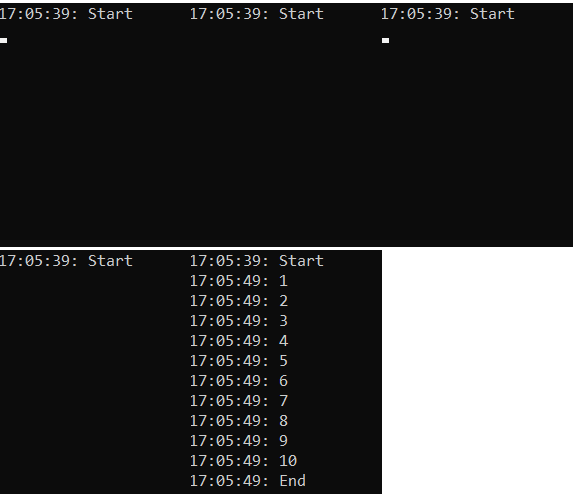
Here we see that once the application starts, it waits for 10 seconds without any data, till the complete data is available. Then, all of a sudden we can see the entire data points returned together.
The Limitation
This approach is not going to be thread blocking, because it’s still async. But we don’t get the data as soon as it arrives. Instead, we have to wait till the complete data arrives. So even though we are using IEnumerable<T> type here, the behavior is more like a List<T>. If you want a refresher on what IEnumerable is and what it gives us, we have a separate article on it.
This type of implementation is quite inefficient, especially with larger datasets. Imagine each async call to fetch the data takes a long time and there are a large number of data points. This is going to take a long time to get the data and the caller needs to wait till complete data is available.
So how do we improve this? Let’s explore the various options.
How Does yield return Work Without async?
What we ideally want is to be able to use the yield keyword to return data as we receive it so that the caller can process it immediately. The yield keyword in C# turns a method into an iterator that returns each element to the caller, one at a time.
Before .NET Core 3.0, we were able to use yield only with synchronous code. With synchronous code, a method that returns IEnumerable<T> can use the yield return statement to return each piece of data to the caller as it is returned from the data source.
This version blocks the thread while it waits for each item, so we use it only to show how yield return behaves. To see this in action, let’s modify the above example to use yield return:
Console.WriteLine($"{DateTime.Now.ToLongTimeString()}: Start");

foreach (var item in FetchItems())
{
    Console.WriteLine($"{DateTime.Now.ToLongTimeString()}: {item}");
}

Console.WriteLine($"{DateTime.Now.ToLongTimeString()}: End");

static IEnumerable<int> FetchItems()
{
    for (int i = 1; i <= 10; i++)
    {
        Thread.Sleep(1000);
        yield return i;
    }
}
Great!
Notice that the FetchItems() method is now synchronous and cannot be awaited. Such a method can also stop early with the yield break statement, which we cover separately.
Let’s run this application and see the results:
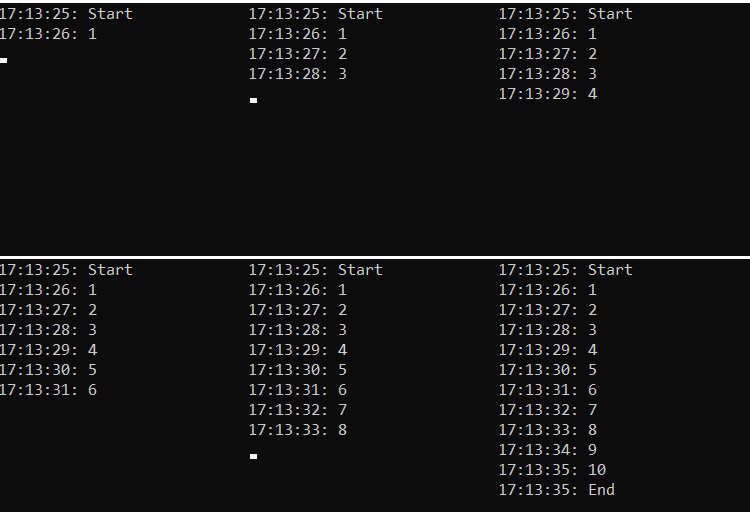
This time we can see that using yield, we can get each data point as soon as it arrives without having to wait for the complete data. This is good!

However, doing so means the FetchItems() method is now synchronous and even if the data fetch operation is async, it will behave as a blocking call and we don’t get the advantages of fetching data asynchronously. So this is not a good approach as it is not going to scale.
The compiler will not let us fix it either. Add await to the method and it stops compiling with CS4032: “The ‘await’ operator can only be used within an async method. Consider marking this method with the ‘async’ modifier and changing its return type to ‘Task<IEnumerable<int>>'”, and taking that advice as far as the async modifier alone gives CS1983: “The return type of an async method must be void, Task, Task<T>, a task-like type, IAsyncEnumerable<T>, or IAsyncEnumerator<T>”. The first message points back to Task<IEnumerable<int>>, the buffered version we started with, and the second already lists IAsyncEnumerable<T> among the valid return types.
Let’s see how we can solve this.
How Do We Write an async IAsyncEnumerable Method?
So, the solution is to use yield return with asynchronous methods. But that wasn’t possible until .NET Core 3.0 and C# 8 introducing the IAsyncEnumerable<T>.
IAsyncEnumerable<T> exposes an enumerator that has a MoveNextAsync() method that can be awaited. This means a method that produces this result can make asynchronous calls in between yielding results.
That said, let’s modify the FetchItems() method to return IAsyncEnumerable<int> instead of IEnumerable<int> and yield return to emit data:
static async IAsyncEnumerable<int> FetchItems()
{
    for (int i = 1; i <= 10; i++)
    {
        await Task.Delay(1000);
        yield return i;
    }
}
Cool! This method can now yield data asynchronously.
Remember that, to consume this method, we need to make some modifications to the calling code as well so that it can support this implementation.
How Do We Consume an IAsyncEnumerable With await foreach?
To consume the IAsyncEnumerable<T> results, we need to use the new await foreach() syntax, which is also a new feature available in C# 8. Let’s see how to do that in our top-level statements:
Console.WriteLine($"{DateTime.Now.ToLongTimeString()}: Start");

await foreach (var item in FetchItems())
{
    Console.WriteLine($"{DateTime.Now.ToLongTimeString()}: {item}");
}

Console.WriteLine($"{DateTime.Now.ToLongTimeString()}: End");
This will await the foreach loop itself rather than awaiting the FetchItems() method call within the foreach loop.
Let’s run this application and see the result:
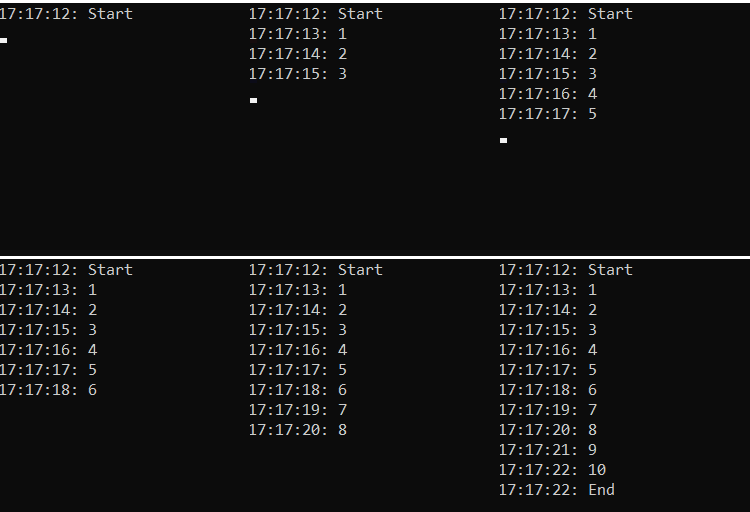
This time again we can see that instead of waiting for 10 seconds to get full data and then returning all data at once, we get each data point as it arrives. On top of this, we get the advantage that this call is not a blocking one and has the advantages of asynchronous execution.
Cool!
So far we have learned how to use IAsyncEnumerable<T> with yield in a C# console application. Next, we’ll see how we can use this in an ASP.NET Core application.
How Do We Stream IAsyncEnumerable From an ASP.NET Core API?
We return the IAsyncEnumerable<T> straight from the action. We do not wrap it in a Task<IEnumerable<T>> and we do not call ToListAsync() first, because either one buffers the whole sequence before a single byte reaches the client.
Whether the response then actually streams depends on the output formatter, and Microsoft Learn states the rule: “When using System.Text.Json formatter, MVC relies on the support that System.Text.Json added to stream the result”, while “When using Newtonsoft.Json or with XML-based formatters the result is buffered”.
System.Text.Json is the default formatter, so a default project streams and a project that added Newtonsoft.Json for its other conveniences silently stopped streaming.
The client still receives one ordinary JSON array. It simply arrives in pieces. A client that needs each item delivered as a separate event wants server-sent events instead, which is a different response shape built from the same IAsyncEnumerable<T>.
Both quotations come from the controller action return types page on Microsoft Learn. For the event-per-item shape, see our article on server-sent events in ASP.NET Core.
IAsyncEnumerable in ASP.NET Core Example
Let’s implement an API controller that returns IAsyncEnumerable:
using Microsoft.AspNetCore.Mvc;

[Route("api/[controller]")]
[ApiController]
public class ValuesController : ControllerBase
{
    [HttpGet]
    public IAsyncEnumerable<int> Get()
    {
        return FetchItems();
    }

    static async IAsyncEnumerable<int> FetchItems()
    {
        for (int i = 1; i <= 10; i++)
        {
            await Task.Delay(1000);
            yield return i;
        }
    }
}
In this example, we are using the same FetchItems() method that we implemented earlier which returns an async stream of data. From the API endpoint, we just return the async stream as such. Also, notice that the Get action method returns IAsyncEnumerable type.
Let’s run the application and observe its behavior:
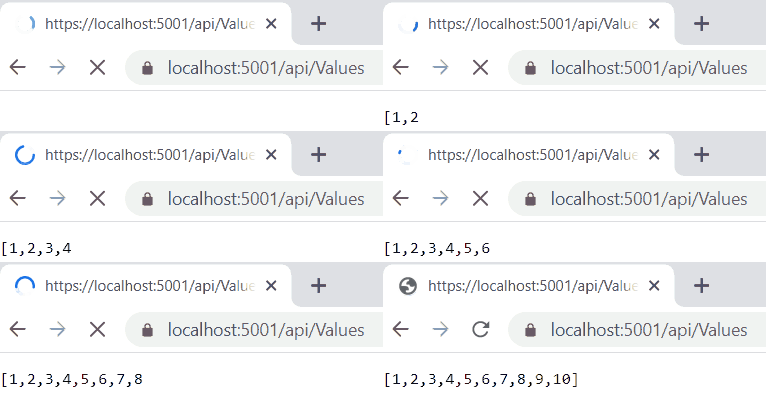
As we can see, the API endpoint returns an async stream of data. This is a great feature because we can now easily build APIs which can stream data from a data source.
We have learned how we can use IAsyncEnumerable with the yield statement in ASP.NET Core.
Streaming From a Minimal API Endpoint
With minimal APIs, the same sequence maps straight to an endpoint in Program.cs:
app.MapGet("/items", () => FetchItems());

static async IAsyncEnumerable<int> FetchItems()
{
    for (var i = 1; i <= 10; i++)
    {
        await Task.Delay(1000);
        yield return i;
    }
}
The endpoint returns the sequence with no wrapper, and the response is the same streamed JSON array the controller produced.
Can We Stream Database Rows With IAsyncEnumerable?
Yes, and with EF Core the method is AsAsyncEnumerable(). It has been an extension on IQueryable<T> since EF Core 3.0, and its documented job is to return “an IAsyncEnumerable<T> which can be enumerated asynchronously”.
The same query can run two ways. ToListAsync() runs it, reads every row into a list, and returns once the list is complete. AsAsyncEnumerable() opens the reader and hands rows over as await foreach pulls them, so the first row reaches our code before the last one has left the server.
Lists win for small result sets a page renders in one go. Streaming wins when the result set is large, when each row is processed and discarded, or when the rows feed an HTTP response.
The enumeration holds the DbContext and its connection open until it finishes, and EF Core documents one rule for that context: “Multiple active operations on the same context instance are not supported”. Whether a second call made inside the await foreach loop actually throws is up to the provider.
Both quotations come from the AsAsyncEnumerable reference on Microsoft Learn.
EF Core Example
Let’s look at an example of fetching items from a database using EF Core. Our sample stores them in SQLite through the Microsoft.EntityFrameworkCore.Sqlite package, so it runs without a database server. The Item entity is a plain class:
public class Item
{
    public int Id { get; set; }
    public string Name { get; set; } = string.Empty;
}
And the ItemContext exposes the items as a DbSet<Item>:
using Microsoft.EntityFrameworkCore;

public class ItemContext(DbContextOptions<ItemContext> options) : DbContext(options)
{
    public DbSet<Item> Items => Set<Item>();
}
We register it in Program.cs with AddDbContext<ItemContext>() and UseSqlite(), and the sample creates the database at startup with EnsureCreated() and seeds it with three items. The controller then returns the query as an async stream:
using Microsoft.AspNetCore.Mvc;
using Microsoft.EntityFrameworkCore;

[Route("api/[controller]")]
[ApiController]
public class ItemsController : ControllerBase
{
    private readonly ItemContext _context;

    public ItemsController(ItemContext context)
    {
        _context = context ?? throw new ArgumentNullException(nameof(context));
    }

    [HttpGet]
    public IAsyncEnumerable<Item> GetItems() =>
        _context.Items.AsNoTracking().AsAsyncEnumerable();
}
GetItems() hands the query to MVC without awaiting it, so the rows are serialized as EF Core reads them instead of being loaded into a list first. Outside a controller, we consume the same query with await foreach, the way we consumed FetchItems() in the console application.
The AsNoTracking() call matters when we stream. A tracking query keeps every entity it returns in the context’s change tracker, so all the rows would stay in memory until the request ends. A no-tracking query keeps none of them.
Cosmos DB Example
IAsyncEnumerable can also be a good choice while dealing with a database that supports returning data in parts and if we want to stream each part of the data as we receive it. For example, Azure Cosmos DB supports this behavior while we are fetching multiple records from the database using the iterator that GetItemQueryIterator() returns and its ReadNextAsync() method.
We have explained how to work with Azure Cosmos DB in the Building APIs that Talks with Azure Cosmos DB section of the Azure Cosmos DB with ASP.NET Core Web API article. In the GetMultipleAsync() method inside the CosmosDbService class of this example, we are getting data in parts using the ReadNextAsync() method of that iterator and we add each part of data to a List and finally return it. Replacing the List with IAsyncEnumerable<T> can be a good choice in these types of scenarios as it provides us an option to return part of data as we receive it rather than waiting for the complete data to arrive.
How Do We Run LINQ Over an IAsyncEnumerable?
.NET 10 added the System.Linq.AsyncEnumerable class, so Where, Select, Take and the rest of LINQ work on an IAsyncEnumerable<T> with nothing to install. Before .NET 10 that took the community System.Linq.Async package.
The operators come in two shapes. Deferred ones such as Where and Select return another IAsyncEnumerable<T> and run nothing until something enumerates the result. Terminal ones carry an Async suffix, return a ValueTask, and enumerate the sequence to produce their value: CountAsync, SumAsync, FirstAsync, ToListAsync.
Upgrading a project that already referenced System.Linq.Async takes one edit. Microsoft’s breaking-change note says to “remove that package reference or upgrade to version 7.0.0”, because both libraries define the same extension methods and the compiler cannot pick one.
The operators read like the ones we already use on IEnumerable<T>, and a chain of them enumerates the source once, lazily.
AsyncEnumerable.Empty<T>() gives us an empty async sequence, which is the tidy answer when a method has nothing to yield.
Here are some of the operators, grouped by what they do:
| To do this | Call | It returns |
|---|---|---|
| Filter | Where | IAsyncEnumerable<T> |
| Project | Select, SelectMany | IAsyncEnumerable<TResult> |
| Skip or take a range | Skip, Take, SkipWhile, TakeWhile | IAsyncEnumerable<T> |
| Remove duplicates | Distinct, DistinctBy | IAsyncEnumerable<T> |
| Order | OrderBy, OrderByDescending, ThenBy | IOrderedAsyncEnumerable<T> |
| Combine two sequences | Concat, Union, Intersect, Except | IAsyncEnumerable<T> |
| Cast or filter by type | Cast, OfType | IAsyncEnumerable<TResult> |
| Count | CountAsync | ValueTask<int> |
| Aggregate | SumAsync, AverageAsync, MinAsync, MaxAsync, AggregateAsync | ValueTask<T>, except SumAsync and AverageAsync, which return a ValueTask of the numeric type (AverageAsync on an int sequence gives ValueTask<double>), and AggregateAsync with a seed, which returns a ValueTask of the seed's type or of its result selector's type |
| Take a single item | FirstAsync, LastAsync, SingleAsync, ElementAtAsync | ValueTask<T> |
| Materialize the sequence | ToListAsync, ToArrayAsync, ToDictionaryAsync, ToHashSetAsync | ValueTask<collection> |
Renames came with the move into the BCL: SelectAwait, for example, is gone, and Select takes the async selector instead. The breaking-change note for .NET 10 has the details. To turn a whole stream into a list in one call, see how to convert an IAsyncEnumerable to a List.
Conclusion
In this article, we have learned Async Streams which is a cool feature that came with .NET Core 3.0 and C# 8.
We have discussed the following topics:
- An introduction to IAsyncEnumerable
- The limitations of async Task<IEnumerable<T>>
- Solving the problem using IAsyncEnumerable<T> with yield
- The support of IAsyncEnumerable<T> in ASP.NET Core controllers and minimal APIs
- Using IAsyncEnumerable<T> with databases
- Running LINQ over IAsyncEnumerable<T> in .NET 10
Until the next one.
All the best.
Tested with .NET 10.0.10 (SDK 10.0.302) and EF Core 10.0.12.
