


Updated on
HttpClient is the HTTP client built into .NET. RestSharp is a NuGet package that wraps it. That relationship settles most of the question of speed. RestSharp calls HttpClient underneath, so the two cannot differ by much: in our runs, the average call spent 44 ms or more on the network and about a tenth of a millisecond inside either library.
They differ in what we write and what we allocate. RestSharp gives us a RestClient, a RestRequest and built-in authenticators. HttpClient gives us a smaller API and fewer objects per call.
This article measures both, then explains why the measurement comes out the way it does. For a new project we recommend starting with HttpClient, and RestSharp wins when its authenticators and parameter handling save enough code to earn the dependency.
What Is HttpClient in C#?
HttpClient is the class .NET gives us for sending HTTP requests and reading the responses. It lives in System.Net.Http and ships with the framework, so there is nothing to install.
One instance is meant to serve the whole application. Microsoft’s own guidance is that it is “intended to be instantiated once per application, rather than per-use”, because the instance owns a pool of connections and reuses them across requests.
Creating a new one per request is the classic mistake. Each instance opens its own connections, and under load the available sockets run out, which surfaces as a SocketException.
There are two supported answers. Hold one shared instance and set SocketsHttpHandler.PooledConnectionLifetime, so connections are recycled often enough to notice a DNS change. Or use IHttpClientFactory, which hands out clients whose handlers are pooled and rotated for us.
The class carries no serializer of its own. The JSON helpers live in System.Net.Http.Json.
That quote is the code comment in the example on the HttpClient class reference, whose remarks also describe both answers. For a longer walk through the class itself, see our HttpClient with ASP.NET Core tutorial.
What Is RestSharp in C#?
RestSharp is an open-source HTTP client library for .NET, published by the .NET Foundation and installed from NuGet. It exists to make calling a REST API shorter than calling it by hand.
The type we actually hold is RestClient. A RestClient carries the base address and the settings, a RestRequest describes one call, and the client executes it.
Two shapes of call exist and they behave differently. GetAsync<T>(request) deserializes straight to T and ignores a 404: it throws when the request never completed, the status is any other non-success code, or the body does not fit T, so a 404 whose body is an empty JSON object comes back as a T full of default values. ExecuteGetAsync<T>(request) returns a RestResponse<T> and, by default, never throws, leaving IsSuccessful, StatusCode and ErrorException for us to inspect.
Synchronous forms exist too. Get<T>, Post<T> and their siblings run the asynchronous call on an internal synchronization context and block until it finishes.
RestClient implements IDisposable and owns an HttpClient, so it inherits the same lifetime rules.
We cover the library on its own in our guide to consuming APIs with RestSharp, and the authenticators in setting an authenticator on a RestClient.
How Do HttpClient and RestSharp Compare on Speed and Memory?
Over a network, the libraries themselves run at the same speed. Every benchmark here calls a public API over the internet, so each result is one network round trip plus a fraction of a millisecond of library work. The round trip is tens or hundreds of milliseconds, and it varies between runs by more than the libraries differ. The one gap we measured, on GET, comes from a RestSharp default that asks for a compressed response.
Memory is the part the benchmark can see, because allocations depend far less on the network than timings do. RestSharp allocates several times more per call than HttpClient does, and the reason is structural: it builds a RestRequest, maps it onto an HttpRequestMessage, and copies the response body into a byte array and a string inside a RestResponse before deserializing it.
So speed is not a reason to choose between them. Allocation is a small one. What we already have installed, and which API we would rather write, are bigger ones.
Now, let’s start by comparing HttpClient and RestSharp using HTTP methods to inspect time performance and memory usage for each tool. Firstly, we will use the BenchmarkDotNet library to get the benchmark results. Secondly, we will use JSONPlaceholder instead of creating a new API from scratch. JSONPlaceholder is a free API that we can use for testing purposes.
Our project is a console app that references two NuGet packages, BenchmarkDotNet and RestSharp. First, let’s create a TodoBenchmark class where we will have all of our methods:
using BenchmarkDotNet.Attributes;
using RestSharp;
using System.Net.Http.Json;

[MemoryDiagnoser]
public class TodoBenchmark
{
    private static readonly HttpClient httpClient = new() { BaseAddress = new Uri("https://jsonplaceholder.typicode.com/") };
    private static readonly RestClient restClient = new("https://jsonplaceholder.typicode.com/");
}
In this class, we initialize two static objects. The first one is httpClient, which we will use to consume the API using the HttpClient tool. We call the second one restClient for consuming API calls with RestSharp. In both cases, we set the base URI, which is the same for each tool. We use the MemoryDiagnoser class annotation to get memory allocation results for each API call.
Before testing, we will create a Todo class to use when calling the API:
public class Todo
{
    public int Id { get; set; }
    public int UserId { get; set; }
    public string? Title { get; set; }
    public bool Completed { get; set; }
}
GET Method Memory and Time Performance
To show how we can measure the time and memory performance of the GET request, we are going to add one method for each tool:
[Benchmark]
public async Task<List<Todo>?> GetAllTodos_HttpClient()
{
    var response = await httpClient.GetAsync("todos");
    var todos = await response.Content.ReadFromJsonAsync<List<Todo>>();

    return todos;
}

[Benchmark]
public async Task<List<Todo>?> GetAllTodos_RestSharp()
{
    var request = new RestRequest("todos");
    var todos = await restClient.GetAsync<List<Todo>>(request);

    return todos;
}
We create the GetAllTodos_HttpClient and GetAllTodos_RestSharp methods and place a Benchmark annotation on each method so we can get results later using the BenchmarkDotNet library. After setting the base URI in the previous step, we add a relative path in each example to retrieve the list of Todo objects. After that, we execute an API call and deserialize the return value into a list of Todo objects called todos.
In the GetAllTodos_HttpClient method, we use the GetAsync and ReadFromJsonAsync methods to get the response and deserialize the data. There is another approach for fetching and deserializing data with HttpClient. We can use the GetFromJsonAsync generic method to get the response and deserialize the data in one line. In a separate run, the two approaches took the same time within the margin of error. Based on that, we can use the second approach to reduce lines of code.

Lastly, let’s execute the benchmark in the main program with the command:
using BenchmarkDotNet.Running;

BenchmarkRunner.Run<TodoBenchmark>();
Then, we run the project in the release configuration dotnet run -c Release, and get the results:
BenchmarkDotNet v0.15.8, Windows 10 (10.0.19045.6466/22H2/2022Update)
AMD Ryzen 5 3600 3.60GHz, 1 CPU, 12 logical and 6 physical cores
.NET SDK 10.0.302
  [Host]     : .NET 10.0.10 (10.0.10, 10.0.1026.32716), X64 RyuJIT x86-64-v3
  DefaultJob : .NET 10.0.10 (10.0.10, 10.0.1026.32716), X64 RyuJIT x86-64-v3

| Method                 | Mean     | Error    | StdDev   | Allocated |
|----------------------- |---------:|---------:|---------:|----------:|
| GetAllTodos_HttpClient | 49.51 ms | 1.188 ms | 3.371 ms |  64.62 KB |
| GetAllTodos_RestSharp  | 44.75 ms | 1.031 ms | 2.925 ms | 285.95 KB |
This time RestSharp finished about 5 ms sooner, and the gap comes from one of its defaults. RestSharp’s AutomaticDecompression option asks the server for a compressed response, so it downloads about 4 KB of gzip, while our plain HttpClient downloads the 24 KB of JSON uncompressed. When we gave an HttpClient a handler with the same setting in a separate run, it finished within half a millisecond of RestSharp. On the other hand, when comparing memory allocation, we can attribute a significant advantage to HttpClient, which allocates less than a quarter of what RestSharp does.
POST Method Memory and Time Performance
In this section, we will do the same steps for the POST request to create a Todo object with HttpClient and RestSharp libraries.
First, we will create a private helper method for getting a new Todo object:
private static Todo GetTodoForCreation()
{
    return new Todo
    {
        Id = 0,
        UserId = 1,
        Completed = false,
        Title = "Wake Up!"
    };
}
Then, we will add CreateTodo_HttpClient and CreateTodo_RestSharp methods:
[Benchmark]
public async Task<Todo?> CreateTodo_HttpClient()
{
    var todoForCreation = GetTodoForCreation();
    var response = await httpClient.PostAsJsonAsync("todos", todoForCreation);
    var createdTodo = await response.Content.ReadFromJsonAsync<Todo>();
    return createdTodo;
}
[Benchmark]
public async Task<Todo?> CreateTodo_RestSharp()
{
    var todoForCreation = GetTodoForCreation();
    var request = new RestRequest("todos").AddJsonBody(todoForCreation);
    var createdTodo = await restClient.PostAsync<Todo>(request);
    return createdTodo;
}
Nothing new here. Initially, we initialize the todoForCreation variable using a previously implemented method. Then, we execute the API calls with both libraries. We call the API with the PostAsync method for RestSharp and the PostAsJsonAsync method for HttpClient. We use the PostAsJsonAsync method to serialize and send the request with one command. Once that is done, we deserialize the response into the Todo object to return.
We go through POST, PUT and DELETE requests with HttpClient in more detail in a separate article.
Lastly, we run the benchmark again to get the results:
BenchmarkDotNet v0.15.8, Windows 10 (10.0.19045.6466/22H2/2022Update)
AMD Ryzen 5 3600 3.60GHz, 1 CPU, 12 logical and 6 physical cores
.NET SDK 10.0.302
  [Host]     : .NET 10.0.10 (10.0.10, 10.0.1026.32716), X64 RyuJIT x86-64-v3
  DefaultJob : .NET 10.0.10 (10.0.10, 10.0.1026.32716), X64 RyuJIT x86-64-v3

| Method                | Mean     | Error   | StdDev  | Allocated |
|---------------------- |---------:|--------:|--------:|----------:|
| CreateTodo_HttpClient | 166.6 ms | 3.28 ms | 4.37 ms |   8.24 KB |
| CreateTodo_RestSharp  | 161.6 ms | 3.06 ms | 3.65 ms |  52.13 KB |
In this case, execution times are almost identical, within five milliseconds of each other, while RestSharp still takes significantly more memory.
PUT Method Memory and Time Performance
Next in line is the PUT method. In this case, we will update the Todo object using HttpClient and RestSharp.
Again, we will create a static method for getting a Todo object used for the update operation:
private static Todo GetTodoForUpdate()
{
    return new Todo
    {
        Id = 2,
        UserId = 2,
        Completed = false,
        Title = "Have Lunch!"
    };
}
In the next step, let’s implement two methods for updating the Todo object through the API:
[Benchmark]
public async Task<Todo?> UpdateTodo_HttpClient()
{
    var todoForUpdate = GetTodoForUpdate();

    var response = await httpClient.PutAsJsonAsync($"todos/{todoForUpdate.Id}", todoForUpdate);
    var updatedTodo = await response.Content.ReadFromJsonAsync<Todo>();

    return updatedTodo;
}

[Benchmark]
public async Task<Todo?> UpdateTodo_RestSharp()
{
    var todoForUpdate = GetTodoForUpdate();

    var request = new RestRequest($"todos/{todoForUpdate.Id}").AddJsonBody(todoForUpdate);
    var updatedTodo = await restClient.PutAsync<Todo>(request);

    return updatedTodo;
}
Like in the POST methods, we first retrieve the Todo object for the update operation. After that, we call the PutAsJsonAsync method for HttpClient and the PutAsync method for RestSharp, and deserialize the return value into the updatedTodo variable.
Like PostAsJsonAsync, PutAsJsonAsync serializes the object and sends it in one call. We cover sending a JSON body with HttpClient in its own article.
Let’s have a look at the output result:
BenchmarkDotNet v0.15.8, Windows 10 (10.0.19045.6466/22H2/2022Update)
AMD Ryzen 5 3600 3.60GHz, 1 CPU, 12 logical and 6 physical cores
.NET SDK 10.0.302
  [Host]     : .NET 10.0.10 (10.0.10, 10.0.1026.32716), X64 RyuJIT x86-64-v3
  DefaultJob : .NET 10.0.10 (10.0.10, 10.0.1026.32716), X64 RyuJIT x86-64-v3

| Method                | Mean     | Error   | StdDev  | Allocated |
|---------------------- |---------:|--------:|--------:|----------:|
| UpdateTodo_HttpClient | 160.5 ms | 3.21 ms | 3.57 ms |   7.92 KB |
| UpdateTodo_RestSharp  | 162.4 ms | 3.20 ms | 5.08 ms |  51.76 KB |
We can see very similar execution times to POST requests we compared before, with a slightly better time for HttpClient in this case. As usual, HttpClient is better at memory allocation.
DELETE Method Memory and Time Performance
Let’s add the last methods to show how we can test a DELETE request performance:
[Benchmark]
public async Task DeleteTodo_HttpClient()
{
    await httpClient.DeleteAsync("todos/1");
}

[Benchmark]
public async Task DeleteTodo_RestSharp()
{
    var request = new RestRequest("todos/1");
    await restClient.DeleteAsync(request);
}
Both methods are simple when we compare them with the POST and PUT methods from the previous sections. Within the DELETE call, we don’t need to send a JSON object and return deserialized value.
After that, we can check our results:
BenchmarkDotNet v0.15.8, Windows 10 (10.0.19045.6466/22H2/2022Update)
AMD Ryzen 5 3600 3.60GHz, 1 CPU, 12 logical and 6 physical cores
.NET SDK 10.0.302
  [Host]     : .NET 10.0.10 (10.0.10, 10.0.1026.32716), X64 RyuJIT x86-64-v3
  DefaultJob : .NET 10.0.10 (10.0.10, 10.0.1026.32716), X64 RyuJIT x86-64-v3

| Method                | Mean     | Error   | StdDev  | Allocated |
|---------------------- |---------:|--------:|--------:|----------:|
| DeleteTodo_HttpClient | 166.8 ms | 3.15 ms | 8.25 ms |   6.29 KB |
| DeleteTodo_RestSharp  | 167.3 ms | 3.27 ms | 6.53 ms |  40.33 KB |
At last, we can see that the execution time is almost identical on the DELETE operation for both HttpClient and RestSharp.
Benchmark Summary
Among the methods, we notice a pattern that implies that HttpClient and RestSharp are almost identical regarding the execution time: POST, PUT and DELETE finished within five milliseconds of each other, and the GET gap closes once HttpClient asks for compressed responses too. However, HttpClient is significantly better at memory allocation: RestSharp allocated 4.4 to 6.5 times as much per call.
How Do HttpClient and RestSharp Work Under the Hood?
RestSharp sends its requests through HttpClient. In the RestSharp source, RestClient declares an internal HttpClient HttpClient { get; } property, and every RestRequest it executes ends up on that instance.
That one line explains the memory numbers. A RestSharp call allocates the RestSharp objects and then the HttpClient objects underneath, so the wrapper’s allocations sit on top of the wrapped ones instead of replacing them.
It also means the lifetime advice is identical for both. A RestClient built from a base URL creates its own HttpClient and its own handler, so creating one per request exhausts sockets exactly as a per-request HttpClient does. Passing an existing HttpClient into the RestClient constructor shares the pool instead, and the Uri constructor takes useClientFactory: true, which caches one client per base address.
Underneath both sits SocketsHttpHandler, the default handler since .NET Core 2.1, and it is the object that actually owns the connection pool on each path.
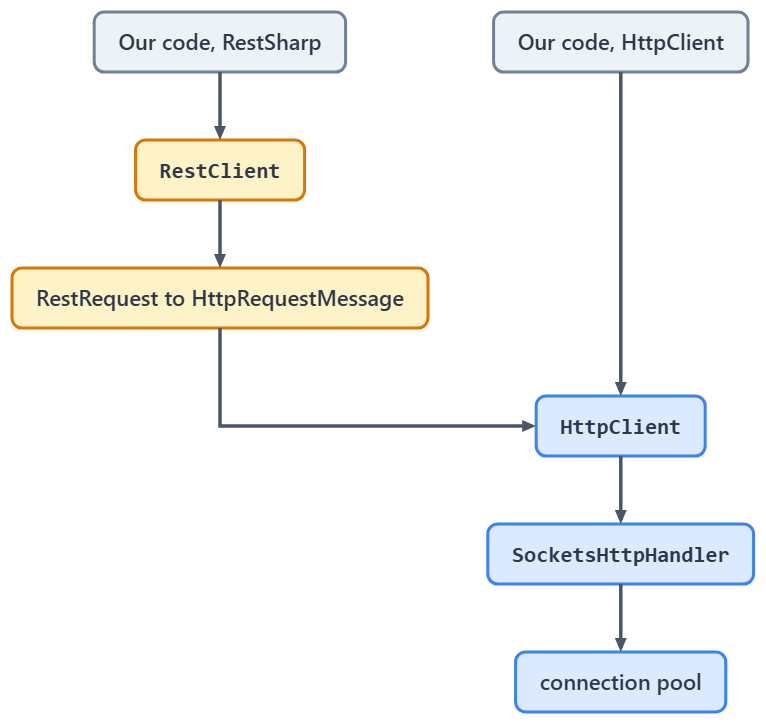
The two highlighted boxes are what RestSharp adds on the way out. On the way back, it also copies the whole response body into a byte array and a string before deserializing it, so the extra allocation comes from both directions.
HttpClient Background
An HttpClient object acts like a session that we can use to send HTTP requests and receive HTTP responses. We can describe it as a collection of settings applied to all of its requests. The request timeout is one of them, and we cover the 100 second default timeout and how to change it separately. Furthermore, the HttpClient instance uses its connection pool for request isolation. HttpClient gained a synchronous Send method in .NET 5, although it is unsupported on browser, Android, iOS and tvOS, so async remains the default path.
HttpClient implements an IDisposable interface. However, we shouldn’t explicitly dispose of it in most cases. When we dispose of the HttpClient, we dispose of its handler and the connection pool with it, so the next instance has to open new connections. Creating and disposing a client for every request opens a new connection every time, and under heavy load the available sockets run out. We can prevent this issue with HttpClientFactory to create and manage HttpClient instances, or with one long-lived instance whose handler sets SocketsHttpHandler.PooledConnectionLifetime, so its connections are recycled and pick up DNS changes.
Since .NET Core 2.1, HttpClient uses SocketsHttpHandler. Before that, HttpClientHandler was used in .NET Framework, .NET Core 2.0, and earlier. With that, SocketsHttpHandler introduced several advantages:
- Performance improvement
- Consistent behavior throughout all .NET platforms
RestSharp Background
Similarly, RestSharp is not overly complicated to use when consuming external APIs. It is a library that is easy to use across multiple platforms. We can say that RestSharp is probably the most popular HTTP client library for .NET among third-party libraries.
Like HttpClient on .NET 5 and later, RestSharp supports synchronous and asynchronous methods. Another great feature that RestSharp offers is automatic JSON, XML, and custom serialization and deserialization. A breaking change in version 107 is that RestSharp stops using the legacy HttpWebRequest class and uses HttpClient instead. HttpWebRequest has itself been obsolete since .NET 6 (SYSLIB0014).
If we dive into the RestSharp RestClient class implementation, we can find an HttpClient property with an internal getter. In RestSharp 114.0.0, the current release when we checked in October 2026, it is line 48 of RestClient.cs:
internal HttpClient HttpClient { get; }
That means that RestSharp is a wrapper around the HttpClient, which explains why RestSharp needs to allocate more memory when performing the API calls. Finally, in the release v107, SimpleJson class is completely removed from the code base. Instead, RestSharp uses JsonSerializer, the default serializer in ASP.NET Core. Since RestSharp uses the HttpClient, we should consider similar issues regarding the RestClient instantiation. With the continuous creation of RestClient, we will get hanging connections and eventually the socket exhaustion.
With the new version implemented, RestSharp presumably solves several issues:
- Connection pool starvation
- Hanging connections
SimpleJsonserialization issues- HTTP/2 support
What Are the Pros and Cons of HttpClient and RestSharp?
Next, let’s have a look at the pros and cons of HttpClient and RestSharp.
HttpClient Pros and Cons
First, we will analyze the HttpClient class:
| HttpClient Pros | HttpClient Cons |
|---|---|
| Already built into the framework | Arguably harder to use than RestSharp for a client that needs authentication or many parameters |
| Better handling of memory allocation | Instance lifetime has to be managed deliberately: one shared instance, SocketsHttpHandler.PooledConnectionLifetime, or IHttpClientFactory |
| A proven way to consume APIs in .NET | No built-in authenticators, so request setup such as signing is a DelegatingHandler we write ourselves |
| Significant improvement in performance and consistency after the introduction of the SocketsHttpHandler class | Synchronous Send exists but is unsupported on browser, Android, iOS and tvOS |
RestSharp Pros and Cons
Again, let’s have a look at the pros and cons of using RestSharp:
| RestSharp Pros | RestSharp Cons |
|---|---|
| Authenticators, parameter handling, interceptors and serialization are built in | One more third-party dependency to track and upgrade |
| Time performance on par with HttpClient over a real network, and compressed responses by default | Allocates more per call: each request is built twice, as a RestRequest and then as an HttpRequestMessage, and each response body is copied into a byte array and a string |
Automatic serialization and deserialization, System.Text.Json by default | It is based on the HttpClient itself, acting as a wrapper |
| Synchronous as well as asynchronous request methods | The synchronous forms block on the asynchronous call through an internal synchronization context |
Which One Should We Choose for a New Project?
Start with HttpClient. It is already in the framework, in ASP.NET Core it is already wired into dependency injection through AddHttpClient, and System.Net.Http.Json gives it the JSON helpers that used to be RestSharp’s main advantage.
Choose RestSharp when its API earns the dependency. Authenticators, parameter handling and interceptors are built in, so a client that has to sign every request is meaningfully shorter in RestSharp than in raw HttpClient.
Keep RestSharp where it already works. It is a wrapper over the same HttpClient we would otherwise call ourselves, so a rewrite buys us fewer allocations and no new features.
Do not reach for WebClient or HttpWebRequest. Both have been obsolete since .NET 6 under SYSLIB0014, and the documented replacement is HttpClient.
If neither API suits, Refit generates a client from an interface and Flurl builds one from a fluent chain.
Here is the whole comparison side by side:
| Question | HttpClient | RestSharp |
|---|---|---|
| Where it comes from | Built into .NET, namespace System.Net.Http | NuGet package RestSharp, open source, .NET Foundation |
| The object we hold | HttpClient | RestClient |
| One request | a method overload, or HttpRequestMessage | RestRequest |
| GET and deserialize | GetFromJsonAsync<T>(url) | GetAsync<T>(request) |
| POST a JSON body | PostAsJsonAsync(url, obj) | PostAsync<T>(new RestRequest(url).AddJsonBody(obj)) |
| A non-success status code | GetAsync returns the response and we call EnsureSuccessStatusCode(); GetFromJsonAsync throws HttpRequestException | GetAsync<T> throws on any non-success code except 404; ExecuteGetAsync<T> gives IsSuccessful and StatusCode to check |
| A deserialization failure | ReadFromJsonAsync throws JsonException | FailOnDeserializationError (default true) sets ResponseStatus.Error, so GetAsync<T> throws and ExecuteGetAsync<T> does not; ThrowOnDeserializationError (default false) makes both throw |
| A synchronous call | Send(HttpRequestMessage), .NET 5 and later | Get<T>, Post<T> and siblings |
| Instance lifetime | share one instance, or use IHttpClientFactory | RestClient is IDisposable and owns an HttpClient; reuse it, or pass one in |
| JSON serializer | System.Text.Json, via System.Net.Http.Json | System.Text.Json by default |
| What is underneath | SocketsHttpHandler | HttpClient, then SocketsHttpHandler |
The benchmarks above do not cover the status code and synchronous rows, so the sample’s LiveTests class calls them against the same API. If Refit’s interface style appeals, see how to consume REST APIs with Refit in C#.
Conclusion
In this article, we’ve learned quite a lot about HttpClient and RestSharp. We’ve inspected memory and time performance for both libraries. Our performance analysis shows that both libraries are similar in time performance. However, HttpClient performs better regarding memory allocation.
The main conclusion is that one is not better than the other, and we shouldn’t compare them since RestSharp is a wrapper around HttpClient. The decision between using one of the two tools depends on the use case and the situation. They perform similarly, and any difference is much smaller than the wait on the network, so we cannot go wrong.
Tested with .NET 10.0.10 (SDK 10.0.302), RestSharp 114.0.0 and BenchmarkDotNet 0.15.8.

I love Restsharp for its automatic serialization/deserialization of JSON objects, and thanks for this article too. Please can you do one article of injecting Restsharp as a dependency inject on .NET 6? I find it challenging to set global configs, i.e. base_url to be set under the appsettings.json, please guide
The true magic of HttpClient is the underlying HttpClientHandler… this is what is expensive to create, and the lifetime/allocation of this is managed by the HttpClientFactory. HttpClient is, itself, only a wrapper around the handler.
Looking at the source for RestSharp, it creates a new handler for each instance of the RestClient. There is no object pooling or reuse of the handler.
I would strongly not recommend RestSharp as it will not scale.
Consider benchmarking using the HttpClientFactory, you should see a marked difference
Thank you for the info. We are aware of how HttpClientFactory works and why it should be used, but for this article, we mainly wanted to compare HttpClient and RestSharp. But as you can see in the article, we had to mention HttpClientFactory and link to our article about it.
I stopped using RestSharp, instead my go to is Flurl
Flurl is a great library as well. We have an article covering Flurl too.
Why not compared with (de)serialization and httpClient since that is part of restsharp?
I’ve been using Refit for the last 2+ years. https://github.com/reactiveui/refit
Can’t imagine not having it. And it leverages HttpClientFactory.
Thank you for the input Donnie. We’ve covered Refit as well.
I encourage you to use IHttpClientFactory instead of HttpClient to prevent socket exhaustion.
Hello James. I agree with you but this is not the topic of this article. As you can find in this article we’ve linked a Page with several HttpClient articles: https://code-maze.com/httpclient-with-asp-net-core-tutorial/ One of those is about HttpClientFactory and why and how you can use it. Whatsoever, we even linked that one in this article (Re-opening the connection is a costly process that can cause socket exhaustion. We can prevent this issue with HttpClientFactory to create and manage HttpClient instances.) That said, this article is mainly about comparison.
Great comparison! Always good to hear about alternatives to something regularly used. Keep up the good work!
Thanks, Goran. We’ll do our best.