


Updated on
ILogger writes log messages, ILoggerProvider sends them to one output, such as the console, and ILoggerFactory connects the two: it holds the providers and creates the loggers. All three come from the Microsoft.Extensions.Logging packages.
Logging is an important part of every application. It helps us identify the issues in our application when we face any problems in production.
Let’s dive in.
What Is the Logging API in .NET?
Microsoft provides a logging API in the Microsoft.Extensions.Logging packages. The interfaces live in Microsoft.Extensions.Logging.Abstractions, and the default implementations in Microsoft.Extensions.Logging. This logging API can work with various built-in logging providers to write logs to various outputs like the Console or Debug window.
Microsoft.Extensions.Logging has various classes and interfaces that are necessary for logging in .NET. We are going to cover the most important ones: ILogger, ILoggerFactory, and ILoggerProvider.
What Is ILoggerFactory in .NET?
ILoggerFactory is the object that creates loggers. We give it a category name, and it returns an ILogger that writes to every provider registered on the factory.
In a console app, we build one with LoggerFactory.Create() and add the providers inside its callback, for example with builder.AddConsole(). In an app with a host, such as ASP.NET Core or a worker service, the host builds the factory for us and registers it in the dependency injection container.
The factory also owns the providers we add with methods such as AddConsole(). Disposing of the factory disposes of them, and that is the moment the console provider writes out any messages still waiting in its queue. So in a console app we declare the factory with using.
Most of our classes never touch the factory directly. They ask for an ILogger<T>, and the factory creates that logger behind the scenes, using the full name of T as the category.
That said, let’s inspect the ILoggerFactory definition:
public interface ILoggerFactory : IDisposable
{
    ILogger CreateLogger(string categoryName);
    void AddProvider(ILoggerProvider provider);
}
As we can see, it has two methods, the CreateLogger() method, and the AddProvider() method.
As the name suggests, the CreateLogger() method is responsible for creating a new logger instance. It takes the name of the category as its input. The AddProvider() method is responsible for adding new providers to the logger factory. The LoggerFactory class is an in-built implementation of the ILoggerFactory interface.
What Does ILoggerProvider Do?
ILoggerProvider is responsible for creating logger instances specified by the logger category:
public interface ILoggerProvider : IDisposable
{
    ILogger CreateLogger(string categoryName);
}
.NET ships four logging providers as part of its runtime libraries:
- Console Provider
- Debug Provider
- EventSource Provider
- EventLog Provider (Windows)
A fifth, the TraceSource provider, comes in the Microsoft.Extensions.Logging.TraceSource package, and each of the four has its own package too, such as Microsoft.Extensions.Logging.Console. The Debug provider only writes while a debugger is attached, so when we run the app from the command line, its messages go nowhere.
We can even create our own logging providers by implementing the ILoggerProvider interface. We write one later in this article. Third-party libraries such as Serilog plug into this logging API too, which is how they work behind the ILogger API.
What Is ILogger in C#?
ILogger is the interface our code calls to write a log message. It has three members. Log() writes an entry, IsEnabled() tells us whether a log level is switched on, and BeginScope() attaches shared data to a group of messages.
We rarely call Log() ourselves. The extension methods LogInformation(), LogWarning(), LogError() and their siblings call it for us with the matching LogLevel.
Every logger has a category, a string that says where a message came from. ILogger<T> is the generic version we ask for in a constructor, and its category is the full type name of T, for example LoggingAPI.Student.
A logger doesn’t decide where messages end up. It passes each message on to every provider the factory knows about, after the level filters drop anything below the minimum level, and each provider writes it to its own output.
The picture below shows the path of one message.
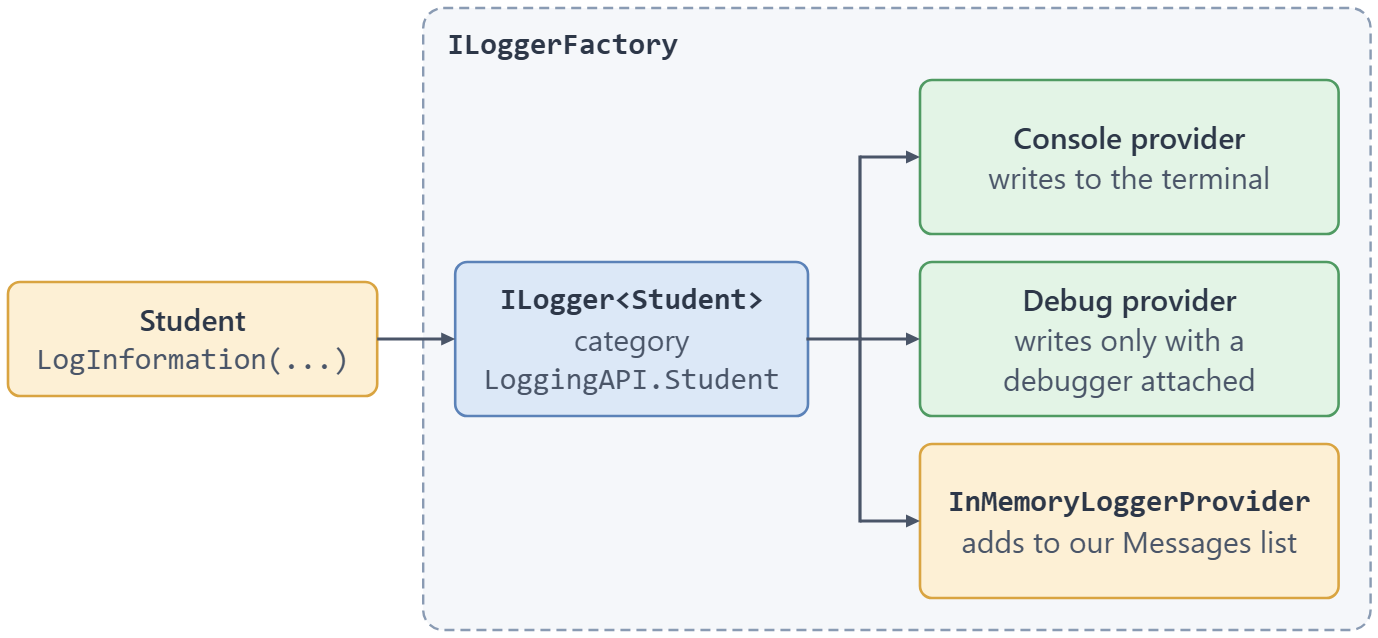
Each message goes from one logger to every provider registered on the factory.
Here is the interface as it looks in .NET 10, with its nullable annotations:
public interface ILogger
{
    void Log<TState>(LogLevel logLevel, EventId eventId, TState state, Exception? exception, Func<TState, Exception?, string> formatter);
    bool IsEnabled(LogLevel logLevel);
    IDisposable? BeginScope<TState>(TState state) where TState : notnull;
}
Now that we’re familiar with what these interfaces are for, let’s see them in action.
Demo Application
For this example, let’s use a simple console application and the console and debug providers for logging. They come in the Microsoft.Extensions.Logging.Console and Microsoft.Extensions.Logging.Debug packages, so we add both to the project.
First, let’s create an instance of ILoggerFactory and then add these two providers to it:
using LoggingAPI;
using Microsoft.Extensions.Logging;

using ILoggerFactory loggerFactory = LoggerFactory.Create(builder =>
{
    builder.AddConsole();
    builder.AddDebug();
});
We declare the factory with using on purpose. The console provider writes on a background thread, and disposing of the factory is what makes it finish. Without using, the program can end before that thread writes anything, so a run may print nothing at all.
Once we register the providers, it’s time to implement a logger.
Let’s create a Student class that uses the logger to log information every time a new instance of the class is created:
using Microsoft.Extensions.Logging;

namespace LoggingAPI;

public class Student
{
    public string Name { get; set; }
    public string Department { get; set; }

    private readonly ILogger _logger;

    public Student(string name, string department, ILogger<Student> logger)
    {
        Name = name;
        Department = department;
        _logger = logger;

        _logger.LogInformation("Name of student is {Name} and his department is {Department}", Name, Department);
    }
}
In this code, we include the ILogger<Student> interface as a parameter in the constructor.
We also pass the values as arguments to a message template instead of joining strings. The text that comes out is the same, but providers that support structured logging can store Name and Department as separate fields. We cover the rules for writing these templates in message templates for logging in C#.
Microsoft Learn’s overview of logging says the same about interpolated strings, which also build the text before the logger sees it: “In most cases, you should use log message template formatting when logging. Use of string interpolation can cause performance issues.”
Now that we have a class, let’s create an instance of it in Program.cs and see the logger in action:
ILogger<Student> logger = loggerFactory.CreateLogger<Student>();
var student = new Student("John", "IT", logger);
First, we use loggerFactory to create an ILogger<Student> called logger. Then we pass it as an argument to the Student constructor.
Once we create a student instance the logger is going to write a message to our console output:
info: LoggingAPI.Student[0]
      Name of student is John and his department is IT
The LoggingAPI.Student part is the category. We never typed it, because ILogger<T> takes it from the type. The [0] after it is the event ID, which we didn’t set.
However, there is another way to do this.
Instead of injecting the ILogger interface, we inject an instance of ILoggerFactory. Let’s create another class called Department and inject the ILoggerFactory to it:
using Microsoft.Extensions.Logging;

namespace LoggingAPI;

public class Department
{
    public string Name { get; set; }
    public string Description { get; set; }

    private readonly ILogger _logger;

    public Department(string name, string description, ILoggerFactory factory)
    {
        Name = name;
        Description = description;

        _logger = factory.CreateLogger<Department>();
        _logger.LogInformation("Department is {Name} {Description}", Name, Description);
    }
}
Now let’s create an instance of this class and see the output:
var department = new Department("IT", "Information Technology", loggerFactory);
This time around our output is a bit different:
info: LoggingAPI.Department[0]
      Department is IT Information Technology
As we can see this approach yields the same result as injecting the logger. However, this is not a recommended approach as it is not a constructor’s responsibility to create the instances of loggers. The factory is still the right tool when we want a category that isn’t a type name, for example factory.CreateLogger("LoggingAPI.Reports").
Next, let’s write a provider of our own.
How Do We Write a Custom ILoggerProvider?
The built-in providers write to the console, the debugger or the event system. When we want our logs somewhere else, we implement ILoggerProvider and ILogger ourselves.
Let’s write a provider that keeps every message in memory. We wouldn’t ship it to production, but it’s handy in tests, and it’s short enough to show everything the two interfaces need:
using Microsoft.Extensions.Logging;

namespace LoggingAPI;

public sealed class InMemoryLoggerProvider : ILoggerProvider
{
    public List<string> Messages { get; } = [];

    public ILogger CreateLogger(string categoryName) => new InMemoryLogger(categoryName, Messages);

    public void Dispose() { }
}

public sealed class InMemoryLogger(string categoryName, List<string> messages) : ILogger
{
    public IDisposable? BeginScope<TState>(TState state) where TState : notnull => null;

    public bool IsEnabled(LogLevel logLevel) => logLevel != LogLevel.None;

    public void Log<TState>(LogLevel logLevel, EventId eventId, TState state,
        Exception? exception, Func<TState, Exception?, string> formatter)
    {
        if (!IsEnabled(logLevel))
            return;

        messages.Add($"{logLevel}: {categoryName}: {formatter(state, exception)}");
    }
}
CreateLogger() is the only method a provider really needs. The factory calls it once for each category and gives our code a logger that forwards each message to it.
Our InMemoryLogger does the actual work in Log(). It skips anything that isn’t enabled, then calls formatter, which turns the message template and its arguments into the final text. BeginScope() returns null because we don’t support scopes.
The list isn’t thread-safe. That is fine for a test, which logs from one thread, and it’s the first thing to change before using a provider like this anywhere else.
Now we can register it next to, or instead of, the built-in providers. This is how the test project uses it:
var provider = new InMemoryLoggerProvider();
using ILoggerFactory factory = LoggerFactory.Create(builder => builder.AddProvider(provider));

_ = new Student("John", "IT", factory.CreateLogger<Student>());

Assert.AreEqual(
    "Information: LoggingAPI.Student: Name of student is John and his department is IT",
    provider.Messages.Single());
AddProvider() here is the builder’s version of the ILoggerFactory.AddProvider() method from the factory’s definition. Because the factory’s loggers send every message to all its providers, we could add AddConsole() in the same callback, and the message would land in both places.
A provider also gets the factory’s filtering for free. With builder.SetMinimumLevel(LogLevel.Warning) in the callback, the same Student constructor leaves the list empty, because an Information message never reaches our logger.
This also lets us test logging without a mocking library. For another ready-made option, Microsoft ships FakeLogger, which we cover in testing logging code with FakeLogger, and there is more on the general approach in how to unit test ILogger.
How Do We Get ILogger<T> From the Host?
In a console app, we created the factory ourselves. In ASP.NET Core or a worker service, the host does it for us. Host.CreateApplicationBuilder() registers an ILoggerFactory with the Console, Debug, EventSource and EventLog (Windows only) providers, and it also registers ILogger<T> for any T.
We can change the providers through builder.Logging before we build the host. This test swaps all of them for our in-memory provider:
var provider = new InMemoryLoggerProvider();

HostApplicationBuilder builder = Host.CreateApplicationBuilder();
builder.Logging.ClearProviders();
builder.Logging.AddProvider(provider);

using IHost host = builder.Build();

ILogger<Student> logger = host.Services.GetRequiredService<ILogger<Student>>();
_ = new Student("John", "IT", logger);
We never created a logger here. We asked the container for ILogger<Student>, and the host’s factory created it with the LoggingAPI.Student category, the same as in our demo.
In a real app, we don’t even ask the container ourselves. A class that takes ILogger<T> in its constructor gets it injected, which is the pattern our Student class already follows. For how the container itself works, see dependency injection in ASP.NET Core.
Conclusion
In this article, we have discussed three main interfaces of the logging API in C#: ILogger, ILoggerFactory, and ILoggerProvider. These are very important and yet simple to use interfaces that help us implement logging in any kind of application.
We’ve also seen why the factory belongs in a using declaration, written a provider of our own, and let the host hand us an ILogger<T>.
Tested with .NET 10 (SDK 10.0.302, runtime 10.0.10) and Microsoft.Extensions.Logging 10.0.14.

How to set log file path? Where will it write the logs?
By default it doesn’t log to the file, it is not built to do that. But you can implement a third-party one for that matter, for example, something we did here: https://code-maze.com/net-core-web-development-part3/