


Updated on
The Dependency Inversion Principle says that our high-level modules, the ones with the business logic, shouldn’t depend on low-level modules such as data access. Both should depend on an abstraction, and that abstraction belongs to the high-level side.
The basic idea behind it is that we should create the higher-level modules with their complex logic in such a way to be reusable and unaffected by any change from the lower-level modules in our application. To achieve this kind of behavior in our apps, we introduce abstraction which decouples higher from lower-level modules.
Having this idea in mind, Robert C. Martin stated the principle in a 1996 column for The C++ Report as two rules:
- High-level modules should not depend on low-level modules. Both should depend on abstractions.
- Abstractions should not depend on details. Details should depend on abstractions.
It’s the D in SOLID, and in C# the abstraction is usually an interface. We’ll apply it to a small example twice, first between two classes and then between two projects, where the compiler starts enforcing it.
To read about other SOLID principles, check out our SOLID Principles page.
What Are High-Level and Low-Level Modules?
The high-level modules describe those operations in our application that have more abstract nature and contain more complex logic, such as our business rules. These modules orchestrate low-level modules in our application.
The low-level modules contain more specific individual components focusing on details and smaller parts of the application, such as storing data, reading a file or sending an email. These modules are used inside the high-level modules in our app.
In our example, EmployeeStatistics is the high-level module. It answers a business question: how many female managers work here? EmployeeManager is the low-level module, and it keeps track of our employees.
A module doesn’t have to be a class. It can be a namespace or a whole project too.
How do we tell the two apart? Ask why each part would change. A new rule for counting managers changes the high-level module. Moving the employees from a list into a database changes the low-level one.
What we need to understand when talking about DIP and these modules is that both the high-level and low-level modules depend on abstractions. That way, the DIP creates a decoupled structure between high and low-level modules by introducing abstraction between them.
People often mix the principle up with dependency injection. Dependency inversion decides which way our dependencies point, and dependency injection is the mechanism that hands an object its dependencies from outside. For the container that does that job in a web app, check out our article on ASP.NET Core dependency injection.
An Example That Violates DIP
Let’s start with a console app:
dotnet new console -n DIP
Then, we create two enumerations and one model class. Create DIP/Gender.cs:
namespace DIP;

public enum Gender
{
    Male,
    Female
}
Create DIP/Position.cs:
namespace DIP;

public enum Position
{
    Administrator,
    Manager,
    Executive
}
And the model class. Create DIP/Employee.cs:
namespace DIP;

public sealed record Employee(string Name, Gender Gender, Position Position);
A positional record gives us the constructor and the three properties in one line.
To continue, we are going to create one low-level class which keeps (in a simplified way) track of our employees. Create DIP/EmployeeManager.cs:
namespace DIP;

public sealed class EmployeeManager
{
    private readonly List<Employee> _employees = [];

    public void AddEmployee(Employee employee) => _employees.Add(employee);
}
Furthermore, we want a higher-level class to perform some kind of statistical analysis on our employees.
With this kind of structure in our EmployeeManager class, we can’t make use of the _employees list in a statistics class, so the obvious solution would be to expose that private list. Mind you, the next two snippets are the version to avoid, and we’ll see why in a moment.
Replace DIP/EmployeeManager.cs with:
namespace DIP;

public sealed class EmployeeManager
{
    private readonly List<Employee> _employees = [];

    public List<Employee> Employees => _employees;

    public void AddEmployee(Employee employee) => _employees.Add(employee);
}
Now, we can create the statistics class with its count logic. Create DIP/EmployeeStatistics.cs:
namespace DIP;

public sealed class EmployeeStatistics(EmployeeManager employeeManager)
{
    public int CountFemaleManagers() =>
        employeeManager.Employees.Count(e => e.Gender == Gender.Female && e.Position == Position.Manager);
}
Even though this will work fine, this is not what we consider good code, and it violates the DIP.
How is that?
Well, first of all, our EmployeeStatistics class has a strong relation (coupled) to the EmployeeManager class, and we can’t send any other object in the EmployeeStatistics constructor except the EmployeeManager object. The second problem is that we are using the public property from the low-level class inside the high-level class. By doing so, our low-level class can’t change its way of keeping track of employees. If we want to change its behavior to use a dictionary instead of a list, we need to change the EmployeeStatistics class behavior for sure. And that’s something we want to avoid if possible.
Notice that EmployeeStatistics already receives its EmployeeManager through the constructor. That’s dependency injection, and the class still violates the principle, because what it receives is a concrete class.
How Do We Apply Dependency Inversion in C#?
What we want is to decouple our two classes so both of them depend on an abstraction. We can do that in four steps, and none of them needs a framework or a package.
First, we find the high-level class that depends on a concrete low-level class. Here, that’s EmployeeStatistics and its EmployeeManager.
Then, we write an interface that describes what the high-level class needs, in its own terms, and nothing more. EmployeeStatistics needs to find employees by gender and position, so the interface gets one method that does exactly that.
After that, the low-level class implements the interface.
Finally, the high-level class depends on the interface instead of the class, and we create the concrete object in one place at the edge of our app. In a console app, that’s Program.cs. In ASP.NET Core, the dependency injection container does the same job.
The order matters. If we extract the interface from the low-level class’s existing methods, we put the ownership on the wrong side.
So, the first thing we need to do is to create the IEmployeeSearchable interface, starting from what EmployeeStatistics needs. Create DIP/IEmployeeSearchable.cs:
namespace DIP;

public interface IEmployeeSearchable
{
    IEnumerable<Employee> GetEmployeesByGenderAndPosition(Gender gender, Position position);
}
The method returns IEnumerable<Employee> instead of List<Employee>, so the interface says nothing about how we store employees. That’s the second rule in action: abstractions don’t depend on details.
It also has a single method, because that’s all EmployeeStatistics needs. Keeping an interface that small is the interface segregation principle, the I in SOLID.

Then, let’s modify the EmployeeManager class. Replace DIP/EmployeeManager.cs with:
namespace DIP;

public sealed class EmployeeManager : IEmployeeSearchable
{
    private readonly List<Employee> _employees = [];

    public void AddEmployee(Employee employee) => _employees.Add(employee);

    public IEnumerable<Employee> GetEmployeesByGenderAndPosition(Gender gender, Position position) =>
        _employees.Where(e => e.Gender == gender && e.Position == position);
}
Finally, we can modify the EmployeeStatistics class. Replace DIP/EmployeeStatistics.cs with:
namespace DIP;

public sealed class EmployeeStatistics(IEmployeeSearchable employees)
{
    public int CountFemaleManagers() =>
        employees.GetEmployeesByGenderAndPosition(Gender.Female, Position.Manager).Count();
}
This looks much better now, and it’s implemented by DIP rules. Now, our EmployeeStatistics class is not dependent on the lower-level class, and the EmployeeManager class can change its behavior about storing employees as well.
We can check the result by modifying Program.cs. Replace DIP/Program.cs with:
using DIP;

var employeeManager = new EmployeeManager();
employeeManager.AddEmployee(new Employee("Leen", Gender.Female, Position.Manager));
employeeManager.AddEmployee(new Employee("Mike", Gender.Male, Position.Administrator));

var statistics = new EmployeeStatistics(employeeManager);

Console.WriteLine($"Number of female managers in our company is: {statistics.CountFemaleManagers()}");
Program.cs is the only place that knows about both classes. It creates the EmployeeManager and hands it to EmployeeStatistics as an IEmployeeSearchable.
Let’s run the app:
dotnet run --project DIP
It prints:
Number of female managers in our company is: 1
Why Is It Called Dependency Inversion?
We can find different opinions about whether the DIP really inverts the dependency between high and low-level modules. It does, and our two classes show where.
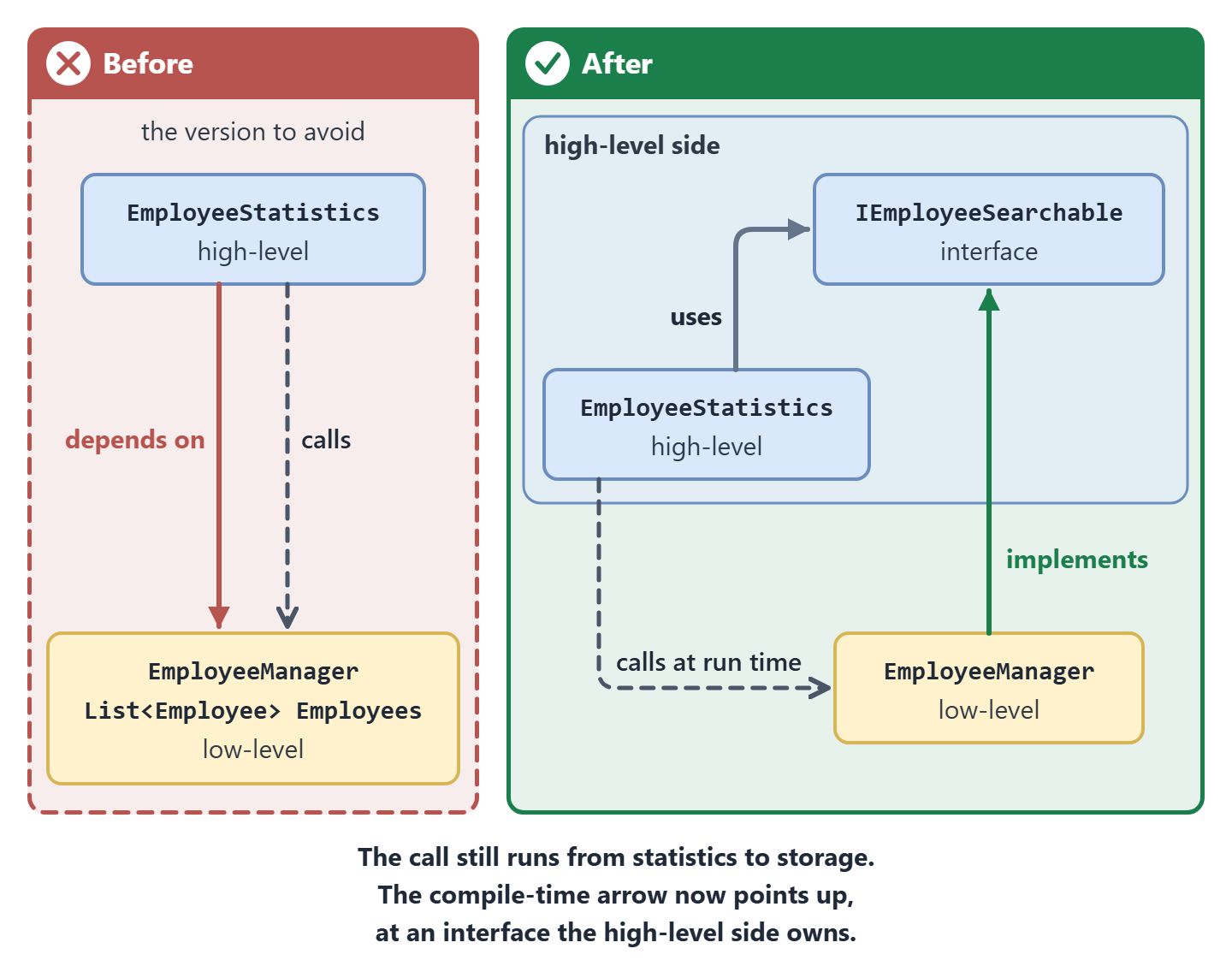
At runtime, nothing changed. EmployeeStatistics still calls into EmployeeManager to get its employees.
At compile time, though, EmployeeStatistics doesn’t mention EmployeeManager at all. Instead, EmployeeManager now mentions IEmployeeSearchable, an interface we wrote for EmployeeStatistics. So the low-level class depends on the high-level side, against the direction of the call, and that’s where the name comes from.
Robert C. Martin explained it the same way in his 1996 column: traditional structured designs made high-level modules depend on low-level ones, and a well-designed object-oriented program inverts that structure.
That also means an interface alone isn’t the inversion. If our interface were named after the storage and handed out the List<Employee>, EmployeeStatistics would still depend on the storage side, one step removed. The interface has to speak the high-level class’s language and live on its side.
Microsoft’s e-book Architect Modern Web Applications with ASP.NET Core and Azure describes the same move with two classes, A and B. The principle still lets A call B at run time, but it makes it possible “for B to depend on an interface controlled by A at compile time”.
Both versions appear in the figure below. Look at the solid arrow between the two classes on the left first, then find where it points on the right:
Dependency Inversion Across Projects
Everything still lives in one project, so the direction we’ve set up is only a convention.
Nothing stops the next person from typing new EmployeeManager() inside EmployeeStatistics, and the compiler wouldn’t say a word.
Separate projects change that, so let’s move the high-level code and the low-level code into projects of their own. Run these four commands in the folder that holds DIP:
dotnet new classlib -n DIP.Statistics
dotnet new classlib -n DIP.Storage
dotnet reference add DIP.Statistics --project DIP.Storage
dotnet reference add DIP.Statistics DIP.Storage --project DIP
The first two commands create the class libraries. Neither library needs its template Class1.cs, so remove both.
The last two commands set the direction.
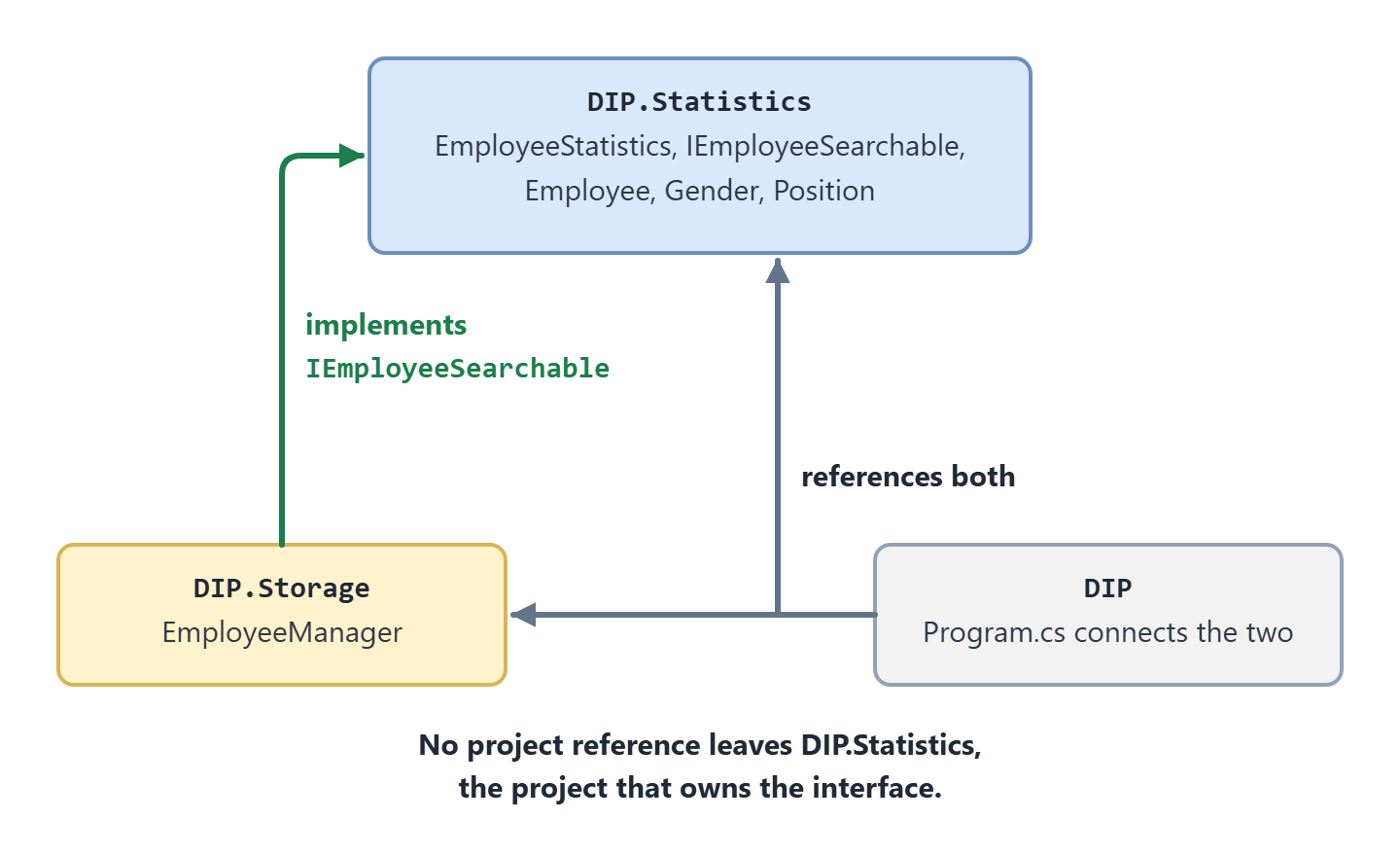
DIP.Storage references DIP.Statistics, because EmployeeManager implements an interface that lives there. The console app references both, because Program.cs connects them.
And DIP.Statistics references nothing.
These are the noun-first commands of the .NET 10 SDK. On an older SDK, the same references are dotnet add DIP.Storage reference DIP.Statistics and dotnet add DIP reference DIP.Statistics DIP.Storage.
Now move the files. Gender.cs, Position.cs, Employee.cs, IEmployeeSearchable.cs and EmployeeStatistics.cs go to DIP.Statistics, and in each of them, namespace DIP; becomes namespace DIP.Statistics;.
Why does the interface travel with EmployeeStatistics and not with EmployeeManager? Because EmployeeStatistics owns it.
If the interface lived in DIP.Storage, then DIP.Statistics would need a reference to DIP.Storage to see it, and we’d be back to the dependency we started with.
EmployeeManager.cs goes to DIP.Storage. Replace DIP.Storage/EmployeeManager.cs with:
using DIP.Statistics;

namespace DIP.Storage;

public sealed class EmployeeManager : IEmployeeSearchable
{
    private readonly List<Employee> _employees = [];

    public void AddEmployee(Employee employee) => _employees.Add(employee);

    public IEnumerable<Employee> GetEmployeesByGenderAndPosition(Gender gender, Position position) =>
        _employees.Where(e => e.Gender == gender && e.Position == position);
}
As you can see, the first line is where the inversion shows up in code. The low-level class imports the high-level project’s namespace to get the interface it implements.
The first line of DIP/Program.cs is still using DIP;. Replace that line with:
using DIP.Statistics;
using DIP.Storage;
Run the app again with dotnet run --project DIP, and it prints the same line as before.
Here are the three projects and the references between them. No arrow leaves DIP.Statistics:
So what did we gain? Let’s make EmployeeStatistics depend on the concrete class again and see. In DIP.Statistics/EmployeeStatistics.cs, change the constructor to EmployeeStatistics(EmployeeManager employees), and build the project:
dotnet build DIP.Statistics
The build fails (path shortened):
DIP.Statistics\EmployeeStatistics.cs(3,40): error CS0246: The type or namespace name 'EmployeeManager' could not be found (are you missing a using directive or an assembly reference?)
Adding using DIP.Storage; doesn’t help either. The project can’t see that namespace at all, and the build adds error CS0234 to the first one.
And what about a reference in the other direction, from DIP.Statistics to DIP.Storage?
The CLI adds it without complaint, but the next build stops with error MSB4006: “There is a circular dependency in the target dependency graph”.
Two projects can’t depend on each other. Once DIP.Storage points at DIP.Statistics, you can’t point anything in DIP.Statistics back at it.
Undo those changes before you move on.
To remove that reference, pass the path to the DIP.Storage project file:
dotnet reference remove DIP.Storage/DIP.Storage.csproj --project DIP.Statistics
The compiler now checks the direction on every build. If your code stays in one project, you can still check it with architecture tests using NetArchTest.
Clean Architecture builds a whole solution on this move.
Its inner projects own interfaces such as repositories, its outer projects implement them, and every project reference points inward, a constraint known there as the Dependency Rule.
Onion Architecture and Hexagonal Architecture apply the same move to a whole application, each with its own names for the parts: the core owns the interfaces, and the code around it implements them.
That rule gets a whole module in our course Clean Architecture in .NET, from four .NET projects to making the compiler enforce it.
Benefits of Implementing the Dependency Inversion Principle
Reducing the number of dependencies among modules is an important part of the process of creating an application. This is something that we get if we implement DIP correctly. Our classes are not tightly coupled with the lower-tier objects, and we can reuse the logic from the high-tier modules.
The first benefit you’ll notice is that we can test the business rule without the storage code. Let’s prove it with a test project that references DIP.Statistics and nothing else. Stay in the same folder for these commands:
dotnet new classlib -n DIP.Tests
dotnet package add Microsoft.NET.Test.Sdk --version 18.10.1 --project DIP.Tests
dotnet package add xunit.v3.mtp-off --version 4.0.1 --project DIP.Tests
dotnet package add xunit.runner.visualstudio --version 4.0.0 --project DIP.Tests
dotnet reference add DIP.Statistics --project DIP.Tests
Its Class1.cs can go too.
We use xunit.v3.mtp-off because it runs xUnit v3 tests under the classic dotnet test runner, with nothing else to configure. Each --version matches the build we tested.
Now we need a fake. Create DIP.Tests/FakeEmployeeSearch.cs:
using DIP.Statistics;

namespace DIP.Tests;

internal sealed class FakeEmployeeSearch(params Employee[] employees) : IEmployeeSearchable
{
    public IEnumerable<Employee> GetEmployeesByGenderAndPosition(Gender gender, Position position) =>
        employees.Where(e => e.Gender == gender && e.Position == position);
}
The fake is a second implementation of IEmployeeSearchable. It filters whatever employees the test hands it, so each test decides exactly who works at the company.
Create DIP.Tests/EmployeeStatisticsTests.cs:
using DIP.Statistics;
using Xunit;

namespace DIP.Tests;

public class EmployeeStatisticsTests
{
    [Fact]
    public void CountFemaleManagers_CountsOnlyFemaleManagers()
    {
        var employees = new FakeEmployeeSearch(
            new Employee("Leen", Gender.Female, Position.Manager),
            new Employee("Ana", Gender.Female, Position.Manager),
            new Employee("Eve", Gender.Female, Position.Executive),
            new Employee("Mike", Gender.Male, Position.Manager));

        var statistics = new EmployeeStatistics(employees);

        Assert.Equal(2, statistics.CountFemaleManagers());
    }
}
Why four employees? So that every wrong question gets a different answer.
If EmployeeStatistics asked for male managers or for female executives, it would count 1 instead of 2, and the test would fail.
Let’s run it:
dotnet test DIP.Tests
The test passes:
Test summary: total: 1, failed: 0, succeeded: 1, skipped: 0, duration: 2.8s
Build succeeded in 4.5s
Now look inside DIP.Tests/bin/Debug/net10.0. You’ll find DIP.Statistics.dll there and no DIP.Storage.dll, because the storage code isn’t part of the test build at all.
Our EmployeeManager keeps its list in memory, so here the fake looks like a copy of it. The difference shows up once the low-level class talks to a real database: the fake stays nine lines long, and our unit tests never touch the database.
Also, changing already implemented modules is risky. By depending on abstraction and not on a concrete implementation, we can reduce that risk by not having to change high-level modules in our project. To move our employees into a database, we write another class that implements IEmployeeSearchable and create it in Program.cs. EmployeeStatistics and its test stay as they are.
So, the main reason why DIP is so important is the modularity and reusability of the application modules. DIP.Statistics doesn’t care where employees come from, so a web API or a background job can use it with a data source of its own.
When Dependency Inversion Isn’t Worth It
Every interface is one more file to read and one more thing to keep in step with its implementation. So where does the principle pay for itself?
It pays where a detail is likely to change or gets in the way of a test: databases, files, HTTP calls, message queues, email and the clock. Those are the dependencies worth putting behind an interface our high-level code owns.
It doesn’t pay for code that won’t change under us. EmployeeManager uses List<T> directly, EmployeeStatistics calls LINQ’s Count(), and nobody wraps those in interfaces. The same goes for a class with one implementation that no test ever replaces.
Project size matters too. A small tool can keep everything in one project and still follow the principle between its classes. Separate projects earn their keep when several people change the code, or when a dependency that points the wrong way would be expensive to undo.
The clock is a good example of a detail worth inverting. If our code reads DateTime.UtcNow directly, we can’t easily test it at a fixed time, and since .NET 8 the framework ships an abstraction for it, TimeProvider. Here the abstraction comes from the platform rather than from our high-level code, and that’s fine because it’s stable. Check out our article on testing time-dependent code with TimeProvider to see how to fake it.
Conclusion
So to sum up, the Dependency Inversion Principle is the last part of the SOLID principles, and it introduces an abstraction between high and low-level components inside our project to remove the direct dependencies between them. The high-level code declares the interface it needs, the low-level code implements it, and one place at the edge of the app connects the two.
We applied it to EmployeeStatistics twice: between two classes, and then between two projects, where the compiler enforces the direction on every build. The test project showed the payoff by checking the counting rule without building the storage code at all.
If someone asks: “Should I put an effort to implement the DIP into my code?”, our answer would be: “Yes, for the dependencies that can change or get in the way of a test.” Loosely coupled code and reusable components should be our goal and responsibility when developing software applications.
If you’ve come here first, the other four SOLID principles each have an article of their own.
Tested with .NET 10.0.12 and xUnit v3 4.0.1.

Thanks for the best Example
Thanks for the helpful example!