


Updated on
The Result Pattern is a way of returning a response containing the operation’s outcome and any data it returned. With it, a method can report a failure without returning null or throwing an exception.
In the expanding world of APIs, meaningful error responses can be just as crucial as well-structured success responses, and here, the Result Pattern can help us greatly.
To introduce the Result Pattern, we will go through a series of iterations, presenting different ways of passing information about the success or failure of a given operation. We will do so by building a simple .NET 10 Web API with minimal API endpoints. At any given moment, we can look up the complete solution on GitHub, so for brevity, we will omit some parts of the code and concentrate on the crucial parts. Our implementation uses the Repository Pattern and service layer.
But before we start with the Result Pattern, let’s check a few other ways we can use to return results in our apps. We’ll replace both of them later, so don’t copy their code.
Null Checking
We can use a null value to pass information about failure from the service to the endpoint.
We can implement our new service class NullCheckingContactService: (for brevity, some code is omitted):
public class NullCheckingContactService
{
    // ...

    public ContactDto? GetById(Guid id)
    {
        var contact = _contactRepository.GetById(id);

        if (contact is null)
        {
            return null;
        }

        return new ContactDto(contact.Id, contact.Email);
    }

    // ...
}
Our GetById() method would return the null value for the non-existing contacts.
Our new endpoints in NullCheckingContactEndpoints look like this:
public static class NullCheckingContactEndpoints
{
    public static void MapNullCheckingContactEndpoints(this IEndpointRouteBuilder app)
    {
        var contacts = app.MapGroup("api/v2/contacts");

        // ...

        contacts.MapGet("/{id:guid}", (Guid id, NullCheckingContactService contactService) =>
        {
            var contactDto = contactService.GetById(id);

            if (contactDto is null)
            {
                return Results.NotFound();
            }

            return Results.Ok(contactDto);
        });

        // ...
    }
}
Here, we check whether the service returned the null value and respond correctly. For the GetById() method, we will return the 404 Not Found response.
While this solution is simple, it has severe limitations. We have to handle null values in the endpoints and respond appropriately. Very little information is passed from the service to the endpoint, and we must know precisely when null means that the contact was not found and when we couldn’t create it, not to mention why creation failed.
Exceptions For Control Flow
Instead of returning the null value, our service can throw an exception (of the appropriate type) to signal that something went wrong.
First, we must create exception classes, such as a RecordNotFoundException for signaling that the contact wasn’t found:
public class RecordNotFoundException(string message) : Exception(message);
Now we can create our new service ExceptionsForFlowControlContactService:
public class ExceptionsForFlowControlContactService
{
    // ...

    public ContactDto GetById(Guid id)
    {
        var contact = _contactRepository.GetById(id);

        if (contact is null)
        {
            throw new RecordNotFoundException($"contact with id {id} not found");
        }

        return new ContactDto(contact.Id, contact.Email);
    }

    // ...
}
To handle the exception, we can use the built-in exception-handling middleware with our own IExceptionHandler implementation. We won’t go into the details, but for more information check out our Global Exception Handling in Web API article.
This solution has advantages: error messages are informative, we can handle different exception types, the endpoints are simple, and introducing custom exception types can ensure more consistent responses.
But a contact that doesn’t exist isn’t an exceptional situation. Clients ask for the wrong ID all the time, and Microsoft’s Framework Design Guidelines are clear about it: “DO NOT use exceptions for the normal flow of control, if possible.”
Of course, there is another solution if you don’t want to use the exception flow: the Result Pattern.
What Is the Result Pattern in C#?
The Result Pattern is a way of returning a response containing the operation’s outcome and any data it returned.
A method that can fail returns a Result<T> instead of a bare value. If everything was OK, the result carries the value. If the operation failed, it carries an error with a code, a description and a type, so the caller knows exactly what went wrong.
Since the failure is part of the return type, every caller can see that the method might fail. We don’t need a null check or a try/catch block to find out.
In a .NET Web API, the endpoint checks the result. A success becomes a 200 OK or 201 Created response. For a failure, the error’s type picks the status code, such as 404 Not Found for a missing record or 409 Conflict for a duplicate one.
We use the pattern for expected failures. Bugs and outages still throw exceptions.
Let’s elaborate on that a little further.

Error and ErrorType
First, we will create the Error record to represent a failed operation, together with the ErrorType enum:
public enum ErrorType
{
    NotFound,
    Conflict
}

public sealed record Error(string Code, string Description, ErrorType Type);
For any error, we can provide a stable code (Code), a detailed description (Description) and its category (Type). Our clients can check the code, and we can reword the description whenever we like.
We need two categories. A missing contact is NotFound, and a contact with an email that already exists is a Conflict with data we already have.
Instead of creating the errors inline, we create a new static class, ContactErrors, and in it, a static factory method for each error:
public static class ContactErrors
{
    public static Error NotFound(Guid id) =>
        new("Contact.NotFound", $"contact with id {id} not found", ErrorType.NotFound);

    public static Error EmailTaken(string email) =>
        new("Contact.EmailTaken", $"contact with email {email} already exists", ErrorType.Conflict);
}
Result
Now, we can create the Result classes that represent our result:
public class Result
{
    protected Result(Error? error) => Error = error;

    public Error? Error { get; }
    public bool IsSuccess => Error is null;

    public static Result Success() => new(null);

    public static implicit operator Result(Error error) => new(error);
}

public sealed class Result<TValue> : Result
{
    private readonly TValue? _value;

    private Result(TValue? value, Error? error)
        : base(error) => _value = value;

    public TValue Value => IsSuccess
        ? _value!
        : throw new InvalidOperationException("A failed result has no value.");

    public static implicit operator Result<TValue>(TValue value) =>
        new(value, null);

    public static implicit operator Result<TValue>(Error error) =>
        new(default, error);
}
Result<TValue> is a generic class that we can use to return results of any type, and its base class, Result, covers operations that return no data. Its private constructor creates an object in case of success, with a value, or in case of failure, with an error.
The IsSuccess property, which we can use to test whether a given operation is completed successfully, is true when there is no Error. So we don’t need a special error that represents no error.
To retrieve the data, we use the Value property. If the operation failed, it throws, so a missing IsSuccess check fails at the exact line with the mistake.
Finally, Result<TValue> has two implicit conversions instead of static Success() and Failure() methods. A method that returns Result<ContactDto> can return a ContactDto or an Error, and the matching operator creates the result for us.
Let’s see it in action by creating TheResultPatternContactService class:
public class TheResultPatternContactService
{
    // ...

    public Result<ContactDto> GetById(Guid id)
    {
        var contact = _contactRepository.GetById(id);

        if (contact is null)
        {
            return ContactErrors.NotFound(id);
        }

        return new ContactDto(contact.Id, contact.Email);
    }

    public Result<ContactDto> Create(CreateContactDto createContactDto)
    {
        if (_contactRepository.GetByEmail(createContactDto.Email) is not null)
        {
            return ContactErrors.EmailTaken(createContactDto.Email);
        }

        var contact = new Contact
        {
            Email = createContactDto.Email
        };

        var createdContact = _contactRepository.Create(contact);

        return new ContactDto(createdContact.Id, createdContact.Email);
    }
}
Here, we see that we can return complete results, regardless of the state of the operation.
Before we create the endpoints, we need one place that turns an error into an HTTP response. Let’s create the ResultExtensions class:
public static class ResultExtensions
{
    public static IResult ToProblem(this Result result)
    {
        var error = result.Error
            ?? throw new InvalidOperationException("A successful result is not a problem.");

        var statusCode = error.Type switch
        {
            ErrorType.NotFound => StatusCodes.Status404NotFound,
            ErrorType.Conflict => StatusCodes.Status409Conflict,
            _ => StatusCodes.Status500InternalServerError
        };

        return TypedResults.Problem(statusCode: statusCode, title: error.Code, detail: error.Description);
    }
}
Here, ToProblem() reads the error’s type and picks the status code: 404 Not Found for NotFound and 409 Conflict for Conflict. A type we haven’t mapped yet becomes a 500.
TypedResults.Problem() then builds the response as problem details, with the error’s code as the title and its description as the detail. Our article on the ProblemDetails class covers the format.
Now, we will create the TheResultPatternContactEndpoints class:
public static class TheResultPatternContactEndpoints
{
    public static void MapTheResultPatternContactEndpoints(this IEndpointRouteBuilder app)
    {
        var contacts = app.MapGroup("api/v4/contacts");

        // ...

        contacts.MapGet("/{id:guid}", (Guid id, TheResultPatternContactService contactService) =>
        {
            var result = contactService.GetById(id);

            if (!result.IsSuccess)
            {
                return result.ToProblem();
            }

            return Results.Ok(result.Value);
        });

        contacts.MapPost("/", (CreateContactDto createContactDto, TheResultPatternContactService contactService) =>
        {
            var result = contactService.Create(createContactDto);

            if (!result.IsSuccess)
            {
                return result.ToProblem();
            }

            var contactDto = result.Value;

            return Results.Created($"/api/v4/contacts/{contactDto.Id}", contactDto);
        });
    }
}
If we ask for a contact that doesn’t exist, the response tells us exactly what happened:
{
  "type": "https://tools.ietf.org/html/rfc9110#section-15.5.5",
  "title": "Contact.NotFound",
  "status": 404,
  "detail": "contact with id 00000000-0000-0000-0000-000000000000 not found",
  "traceId": "00-8a052a70d3db3659d48fc7fbb12b8582-1621b283d045fe68-00"
}
Creating a second contact with the [email protected] email returns a 409 Conflict with Contact.EmailTaken as the title.
As we can see with the Result Pattern, we can easily differentiate whether a given operation was completed successfully, and if it failed, we can retrieve a detailed explanation.
This approach has many benefits: error messages are informative, the endpoints have minimal to no logic, and the execution path is more accessible to follow (compared to using exceptions for control flow).
As always, there are cons, but they are relatively minor this time. We should ensure that we are using this pattern when needed. There is no native support for it yet.
C# 15, which comes with .NET 11, adds union types. Microsoft’s union types reference names result-or-error returns as one of their uses: “A union like union Result(Success, Error) makes the set of outcomes explicit.”
Until then, the OneOf library gives us discriminated unions in the C# we have now.
When Should We Still Throw an Exception?
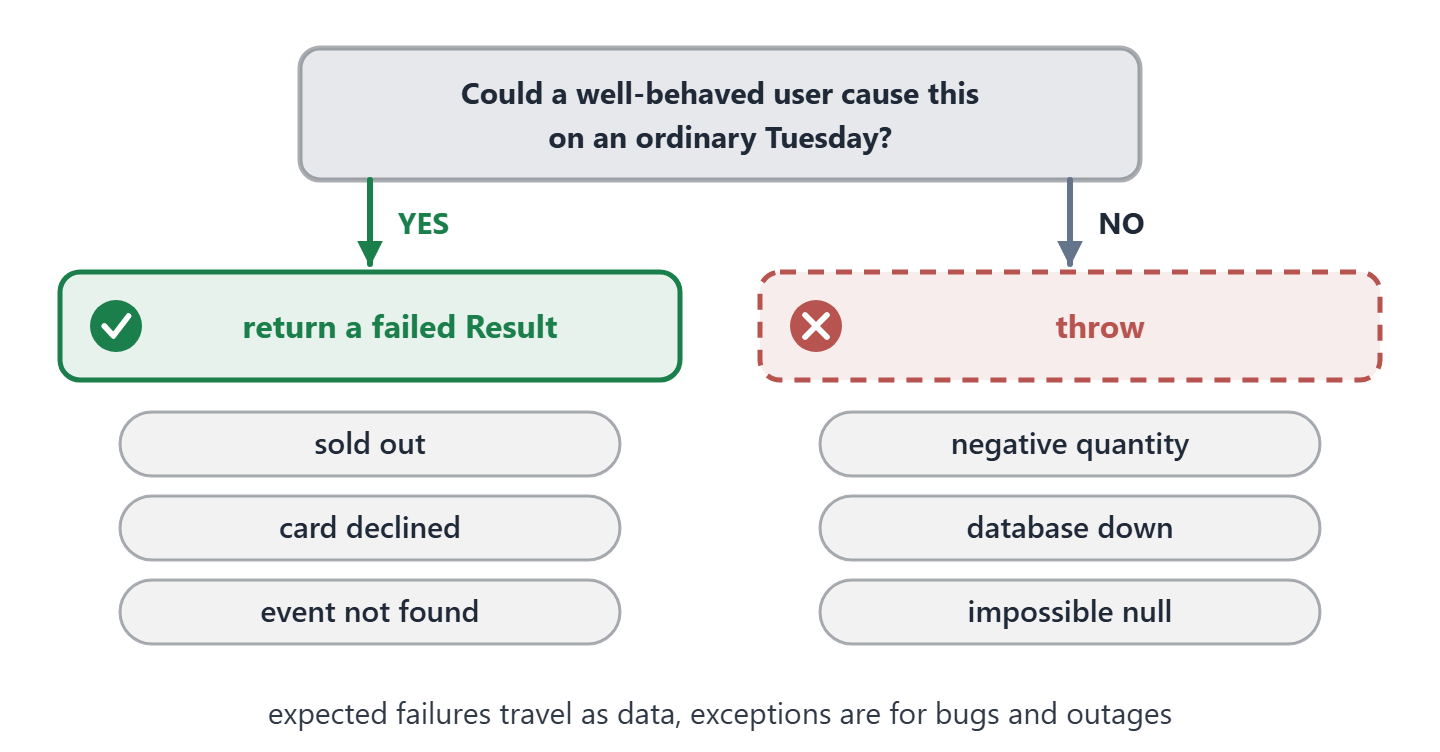
We should throw an exception when a failure means that something is broken, and return a result when a well-behaved client can cause it.
If we’re not sure which group a failure belongs to, one question sorts it out: could a correct client cause this on an ordinary Tuesday?
A contact that doesn’t exist and an email someone already used both pass that test. They are expected failures, so they belong in the method’s return type.
A database outage fails the test, and so does an argument that slipped past validation. Both mean something in our own system is broken, and no client can fix that.
Exceptions suit that second group. They stop the operation and carry a stack trace up to one place that handles them.
In ASP.NET Core, UseExceptionHandler() with AddProblemDetails() turns any exception that escapes an endpoint into a 500 response with a problem details body.
Here’s that test as a picture:
Using FluentResults for Result Pattern
While we can create custom result classes, as we did, we can also use existing libraries such as FluentResults. While our custom implementation is trivial, this library is way more powerful.
First, we will need to add it to our project:
dotnet add package FluentResults
Now, we can create our error classes by extending the Error class provided by the library:
public class RecordNotFoundError(string message) : Error(message);

public class ConflictError(string message) : Error(message);
One class represents a not found error, and the other is for conflicts.
FluentResults has its own Result and Error types, so we import its namespace only in the files that use it.
Then, we can create our FluentResultsContactService class:
using FluentResults;
using UsingResultPatternInNETWebAPI.Errors;

namespace UsingResultPatternInNETWebAPI.Services;

public class FluentResultsContactService
{
    // ...

    public Result<ContactDto> GetById(Guid id)
    {
        var contact = _contactRepository.GetById(id);

        if (contact is null)
        {
            return new RecordNotFoundError($"contact with id {id} not found");
        }

        return Result.Ok(new ContactDto(contact.Id, contact.Email));
    }

    public Result<ContactDto> Create(CreateContactDto contact)
    {
        if (_contactRepository.GetByEmail(contact.Email) is not null)
        {
            return new ConflictError($"contact with email {contact.Email} already exists");
        }

        var createdContact = _contactRepository.Create(new Contact { Email = contact.Email });

        return Result.Ok(new ContactDto(createdContact.Id, createdContact.Email));
    }
}
Here, we will return an appropriate error if anything goes wrong. If everything is OK, we return Result.Ok() with the proper value.
Now, let’s create the FluentResultsContactEndpoints class:
public static class FluentResultsContactEndpoints
{
    public static void MapFluentResultsContactEndpoints(this IEndpointRouteBuilder app)
    {
        var contacts = app.MapGroup("api/v5/contacts");

        // ...

        contacts.MapGet("/{id:guid}", (Guid id, FluentResultsContactService contactService) =>
        {
            var result = contactService.GetById(id);

            if (result.IsFailed)
            {
                return Results.Problem(statusCode: StatusCodes.Status404NotFound, detail: result.Errors[0].Message);
            }

            return Results.Ok(result.Value);
        });

        contacts.MapPost("/", (CreateContactDto createContactDto, FluentResultsContactService contactService) =>
        {
            var result = contactService.Create(createContactDto);

            if (result.IsFailed)
            {
                return Results.Problem(statusCode: StatusCodes.Status409Conflict, detail: result.Errors[0].Message);
            }

            return Results.Created($"/api/v5/contacts/{result.Value.Id}", result.Value);
        });
    }
}
We can check if a given operation failed by checking the IsFailed property and then retrieving any errors with the Errors property. If everything goes as planned, we can use Value property.
FluentResults errors don’t carry an ErrorType, so each endpoint picks its own status code, while our ToProblem() reads it from the error. On the other hand, one FluentResults result can hold several errors, and the library chains steps with methods like Bind() and Map().
So which one should we pick? If one error per call is enough, a small type we own is easier to read and change. If we need more, the library has it written and tested already.
Conclusion
Now we know why we might want to use the Result Pattern and how to do it properly. We have seen different ways to pass results from our services into endpoints and how that can influence our ability to signal error conditions. Each method has pros and cons, and we should strive to balance the two, leading us to the Result Pattern for the failures we expect.
If your API throws exceptions for missing records today, try it on one endpoint first. Return a Result from its service, add ToProblem(), and compare the new endpoint with the old one.
In our Clean Architecture in .NET course, you build your own Result type, mediator and behavior pipeline into a complete, fully tested application.
Tested with .NET 10.0.12 and FluentResults 4.0.0.
