
Updated on
A write action in an ASP.NET Core Web API does four things: it accepts a DTO from the request body, validates it, asks the repository to stage the change, and returns a status code that tells the client what happened. POST returns 201 Created, PUT and DELETE return 204 No Content.
In this part we add those three actions to the OwnerController we built while handling GET requests with a repository, on top of the repository pattern from part 4. That completes the .NET side of this series.
VIDEO: Handling POST, PUT, and DELETE Requests.
The embedded video writes these actions synchronously and validates the model by hand. The code below is the current version: the same three actions, async, with validation left to [ApiController].
If you want to see all the basic instructions and complete navigation for this series, please follow this link: Introduction page for this tutorial.
How Do We Handle a POST Request in ASP.NET Core Web API?
A POST action creates a resource, and it needs four pieces before it can say so honestly.
A creation DTO. OwnerForCreationDto carries the fields a client may set and omits the ones it may not: no Id, no Accounts. The validation attributes live here, on the shape that crosses the wire, not on the entity.
A mapping rule, so the DTO becomes an Owner the repository understands.
A repository method that stages the new entity, and a save that commits it. EF Core fills the Id in when we stage the entity, not when we save, so the response can name the new resource straight away.
A response that says where the new thing lives. CreatedAtRoute returns 201 Created, puts the created object in the body, and adds a Location header holding the URL that will fetch it. That is why the GET-by-id action is given a name: CreatedAtRoute looks the route up by that name to build the URL.
Firstly, let’s modify the decoration attribute for the GetOwnerById action method in the Owner controller:
[HttpGet("{id}", Name = "OwnerById")]
The route name is OwnerById and it is the string CreatedAtRoute looks up, so it stays the same even though the C# method name changes when the action becomes asynchronous.
Before we continue, we should create another DTO class. As we said in the previous part, we use the model class just to fetch the data from the database, and to return the result we need a DTO. It is the same for the create action. So, let’s create the OwnerForCreationDto class in the Entities/DataTransferObjects folder:
public class OwnerForCreationDto
{
[Required(ErrorMessage = "Name is required")]
[StringLength(60, ErrorMessage = "Name can't be longer than 60 characters")]
public string? Name { get; set; }
[Required(ErrorMessage = "Date of birth is required")]
public DateTime DateOfBirth { get; set; }
[Required(ErrorMessage = "Address is required")]
[StringLength(100, ErrorMessage = "Address cannot be longer than 100 characters")]
public string? Address { get; set; }
}
As we can see, we don’t have the Id and Accounts properties.
We are going to continue with the interface modification:
public interface IOwnerRepository
{
Task<IEnumerable<Owner>> GetAllOwnersAsync();
Task<Owner?> GetOwnerByIdAsync(Guid ownerId);
Task<Owner?> GetOwnerWithDetailsAsync(Guid ownerId);
void CreateOwner(Owner owner);
}
After the interface modification, we are going to implement that method:
public void CreateOwner(Owner owner) => Create(owner);
CreateOwner stays synchronous on purpose. It only stages the entity on the change tracker, and staging touches no database, so there is nothing to await here. The awaited call is the save on the wrapper, and that is the one that talks to SQL Server.
Before we modify the OwnerController, we have to create an additional mapping rule:
CreateMap<OwnerForCreationDto, Owner>();
The sample pins AutoMapper to 14.0.0, which is the last release under the MIT licence. From 15.0.0 the package moved to the Reciprocal Public License 1.5 or a commercial licence, and the registration call in Program.cs changed shape at the same time, so moving up is a decision rather than a version bump. One thing to weigh before pinning 14.0.0 in a project of our own: it is affected by GHSA-rvv3-g6hj-g44x, a high-severity denial-of-service advisory caused by uncontrolled recursion, and the first fixed release, 15.1.1, is already under the new non-MIT licence, which is why restoring this sample prints NU1903. If that decides it, our comparison of AutoMapper and Mapster weighs the alternative in detail.
Lastly, let’s modify the controller:
[HttpPost]
public async Task<IActionResult> CreateOwner([FromBody] OwnerForCreationDto owner)
{
var ownerEntity = _mapper.Map<Owner>(owner);
_repository.Owner.CreateOwner(ownerEntity);
await _repository.SaveAsync();
var createdOwner = _mapper.Map<OwnerDto>(ownerEntity);
return CreatedAtRoute("OwnerById", new { id = createdOwner.Id }, createdOwner);
}
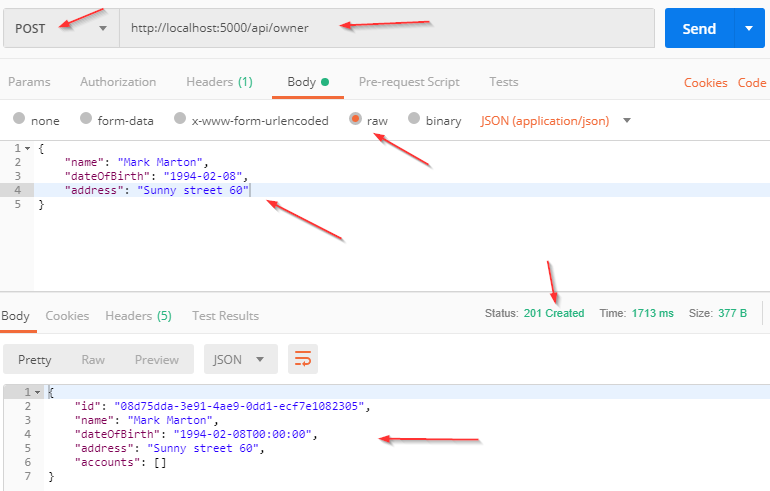
Right now is a good time to test this code by sending the POST request by using Postman.
Let’s examine the result:
What the Create Action Does
Let’s talk a little bit about this code. The interface and the repository parts are pretty clear, so we won’t talk about those. However, the code in the controller contains several things worth mentioning.
The CreateOwner method has its own [HttpPost] decoration attribute, which restricts it to POST requests. The owner parameter comes from the client, and it comes from the request body rather than from the URL, which is what [FromBody] says. On a controller decorated with [ApiController] that attribute is inferred for a complex type, so it can be left off; we keep it because it states the contract for anyone reading the action.
We could bind the same parameter from the query string with [FromQuery] or from the route with [FromRoute], but a complex object does not belong in a URL: it is long, it is logged, and it ends up in browser history.
There is no null check and no ModelState check in this action, and that is deliberate. [ApiController] validates the model before the action runs and short-circuits an invalid request with a 400 Bad Request carrying a ValidationProblemDetails body, and it makes [FromBody] parameters implicitly required, so an empty body is rejected the same way. Writing those checks by hand puts twelve lines into three actions that can never execute. This is what the [ApiController] attribute does for us, and there is more on how model validation works in a Web API in its own article.
An empty body produces this response:
{"type":"https://tools.ietf.org/html/rfc9110#section-15.5.1","title":"One or more validation errors occurred.","status":400,"errors":{"":["A non-empty request body is required."],"owner":["The owner field is required."]}}
And a body that misses required properties produces this one, naming each of them:
{"type":"https://tools.ietf.org/html/rfc9110#section-15.5.1","title":"One or more validation errors occurred.","status":400,"errors":{"Name":["Name is required"],"Address":["Address is required"]}}
Both come from the [Required] and [StringLength] attributes on the DTO, with the messages we wrote there. The behaviour is opt-out rather than fixed: SuppressModelStateInvalidFilter and SuppressInferBindingSourcesForParameters turn each half of it off if an application needs to handle validation itself.
We have two map actions as well. The first one is from the OwnerForCreationDto type to the Owner type, because we accept the OwnerForCreationDto object from the client and we have to use the Owner object for the create action. The second map action is from the Owner type to the OwnerDto type, which is the type we return as a result.
The last thing to mention is this part of the code:
CreatedAtRoute("OwnerById", new { id = createdOwner.Id }, createdOwner);
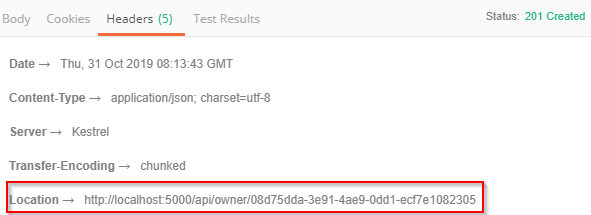
CreatedAtRoute returns status code 201, which stands for Created. It also populates the body of the response with the new owner object, and the Location header with the address that retrieves that owner. We provide the name of the route where the created entity can be fetched, which is the name we added to the GET-by-id action a few paragraphs ago:
If we copy that address and paste it into Postman, sending the GET request returns the newly created owner object. The id in the header is worth a second look: EF Core generated it while staging the entity, before the save, which is why the action can build the URL at all.
How Do We Handle a PUT Request?
A PUT action replaces a resource, and the word replaces is the whole specification. The client sends the complete new state; anything left out of the body is not “unchanged”, it is absent.
That is why the update DTO exists separately from the creation DTO even when the two look identical. They are different contracts, and their validation rules will diverge the first time a field becomes optional on one and not the other.
The action fetches the existing entity by id before mapping onto it. Mapping the DTO onto that existing entity, rather than constructing a new one, is what preserves the fields the DTO does not carry.
The response is 204 No Content. The client already knows the new state, since it sent it, so returning the object again is a payload nobody reads. A missing id returns 404 Not Found instead.
First, we are going to add a new DTO class:
public class OwnerForUpdateDto
{
[Required(ErrorMessage = "Name is required")]
[StringLength(60, ErrorMessage = "Name can't be longer than 60 characters")]
public string? Name { get; set; }
[Required(ErrorMessage = "Date of birth is required")]
public DateTime DateOfBirth { get; set; }
[Required(ErrorMessage = "Address is required")]
[StringLength(100, ErrorMessage = "Address cannot be longer than 100 characters")]
public string? Address { get; set; }
}
We did the same thing as with the OwnerForCreationDto class, and the properties are nullable for the same reason: the request body decides whether they arrive, and the [Required] attributes are what reject a body that leaves them out.
One more thing. If we want to remove the code duplication between OwnerForCreationDto and OwnerForUpdateDto, we can create an abstract class, move the shared properties to it, and let both classes inherit from it. For the sake of simplicity we won’t do that here.
After that, we have to create a new map rule:
CreateMap<OwnerForUpdateDto, Owner>();
Then, let’s change the interface:
public interface IOwnerRepository
{
Task<IEnumerable<Owner>> GetAllOwnersAsync();
Task<Owner?> GetOwnerByIdAsync(Guid ownerId);
Task<Owner?> GetOwnerWithDetailsAsync(Guid ownerId);
void CreateOwner(Owner owner);
void UpdateOwner(Owner owner);
}
Of course, we have to modify the OwnerRepository class:
public void UpdateOwner(Owner owner) => Update(owner);
Finally, let’s alter the OwnerController:
[HttpPut("{id}")]
public async Task<IActionResult> UpdateOwner(Guid id, [FromBody] OwnerForUpdateDto owner)
{
var ownerEntity = await _repository.Owner.GetOwnerByIdAsync(id);
if (ownerEntity is null)
{
_logger.LogError($"Owner with id: {id}, hasn't been found in db.");
return NotFound();
}
_mapper.Map(owner, ownerEntity);
_repository.Owner.UpdateOwner(ownerEntity);
await _repository.SaveAsync();
return NoContent();
}
The action is decorated with the [HttpPut] attribute and it receives two parameters: the id of the entity we want to update, and the entity with the updated fields taken from the request body. After fetching the owner, _mapper.Map(owner, ownerEntity) copies the DTO’s three properties onto the entity we just read, which is how the Id and the accounts survive an update that never mentions them.
One consequence is worth knowing before it surprises us in a query log. Our repository reads with AsNoTracking(), so the entity arrives detached, and Update() re-attaches it with every property marked as modified. The generated statement therefore writes all three columns, not only the ones that changed.
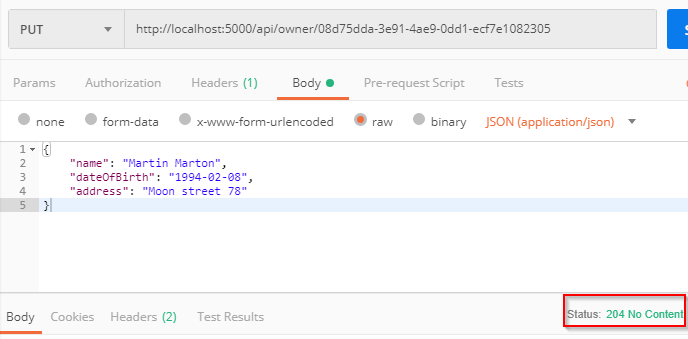
Finally, we return NoContent, which stands for the status code 204:
We can read more about update actions in ASP.NET Core with EF Core to get a better picture of how things work behind the scenes. If two clients may update the same owner at the same time, handling concurrent updates to the same record is the next thing to add.
How Do We Handle a DELETE Request?
A DELETE action removes a resource and returns 204 No Content, because there is nothing left to describe.
The interesting part is what happens when the row cannot be removed. Our owner has accounts, and the database schema this series created in part 1 sets the foreign key to restrict deletes rather than cascade them. Deleting an owner that still has accounts is refused by the database, and the request fails.
Returning that failure as a 500 would be wrong. Nothing broke; the client asked for something the data does not allow. 400 Bad Request with a message naming the reason is the honest answer, and the action checks for related accounts before attempting the delete.
DELETE requests should not carry a body. RFC 9110 gives content on a DELETE no generally defined semantics and lets a server reject it outright, so the id lives in the route and the action needs no [FromBody] parameter.
For the delete request, we follow the same three steps. The interface:
public interface IOwnerRepository
{
Task<IEnumerable<Owner>> GetAllOwnersAsync();
Task<Owner?> GetOwnerByIdAsync(Guid ownerId);
Task<Owner?> GetOwnerWithDetailsAsync(Guid ownerId);
void CreateOwner(Owner owner);
void UpdateOwner(Owner owner);
void DeleteOwner(Owner owner);
}
The OwnerRepository class:
public void DeleteOwner(Owner owner) => Delete(owner);
Before the controller, one more thing. An owner that still has accounts cannot be deleted, so we need a way to ask. Let’s modify the IAccountRepository interface:
using Entities.Models;
namespace Contracts
{
public interface IAccountRepository
{
Task<IEnumerable<Account>> AccountsByOwnerAsync(Guid ownerId);
}
}
Notice that IAccountRepository does not inherit IRepositoryBase<Account>, while AccountRepository still inherits RepositoryBase<Account> and calls FindByCondition below. That is the design part 5 argued for: the implementation gets the generic operations, and the interface exposes only the one query a caller is allowed to make.
Then let’s modify the AccountRepository class by adding the new method:
public async Task<IEnumerable<Account>> AccountsByOwnerAsync(Guid ownerId) =>
await FindByCondition(a => a.OwnerId.Equals(ownerId)).ToListAsync();
Finally, the action in the OwnerController:
[HttpDelete("{id}")]
public async Task<IActionResult> DeleteOwner(Guid id)
{
var owner = await _repository.Owner.GetOwnerByIdAsync(id);
if (owner is null)
{
_logger.LogError($"Owner with id: {id}, hasn't been found in db.");
return NotFound();
}
var accounts = await _repository.Account.AccountsByOwnerAsync(id);
if (accounts.Any())
{
_logger.LogError($"Cannot delete owner with id: {id}. It has related accounts.");
return BadRequest("Cannot delete owner. It has related accounts. Delete those accounts first");
}
_repository.Owner.DeleteOwner(owner);
await _repository.SaveAsync();
return NoContent();
}
Sending a DELETE request for an owner that still has accounts now answers with a 400 and a sentence a client can show a user:
Cannot delete owner. It has related accounts. Delete those accounts first
The pre-check buys that message, and it is not the guard. Between the check and the save, another request can insert an account, and the delete then fails at the database instead: EF Core raises a DbUpdateException wrapping a Microsoft.Data.SqlClient.SqlException with Number = 547, the foreign key violation. The constraint is the real protection; the pre-check is the good error message.
For a repository built asynchronously from the ground up in a standalone project, see Implementing Async Repository in .NET Core. We still recommend finishing all the parts of this series first, to get an easier understanding of the project’s business logic.
Errors are handled outside these actions, by a global handler, which is why each one reads as four lines of intent: how IExceptionHandler implements that, and why global error handling is the right shape for an API.
Which Status Code Should Each Action Return?
Three verbs, three success codes, and the differences are not arbitrary.
POST returns 201 Created because something now exists that did not before, and the client needs its address. The Location header carries that address, which is why the response is not merely 200 OK.
PUT and DELETE both return 204 No Content because the client already knows the outcome. After a successful replace, the new state is the body the client sent. After a successful delete, there is no state.
Failures divide the same way. 400 Bad Request means the request itself was unacceptable: a DTO that fails validation, or a delete the data does not permit. 404 Not Found means the URL addresses nothing. 500 means our code broke, and returning it for anything else hides real faults among expected ones.
Every one of these is a decision the client depends on.
| Action | Request | Request body | On success | On failure |
|---|---|---|---|---|
CreateOwner | POST /api/owner | OwnerForCreationDto | 201 Created, the new OwnerDto, and a Location header pointing at it | 400 Bad Request when validation fails |
UpdateOwner | PUT /api/owner/{id} | OwnerForUpdateDto | 204 No Content | 400 Bad Request when validation fails, 404 Not Found when the id does not exist |
DeleteOwner | DELETE /api/owner/{id} | none | 204 No Content | 404 Not Found when the id does not exist, 400 Bad Request when the owner still has accounts |
When something really does break, returning a 500 properly is a subject of its own, and ProblemDetails, the standard shape for an error response, is what our handler writes into the body.
Conclusion
That completes the .NET side of this series: a database, a configured host, logging, a repository, and a full set of CRUD endpoints.
From here the API is ready for the things a real one needs, starting with pagination, filtering, searching and sorting, each covered in its own article.
If we want to build a client for this API instead, part 7 starts the Angular half of the series.
In this post we have learned:
- How to handle a POST request and return the new resource’s address
- How to handle a PUT request, and why it replaces rather than patches
- How to handle a DELETE request, and what to return when the data refuses one
- Why
[ApiController]makes the hand-written validation guards unnecessary - Which status code each of the three actions returns, and why
A good exercise from here is to repeat all three actions for the Account entity, because nothing beats the practice.
This series builds a working API. The Ultimate ASP.NET Core Web API course builds a production one: a service layer, validation and content negotiation, versioning, caching, authentication, and the tests that hold it together.
Tested with .NET 10 (SDK 10.0.302), Microsoft.EntityFrameworkCore.SqlServer 10.0.11 and AutoMapper 14.0.0 against SQL Server Express LocalDB.


Hi Marinko,
Firstly what a great book “Ultimate ASP.NET Core Web API”.
I wondered if you could shed some light on why I’m facing an issue when following the code in Ch. 12 Working with Patch Requests.
In the book it mentions there is a workaround to using NewtonsoftJson alongside System.Text.Json buy using the following:
and in the AddControllers section:
builder.Services.AddControllers(config => { config.RespectBrowserAcceptHeader = true; config.ReturnHttpNotAcceptable = true; config.InputFormatters.Insert(0, GetJsonPatchInputFormatter()); }).AddXmlDataContractSerializerFormatters() .AddCustomCSVFormatter() .AddApplicationPart(typeof(APReporter.Presentation.AssemblyReference).Assembly);When I run the project with this configuration the patchDoc object passed from the client to the controller is empty as if there was a serialization problem.
The only way I can get patching to work is by adding .AddNewtonsoftJson directly to the AddControllers method in the program.cs. Resulting in the GetJsonPatchInputFormatter() method irrelevant.
builder.Services.AddControllers(config => { config.RespectBrowserAcceptHeader = true; config.ReturnHttpNotAcceptable = true; config.InputFormatters.Insert(0, GetJsonPatchInputFormatter()); }).AddNewtonsoftJson() .AddXmlDataContractSerializerFormatters() .AddCustomCSVFormatter() .AddApplicationPart(typeof(APReporter.Presentation.AssemblyReference).Assembly);Any ideas why this is?
Hello. Thanks for the kind words. Now, I am just guessing here because the code looks quite fine. Have you installed both required libraries in both projects when you tried the first example? Also, have you tried to compare your solution with ours, also to run our solution? It must work since it was tested so many times by us and many many times by all of our customers 🙂 Looking at the code it really seems ok, and I can’t find a reason why the API couldn’t deserialize the JsonPatch object.
Thanks Marinko,
My bad, the issue was with the header in my request.
ForeignKey fields not updated if I use Include() in GetById() method.
Hi, What is the best way for updating hole entity, but without using automapper, shoul i update each propery individually?
If you want to do that without the mapping tool, you have to do it manually. But in order to remove that code from the business logic, you should create an extension method for that exact type and move the mapping logic there. For me, it would be the best approach.
i thing mapping in this context violates always valid domain model principle, i think entity should be responsible for cheks and invariants. for example while updating checking if property is null. what is your opinion about this?
Well, to be honest, if there is a lot to map, I will probably use the tool, if not, I can do it on my own. But in most cases, I use the mapper. You can perform all the checks on your DTOs that come from the client, and then just map them to your models.
Thank you
I have gone through the parts of “Net core web development”. Indeed, it is awesome, nice and very useful resource.
I want to give you thumb-up for the great work you guys had done.
Cheers…
Thanks a lot for the comment. I’m glad you like the series.
How do you format a “201” status code when 2 or more rows are added to a database table via an HttpPost action method in a Web API ? Dapper uses “anonymous parameters” that allows multiple rows to be added in a single HttpPost. But, how do you fully format the response using “201” response code ?
Well, you can do it in a similar manner. Of course, it is a bit complicated since you return multiple ids as a string and a collection of created objects to the client. Also, you have to have a GET action that accepts collection as a parameter but this has to be mapped through model binding. We talk about this in detail in our Ultimate Web API book https://code-maze.com/ultimate-aspnet-core-web-api
Hello Marinko,
there is one small problem in the implementation of CreateOwner method that I noticed: if the last mapping (var createdOwner = _mapper.Map(ownerEntity)) failed, the user is still created but API returns code 500.
Kind Regards, Petr
Hi Petr. Well, that’s the mapping problem, and the mapping is under the developer’s controll. So I wouldn’t say that it is an implementation problem. You have to write a correct rule to map from the entity, which is valid for sure at that point, to the dto object that you are going to return to the client. But I understand your point, just I think this is not something I should mention in the article.
Yes, you’re right. It’s just a detail (but was an issue in my case 😉 Maybe an alternative approach could be a transaction like: using var scope = new TransactionScope(); // CreatOwner implementation; scope.Complete();
Thanks a lot for this article and Kind Regards.
Hi Marinko! Thank you for the tutorial. It did help me alot to get up to speed with asp.net core. Can you update this to include adding owner with a list of accounts and also updating?
Hi Samuel. Thanks a lot for the kind words, I am really glad this tutorial helped you. Regarding your question, that is basically the EF Core’s job. API should just accept the request with the correct payload and all the other activities are related to EF Core. You can read this article: https://code-maze.com/efcore-modifying-data/#addingrelatedentities to learn more about that.
This is one of the best asp .net core Restful API tutorials I found on google.
Thank you so much team code-maze 🙂
I referred to this example and i couldnt get PUT to work. https://github.com/CodeMazeBlog/advanced-rest-concepts-aspnetcore/blob/sorting-end/AccountOwnerServer/Controllers/OwnerController.cs
Have been trying several days. My issue is when i update one field in OwnerExtension, the remaining exsiting fields becomes null as their value is not in the PUT request. Any thoughts on how to go about this following the same code structure?
Hi Tham. If you want to send only one property in the request body and not the whole object, you need the patch request, not put. This is a normal behavior for the put request. In our book we explain in detail what are the differences, how to use patch and how to validate it. https://code-maze.com/ultimate-aspnet-core-3-web-api/?source=nav
Hi Marinko & Vladimir..
First of all thx for the amazing articles & all efforts you have done with Code-Maze team. Really appreciated. I learn a lot, refresh many things and see many Best Practices when i check source-codes of all articles.
Regarding an important point about Model.IsValid & [FromBody] attributes. I think you can read it in Pro Asp.Net Core 3, 8th Edition of Adam Freeman from Apress, 2020. I would like to take as quotation his words below, rather than explaining it myself.
“Applying the API Controller Attribute
The ApiController attribute can be applied to web service controller classes to change the behavior of the model binding and validation features. The use of the FromBody attribute to select data from the request body and explicitly checking the ModelState. IsValid property is not required in controllers that have been decorated with the ApiController attribute. Getting data from the body and validating data are required so commonly in web services that they are applied automatically when the attribute is used, restoring the focus of the code in the controller’s action to dealing with the application features,”
https://uploads.disquscdn.com/images/eba24eb5597dce6bba4b5c485fdbec35687e366f3e271bcc585f7475a33510ca.png
This means, when [ApiController] attribute is used, behind the scene Model Binding works & validates client DTO and if Model.IsValid then Web API action method is called afterwards. In case of Model not valid, Web API already responds with Error Codes and action methods are not run. But anyway, using [FromBody] gives a hint to another developer that data comes from Request body, as you already use [ApiController] attribute in OwnerController.
When [ApiController] is not used then we have to use Model.IsValid and [FromBody] to properly get Request data from Body and Validate it before any model & data operations.
I think, you can adapt this best practice in future updates of all Code-Maze articles & Source Codes.
Thx again for all amazing articles.
Atilla Selem.
Hi Atilla. This attribute is added by default and we didn’t bother with removing it. But everything you said and that writes in the book stands its point. Also, you can override this behavior in the Startup class. So you can have the ApiController attribute and still have your own Model.IsValid expression that triggers instead of the default one. Thanks a lot for the comment.
Thanks for another great article (-:
Why do we need the Id when doing a HttpPut? it’s on the model
Hello Martin. Thank you for the kind words.
Regarding your question, by the REST standards you have to pass the Id of the entity and the modified entity to the PUT Action. Than in the action you can use that Id to retreive the entity from the database and map the changes to it. This is how the PUT request should be done by the RESTful standards.
Also, you are not sending the Entity itself from the client, you are sending a DTO for update, which doesn’t contain the Id property.
Thanks for the explanation.
I am not convinced that you should only use dto’s maybe in a public API but I only use it when my web page needs data from many sources
Well, I am not trying to force anyone to do it this way. I am just saying if your database is changed (your table) than your model must change thus causing the result to change (because your model which you use to send a result to the client is modified). But with DTO’s you don’t have to warry about that. Your tables and entities may change as much as they can, but if your client still want the same result, you are safe with DTO because it is not connected to the database at all. Just one advantage. But again, as long as your solution works for you, you should do it that way.
Hi, when test deleting from postman, I face bad request error. Thank in advance
[HttpDelete(“{id}”)]
public IActionResult DeleteOwner(Guid id)
{
try
{
var ownerEntity = repositoryWrapper.Owner.GetOwnerById(id);
if (ownerEntity == null)
{
_logger.LogError(“No owner found with this id ” + id);
return NotFound();
}
repositoryWrapper.Owner.DeleteOwner(ownerEntity);
repositoryWrapper.Save();
_logger.LogInfo(“Owner Delete success”);
return NoContent();
}
catch (Exception ex)
{
_logger.LogInfo(“Error in deleting owner – ” + ex.Message);
return StatusCode(500, “Internal server error”);
}
}
// Delete -> http://localhost:5000/api/owner/c0737034-4d3e-4913-a0fd-08d82489b5
{
“type”: “https://tools.ietf.org/html/rfc7231#section-6.5.1”,
“title”: “One or more validation errors occurred.”,
“status”: 400,
“traceId”: “|60258898-47d1ac009bd94386.”,
“errors”: {
“id”: [
“The value ‘c0737034-4d3e-4913-a0fd-08d82489b5’ is not valid.”
]
}
}
It seems that your guid is shorter two characters. Maybe this is the problem.
Nice job. Thanks,
Hey, inside UpdateOwner method you call method Update with parameter dbOwner. Is that what you wanted, or is it typo?
Hello Ondřej Hadrava. You are right, this is typo. It should be just owner parameter. It is fixed now. Thank you very much for the suggestion.
hi Marinko, just to confirm with you, if I created extended class for owner (ownerExtended.cs) with account info is it I need to create Interface for OwnerExtended class and also OwnerExtendedRepository for insert new owner with account info? for delete owner and also account info also same if i want delete the owner and all related to owner accounts at one Delete method. Since tutorial only trying to insert owner info without account info at the same time, so OwnerRepository manage to handle Get and Create in one Repository.
Hello. First of all you don’t have to create a separate repository class for every entity you require in your project. If it is related to owner, place actions in the owner repository class. Second, deleting related entites could be solved with the database configuration, by setting cascading delete to true. This will automaticaly delete all the children entites when the parent is deleted. What is my recommendation: First try to read updated .NET Core series, in there you will find no more owner extended but different and better project architecture. Second please read our EF Core tutorial (series of articles). In there you will understand how EF Core works and how to utilize that knowledge for all your requirements. Based on your comment, this series will help you a lot. Best regards.
hi Marinko, Thanks for your reply. Just noticed this .net core series is different architecture from previous once. could you please give some example why we are better to separate CreateDto and UpdateDto instead of share only one? because i cant figure out in what situation this 2 is different.
Hello. As we stated in the article the first difference is a conceptual one, they are different classes because you use them for different actions. But what is more important is that the Update validation rules doesn’t have to be the same as the Create validation rules. For example if you register on some web shop, they don’t have to ask a credit card number from you right at the registration point. So that API is creating a new user in the db without the credit card number field. As you can see the card number field is not required. But as soon as you want to buy something, they will ask for the credit card number and update your entity in the database, thus the number field must be required during the update. Of course this is just one of the examples that could happen, there are a lot more. Hope this makes it clearer.
hi Marinko, really thanks for your fast response. I got what you mean. it is clear to me. Really enjoy to learn from code maze. Hope code maze can publish more tutorial. 🙂
I am glad to hear that. Every monday a new article is published. You may subscribe to get a regular information about our content. If you have some suggestions or anything to say to us, consider leaving us a review, it means us a lot. Best regards.
hi Marinko, really thanks for your fast response. I got what you mean. it is clear to me. Really enjoy to learn from code maze. Hope code maze can publish more tutorial. 🙂
hi, I’m really enjoy the tutorial, it’s really details in explanation. Great Job. 🙂
Now I’m trying to build the same for Account model. I need to create POST request (just same as owner’s POST request). When i using Postman to send POST request JSON as below
{"AccountType": "Saving",
"DateCreated": "1900-01-51",
"OwnerId": "261e1685-cf26-494c-b17c-3546e65f5620"
}
I’m getting “Account object is null” return from the request. If i change the “1900-01-51” to “1900-01-01”, it return Status OK(200) and data inserted into db.
but i follow the above tutorial for owner POST request, using below body
{"Name": "Mark Marton",
"DateOfBirth": "1900-01-51",
"Address": "Sunny street 60"
}
i’m getting JSON
{"DateOfBirth": [
"Could not convert string to DateTime: 1900-01-51. Path 'DateOfBirth', line 3, position 27."
]
}
Why i getting different result from the same method? could anyone help me about this? seem like i’m missing something. Thanks in advance 🙂
My code for Account:
AccountController.cs
[HttpPost]public IActionResult CreateAccount([FromBody]Account account)
{
try
{
if (account.IsObjectNull())
{
_logger.LogError("Account object sent from client is null.");
return BadRequest("Account object is null");
}
if (!ModelState.IsValid)
{
_logger.LogError("Invalid account object sent from client.");
return BadRequest("Invalid model object");
}
_repository.Account.CreateAccount(account);
_repository.Save();
return CreatedAtRoute("AccountById", new { id = account.Id }, account);
}
catch (Exception ex)
{
_logger.LogError($"Something went wrong inside CreateAccount action: {ex.Message} : {ex.InnerException}");
return StatusCode(500, "Internal server error");
}
}
Contracts.IAccountRepository.cs
public interface IAccountRepository : IRepositoryBase{
...
void CreateAccount(Account account);
}
Repository.AccountRepository.cs
public class AccountRepository : RepositoryBase, IAccountRepository
{
public AccountRepository(RepositoryContext repositoryContext)
: base(repositoryContext)
{
}
....
....
public void CreateAccount(Account account)
{
account.Id = Guid.NewGuid();
Create(account);
}
}
Entities.Models.Account.cs
[Table("account")]public class Account : IEntity
{
[Key]
[Column("AccountId")]
public Guid Id { get; set; }
[Required(ErrorMessage = "Date created is required")]
public DateTime DateCreated { get; set; }
[Required(ErrorMessage = "Account type is required")]
[StringLength(10, ErrorMessage = "Account type cannot be longer then 10 characters")]
public string AccountType { get; set; }
[Required(ErrorMessage = "Owner Id is required")]
public Guid OwnerId { get; set; }
}
Hello. First of all you are getting those errors because your date has a wrong format (51 days) but I believe you already know that. Why different erros? Well from what I can see in the CreateAccount action your account object is not deserialized, due to the wrong date format, thus making that object null. And then the first check triggers and returns that object is null. For the CreateOwner action, your object hasn’t been deserialized as well, but you are getting a model binding error from the API, I just tried and getting the same. I don’t know why you get different responses, it is a bit strange. I have created additional account controller and getting the same error as for the CreateOwner action.
hi Marinko, thanks for the reply. I found the issue and fixed it, I didn’t put the [ApiController] in account controller, that why causes the different response, now i can get the model binding error for “1900-01-51” input. Really thanks Marinko because you trigger me on “deserialized”, then i found the root cause. 🙂
Great to hear that. I am glad that I could help you even if I didn’t 😀 If you have some propositons or anything to say to us you can always do that on this link: http://34.65.74.140/review-form/ . Best regards.
I hope you can assist me in some way. I followed the tutorial but I’m writing my own software.
I wrote a post method and it looks something like this:
[HttpPost("LiveDevices")]public ActionResult LiveDevices([FromBody] LiveDeviceTransform transform)
{
Console.WriteLine("Transform: " + transform);
}
And from the client I’m sending a string I created using a JSON utility from a class that looks exactly like LiveDeviceTransform using a POST request. I tried Content-Type “application/json” and “raw”.
From the server, I’m getting this:
info: Microsoft.AspNetCore.Routing.EndpointMiddleware[0]Executing endpoint 'ShowWrapper.Controllers.ShowController.LiveDevices (ShowWrapper)'
info: Microsoft.AspNetCore.Mvc.Internal.ControllerActionInvoker[3]
Route matched with {action = "LiveDevices", controller = "Show"}. Executing controller action with signature Microsoft.AspNetCore.Mvc.ActionResult LiveDevices(System
.Object) on controller ShowWrapper.Controllers.ShowController (ShowWrapper).
info: Microsoft.AspNetCore.Mvc.Infrastructure.ObjectResultExecutor[1]
Executing ObjectResult, writing value of type 'Microsoft.AspNetCore.Mvc.ProblemDetails'.
info: Microsoft.AspNetCore.Mvc.Internal.ControllerActionInvoker[2]
Executed action ShowWrapper.Controllers.ShowController.LiveDevices (ShowWrapper) in 404.7825ms
info: Microsoft.AspNetCore.Routing.EndpointMiddleware[1]
Executed endpoint 'ShowWrapper.Controllers.ShowController.LiveDevices (ShowWrapper)'
info: Microsoft.AspNetCore.Hosting.Internal.WebHost[2]
Request finished in 598.5863ms 415 application/problem+json; charset=utf-8
info: Microsoft.AspNetCore.Server.Kestrel[32]
Connection id "0HLQ2G1H2OEU3", Request id "0HLQ2G1H2OEU3:00000001": the application completed without reading the entire request body.
Which, I think, means it’s not finding the right route to match or that it does but reading the content doesn’t work.
And, indeed, when I removed the parameters from the method, it entered correctly. So, something about my definitions or my formatting is wrong.
Can you help?
Hello Eran. Well if you want your post to be decorated with the name, as you did here (“LiveDevices”), then your request must target localhost:5000apicontrollernameLiveDevices. You can’t just target this one localhost:5000apicontrollername, because you added a name for your action. So if you remove that name than just apicontrollerName will work. If you remove parameters from the Post action, then it is no longer a valid POST action, because it expects a valid model data through the request body. Make sure that the client object has the same properties as the server model object.
Do I have to have the “/api” prefix? Because I have other methods (and this one) accessed without it.
I checked again, comparing the two objects, and they are both 7 floats with the same field names. Is there something else I could do to make sure they are the same? Is converting the object to JSON in order to send it the best method or is it wrong?
You don’t have to have the /api prefix, even in .net core 3.0 the default controller doesn’t have it. Still I like to have it. About jor json object, it is enough if you have the same type and the same keys for your properties. And you should send a json object to the server, so converting it to JSON is not wrong at all.
Well. It’s not working. Is there a way to output the ProblemDetails so I can see what is going on.
I went over many tutorials and eventually settled on just having no parameters and reading the body raw.
Just wanted to say I very much enjoyed this tutorial. It was very enlightening and helpful.
The extension method on the interface blew my mind.
Thank you very much Eran, it is always great feeling when we hear something like that from our readers. I hope you will find other articles useful for you as well, and we have a lot of those 😀 Best reagards.
Marinko,
UpdateOwner is using HttpPut, and somehow it’s delete the record update ( which is OwnerId).
Postman return 204 which is good. But somehow the OwnerId which is using as a parameter with UpdateOwner is getting deleted.
Any idea?
Hello Kyle. Well, I have some ideas but can’t be sure without a source code. But if you are asking me could an entity be deleted with the update request, the answer is Yes. I could write here a complete theory about that, but it would take a lot of time. Bottom line is that if you fetch an entity from a database with its relations, remove those relations in a code, and Update that entity, those relations will be deleted from the db.
WHen it run
_repository.Owner.UpdateOwner(dbOwner, entity);it’s callUpdateOwnerand passing dbOwner and entity ( which is obj I send from Postman). Then, It calls the functioin Map :public static void Map( this OwnerTbl dbOwner, OwnerTbl entity).I’m not sure, but
dbOwner.OwnerId = entity.OwnerIdare not the same value. ( which I think it should be the same)For example, I’m sending ownerId = 1000 , then dbOwner.OwnerId = 1000, but entity.OwnerId = 0. Other properties are renaming the same. Not sure it’s the way EFCore should do or not. I think its correct because I’m not warp OwnerId inside body.
The ex error is : {“The property ‘OwnerId’ on entity type ‘OwnerTbl’ has a temporary value while attempting to change the entity’s state to ‘Deleted’. Either set a permanent value explicitly or ensure that the database is configured to generate values for this property.”}
[HttpPut("{id}")]public IActionResult UpdateOwner(int id, [FromBody]OwnerTbl owner)
{
try
{
if (owner.IsObjectNull())
{
_logger.LogError("Owner object sent from client is null.");
return BadRequest("Owner object is null");
}
if (!ModelState.IsValid)
{
_logger.LogError("Invalid Owner object sent from client.");
return BadRequest("Invalid model object");
}
var dbOwner = _repository.Owner.GetOwnerById(id);
if (dbOwner.IsEmptyObject())
{
_logger.LogError($"Owner with Id: {id}, hasn't been found in db.");
return NotFound();
}
_repository.Owner.UpdateOwner(dbOwner, Owner);
_repository.Save();
return NoContent();
}
catch (Exception ex)
{
_logger.LogError($"Something went wrong inside UpdateOwner action: {ex.Message}");
return StatusCode(500, "Internal server error@updateOwner");
}
}
public void UpdateOwner(OwnerTbl dbOwner, OwnerTbl owner){
dbOwner.Map(owner);
Update(dbOwner);
}
Basically same code as in your blog.
Here is my database: OwnerTbl has OwnerId(PK) , OwnerDriverLicenceId, AccountId(FK to AccountTbl), AccountType(FK to AccountTypeTbl)
AccountTbl has AccountID ( PK) , DateOpen…etc
AccountType has TypeID ( PK), TYpeType…
Hi Kyle, the error message are clear enough. Your OwnerId is of type Int, and because it is not populated, when you send your request, once it arrives to the server it has a value 0 which is a default value for the Int type. You shouldn’t map dbOwner.Id with entity.Id, because entity.Id is not populated at all. After all, you should never change the Id field in the database. Because it is of type Int, it shoud be autogenerated (as I explained it to you in one of the previous comments). So, this code looks good to me, just don’t map Id property, map all the others and then send the dbOwner object for update. Best regards.
Hey Marinko,
How can I check if the owner is exits in the database or not before I create a new owner?
Shoud I do it in controller before calling CreateOwner(entity) or check it inside OwnerRepository -> CreateOwner ?
Well when you create an owner object, you are always creating a new one (because it has unique id) so you can’t find it by id, as you would do with Update or Delete requersts. But you can make sure, for example, that owner with a same name and last name and account number (etc…) doesn’t exist (if you want to do that) and this action should be executed prior calling CreateOwner method.
Thank for a quick reply ( as always <3)
The only place calling CreateOwner is in OwnerController.cs.
How can I retrive ownertbl.AccountNumber in the OwnerController?
I'm doing something like this to check if the Owner.AccountNumber is exist or not:
var ExistAccount = _repository.Owner.GetOwnerById(o => o.owner.ownderId)) but seem like not correct.
Any advice?
Well if you have AccountNumber (for some reason) in the Owner table and you have an Id of that same owner, than all you have to do is to use First or FirstOrDefault method: if(_context.Owners.First(o => o.Id == Id).AccountNumber) … If you don’t have that number in the Owner table, than you have to fetch the owner by id first, and then to fetch the account with the FK inside the owner object you just retreived. Than you can check if AccountNumber exists in the retreived account object.
I’m not sure understood, can you explain a bit more please.
Here is my scenario :
– OwnerTbl : OwnerId( PK), AccountId (FK), SSN, Name… etc
– AccountTbl : AccountId(PK), Type…
To create a new Owner, I need to check if Owner’s SSN is exist in OwnerTbl or not. If the SSN is not exist, I create a new OwnerId, also create a new AccountId in AccountTbl.
How can I save to AccountTbl?
Here is how I setup it.
https://uploads.disquscdn.com/images/9685c40505477a62d8a81227db48390fd6975645776f4a72174029e46d21de51.png
Forget to add how is database look like.
https://uploads.disquscdn.com/images/1db4f5a782eab36ebf0685039119d32945ef122f07f8db78ac73c70f58a8445f.png
Hello again Kyle. There are two things about your code:
1)You have wrong relationship between owner and account. FK should go other way around. One owner is related to multiple accounts, so ownerId shoud be FK inside Account table. After you fix that, you won’t have your problem with accountId creation while creating owner.
2)Your temp object should also be inside try block and beneath the model validation check. That’s because if you fetch your temp object from db and then owner is null or model is invalid, you are returning bad request which means that the temp object is useless, so you are having one additioanl trip to the db for no reason. You should do that only if owner is not null and if model is valid.
You still have some wrong configuration in your database. You don’t need AccountId at all in the OwnerTbl. Second, check your code, your temp object has no meaning at all because if it is null or if it is not null you are doing the same thing – creating account. So you have to remove one of those validation checks. Also, remove ModelState.IsValid form the validation check (that you are not going to remove), you have already validate model state above. Finaly if you create an account, you should already have created owner to relate to. But if you want to create the owner object while creating a new account, than you need to send required data from the client. And then add it first to the db, retrieve its PK and then create an account with that owner’s Id field. By the REST your route towards the account controller should be api/owners/ownerId/accounts because one owner has multiple accounts. And as you can see from the route, you should have a created owner prior to creating a new account related to that owner. But this is completely different story, and we are going away from this articles topic.
Hello Kyle. That is right if you use type int than you don’t need to involve GUID’s at all. In your case, where your PK is of type int, you sould delegate that job to the SQL server by adding the auto-increment property to your Id column of type int. That way as soon as you insert a new row in the table, your SQL servier will add the next integer number as a PK, increased by 1 (comparing to the previous row). And of course, you can send an object from your app towards the SQL server without Id populated because SQL will handle that for you.
I dont get it. I dont know what I should substitute in CreateOwner if owner.id is an int.
Ok, so first here it is an article about Identity in SQL (how to create auto incremented primary keys of type int): https://chartio.com/resources/tutorials/how-to-define-an-auto-increment-primary-key-in-sql-server/
When you do that, you don’t have to specify the Id property in your object in C#, just all the other properties. Then when you call Add method and SaveChanges, this object is going to be sent to the database for INSERT. SQL will look at the object and map the values to the required columns and will automaticaly insert the PK column to the next integer value comparing to the previous row.
So you don’t need this line of code:
owner.Id = Guid.NewGuid();
Your object (that you send to create) will have a zero as a value for the PK property (zero is a default value for the value types in C#) and the SQL will do the rest for you.
I hope this made it clearer.
Hello Marinko,
Its a new question here, In the Update method of the controller class i get two methods to update a class. I can update the RepoWrapper directly using the “Update” method or the method “UpdateEmployee” i write in the Repository.
The “UpdateEmployee” in turn calls the Update method obviously.
This confuses me at times, so why this happens? and can i use the “Update” method directly instead of writing a new method in the Repository?
Please let me know if i’m not clear.
Hi Santhosh. I believe you have this kind of behavior because your IOwnerRepository interface inherits from the IRepositoryBase interface. That was initial setup, but if I remember correctly, in part 5 of this series, I wrote that to avoid this type of behavior you can just remove that inheritance. So, just leave IOwnerRepository on its own, without inheritance and you are good. Hope this helps. Best regards.
Yes, but to use the method like “FindByCondition” is that okay to write the code inside the OwnerRepository along side with the “GetAll” to use it in the controller?
My personal opinion is NO 😀 The RepositoryBase methods should be used only in the Repository user classes and that is all. You are registering the RepositoryWrapper class in the IOC which exposes the Repository user classes and methods from those repo user classes should be used in your Controller. Or at least this is the way I use Repository Pattern in my projects.
Understood, so that will be the only way where i could use the methods of the Repobase class. I’ll go by that way then. Thanks
Hi,
Is there any article you could share for using the AutoMapper for the update method used? I tried few places but it didn’t work. Or if you could post a piece of code on where to use it.
As i use many properties in the entity its hard to map each.
Hello,
First you need to install it via Package Manager: Install-Package AutoMapper.Extensions.Microsoft.DependencyInjection
Then configure it in the ConfigureServices method in the StartUp class: services.AddAutoMapper();
After that create your profile class that inherits from the Automapper’s Profile class and create mapping rule:
public class ProfileClass : Profile
{
public ProfileClass()
{
CreateMap(); //could be the same types as well
}
}
After that inject it into your controller as you did with the Repository and logger.
Finally, use the mapper: var result = _mapper.Map(originalObject);
The result object will have mapped values so it should be the only object passed to the Update method.
Hope this helps you.
Cool,This is what i have did in exact. I swapped the source and destination and ran into an exception. It worked now, Thank you!
The article and the explanation was really awesome. Keep doing this, thanks again 🙂
I am glad I could help you. Thank you for those kind words, we are going to work even harder to create a quality content. Best regards.
Hi Marinko,
I would really like to request you to add / call a procedure from this API in repo pattern.
That would be really helpful.
Context : I want to get LEFT OUTER JOIN result from API. Its tough to write the code in LINQ. So I would put that in Stored Procedure and then execute SP. I would need your help to store the DTO Model to grab the return type of SP and execute SP. May be in a common generic method if possible.
Please guide/suggest.
Thanks !
Ok, let me try to explain you here with an example:
First create stored procedure in MySql:
Delimiter //
Create procedure GetAllOwners()
Begin
Select * From accountowner.owner ;
End
Then check if this works:
Delimiter //
Call GetAllOwners()
This should return all the rows from the Owners tabel. Next let’s implement API logic. First in the IOwnerRepository calss add: GetAllWithSP();
IEnumerable
Then in the OwnerRepository class implement this method: GetAllWithSP() => RepositoryContext.Owners.FromSql(“Call GetAllOwners()”).ToList();
public IEnumerable
Pay attention that you must have this package installed alongside the EF Core pacakge: Microsoft.EntityFrameworkCore.Relational (You can do that via NuGet package manager)
Now, I will modify GetAllOwners action inside the Owners controller, to collect all the owners but from the stored procedure:
public IActionResult GetAllOwners()
{
try
{
var owners = _repository.Owner.GetAllWithSP();
_logger.LogInfo($”Returned all owners from database.”);
return Ok(owners);
}
catch (Exception ex)
{
_logger.LogError($”Something went wrong inside GetAllOwners action: {ex.Message}”);
return StatusCode(500, “Internal server error”);
}
}
And that is it. Call this action with postman and you will get your result:
https://uploads.disquscdn.com/images/e34e92243e761054e5db4f06f548d64a549f2eb08cea9520aa2880b2e5e6ee76.png
You are super star. Bro I will do it .. thanks
Hi, I don’t know if it’s the best place to ask. You use ‘reposittory pattern’, if we want to use stores procedures… in repostory’s projects can it extended this logic?
I found it (http://csharpdocs.com/call-stored-procedure-using-repository-pattern/) but I cant adapt it.
Any idea?
Thanks you.
Hello Dani, yes you can do that. As you can see in our example the OwnerRepository class (which is repository user class) inherits from the RepositoryBase class which means that RepositoryContext object is exposed in the user class. Then you can create a method in your repo user class and in the body of that method you can have something like this:
return RepositoryContext.Owners.FromSql(“NameOfYourProcedure”).ToList();
And that is pretty much it. It is important that you have installed Microsoft.EntityFrameworkCore in your project whre using the FromSql method.
All the best.
Hi marinko,
Can you pleas suggest how to perform a join query in Repository patterns as suggested by you guys.
Inside the StudentRepository class under repositories layer, How can i make a join of Student and Standard(1st,2nd class etc).
Question : How to get inner join result?
Assumption : Student table( ‘StudentName’,’StandardID’), Standar table ( ‘StandarID’,’Standard Desc’)
Layer : Repository Layer
Class: StudentRepository
Solution : Please suggest.
Hello Deepak. The best way to achieve that is by creating a navigation properties first in your models. So your Student table should be: Guid StudentId, string StudentName, Guid StandardId, Standard Standard. Your Standard table should be: Guid StandardId, string Desc, ICollection Students. Once you have models like that, you can use something like this: _context.Standard.Include(s => s.Students). This will create a JOIN between those two tables and return all the Standards with all the Students per Standard.
Thanks A Lot of replying.
I will implement that.
Otherwise I was planning to create a procedure or
I was planning to use the join in Presentation Layer ( API Method ) using LINQ. I think thats not a good practice though.
Thanks Marinko.
Hi Marinko,
Thanks for this article, well done. I’m facing a bit of a problem though. Why is that I’m receiving an
empty Guid (00000000-0000-0000-0000-000000000000) in my PUT action even though I’m sending over a valid one in my request?
https://uploads.disquscdn.com/images/ae86a478d32e9197b1ac73a533fdbe4d692fb9015aa68dc3d0678028849be87e.png
Hello Miguel. It is because you have defined your route to be api/users/id in your [HttpPut] attribute, but you are having userId as a parameter. You can’t have userId but id. If you want to name you parameter userId, change the HttpPut attribute from id to userId. All the best.
That did it! Thank you so much for that prompt reply. Really appreciate it, you just saved me hours of googling 😀
It is my pleasure. I’m just glad you like this tutorial and that it helped you to learn something new. Best regards.
Hi, that is a wonderful tutorial.
I finished my simple API and now I’ll develop JWT(Authorizations) and Roles.
My question is, you dont use DTOs, only the models. Is good practice?
Where can insert this logic (dto), in main project or entities project?
Thank you very much
Hello Dani, thank you for your comment.
It is not the good practice to leave out DTOs, you should use them in your project. This is just an example which I didn’t want to complicate even more, thus the model only usage. But again, I encourage you to use DTOs.
I would insert them into the entities project, because some DTOs are an entity representation just slightly modified. Of course the other DTOs will be used for reports and other stuff and there are not related to you own model entities, but still, I would place them into the entities project.
Best regards.
Hi,
i have problem with UPDATE. I got error message :
New transaction is not allowed because there are other threads running in the session.
Inside my function i get data from database and then i do update process after that. If i do like this i got this error.
Can help me about this?
hi,
The PUT request seems a bit complex if I have some 25 properties in a model. Is there anyway that the object can be assigned directly? or can you explain the reason behind this elaborated approach?
Hello. Well this is just a simply example (tutorial for the beginners) and we didn’t want to complicate things additionally. Of course that some things can be simplified. If you want to simplify the PUT Action logic, please read these articles http://34.65.74.140/global-error-handling-aspnetcore/ , http://34.65.74.140/action-filters-aspnetcore/ . In those articles you will learn how you can extract error handling logic to a separate file and how to extract repetitions from your actions, thus making them cleaner and easier to read and maintain.
If your question is targeting the mapping logic (manual mapping from property to property) then you can use the AutoMapper tool. It is a great tool that helps you create a rule for mapping and then just apply it in a single line of code.
All the best, and I hope this helps you.
Hi, I have another issue which I would greatly appreciate your help with. The GET requests work fine but the POST request returns a 500 error, telling me:
An unhandled exception occurred while processing the request.
InvalidOperationException: No route matches the supplied values.
Microsoft.AspNetCore.Mvc.CreatedAtRouteResult.OnFormatting(ActionContext context)
Could you please advise what’s happening or how to fix this. I’ve looked online and there are suggestions to add a name attribute to each request, but that doesn’t solve it for me. I also tried adding a specific route for the get by id request but again, no change.
—
Not that it matters but my version has one slight difference in that I use int instead of guid, and auto-increment it DB-side. I’ve revised all the code to work correctly.
Hello Luke. I think I know what is the problem. If you look at your action where you fetch the owner by it’s id, you can see the [HttpGet(“{id}”, Name = “OwnerById”)] statement. In here we created a name for our action as well especially for the POST request purpose. Then in your POST action you have return statement like this:
return CreatedAtRoute(“OwnerById”, new { id = owner.Id }, owner);
Well it could happened that you misspelled the name of your get action (I got the same error when replaced OwnerById with OwnerBy for example). You can also have the same error if your parameter id in the HTTPGet request has different name then your argument in the CreatedAtRoute method. Please check those out. Again if you can’t solve it, you can share your code with us on github or however you want, and I can check it out. But prior doing that, please compare our source code with yours, and try to find difference.
Hope this will help you, all the best.
Ah, that’s perfect. Thanks. You are right that the names didn’t match and this was causing the issue – it all works well now thanks. My next step is to try to get the api to link directly to mysql stored procedures – were you planning a tutorial on that Marinko?
I am glad that worked for you and that you find this tutorial useful. We don’t have article about executing stored procedures but it is quite an easy action with ef core. Here is the link to help you with that:
http://www.entityframeworktutorial.net/efcore/working-with-stored-procedure-in-ef-core.aspx
All the best.
Hello Luke, did you have any success working with stored procedures ? If so, please advice. I am struggling trying to re-invent the wheel. So any help will be truly appreciated . Thank you very much in advance
Hey Alex. I struggle to remember what this was even about! What are your issues with stored procs?
Hi Marinko, amazing series.
This is my solution for GetAccountWithDetails() which uses an AccountExtended model. I am not that sure whether my solution is good since the Owner property is IEnumerable, should it be? …since it is always one Owner..
Example:
public AccountExtended GetAccountWithDetails(Guid accountId) {
var account = GetAccountById(accountId);
return new AccountExtended(account) { with one Owner
// Owner here is IEnumerable
Owner = RepositoryContext.Owners
.Where(o => o.Id == account.OwnerId)
};
}
Hello Akis, thank you for your kind words and I hope you really enjoy this series, as we did while writing it. Let me say couple of things about your solution. First of all you have 1:N relation between Owner and Account, so it means that a single Owner has more accounts related to it and one account is only related to a single owner. That being said your Owner class should have IEnumerable Accounts and your Account should have Owner owner. After we have this knowledge, we can fix you AccountExtended into something like this:
public AccountExtended GetAccountWithDetails(Guid accountId)
{
var account = GetAccountById(accountId);
return new AccountExtended(account)
{
Owner = RepositoryContext.Owners.SingleOrDefault(o => o.Id.Equeals(account.OwnerId))
};
}
So you are transforming your account object into account with a single Owner.
Hope this will help you. All the best mate.
Thanks, got it. That was what I suspected, but was not that sure whether by removing IEnumerable also reverted any possible future-proof change to the project (any project). But you made it very clear of keeping the relations persistent.
Hi, really great series.
I have a problem in
[HttpPost]
public IActionResult CreateOwner([FromBody]Owner owner)
I send this {“name”: “Test Name”, “address”: “some address”} via postman to the server and expected ModelState.IsValid to be false, and return Bad Request.
What happens instead is this:
https://uploads.disquscdn.com/images/e177eaebdb21691d0e520fbf49313471668df2c4c5846926b0fa57fb444e51b0.gif
DateOfBirth has the value {01.01.0001 00:00:00} and so is valid
Hope I could explain my problem,
Thanks
Norbert
It is normal behavior for the .NET. It will set the default GUID, default value types (for example int to 0) and default datetime objects. For those types which are going to be set by default the Required won’t work, because as you can see they will be populated with default values. But what you can do is to set a Range attribute for that property like this:
[Range(typeof(DateTime), “2013/01/01”, “2050/01/01”, ErrorMessage = “your error message.”)]
public DateTime DateOfBirth { get; set; }
Now the default DateOfBIrth won’t satisfy requirements. Of course those dates are just for example purpose, you have to pick the right ones for your app. It is the same for the int type and other value types.
Hope this helps, all the best.
Hi Marinko, thanks for this nice series!
I have a issue though. I cant seem to implement the refactoring part successfully. This is the part where you are creating an extension method called “IsObjectNull()” for all the entities so that we dont have to check for null in the controller. Im not getting any error or anything it’s just that the method for the object “owner” in the controller is not showing any method called “IsObjectNull()” after implementing your solution.
Do you have any idea of what could be the issue for me?
Hello David. Have you implemented the IEntity interface on the Owner, OwnerExtended and Account classes (this is mentioned in the article: Then, we can modify the model classes: Owner, OwnerExtended, and Account, to implement that interface.)? Your Owner class should inherit form IEntity interface => public class Owner: IEntity.
Our extension methods are extending the IEntity type, so in order to have them implemented you must modify your model classes. When your Owner class implements IEntity interface, that means that the Owner is IEntity. So, extension upon the IEntity type will work for the Owner type as well, because it is IEntity.
From what you wrote, I believe this is a problem, but if it is not, please share your code, and I will help you further more.
I got it working, thanks!
https://uploads.disquscdn.com/images/d575c9f48b7de63da71b6f8dc9a71aa3a281909668cb15eded07784e92b570d6.png Hi
Thanks for this nice tutorial.
in the OwnerController, CreateOwner action:
I can access repository.Owner.CreateOwner(owner); (expected)
and repository.Owner.Create(owner);
Same for Update and Delete.
Is there a way to hide Create ?
thanks
Hi khayralla. You are very welcome and thank you for reading the post. About your question, please read this section in the fifth part of the series: http://34.65.74.140/net-core-web-development-part5/#codePermissions . I believe you are going to find the answer on your question. And to answer you in here, yes you can hide methods from your abstract class RepositoryBase. Just remove inheritance inside the IOwnerRepository interface. I believe right now, you have the situation like this
IOwnerRepository: IRepositoryBase , therefore, you are having access to the RepositoryBase methods. If you remove that inheritance you are going to be available to call only methods from the OwnerRepository class. I hope this helped you.
One more time, thanks for the reading and commenting. If you have any questions don’t hesitate to ask. Also if you like our posts, you may subscribe to be notified when new post goes published.
All the best.
Marinko.
Best tutorial in a long time. Hope you show unit testing to demonstrate the advantage of using interfaces
Thank you Matthew a lot for taking a time to read and comment. I really appreciate it. Also, thank you for the suggestion, it could be a great way to show advantages of interfaces as you mentioned in your comment. All the best.