


Updated on
String.Split() cuts a string into an array of substrings at every occurrence of a separator we name. "a,b,c".Split(',') returns ["a", "b", "c"].
The separator can be one character, one string, or an array of either, and every form accepts an optional StringSplitOptions value deciding what happens to the pieces afterwards. .NET 10 ships eleven public overloads covering those combinations.
Two things decide which one we call: whether we are cutting at one separator or at any of several, and whether we want to cap how many pieces come back.
What Is StringSplitOptions in C#?
StringSplitOptions is a flags enum we hand to String.Split() to say what happens to the pieces after the cut. It has three values, and none of them changes where the cut lands.
None is the default. Every piece survives, including the zero-length ones that two adjacent separators produce.
RemoveEmptyEntries drops those zero-length pieces. A whitespace-only piece is not zero-length, so on its own this option keeps " ".
TrimEntries trims leading and trailing whitespace from every piece.
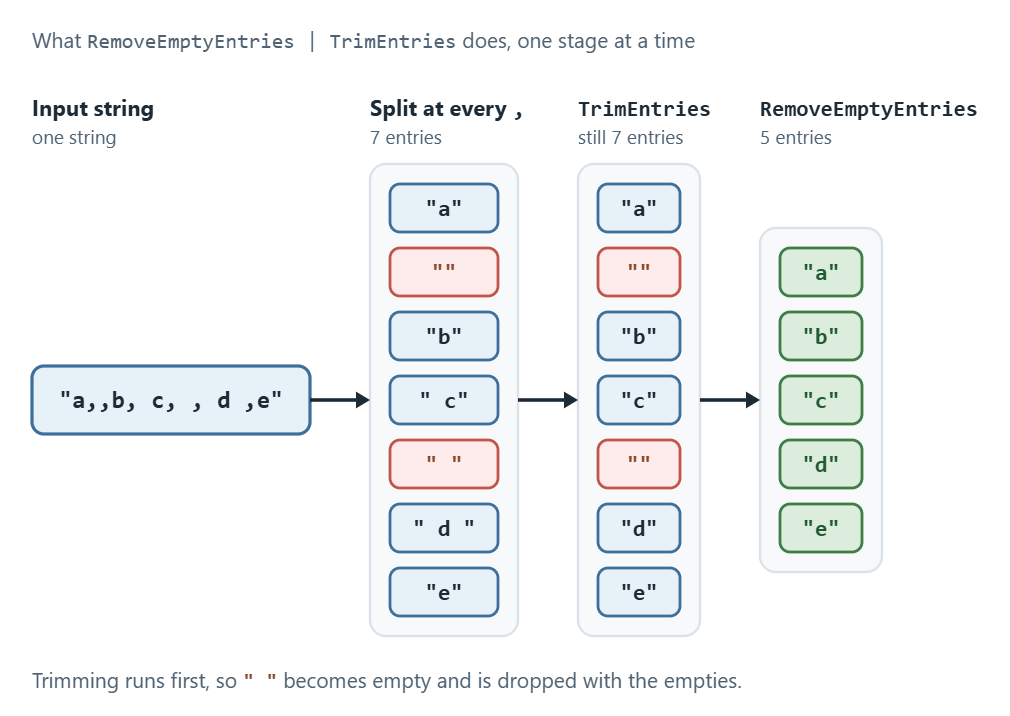
The enum carries [Flags], so we combine values with |, and the order they apply in is what makes the combination worth knowing: trimming runs first, then the empty check. A piece holding nothing but spaces is trimmed to an empty string and then removed, so RemoveEmptyEntries | TrimEntries clears empty and whitespace-only entries in one pass. Any other bit throws ArgumentException.
The StringSplitOptions enumeration has 3 possible values:
- None
- RemoveEmptyEntries
- TrimEntries
The order is what makes the pair useful, and it is easier to see than to describe.
| Value | What it does | "a,,b, c, , d ,e".Split(',', …) returns |
|---|---|---|
None | Nothing. Every piece is kept as cut. This is the default. | "a", "", "b", " c", " ", " d ", "e" |
RemoveEmptyEntries | Drops zero-length pieces. A whitespace-only piece is not zero-length and survives. | "a", "b", " c", " ", " d ", "e" |
TrimEntries | Trims leading and trailing whitespace from every piece. Keeps the empties. | "a", "", "b", "c", "", "d", "e" |
RemoveEmptyEntries | TrimEntries | Trims first, then drops what is now empty, so whitespace-only pieces go too. | "a", "b", "c", "d", "e" |
Microsoft Learn’s StringSplitOptions reference states the combined rule in one line: “If RemoveEmptyEntries and TrimEntries are specified together, then substrings that consist only of white-space characters are also removed from the result.”
How Do We Split a String on One Character or String?
We pass the separator straight to String.Split(). There are overloads taking a single char and a single string, so there is no array to build and no options argument unless we want one.
csv.Split(',') cuts on one character. log.Split(" | ") cuts on one multi-character string. Both have a count form as well, csv.Split(',', 3), which stops after a set number of pieces.
A single string separator is not the same as an array of its characters, and confusing the two is the common bug here. text.Split(" | ") cuts only where those three characters appear together, while text.Split(' ', '|') cuts at every space and every pipe.
Calling Split() with no separator at all is the third shortcut. The runtime reads an empty separator list as “any whitespace”, so sentence.Split() hands back the words without us naming a space, a tab, or a newline.
One character, one string, and no separator at all, in that order:
var csv = "apple,banana,cherry";
string[] fruits = csv.Split(',');

var log = "12:04 | WARN | disk almost full";
string[] fields = log.Split(" | ");

var sentence = "  split   me  up ";
string[] words = sentence.Split((char[]?)null, StringSplitOptions.RemoveEmptyEntries);
The last call names no separator, so it cuts at every run of whitespace; RemoveEmptyEntries is what turns the runs into single cuts instead of empty pieces between them.
Split a String Based on a Char[]
The Split(Char[]?) method allows us to split a string into an array of substrings based on a specified array of characters:
var str = "apple,banana,cherry;date";
char[] delimiterChars = [',', ';'];

string[] words = str.Split(delimiterChars);
foreach (string s in words)
{
    Console.WriteLine(s);
}
In the example, we utilize the Split(Char[]) method to divide a string based on a delimiter array of characters.
Here’s the output of the program:
apple
banana
cherry
date
Split a String Based on Char[] With StringSplitOptions
The Split(Char[]?, StringSplitOptions) method in C# allows us to split a string into an array of substrings based on multiple delimiter characters.
We can use the StringSplitOptions to specify whether empty entries and/or whitespaces should be removed from the resulting array:
var input = "John & Jane & James";
char[] delimiterChars = [' ', '&'];

string[] words = input.Split(delimiterChars, StringSplitOptions.RemoveEmptyEntries);
foreach (string word in words)
{
    Console.WriteLine(word);
}
In this example, we use StringSplitOptions.RemoveEmptyEntries to remove any empty entries from the resulting string array.

Finally, after we run our app, we can inspect the result:
John
Jane
James
Extract Maximum Number of Substrings Based on the Char[]
The Split(Char[]?, Int32) method in C# is another overloaded version of the Split method that allows us to split a string into substrings based on a specified delimiter character array, but with an additional count parameter that limits the number of substrings returned.
Let’s take a look at an example of how we can use this overloaded method in our code:
var input = "apple,banana,cherry,orange";
char[] delimiterChars = [','];

string[] fruits = input.Split(delimiterChars, 3);
foreach (string fruit in fruits)
{
    Console.WriteLine(fruit);
}
We use the Split method to split a string into an array of substrings based on an array of delimiter characters. We limit the number of substrings returned to 3 and output each element to the console.
It’s important to keep in mind that if the specified delimiter characters appear more than count times in the input string, the resulting string array will contain count or fewer elements. The final element will contain the remainder of the input string:
apple
banana
cherry,orange
Split a String Using the Char[] With Options
We use the Split(Char[]?, Int32, StringSplitOptions) method to split a string into an array of substrings based on multiple delimiter characters.
Additionally, this method includes the option to limit the maximum number of substrings that the resulting array can contain and exclude any empty substrings from the array.
Let’s consider the example of how to apply this method:
var input = " apple , banana ; cherry,orange ";
char[] delimiterChars = [',', ';'];

string[] fruits = input.Split(delimiterChars, 3, StringSplitOptions.TrimEntries);
foreach (string fruit in fruits)
{
    Console.WriteLine(fruit);
}
In this example, we define a string input with extra whitespace and we call the Split method on the input string, passing in the delimiterChars array and StringSplitOptions.TrimEntries to remove any leading or trailing whitespace.
When we run the program, we will see the output:
apple
banana
cherry,orange
When we use the option StringSplitOptions.TrimEntries, it removes any leading or trailing white spaces from the resulting substrings.
As a result, the first and second substring is printed without any leading or trailing spaces, and the third substring is printed without any leading space before “cherry” and any trailing spaces after “orange”.
Split a String Based on String[] With Options
We use the Split method with String[] and StringSplitOptions options to split a string based on an array of string delimiters while specifying the behavior of the method when encountering empty or whitespace elements:
var input = "apple,,banana;;kiwi";
string[] separators = [",", ";"];

string[] fruits = input.Split(separators, StringSplitOptions.RemoveEmptyEntries);
foreach (string fruit in fruits)
{
    Console.WriteLine(fruit);
}
The input carries two pairs of adjacent separators, so the cut produces two zero-length pieces. RemoveEmptyEntries is what drops them. With StringSplitOptions.None in its place, the very same call returns five entries, two of them empty.
The output of this program would be:
apple
banana
kiwi
Split a String Using the String[]
In the Split(String[], Int32, StringSplitOptions) overload, we pass in an array of separator strings and the integer value to limit the number of substrings returned.
We also specify the RemoveEmptyEntries option to exclude any empty entries or whitespaces from the resulting substrings array.
Now, let’s see how to use this method with an example:
var input = "apple,banana,cherry,orange,pear";
string[] separators = [","];

string[] fruits = input.Split(separators, 3, StringSplitOptions.RemoveEmptyEntries);
foreach (string fruit in fruits)
{
    Console.WriteLine(fruit);
}
In this example, we split a string input that contains a comma using the Split method with a comma separator, a limit of 3 substrings, and the RemoveEmptyEntries option.
Here is the output generated by the program when executed:
apple
banana
cherry,orange,pear
How Do We Split a String Into Lines in C#?
We split on the line endings the text actually contains, not on Environment.NewLine. That property is the current machine’s ending: "\r\n" on Windows, "\n" on Linux and macOS.
Text rarely comes from the current machine. A file, an HTTP response, or a pasted literal carries whatever ending its author used, so matching on the local one can find nothing and hand back the whole input as a single element. The failure is silent, and it shows up on one operating system and not the other.
Splitting on both endings works everywhere:
text.Split(["\r\n", "\n"], StringSplitOptions.None)
Listing "\r\n" alongside "\n" is what does the work. The runtime only matches a separator where its first character matches, so a \r\n pair is always consumed whole and never leaves a stray carriage return behind.
For a large file, StringReader.ReadLine() recognises both endings on every platform and never materialises the array.
When the breaks are something we want to normalise rather than cut on, replacing line breaks rather than splitting on them is the simpler operation.
Let’s take a look at an example:
var multiLineText = "Line 1\nLine 2\nLine 3\nLine 4\nLine 5";

string[] lines = multiLineText.Split(["\r\n", "\n"], StringSplitOptions.None);
foreach (string line in lines)
{
    Console.WriteLine(line);
}
We define a multi-line string that contains five lines of text. Because we name both endings instead of the machine’s own, the split finds every break whatever the text carries, and the resulting array holds five elements on Windows and on Linux alike:
Line 1
Line 2
Line 3
Line 4
Line 5
Optimizing the Performance of the Split() Method in C#
When we are using the Split method in C#, there are a few performance considerations to keep in mind.
First, the method creates an array to hold the substrings, which can be expensive in terms of memory usage, especially when processing large strings.
Another consideration is the use of StringSplitOptions enumeration. If the RemoveEmptyEntries is specified, the method has to perform additional checks to skip over any empty substrings, which can impact performance.
One way we can improve the performance of the Split method is to use an overload that takes a character delimiter instead of a string. This can be faster since it doesn’t require creating a string object for each delimiter.
When we want no array at all, current .NET ships a span-based split. MemoryExtensions.Split() and SplitAny() write Range values into a Span<Range> we supply and return how many they wrote, so no substring is allocated:
ReadOnlySpan<char> source = "apple,banana,cherry,date";
Span<Range> ranges = stackalloc Range[8];

int count = source.Split(ranges, ',');
for (int i = 0; i < count; i++)
{
    Console.WriteLine(source[ranges[i]].ToString());
}
The destination has to be big enough for every piece we expect, and nothing here becomes a string until we ask for one. For the wider picture, see our article on Span<T> and why it avoids allocating.
Two limits are worth naming before we hit them. Split() knows nothing about quoting, so "a,\"b,c\",d".Split(',') hands back four pieces rather than three, and comma-separated data belongs to a proper CSV reader instead. And when the delimiter is a pattern rather than a literal, Split() cannot express it at all, which is where source-generated regular expressions take over.
To learn more about the rest of the string API these methods sit beside, check out our article on string methods.
Which String.Split() Overload Should We Use?
We pick by what the separator is, then by whether we want a cap or options. .NET 10 ships eleven public String.Split() overloads, and between them they answer four questions: one separator or several, characters or strings, capped at a count or not, options or not.
The single-separator overloads are the ones to reach for first. Split(char) and Split(string) default their options to None, so text.Split(',') reads cleanly and builds no separator array to pass.
Several separators need an array. Split(char[]) cuts at any of the listed characters, and Split(string[], StringSplitOptions) cuts at any of the listed strings. That string-array form has no options-free overload, so an explicit StringSplitOptions.None is required even when we want nothing done.
The count parameter is a stop, not a filter. Once the result holds that many pieces, the last one carries the entire unsplit remainder of the input, separators included.
| Overload | Cuts at | Max pieces | Options |
|---|---|---|---|
Split(char, StringSplitOptions) | one character | no cap | yes, defaults to None |
Split(char, int, StringSplitOptions) | one character | the int | yes, defaults to None |
Split(string, StringSplitOptions) | one string | no cap | yes, defaults to None |
Split(string, int, StringSplitOptions) | one string | the int | yes, defaults to None |
Split(params char[]) | any of the listed characters; none listed means any whitespace | no cap | no |
Split(char[], int) | any of the listed characters | the int | no |
Split(char[], StringSplitOptions) | any of the listed characters | no cap | yes, required |
Split(char[], int, StringSplitOptions) | any of the listed characters | the int | yes, required |
Split(params ReadOnlySpan<char>) | any of the listed characters | no cap | no |
Split(string[], StringSplitOptions) | any of the listed strings | no cap | yes, required |
Split(string[], int, StringSplitOptions) | any of the listed strings | the int | yes, required |
The inverse operation has choices of its own, and we cover them in our article on joining the pieces back into one string.
Conclusion
Two questions settle every call to String.Split(): whether we cut at one separator or at any of several, and whether we cap how many pieces come back. The single-char and single-string overloads answer the first with no array to build, the array overloads answer it when there are several, and the count parameter answers the second by handing the whole remainder to the last piece.
StringSplitOptions then decides what survives the cut, and the table near the top of this article shows what each value does to one input. The overload table above is the index to all eleven signatures.
Tested with .NET 10.0.10 and SDK 10.0.302.
