


Updated on
A query string is the ?name=value&name=value tail of a URL, and in C# we have six ways to build one. Five of them percent-encode the values for us. UriBuilder, the one most people reach for, does not.
QueryHelpers.AddQueryString() is the short answer for an ASP.NET Core application: hand it a base URL and a dictionary, get an encoded URL back. HttpUtility.ParseQueryString(string.Empty) is the answer for a console application with no framework reference.
Below, we build the same query string all six ways against a real API, and we run a value like Simon & Schuster through each of them to see which survive it.
Let’s start.
What Is a URL Query String?
A query string is the part of a URL after the first question mark: a list of name=value pairs joined by ampersands. In https://test.com/api/Books?author=rowling&language=english, the query string is author=rowling&language=english.
Everything in a query string is text. A server reads names and values out as strings and converts them itself; there are no typed values on the wire.
Four characters carry structure rather than data. ? opens the query, & separates one pair from the next, = splits a name from its value, and # ends the query string and starts the fragment, which the browser keeps and never sends.
That is why building a query string is not string concatenation. Any of those four characters inside a name or a value has to be percent-encoded first, or the receiver reads a different query from the one we sent.
The value Simon & Schuster, written straight into a URL, arrives as two parameters: author with the value Simon , and a second one named Schuster.
Let’s see an example of a query string:
https://test.com/api/Books?author=rowling&language=english
Here, for instance, the URL starts with the base address https://test.com/api/Books. After the question mark (?), the query string begins with the first key-value pair: author=rowling. Here, “author” is the key, and “rowling” is the value. The ampersand (&) separates the first key-value pair from the second: language=english.
Which C# APIs Build Query Strings?
There are several ways we can build a query string for a URL:
- String Concatenation
- UriBuilder
- ParseQueryString
- QueryHelpers
- QueryBuilder
- QueryString.Create
Let’s look at each approach to build a query string.
Setting up the Application
To mimic a real API call using the query string, we can set up a simple GET API that accepts a query string for testing purposes. This API represents a book service that accepts author and language as query parameters and returns some book details.
We can construct a query string and then make an API call using it to test if it works. However, setting up the API is optional and not compulsory in this article. Please visit the code for more information about the API.
To begin with, let’s proceed to create a console app and define a BooksApiService class:
public class BooksApiService
{
    private const string BaseApiUrl = "https://localhost:7220/api/Books";
}
Here, we declare a BaseApiUrl constant, which holds the base URL for an API endpoint.
Now, let’s explore each section in detail.
Using String Concatenation
String concatenation is one of the traditional techniques for constructing query strings in C#. This technique combines multiple strings, including parameter names and values, to create a complete query string. While it offers control, it can be cumbersome when dealing with complex queries or numerous parameters.
First, we’ll create a QueryStringHelper utility class. This class will contain various methods, each employing a different technique to construct query strings.
Now, let’s create our first method to build a query string using string concatenation:
public static class QueryStringHelper
{
    public static string BuildUrlWithQueryStringUsingStringConcat(
        string basePath, Dictionary<string, string> queryParams)
    {
        var queryString = string.Join("&", queryParams.Select(kvp => $"{kvp.Key}={kvp.Value}"));

        return $"{basePath}?{queryString}";
    }
}
First, inside the QueryStringHelper class, we define a method that accepts the basePath and queryParams as the input parameters. We then use the Select() LINQ method to transform the dictionary into a collection of formatted key-value pairs. Then, we use the string.Join() method to concatenate these pairs with “&” as the separator.
Moving forward, we concatenate the basePath and the queryString to form the complete URL and return it.
In this example, one of the primary challenges we face is the URL and URI encoding of the query parameters. If we have an author name with special characters, we might end up with a malformed URL if we don’t encode the special characters when passing the name as a query parameter.
Let’s see an example of how to encode the query parameters:
public static string BuildUrlWithQueryStringUsingStringConcat(
    string basePath, Dictionary<string, string> queryParams)
{
    var queryString = string.Join("&",
        queryParams.Select(kvp => $"{HttpUtility.UrlEncode(kvp.Key)}={HttpUtility.UrlEncode(kvp.Value)}"));

    return $"{basePath}?{queryString}";
}
Here, we use the HttpUtility.UrlEncode() method to encode both the Key and Value of the queryParams.
Finally, let’s invoke the BuildUrlWithQueryStringUsingStringConcat() method:
var query = new Dictionary<string, string>
{
    { "author", "George Orwell" },
    { "language", "english" }
};

Console.WriteLine(QueryStringHelper.BuildUrlWithQueryStringUsingStringConcat(BaseApiUrl, query));
//prints https://localhost:7220/api/Books?author=George+Orwell&language=english
We start by initializing a Dictionary object, which contains key-value pairs representing the query parameters for the API request. We pass “George Orwell” as the author and “english” as the language.
Finally, we call the BuildUrlWithQueryStringUsingStringConcat() method, passing the BaseApiUrl and query variables to build the complete URL.
String concatenation is not the only manual way to assemble a query string. Two others are worth knowing: String Interpolation and Different Ways to Concatenate String.
Using the UriBuilder Class
The UriBuilder class in C# provides a powerful and convenient way to construct and modify System.Uri instances. We can create or manipulate URLs with various components like the scheme, host, port, path, and query string.
Port is -1 when no port is set, which is what removes an explicit port from the result; parsing a URL without one gives us the scheme’s default instead.
The UriBuilder class escapes characters that are illegal in a URI, such as the space in Jane Austen, but it does not escape the query delimiters &, = and # inside a value, see the next section.
Microsoft’s UriBuilder.Query reference says which standard that follows: “The query information is escaped according to RFC 2396.” That standard reserves & and = for use inside a query, so escaping to it leaves them exactly where they are. The hash is a harder case: RFC 2396 makes it the delimiter that ends the query and opens the fragment, so it survives unescaped as well, and everything after it stops being part of the query at all.

Let’s create another method in the QueryStringHelper class to demonstrate using the UriBuilder class:
public static string BuildUrlWithQueryStringUsingUriBuilder(string basePath, Dictionary<string, string> queryParams)
{
    var uriBuilder = new UriBuilder(basePath)
    {
        Query = string.Join("&", queryParams.Select(kvp => $"{kvp.Key}={kvp.Value}"))
    };

    return uriBuilder.Uri.AbsoluteUri;
}
We start by creating an instance of the UriBuilder class and initialize it with a base API URL. Then, we concatenate the key-value pairs using string.Join() method and set the Query property of the uriBuilder instance. Finally, we obtain the complete API URL by accessing the Uri property of the UriBuilder instance and then retrieving its AbsoluteUri property.
So, let’s proceed to invoke the BuildUrlWithQueryStringUsingUriBuilder() method:
var query = new Dictionary<string, string>
{
    { "author", "Jane Austen" },
    { "language", "english" }
};

Console.WriteLine(QueryStringHelper.BuildUrlWithQueryStringUsingUriBuilder(BaseApiUrl, query));
//prints https://localhost:7220/api/Books?author=Jane%20Austen&language=english
In a similar fashion, we initialize a Dictionary object that holds the query parameters. Then, we pass the BaseApiUrl and the query variables to the BuildUrlWithQueryStringUsingUriBuilder() method to get a complete URL. The UriBuilder class encodes the author parameter value that contains a space.
Does UriBuilder Encode Query Parameter Values?
No. UriBuilder escapes only the characters that are illegal anywhere in a URI. The query delimiters are legal in a URI, so they pass straight through.
Assign author=Simon & Schuster to the Query property and read Uri.AbsoluteUri back, and we get ?author=Simon%20&%20Schuster. The space became %20. The ampersand stayed an ampersand, so the receiver reads a parameter named author with the value Simon , and a second one named Schuster.
The # character is worse, and it is the one a C# article is most likely to meet. tag=C#&language=english truncates at the hash: everything after it becomes the fragment, the server receives tag=C, and language never arrives at all.
So UriBuilder is a URL assembler, not a query encoder. It is the right class for scheme, host, port and path, and it expects the string we assign to Query to be encoded already.
The fix is one line. Build the query with something that encodes, then hand the finished string to UriBuilder.
The diagram traces one value through both APIs and stops where the server parses it, because that is where the difference shows up.
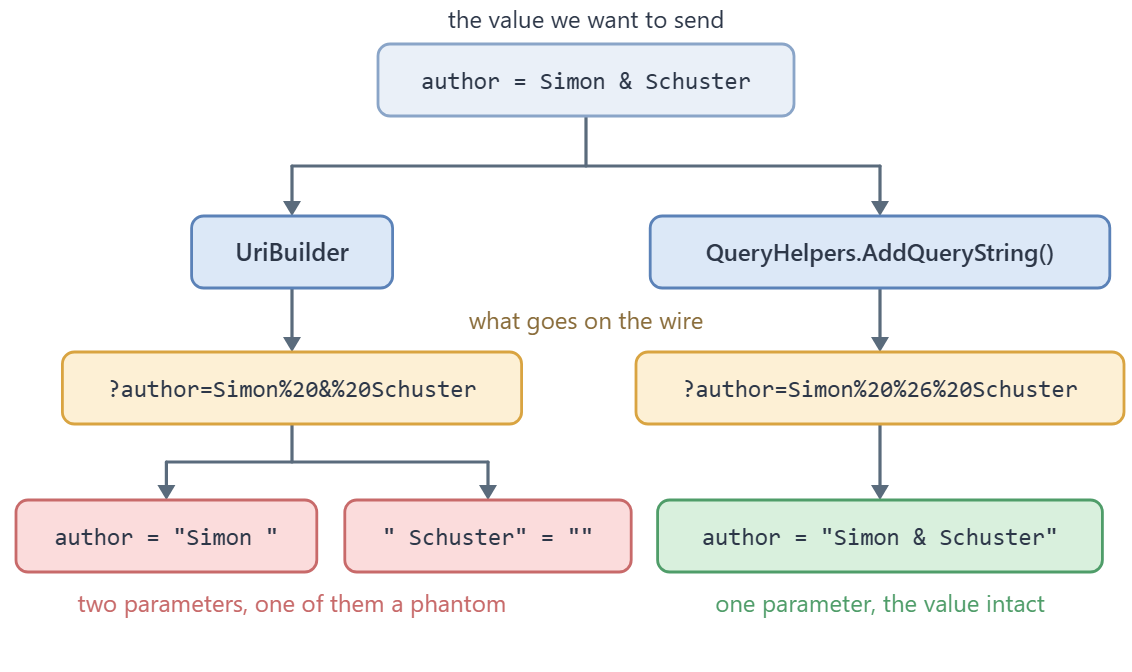
So we build the query with QueryString.Create() and let UriBuilder assemble the rest of the URL around it:
public static string BuildUrlWithQueryStringUsingUriBuilderSafely(
    string basePath, Dictionary<string, string?> queryParams)
{
    var uriBuilder = new UriBuilder(basePath)
    {
        Query = QueryString.Create(queryParams).Value
    };

    return uriBuilder.Uri.AbsoluteUri;
}
The Value property hands us the encoded query with its leading question mark, which is exactly the shape the Query property expects. With author set to Simon & Schuster and tag set to C#, the result parses back to the values we put in:
https://localhost:7220/api/Books?author=Simon%20%26%20Schuster&tag=C%23
Using HttpUtility.ParseQueryString
The HttpUtility.ParseQueryString() method is part of the System.Web namespace in C#. This method is beneficial when we create or manipulate query strings in web applications.
It allows us to parse an existing query string into a collection of key-value pairs, modify those pairs, and generate a new query string.
Taking a query string apart by hand means splitting a string on & and =, and the overloads that do it are worth knowing for the times a helper is not available.
We will create a new method within the QueryStringHelper class to demonstrate this technique:
public static string BuildUrlWithQueryStringUsingParseQueryStringMethod(
    string basePath, Dictionary<string, string> queryParams)
{
    var query = HttpUtility.ParseQueryString(string.Empty);

    foreach (var dict in queryParams)
    {
        query[dict.Key] = dict.Value;
    }

    return string.Join("?", basePath, query.ToString());
}
Here, we create an empty NameValueCollection using the HttpUtility.ParseQueryString(string.Empty) method.
This method internally creates an instance of HttpQSCollection, which is a non-publicly accessible overload of NameValueCollection. Because it is an internal class, we have to use this non-standard method of initialization. The upside of this special collection is its automatic handling of null values, along with proper URL encoding of all key-value pairs.
Assigning a null through the indexer writes an empty value (author=) rather than skipping the parameter, and no exception is thrown. Adding one with Add(name, null) does drop it. QueryHelpers.AddQueryString() drops a null either way.
Now, let’s call the method:
var query = new Dictionary<string, string>
{
    { "author", "Agatha Christie" },
    { "language", "english" }
};

Console.WriteLine(QueryStringHelper.BuildUrlWithQueryStringUsingParseQueryStringMethod(BaseApiUrl, query));
//prints https://localhost:7220/api/Books?author=Agatha+Christie&language=english
Here, we create the query parameters using the Dictionary object and invoke the BuildUrlWithQueryStringUsingParseQueryStringMethod() method to obtain the complete URL.
Using QueryHelpers.AddQueryString
The QueryHelpers is a utility class provided by the Microsoft.AspNetCore.WebUtilities namespace. It includes the AddQueryString() method that builds the query string by adding or appending parameters to an existing URL.
The QueryHelpers.AddQueryString() method ensures correct URL encoding of parameter names and values for proper URL formation.
Because it appends, this is also the method we reach for when the URL already carries a query, and there is a whole article on appending or updating parameters on a URL that already has a query.
As a first step, let’s include the Microsoft.AspNetCore.App as a FrameworkReference in the .csproj file within an ItemGroup:
<FrameworkReference Include="Microsoft.AspNetCore.App" />
Adding this reference ensures that we can use the QueryHelpers.AddQueryString() method from the Microsoft.AspNetCore.WebUtilities namespace, which we need for QueryHelpers, QueryBuilder and QueryString. HttpUtility needs nothing: System.Web.HttpUtility is part of the base shared framework.
Now, let’s create a new method to demonstrate using the QueryHelpers.AddQueryString() method:
public static string BuildUrlWithQueryStringUsingAddQueryStringMethod(
    string basePath, Dictionary<string, string?> queryParams)
{
    return QueryHelpers.AddQueryString(basePath, queryParams);
}
Here, we use the QueryHelpers.AddQueryString() method to generate the query string. We pass the basePath and the queryParams dictionary as input, and we get the complete URL.
In this method, we specifically accept the Dictionary<string, string?> with nullable string values because the QueryHelpers.AddQueryString() method supports nullable values, providing flexibility in handling optional query parameters.
Then, let’s invoke the method:
var query = new Dictionary<string, string?>
{
    { "author", "Haruki Murakami" },
    { "language", "japanese" }
};

Console.WriteLine(QueryStringHelper.BuildUrlWithQueryStringUsingAddQueryStringMethod(BaseApiUrl, query));
//prints https://localhost:7220/api/Books?author=Haruki%20Murakami&language=japanese
Similarly, we create a Dictionary object that holds the query parameters and passes the query and the BaseApiUrl variables to the BuildUrlWithQueryStringUsingAddQueryStringMethod() method to build the complete URL. We declare it as Dictionary<string, string?> to match the method’s parameter; a plain Dictionary<string, string> compiles but warns with CS8620.
Using the QueryBuilder Class
The QueryBuilder class is part of the Microsoft.AspNetCore.Http.Extensions namespace and is used to construct a query string. In essence, the QueryBuilder class allows us to build a query string by adding key-value pairs. It implements the IEnumerable<KeyValuePair<String,String>> interface, which means we can iterate over the key-value pairs contained within it.
Let’s take a look at an example:
public static string BuildUrlWithQueryStringUsingQueryBuilderClass(
    string basePath, Dictionary<string, string> queryParams)
{
    var queryBuilder = new QueryBuilder(queryParams);

    return basePath + queryBuilder;
}
Here, we create an instance of QueryBuilder class, and we pass the queryParams to the constructor, which returns the instance of the QueryBuilder class.
When we concatenate a queryBuilder object with a string, it implicitly calls the ToString() method of the QueryBuilder class. In the context of the QueryBuilder class, it overrides the ToString() method to return the query string representation of the key-value pairs stored in the queryBuilder object.
Consequently, we can concatenate the queryBuilder object with the basePath to create a complete URL.
Let’s proceed and invoke the method:
var query = new Dictionary<string, string>
{
    { "author", "Gabriel Garcia" },
    { "language", "spanish" }
};

Console.WriteLine(QueryStringHelper.BuildUrlWithQueryStringUsingQueryBuilderClass(BaseApiUrl, query));
//prints https://localhost:7220/api/Books?author=Gabriel%20Garcia&language=spanish
Here, we initialize a Dictionary object and pass the BuildUrlWithQueryStringUsingQueryBuilderClass() method to construct the complete URL.
Using QueryString.Create
The QueryString.Create() method is a convenient way to create a key-value pair query string object.
The QueryString.Create() method offers three overloads. The first overload, Create(string name, string value), allows us to create a query string with a single key-value pair.
The second overload, Create(IEnumerable<KeyValuePair<string, string?>> parameters), accepts a collection of key-value pairs, where values are nullable strings.
Lastly, the third overload, Create(IEnumerable<KeyValuePair<string, StringValues>> parameters), takes a collection of key-value pairs where the values are of type StringValues.
Let’s create a new method in the QueryStringHelper class:
public static string BuildUrlWithQueryStringUsingCreateMethod(
    string basePath, Dictionary<string, string?> queryParams)
{
    var queryString = QueryString.Create(queryParams);

    return basePath + queryString;
}
Here, we define a method that accepts a Dictionary<string, string?>, allowing nullable string values. This choice is made because the second overload of the QueryString.Create() method supports nullable values.
Although this method doesn’t explicitly accept a Dictionary, we can still pass a Dictionary to it. This is possible because Dictionary implements the IEnumerable<KeyValuePair<string, string>> interface. Then, we use the QueryString.Create() method and pass the queryParams dictionary object to build a query string.
When the parameters come from a class rather than a dictionary, building the query string from an object instead of a dictionary saves us assembling the dictionary by hand first.
Finally, let’s call the method:
var query = new Dictionary<string, string?>
{
    { "author", "Leo Tolstoy" },
    { "language", "russian" }
};

Console.WriteLine(QueryStringHelper.BuildUrlWithQueryStringUsingCreateMethod(BaseApiUrl, query));
//prints https://localhost:7220/api/Books?author=Leo%20Tolstoy&language=russian
Here, we create a Dictionary object to represent the query parameters and invoke the BuildUrlWithQueryStringUsingCreateMethod() method to form the complete URL.
How Do We Add Query Parameters to an HttpClient Request?
HttpClient has no query parameter API. GetAsync() takes a URL or a Uri, so the query string has to be finished before the call is made.
In an ASP.NET Core application the usual shape is QueryHelpers.AddQueryString() over a relative path, handed to a client whose BaseAddress is already configured. The base address holds the host, the call holds the parameters, and neither knows about the other.
AddQueryString() appends rather than replaces. Called on a path that already carries a query, it adds to it, so /api/Books?page=2 with author added becomes /api/Books?page=2&author=Orwell.
That appending behaviour is the thing to watch when a base address, a route and a filter each contribute parameters. Build the whole dictionary first and call it once, rather than chaining calls. And BaseAddress needs its trailing slash, or Uri combination drops the last path segment.
Nothing about sending the request encodes anything. HttpClient sends the URL we give it, so the encoding has already happened or it has not happened at all.
Our sample already makes that call. BooksApiService builds the URL and hands it straight to the client:
public async Task<string> GetWithQueryParamsUsingAddQueryStringMethod(string author, string language)
{
    var query = new Dictionary<string, string?>
    {
        { "author", author },
        { "language", language }
    };

    return await HttpGetAsync(QueryStringHelper.BuildUrlWithQueryStringUsingAddQueryStringMethod(BaseApiUrl, query));
}

public async Task<string> HttpGetAsync(string apiUrl)
{
    var response = await _httpClientWrapper.GetAsync(apiUrl);
    response.EnsureSuccessStatusCode();

    return await response.Content.ReadAsStringAsync();
}
The finished URL is the only thing that crosses into HttpClient. On the other side of the call, reading those values back on the server is the mirror image of this work.
In a real application we would not new up the client ourselves either; configuring the HttpClient this call goes through is a job for IHttpClientFactory.
Which Query String Method Is the Safest to Use?
Only one of the six is unsafe by default. QueryHelpers.AddQueryString(), QueryString.Create(), QueryBuilder and the ParseQueryString collection all percent-encode names and values. String concatenation encodes when we remember to call HttpUtility.UrlEncode() ourselves. UriBuilder never encodes a delimiter at all.
QueryHelpers.AddQueryString() is the default choice inside an ASP.NET Core application: a base URL and a dictionary in, an encoded URL out, appended to any query the URL already had.
HttpUtility.ParseQueryString(string.Empty) is the choice for a plain console application, because System.Web.HttpUtility is in the base shared framework and needs no framework reference.
The two disagree about null. AddQueryString() drops a parameter whose value is null; QueryString.Create() keeps it and writes name=. Neither one throws.
They also disagree about spaces. HttpUtility.UrlEncode() writes +, the ASP.NET Core helpers write %20, and both decode back to a space.
QueryBuilder is that same encoder again, reached one Add() call at a time, which suits a query assembled across several methods rather than built from one dictionary.
| Approach | Encodes & = # in values? | null value becomes | Repeated name | Reach for it when |
|---|---|---|---|---|
String concatenation + HttpUtility.UrlEncode() | Only if we call UrlEncode() ourselves | whatever we write | we build it ourselves | we need full control and accept full responsibility |
UriBuilder (assigning Query) | No | n/a | we build it ourselves | assembling scheme, host, port and path, not the query |
HttpUtility.ParseQueryString(string.Empty) | Yes | name= | Add() the same name twice | a console app with no FrameworkReference |
QueryHelpers.AddQueryString() | Yes | parameter is dropped | StringValues overload | ASP.NET Core, and when the URL may already have a query |
QueryBuilder | Yes | n/a (takes string) | Add(name, IEnumerable<string>) | adding parameters one at a time |
QueryString.Create() | Yes | name= | StringValues overload | one call from a dictionary, no base URL involved |
Once the URL is assembled, checking that the URL we built is valid is a single call, and it is worth making when any part of the URL came from user input.
Conclusion
In this article, we have explored various approaches for building a query string in C#. The method we choose will depend on our specific needs and preferences.
To conclude, we can use string concatenation and other manual techniques if we need a straightforward way to build a query string. However, using the string concatenation technique, we must ensure that we properly encode the parameter names and values.
On the other hand, if we need to build complex queries or deal with numerous parameters, we may use a more robust method, such as the HttpUtility.ParseQueryString() method, the QueryHelpers.AddQueryString() method, the QueryBuilder class, or the QueryString.Create() method.
We do not need to manually encode the query string parameters when employing any of those four methods, because they handle URL encoding internally. UriBuilder is the exception, and it is the one to compose with an encoder rather than to hand a raw query.
Tested with .NET 10.
