


In the previous post, we handled different GET requests with the help of a DTO object. In this post, we are going to create POST PUT DELETE requests and by doing so we are going to complete the server part (.NET Core part) of this series.
Let’s get into it.
Prefer watching a video on this topic:
VIDEO: Handling POST, PUT, and DELETE Requests.
If you want to see all the basic instructions and complete navigation for this series, please follow this link: Introduction page for this tutorial.
Let’s get right into it.
Handling POST Request
Firstly, let’s modify the decoration attribute for the action method GetOwnerById in the Owner controller:
[HttpGet("{id}", Name = "OwnerById")]
With this modification, we are setting the name for the action. This name will come in handy in the action method for creating a new owner.
Before we continue, we should create another DTO class. As we said in the previous part, we use the model class just to fetch the data from the database, to return the result we need a DTO. It is the same for the create action. So, let’s create the OwnerForCreationDto class in the Entities/DataTransferObjects folder:
public class OwnerForCreationDto
{
    [Required(ErrorMessage = "Name is required")]
    [StringLength(60, ErrorMessage = "Name can't be longer than 60 characters")]
    public string? Name { get; set; }

    [Required(ErrorMessage = "Date of birth is required")]
    public DateTime DateOfBirth { get; set; }

    [Required(ErrorMessage = "Address is required")]
    [StringLength(100, ErrorMessage = "Address cannot be loner then 100 characters")]
    public string? Address { get; set; }
}
As you can see, we don’t have the Id and Accounts properties.
We are going to continue with the interface modification:
public interface IOwnerRepository : IRepositoryBase<Owner>
{
    IEnumerable<Owner> GetAllOwners();
    Owner GetOwnerById(Guid ownerId);
    Owner GetOwnerWithDetails(Guid ownerId);
    void CreateOwner(Owner owner);
}
After the interface modification, we are going to implement that interface:
public void CreateOwner(Owner owner)
{
    Create(owner);
}
Before we modify the OwnerController, we have to create an additional mapping rule:
CreateMap<OwnerForCreationDto, Owner>();
Lastly, let’s modify the controller:
[HttpPost]
public IActionResult CreateOwner([FromBody]OwnerForCreationDto owner)
{
    try
    {
        if (owner is null)
        {
            _logger.LogError("Owner object sent from client is null.");
            return BadRequest("Owner object is null");
        }

        if (!ModelState.IsValid)
        {
            _logger.LogError("Invalid owner object sent from client.");
            return BadRequest("Invalid model object");
        }

        var ownerEntity = _mapper.Map<Owner>(owner);

        _repository.Owner.CreateOwner(ownerEntity);
        _repository.Save();

        var createdOwner = _mapper.Map<OwnerDto>(ownerEntity);

        return CreatedAtRoute("OwnerById", new { id = createdOwner.Id }, createdOwner);
    }
    catch (Exception ex)
    {
        _logger.LogError($"Something went wrong inside CreateOwner action: {ex.Message}");
        return StatusCode(500, "Internal server error");
    }
}
Right now is a good time to test this code by sending the POST request by using Postman.
Let’s examine the result:
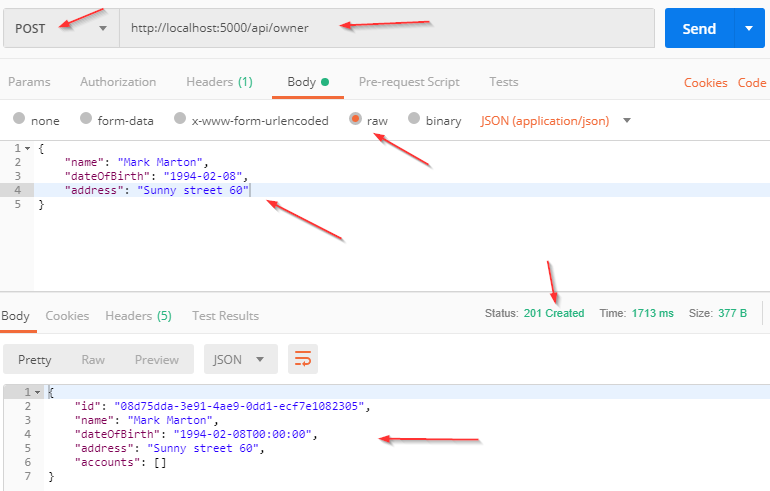
Code Explanation
Let’s talk a little bit about this code. The interface and the repository parts are pretty clear so we won’t talk about that. However, the code in the controller contains several things worth mentioning.
The CreateOwner method has its own [HttpPost] decoration attribute, which restricts it to the POST requests. Furthermore, notice the owner parameter which comes from the client. We are not collecting it from Uri but from the request body. Thus the usage of the [FromBody] attribute. Also, the owner object is a complex type and because of that, we have to use [FromBody].
If we wanted to, we could explicitly mark the action to take this parameter from the Uri by decorating it with the [FromUri] attribute, though I wouldn’t recommend that at all due to the security reasons and complexity of the request.
Since the owner parameter comes from the client, it could happen that the client doesn’t send that parameter at all. As a result, we have to validate it against the reference type’s default value, which is null.
Further down the code, you can notice this type of validation: if(!ModelState.IsValid). If you look at the owner model properties: Name, Address, and DateOfBirth, you will notice that all of them are decorated with Validation Attributes. If for some reason validation fails, the ModelState.IsValid will return false as a result, signaling that something is wrong with the creation DTO object. Otherwise, it will return true which means that values in all the properties are valid.
We have two map actions as well. The first one is from the OwnerForCreationDto type to the Owner type because we accept the OwnerForCreationDto object from the client and we have to use the Owner object for the create action. The second map action is from the Owner type to the OwnerDto type, which is a type we return as a result.
The last thing to mention is this part of the code:
CreatedAtRoute("OwnerById", new { id = owner.Id}, owner);
CreatedAtRoute will return a status code 201, which stands for Created as explained in our post: The HTTP Reference. Also, it will populate the body of the response with the new owner object as well as the Location attribute within the response header with the address to retrieve that owner. We need to provide the name of the action, where we can retrieve the created entity:
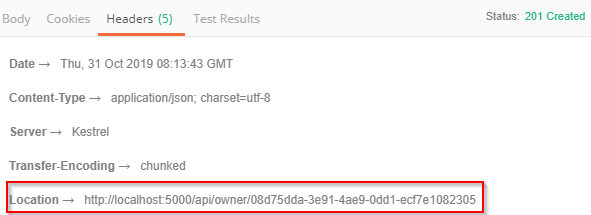
If we copy this address and paste it in Postman, once we send the GET request, we are going to get a newly created owner object.
Handling PUT Request
Excellent.
Let’s continue with the PUT request, to update the owner entity.
First, we are going to add a new DTO class:
public class OwnerForUpdateDto
{
    [Required(ErrorMessage = "Name is required")]
    [StringLength(60, ErrorMessage = "Name can't be longer than 60 characters")]
    public string Name { get; set; }

    [Required(ErrorMessage = "Date of birth is required")]
    public DateTime DateOfBirth { get; set; }

    [Required(ErrorMessage = "Address is required")]
    [StringLength(100, ErrorMessage = "Address cannot be loner then 100 characters")]
    public string Address { get; set; }
}
We did the same thing as with the OwnerForCreationDto class. Even though this class looks the same as the OwnerForCreationDto, they are not the same. First of all, they have a semantical difference, this one is for update action and the previous one is for creation. Additionally, the validation rules that apply for the creation of DTO don’t have to be the same for the update DTO. Therefore, it is always a good practice to separate those.
One more thing, if you want to remove the code duplication from the OwnerForCreationDto and OwnerForUpdateDto, you can create an additional abstract class, extract properties to it, and then just force these classes to inherit from the abstract class. Due to the sake of simplicity, we won’t do that now.
After that, we have to create a new map rule:
CreateMap<OwnerForUpdateDto, Owner>();
Then, let’s change the interface:
public interface IOwnerRepository : IRepositoryBase<Owner>
{
    IEnumerable<Owner> GetAllOwners();
    Owner GetOwnerById(Guid ownerId);
    Owner GetOwnerWithDetails(Guid ownerId);
    void CreateOwner(Owner owner);
    void UpdateOwner(Owner owner);
}
Of course, we have to modify the OwnerRepository.cs:
public void UpdateOwner(Owner owner)
{
    Update(owner);
}
Finally, alter the OwnerController:
[HttpPut("{id}")]
public IActionResult UpdateOwner(Guid id, [FromBody]OwnerForUpdateDto owner)
{
    try
    {
        if (owner is null)
        {
            _logger.LogError("Owner object sent from client is null.");
            return BadRequest("Owner object is null");
        }

        if (!ModelState.IsValid)
        {
            _logger.LogError("Invalid owner object sent from client.");
            return BadRequest("Invalid model object");
        }

        var ownerEntity = _repository.Owner.GetOwnerById(id);
        if (ownerEntity is null)
        {
            _logger.LogError($"Owner with id: {id}, hasn't been found in db.");
            return NotFound();
        }

        _mapper.Map(owner, ownerEntity);

        _repository.Owner.UpdateOwner(ownerEntity);
        _repository.Save();

        return NoContent();
    }
    catch (Exception ex)
    {
        _logger.LogError($"Something went wrong inside UpdateOwner action: {ex.Message}");
        return StatusCode(500, "Internal server error");
    }
}
As you may have noticed, the action method is decorated with the [HttpPut] attribute. Furthermore, it receives two parameters: the id of the entity we want to update and the entity with the updated fields, taken from the request body. The rest of the code is pretty simple. After the validation, we fetch the owner from the database and execute the update of that owner.
Finally, we return NoContent which stands for the status code 204:
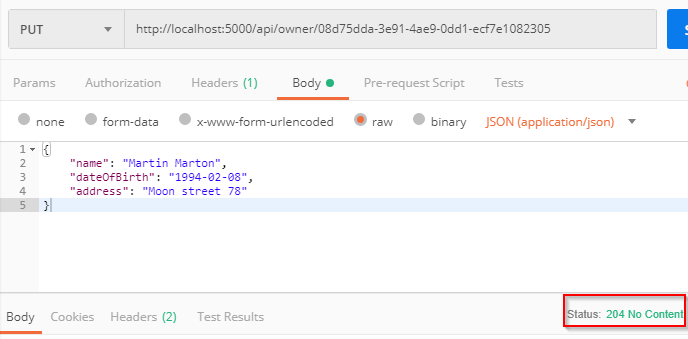
You can read more about Update actions in ASP.NET Core with EF Core to get a better picture of how things are done behind the scenes. It could be very useful to upgrade the quality of the update actions.
Handling DELETE Request
For the Delete request, we should just follow these steps:
Interface:
public interface IOwnerRepository : IRepositoryBase<Owner>
{
    IEnumerable<Owner> GetAllOwners();
    Owner GetOwnerById(Guid ownerId);
    Owner GetOwnerWithDetails(Guid ownerId);
    void CreateOwner(Owner owner);
    void UpdateOwner(Owner owner);
    void DeleteOwner(Owner owner);
}
OwnerRepository:
public void DeleteOwner(Owner owner)
{
    Delete(owner);
}
OwnerController:
[HttpDelete("{id}")]
public IActionResult DeleteOwner(Guid id)
{
	try
	{
		var owner = _repository.Owner.GetOwnerById(id);
		if(owner == null)
		{
			_logger.LogError($"Owner with id: {id}, hasn't been found in db.");
			return NotFound();
		}

		_repository.Owner.DeleteOwner(owner);
                _repository.Save();

		return NoContent();
	}
	catch (Exception ex)
	{
		_logger.LogError($"Something went wrong inside DeleteOwner action: {ex.Message}");
		return StatusCode(500, "Internal server error");
	}
}
Let’s handle one more thing. If you try to delete the owner that has accounts, you are going to get 500 internal errors because we didn’t allow cascade delete in our database configuration. What we want is to return a BadRequest. So, to do that let’s make a couple of modifications.
Modify the IAccountRepository interface:
using Entities.Models;

namespace Contracts
{
    public interface IAccountRepository
    {
        IEnumerable<Account> AccountsByOwner(Guid ownerId);
    }
}
Then modify the AccountRepository file by adding one new method:
public IEnumerable<Account> AccountsByOwner(Guid ownerId)
{
    return FindByCondition(a => a.OwnerId.Equals(ownerId)).ToList();
}
Finally, modify the DeleteOwner action in the OwnerController by adding one more validation before deleting the owner:
if(_repository.Account.AccountsByOwner(id).Any())
{
    _logger.LogError($"Cannot delete owner with id: {id}. It has related accounts. Delete those accounts first");
    return BadRequest("Cannot delete owner. It has related accounts. Delete those accounts first");
}
So, that is it. Send the Delete request from Postman and see the result. The owner object should be deleted from the database.
We have created these actions that use Repository Pattern logic synchronously but it could be done asynchronously as well. If you want to learn how to do that you can visit Implementing Async Repository in .NET Core. However, we strongly recommend finishing all the parts from this series to gain an easier understanding of the project’s business logic.
Also, in all these actions we are using try-catch blocks to handle our errors. You can do that in a more readable and maintainable way by introducing the Global Error Handling feature.
Conclusion
Now that you know all of this, try to repeat all the actions but for the Account entity. Because nothing beats the practice, doesn’t it? 😉
With all this code in place, we have a working web API that covers all the features for handling the CRUD operations.
By reading this post you’ve learned:
- The way to handle the POST request
- How to handle PUT request
- How to write better and more reusable code
- And the way to handle a DELETE request
Thank you for reading and I hope you found something useful in it.
When you are ready, continue to Part 7 which is the part of the series where we introduce Angular. I will show you how to create an angular project and set up your first component.

