


Updated on
MemoryStream is a stream whose backing store is a byte[] held in memory instead of a file, a socket, or a network connection. It exists so that code which only speaks Stream can be handed bytes we already have, and so that code which only writes to a Stream can hand bytes back.
Three numbers describe one at any moment: Length is how many bytes it holds, Capacity is how big the underlying array is, and Position is where the next read or write lands. Almost every surprising thing a MemoryStream does is one of those three behaving exactly as documented.
What Is MemoryStream in C#?
MemoryStream is a class in System.IO that stores its data in a byte[] in managed memory. It inherits from the abstract Stream class, so anything in .NET that accepts a Stream accepts one of these without knowing the difference.
That inheritance is the whole value. Serializers, compression, cryptography, image libraries and HTTP clients all speak Stream, and a MemoryStream lets us feed them bytes we already hold, or collect bytes they produce, without a file anywhere.
Three numbers describe the stream. Length is how many bytes it holds. Capacity is how large the backing array currently is, which is usually larger. Position is where the next read or write happens.
CanRead and CanSeek are always true, which is what separates a MemoryStream from a network stream. CanWrite and whether the stream can grow both depend on which constructor built it.
When Should We Use a MemoryStream in C#?
Use a MemoryStream when an API demands a Stream and we hold bytes, or when it hands us a Stream and we want bytes. That adapter role is what it is for, and it covers most real uses: serializing to memory before sending, buffering a download before parsing it, feeding an image library, testing code that expects a file without touching the disk.
It buys three things. No file handles to release, no disk latency, and true random access, because CanSeek is always true.
The cost is that every byte lives in managed memory for as long as the stream does. A payload over roughly 85,000 bytes lands on the large object heap, and one of those per request under load makes garbage collection the bottleneck rather than the I/O.
So the rule is size. Small payloads belong in memory. Large ones belong streamed straight through to their destination, with nothing buffered in between.
Those bytes have to come from somewhere first, and when they start life as text, creating a stream from a string gets us there in one step. Where the buffers themselves are the pressure, because the same sizes are allocated and thrown away request after request, pooling arrays instead of allocating them hands the same buffer back out instead of asking the collector for a new one.
How Do We Create a MemoryStream in C#?
Creating and using MemoryStream is relatively easy. MemoryStream inherits from the abstract Stream class, which is what gives it the read, write and seek methods.
MemoryStream has several overloaded constructors:
public MemoryStream();
public MemoryStream(byte[] buffer);
public MemoryStream(int capacity);
public MemoryStream(byte[] buffer, bool writable);
public MemoryStream(byte[] buffer, int index, int count);
public MemoryStream(byte[] buffer, int index, int count, bool writable);
public MemoryStream(byte[] buffer, int index, int count, bool writable, bool publiclyVisible);
The possible parameters are:
- buffer – an array of unsigned bytes used to create the stream
- capacity – the initial size of the internal array in bytes
- index – start position in the buffer at which the stream begins
- count – the length of the stream
- writable – determines if the stream supports writing
- publiclyVisible – if true,
GetBuffer(), a method that returns the unsigned byte array from which the stream was created is enabled. If it is false,GetBuffer()throwsUnauthorizedAccessExceptionandTryGetBuffer()returnsfalse
Now, let’s see some examples of this.
First, let’s create a class Constructors:
public static class Constructors
{
    public static MemoryStream SimpleConstructor() =>
        new MemoryStream();

    public static MemoryStream ByteArrayConstructor(byte[] bytes) =>
        new MemoryStream(bytes);

    public static MemoryStream FullConstructor(byte[] bytes, int count) =>
        new MemoryStream(bytes, 0, count, true, true);
}
Here we define three methods we will use to create MemoryStream objects.
Then, to make it easier for us to view MemoryStream properties, let’s define a method ShowMemoryStreamProperties():
public static string ShowMemoryStreamProperties(MemoryStream memoryStream, string comment = "")
{
    var sb = new StringBuilder();
    if (!string.IsNullOrEmpty(comment))
        sb.AppendLine($"{comment}\n--------------------------");

    sb.AppendLine($"{"Length:",-20}{memoryStream.Length}");
    sb.AppendLine($"{"Capacity:",-20}{memoryStream.Capacity}");
    sb.AppendLine($"{"CanRead:",-20}{memoryStream.CanRead}");
    sb.AppendLine($"{"CanSeek:",-20}{memoryStream.CanSeek}");
    sb.AppendLine($"{"CanWrite:",-20}{memoryStream.CanWrite}");
    sb.AppendLine($"{"CanTimeout:",-20}{memoryStream.CanTimeout}");
    sb.AppendLine($"{"publiclyVisible:",-20}{memoryStream.TryGetBuffer(out _)}");

    return sb.ToString();
}
This method returns a string that shows the values of MemoryStream properties.
Let’s start with the basic constructor and analyze MemoryStream properties:
var memoryStream = Constructors.SimpleConstructor();
var displayProperties = Methods.ShowMemoryStreamProperties(memoryStream,
    "Simple Constructor");
The result of the ShowMemoryStreamProperties() method is:
Simple Constructor
--------------------------
Length:             0
Capacity:           0
CanRead:            True
CanSeek:            True
CanWrite:           True
CanTimeout:         False
publiclyVisible:    True
Here we can see that by default, our MemoryStream has the Length and Capacity of zero. Furthermore, we can see the parameters CanRead, CanWrite, and CanSeek set to true. Finally, we can see the parameter CanTimeout is set to false, and the parameter publiclyVisible is set to true, which consequently means that the GetBuffer() method is enabled.
Let’s see how to create a MemoryStream from byte array:
var phrase1 = "How to Use MemoryStream in C#";
var phrase1Bytes = Encoding.UTF8.GetBytes(phrase1);

memoryStream = Constructors.ByteArrayConstructor(phrase1Bytes);
displayProperties = Methods.ShowMemoryStreamProperties(memoryStream,
    "Constructed From byte array");
Our new MemoryStream properties are:
Constructed From byte array
--------------------------
Length:             29
Capacity:           29
CanRead:            True
CanSeek:            True
CanWrite:           True
CanTimeout:         False
publiclyVisible:    False
In this case, publiclyVisible parameter is set to false. Consequently, this means its GetBuffer() method is disabled.
Finally, let’s see the last overloaded MemoryStream constructor:
memoryStream = Constructors.FullConstructor(phrase1Bytes, phrase1Bytes.Length - 10);
displayProperties = Methods.ShowMemoryStreamProperties(memoryStream,
    "Constructed Writable from byte array with GetBuffer() enabled");
And the properties display is:
Constructed Writable from byte array with GetBuffer() enabled
--------------------------
Length:             19
Capacity:           19
CanRead:            True
CanSeek:            True
CanWrite:           True
CanTimeout:         False
publiclyVisible:    True
The constructor attributes set the Length, Capacity, and publiclyVisible parameters as expected.

Those three examples are three of the seven constructors, and the choice between them is not a matter of convenience. It decides whether the stream can grow, whether it can be written to at all, and whether anything can reach its buffer:
| Constructor | Length | Capacity | Resizable | CanWrite | GetBuffer() / TryGetBuffer() |
|---|---|---|---|---|---|
MemoryStream() | 0 | 0 | yes | true | allowed |
MemoryStream(capacity) | 0 | capacity | yes | true | allowed |
MemoryStream(buffer) | array length | array length | no | true | blocked |
MemoryStream(buffer, writable) | array length | array length | no | as given | blocked |
MemoryStream(buffer, index, count) | count | count | no | true | blocked |
MemoryStream(buffer, index, count, writable) | count | count | no | as given | blocked |
MemoryStream(buffer, index, count, writable, publiclyVisible) | count | count | no | as given | as given |
How Do We Write to a MemoryStream in C#?
Once we have a MemoryStream object, we can use it to read, write and seek data in the system’s memory.
Let’s see how we can write data to the MemoryStream object.
First, let’s define the data we want to write:
var phrase1 = "How to Use MemoryStream in C#";
var phrase1Bytes = Encoding.UTF8.GetBytes(phrase1);
var phrase2 = " - explanation with examples";
var phrase2Bytes = Encoding.UTF8.GetBytes(phrase2);
We define two strings and the byte arrays created from these strings. Now let’s define our MemoryStream object and write byte arrays to it:
memoryStream = Constructors.SimpleConstructor();
Methods.WriteToMemoryStream(memoryStream, phrase1Bytes);
Methods.WriteToMemoryStream(memoryStream, phrase2Bytes);
displayProperties = Methods.ShowMemoryStreamProperties(memoryStream,
    "Writing to MemoryStream");
Here are the properties of our MemoryStream object:
Writing to MemoryStream
--------------------------
Length:             57
Capacity:           256
CanRead:            True
CanSeek:            True
CanWrite:           True
CanTimeout:         False
publiclyVisible:    True
Write() copies a byte array in at Position and advances it. WriteByte() does the same for a single byte. Both grow the stream when it can grow, and throw when it cannot.
Growth explains the jump in Capacity above. An expandable stream starts at zero, allocates 256 bytes the moment we write the first one, and then doubles: 256, 512, 1,024, 2,048. Writing 57 bytes therefore reports a Capacity of 256, and passing an expected size to the constructor avoids the intermediate copies entirely.
Whether a stream can grow is decided at construction. One built from our own byte array is fixed at that array’s size forever, because the array belongs to us.
Writing past the end of a fixed stream throws NotSupportedException with the message “Memory stream is not expandable.” Setting Capacity or calling SetLength() beyond the limit throws the same thing.
That is exactly what the sample’s own test asserts:
[Fact]
public void WhenWritingOverTheCapacity_ThenFailure()
{
    var memoryStream = Constructors.ByteArrayConstructor(new byte[10]);
    var addBytes = new byte[20];
    Assert.Throws<NotSupportedException>(() => memoryStream.Write(addBytes, 0, addBytes.Length));
}
Reading from MemoryStream in C#
To read data from the MemoryStream, we define a method ReadFromMemoryStream():
public static List<string> ReadFromMemoryStream(MemoryStream memoryStream)
{
    var phrases = new List<string>();

    var buffer = new byte[10];
    memoryStream.Position = 0;
    memoryStream.Read(buffer, 0, 10);
    phrases.Add(Encoding.UTF8.GetString(buffer));

    buffer = new byte[20];
    memoryStream.Seek(10, SeekOrigin.Begin);
    memoryStream.ReadAtLeast(buffer, 20);
    phrases.Add(Encoding.UTF8.GetString(buffer));

    buffer = new byte[27];
    memoryStream.Seek(-27, SeekOrigin.End);
    memoryStream.ReadExactly(buffer, 0, 27);
    phrases.Add(Encoding.UTF8.GetString(buffer));

    return phrases;
}
Here we read data from the MemoryStream in parts using methods Read(), ReadAtLeast(), and ReadExactly().
Read() reads a block of bytes from the current stream, writes it to the buffer, and advances the position within the stream. It reads up to the specified number of bytes but does not block the stream if fewer bytes are available. It takes three parameters, buffer as a byte array, offset which defines at which position to begin storing data, and count, the maximum number of bytes to read.
ReadAtLeast() is an instance method declared on System.IO.Stream itself, not an extension method, and it takes two parameters, buffer as a byte array and minimumBytes. It reads at least minimumBytes from the current stream into the buffer and advances the position in the stream by the same amount. Nothing blocks, because every byte of a MemoryStream is already in memory: when the stream runs out first it throws EndOfStreamException with the message “Unable to read beyond the end of the stream.”, and passing throwOnEndOfStream: false returns the short count instead.
Finally, ReadExactly() is declared on Stream in the same way and reads exactly the required number of bytes. It takes the same parameters as the Read() method, and it throws that same EndOfStreamException when the stream ends before the count is met.
Highlighted lines show different ways to set the current position within the MemoryStream object.
For example, to seek the data in the MemoryStream, we can set the Position property with the Seek() method. This method takes two parameters, an Offset and a SeekOrigin. The Seek() method will seek the specified offset from the specified SeekOrigin and return the new position.
Setting Position back to zero is the step people forget: a stream that was just written to is parked at the end, and a read from there returns nothing.
How Do We Get the Bytes Out of a MemoryStream?
ToArray() is the safe default. It returns a fresh copy of exactly Length bytes and ignores Position entirely, so it does not matter where the stream is parked when we call it.
GetBuffer() returns the underlying array itself, which is Capacity bytes long. A stream holding 57 bytes hands back an array of 256, and treating those extra bytes as data is the classic mistake.
TryGetBuffer() is the version worth reaching for. It gives us an ArraySegment<byte> whose Offset and Count mark the real window, and returns false rather than throwing when the buffer is private.
Both buffer methods need a publicly visible stream, and one built from a plain byte array is not, so GetBuffer() on it throws UnauthorizedAccessException.
WriteTo() is the fourth option and the one people get wrong. It writes the entire contents to another stream no matter where Position sits, and does not move it.
ToArray() also keeps working after Close() or Dispose(), which Length, Position and Capacity do not.
Microsoft’s documentation for MemoryStream.ToArray states that last point outright, in a note saying the method works when the MemoryStream is closed, and the same page explains the first two:
This method omits unused bytes in
MemoryStreamfrom the array. To get the entire buffer, use theGetBuffermethod.
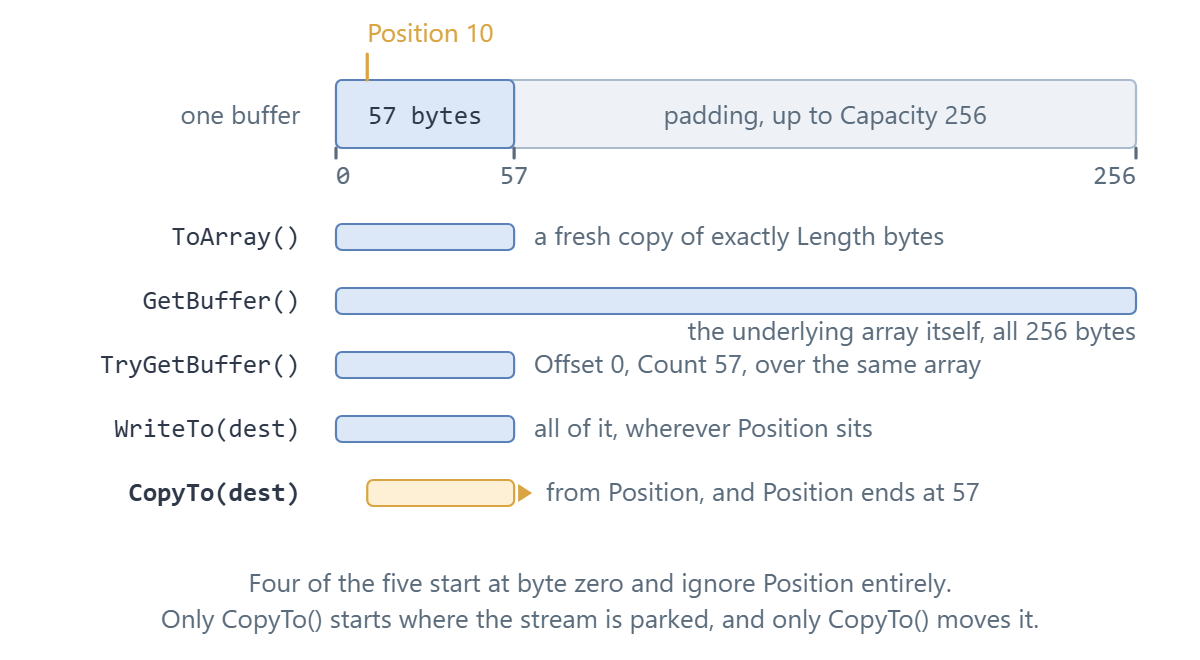
The figure above is the same stream five times over. The table below is the same information as a lookup:
| Call | Returns | How much | Respects Position? | Moves Position? | Works after Dispose()? |
|---|---|---|---|---|---|
ToArray() | a new byte[] | exactly Length bytes | no, ignores it | no | yes |
GetBuffer() | the underlying array itself | Capacity bytes, padding included | no, ignores it | no | yes, if publicly visible |
TryGetBuffer(out seg) | bool plus an ArraySegment<byte> | seg.Count is Length, seg.Offset is the start | no, ignores it | no | yes, if publicly visible |
WriteTo(dest) | nothing | all of it, always | no | no | no |
CopyTo(dest) | nothing | from Position to the end | yes | yes, to the end | no |
CopyTo() has the opposite habit: it starts wherever Position is and leaves it at the end, which is why a stream copied twice in a row gives nothing the second time.
None of this is specific to a MemoryStream. For a stream of any kind, converting a stream to a byte array covers the general case.
Loading a File Using MemoryStream in C#
We often use MemoryStream when working with project resources.
Let’s use MemoryStream to load the image from the resource:
public static void LoadImageFromResources()
{
    var imageMemoryStream = Constructors.ByteArrayConstructor(Resources.Image);
    File.WriteAllBytes("Image.jpg", imageMemoryStream.ToArray());
}
After loading the image data to MemoryStream, we use it to save the image to the file system.
The resource the bytes come from is its own subject, covered in loading files that ship inside the assembly, and the last line here is the short form of writing a stream to a file.
Serialization and Deserialization Using MemoryStream in C#
Another useful usage of MemoryStream is object serialization and deserialization.
This is binary serialization written by hand: BinaryWriter puts each field into the stream and BinaryReader takes it back out in the same order. It is the right tool for a compact binary format we control, and the wrong one for anything another system has to read, where JSON belongs instead.
Let’s define a simple Person record:
public record Person(string FirstName, string LastName, int Age);
To serialize an object, we define a SerializeObject() method:
public static byte[] SerializeObject(Person person)
{
    var memoryStream = Constructors.SimpleConstructor();
    using var writer = new BinaryWriter(memoryStream);
    writer.Write(person.FirstName);
    writer.Write(person.LastName);
    writer.Write(person.Age);

    return memoryStream.ToArray();
}
Here we create a MemoryStream object and populate it with the data from the Person instance using BinaryWriter.
Similarly, to deserialize this data to an object, we define a method DeserializeObject():
public static Person DeserializeObject(byte[] serializedData)
{
    var memoryStream = Constructors.ByteArrayConstructor(serializedData);
    using var reader = new BinaryReader(memoryStream);

    return new Person(reader.ReadString(), reader.ReadString(), reader.ReadInt32());
}
The three arguments are read in the order the record declares them, which is the order BinaryWriter wrote them in, because C# evaluates arguments left to right.
Let’s see these methods in action:
var person = new Person("Jack", "Black", 30);
byte[] serializedData = Methods.SerializeObject(person);
var deserializedPerson = Methods.DeserializeObject(serializedData);
Do We Need to Dispose a MemoryStream in C#?
No, and Microsoft’s own documentation says so. A MemoryStream holds a managed byte array and nothing else, so there is no handle to release and a using statement buys us nothing the garbage collector was not going to do anyway.
Disposing is not free either. It flips CanRead, CanWrite and CanSeek to false, and Length, Position and Capacity begin throwing ObjectDisposedException. Only ToArray(), GetBuffer() and TryGetBuffer() keep answering.
What does need disposing is whatever we wrapped around it. A StreamWriter buffers its text, so calling ToArray() before that writer is flushed returns an empty array even though we wrote to it. A BinaryWriter happens not to have that problem for strings and primitives, but relying on the difference is fragile.
The rule is therefore about the writer, not the stream. Flush or dispose the wrapper first, then read the bytes, and let the MemoryStream itself go out of scope.
The official documentation is unambiguous about the first half of that:
This type implements the
IDisposableinterface, but does not actually have any resources to dispose. This means that disposing it by directly callingDispose()or by using a language construct such asusing(in C#) orUsing(in Visual Basic) is not necessary.
Here is the version that silently produces nothing, and the fix is one line:
// Don't do this: the writer still holds the text
var stream = new MemoryStream();
var writer = new StreamWriter(stream);
writer.Write("hello world");
var bytes = stream.ToArray();        // 0 bytes
StreamWriter buffers, so nothing has reached the stream yet. Calling writer.Flush() before ToArray() returns the eleven bytes we expect.
The wrapper is where the buffering lives, and our article on StreamWriter and StreamReader covers how those two behave over any stream.
Conclusion
In this article, we learned what MemoryStream is, which constructor produces which kind of stream, how Length, Capacity and Position behave as we write and read, and how ToArray(), GetBuffer() and WriteTo() differ when we want the bytes back.
Tested with .NET 10.0.10.
